

Serverless is already here. We know that. Even for companies that are starting their cloud journey moving to container-based platforms, they already know that serverless is in their future view at least for some specific use cases.
Its simplicity without needed to worry about anything related to the platform just focuses on the code and also the economics that comes with them makes this computing model a game-changer.
The mainstream platform for this approach at this moment is AWS Lambda from Amazon, we have read and heard a lot of AWS Lamba, but all the platforms are going to that path. Google with its Google Functions, Microsoft with its Azure. This is not just a thing for public cloud providers, also if you’re running on a private cloud approach you can use this deployment mode using frameworks like KNative or OpenFaaS. If you need more details about it, also we had some articles about this topic:
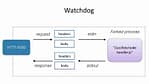
All of these platforms are updating and enhancing its option to execute any kind of code that you want on it, and this is what Azure Function just announced some weeks ago, the release of a Custom Handler approach to support any kind of language that you could think about:

And we’re going to test that doing what we’d like best ………..
…. Run a Flogo Application on top of it!
So, let’s start working!

The first thing we need to do is to create our Flogo Application. I’m going to use Flogo Enterprise to do that, but you can do the same using the Open Source version as well:
We’re going to create a simple application just a Hello World REST service. As you can see here:
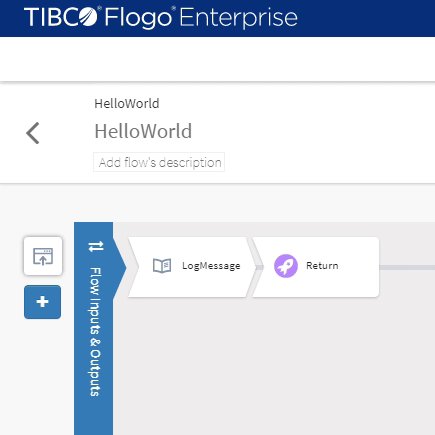
The JSON file of the Flogo Application you can find it in the GitHub repository shown below:
But the main configurations are the following ones:
- Server will listen on the port specified by the environment variable FUNCTIONS_HTTPWORKER_PORT
- Server will listen for a GET request on the URI /hello-world
- Response will be quite simple “Invoking a Flogo App inside Azure Functions”
Now, that we have the JSON file, we only need to start creating the artifacts needed to run an Azure Function.
We will need to install the npm package for the Azure Functions. To do that we need to run the following command:
npm i -g azure-functions-core-tools@3 --unsafe-perm true
It is important to have the “@3” because that way we reference the version that has this new Custom Handler logic to be able to execute it.
We will create a new folder call flogo-func and run the following command inside that folder:
func init --docker
Now we should select node as the runtime to be used and javascriptas the language. That could be something strange because we are going to use neither node, nor dotnet or pythonor powershell. But we will select that to keep it simple as we just try to focus on the Docker approach to do that.
After that we just need to create a new function, and to do that we need to type the following command:
func new
In the CLI-based interface that the Azure Function Core Tools shows us, we just need to select HTTP trigger and provide a name.
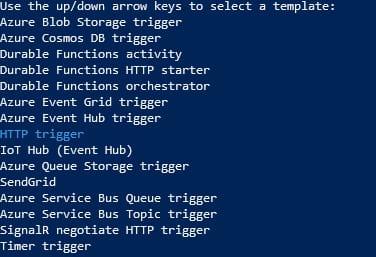
In our case, we will use hello-world as the name to keep it similar to what we defined as part of our Flogo Application. We will end up with the following folder structure:
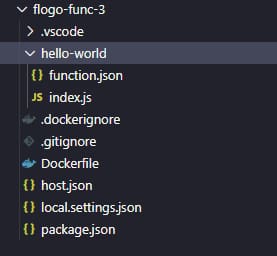
Now we need to open the folder that is has been created and we need to do several things:
- First of all, we need to remove the index.js file because we don’t need that file as this will not be a node JS function.
- We need to copy the HelloWorld.json (our Flogo application) to the root folder of the function.
- We need to change the host.json file to the following content:
{"version": "2.0",
"httpWorker": { "description": {"arguments": ["-app"],
"defaultExecutablePath": "engine-windows-amd64.exe",
"defaultWorkerPath": "HelloWorld.json"
}
}
}
Now, we need to generate the engine-windows-amd64.exe and to be able to do that we need to go to the FLOGO_HOME in our machine and go to the folder FLOGO_HOME/flogo/<VERSION>/bin and launch the following command:
./builder-windows-amd64.exe build
And you should get the engine-windows-amd64.exe as the output as you can see in the picture below:

Now, you just need to copy that file inside the folder of your function, and you should have the following folder structure as you can see here:
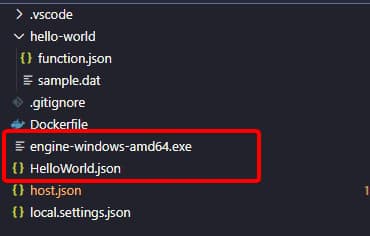
And once you have that, you just need to run your function to be able to test it locally:
func start
After running that command you should see an output similar to the one shown below:
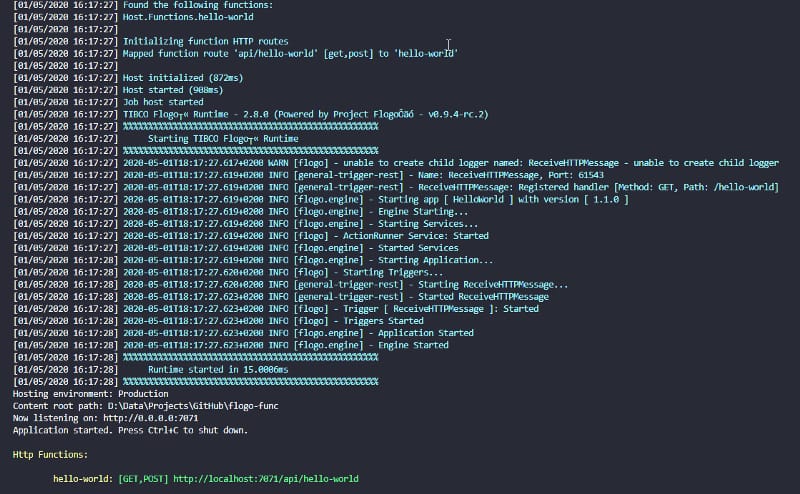
I’d just like to highlight the startup time for our Flogo application around 15 milliseconds!!! Now, you only need to test it using any browser and just go to the following URL:
http://localhost:7071/api/hello-world
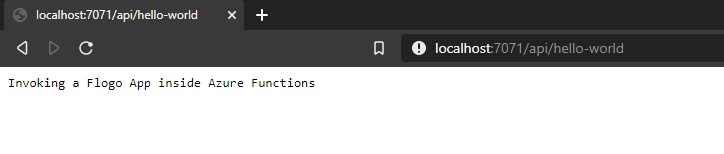
This has been just the first step on our journey but it was the steps needed to be able to run our Flogo application as part of your serverless environment hosted by Microsoft Azure platform!