Integrating Kyverno CLI into CI/CD Pipelines with GitHub Actions

Integrating Kyverno CLI into CI/CD Pipelines with GitHub Actions

Introduction

As Kubernetes clusters become an integral part of infrastructure, maintaining compliance with security and configuration policies is crucial. Kyverno, a policy engine designed for Kubernetes, can be integrated into your CI/CD pipelines to enforce configuration standards and automate policy checks. In this article, we’ll walk through integrating Kyverno CLI with GitHub Actions, providing a seamless workflow for validating Kubernetes manifests before they reach your cluster.

What is Kyverno CLI?

Kyverno is a Kubernetes-native policy management tool, enabling users to enforce best practices, security protocols, and compliance across clusters. Kyverno CLI is a command-line interface that lets you apply, test, and validate policies against YAML manifests locally or in CI/CD pipelines. By integrating Kyverno CLI with GitHub Actions, you can automate these policy checks, ensuring code quality and compliance before deploying resources to Kubernetes.

Benefits of Using Kyverno CLI in CI/CD Pipelines

Integrating Kyverno into your CI/CD workflow provides several advantages:

  1. Automated Policy Validation: Detect policy violations early in the CI/CD pipeline, preventing misconfigured resources from deployment.
  2. Enhanced Security Compliance: Kyverno enables checks for security best practices and compliance frameworks.
  3. Faster Development: Early feedback on policy violations streamlines the process, allowing developers to fix issues promptly.

Setting Up Kyverno CLI in GitHub Actions

Step 1: Install Kyverno CLI

To use Kyverno in your pipeline, you need to install the Kyverno CLI in your GitHub Actions workflow. You can specify the Kyverno version required for your project or use the latest version.

Here’s a sample GitHub Actions YAML configuration to install Kyverno CLI:

name: CI Pipeline with Kyverno Policy Checks

on:
  push:
    branches:
      - main
  pull_request:
    branches:
      - main

jobs:
  kyverno-policy-check:
    runs-on: ubuntu-latest

    steps:
      - name: Checkout Code
        uses: actions/checkout@v2

      - name: Install Kyverno CLI
        run: |
          curl -LO https://github.com/kyverno/kyverno/releases/download/v<version>/kyverno-cli-linux.tar.gz
          tar -xzf kyverno-cli-linux.tar.gz
          sudo mv kyverno /usr/local/bin/

Replace <version> with the version of Kyverno CLI you wish to use. Alternatively, you can replace it with latest to always fetch the latest release.

Step 2: Define Policies for Validation

Create a directory in your repository to store Kyverno policies. These policies define the standards that your Kubernetes resources should comply with. For example, create a directory structure as follows:

.
└── .github
    └── policies
        ├── disallow-latest-tag.yaml
        └── require-requests-limits.yaml

Each policy is defined in YAML format and can be customized to meet specific requirements. Below are examples of policies that might be used:

  • Disallow latest Tag in Images: Prevents the use of the latest tag to ensure version consistency.
  • Enforce CPU/Memory Limits: Ensures resource limits are set for containers, which can prevent resource abuse.

Step 3: Add a GitHub Actions Step to Validate Manifests

In this step, you’ll use Kyverno CLI to validate Kubernetes manifests against the policies defined in the .github/policies directory. If a manifest fails validation, the pipeline will halt, preventing non-compliant resources from being deployed.

Here’s the YAML configuration to validate manifests:

- name: Validate Kubernetes Manifests
  run: |
    kyverno apply .github/policies -r manifests/

Replace manifests/ with the path to your Kubernetes manifests in the repository. This command applies all policies in .github/policies against each YAML file in the manifests directory, stopping the pipeline if any non-compliant configurations are detected.

Step 4: Handle Validation Results

To make the output of Kyverno CLI more readable, you can use additional GitHub Actions steps to format and handle the results. For instance, you might set up a conditional step to notify the team if any manifest is non-compliant:

- name: Check for Policy Violations
  if: failure()
  run: echo "Policy violation detected. Please review the failed validation."

Alternatively, you could configure notifications to alert your team through Slack, email, or other integrations whenever a policy violation is identified.

Example: Validating a Kubernetes Manifest

Suppose you have a manifest defining a Kubernetes deployment as follows:

apiVersion: apps/v1
kind: Deployment
metadata:
  name: nginx-deployment
spec:
  replicas: 1
  selector:
    matchLabels:
      app: nginx
  template:
    metadata:
      labels:
        app: nginx
    spec:
      containers:
        - name: nginx
          image: nginx:latest  # Should trigger a violation

The policy disallow-latest-tag.yaml checks if any container image uses the latest tag and rejects it. When this manifest is processed, Kyverno CLI flags the image and halts the CI/CD pipeline with an error, preventing the deployment of this manifest until corrected.

Conclusion

Integrating Kyverno CLI into a GitHub Actions CI/CD pipeline offers a robust, automated solution for enforcing Kubernetes policies. With this setup, you can ensure Kubernetes resources are compliant with best practices and security standards before they reach production, enhancing the stability and security of your deployments.

Extending Kyverno Policies: Creating Custom Rules for Enhanced Kubernetes Security

Extending Kyverno Policies: Creating Custom Rules for Enhanced Kubernetes Security

Kyverno offers a robust, declarative approach to enforcing security and compliance standards within Kubernetes clusters by allowing users to define and enforce custom policies. For an in-depth look at Kyverno’s functionality, including core concepts and benefits, see my detailed article here. In this guide, we’ll focus on extending Kyverno policies, providing a structured walkthrough of its data model, and illustrating use cases to make the most of Kyverno in a Kubernetes environment.

Understanding the Kyverno Policy Data Model

Kyverno policies consist of several components that define how the policy should behave, which resources it should affect, and the specific rules that apply. Let’s dive into the main parts of the Kyverno policy model:

  1. Policy Definition: This is the root configuration where you define the policy’s metadata, including name, type, and scope. Policies can be created at the namespace level for specific areas or as cluster-wide rules to enforce uniform standards across the entire Kubernetes cluster.
  2. Rules: Policies are made up of rules that dictate what conditions Kyverno should enforce. Each rule can include logic for validation, mutation, or generation based on your needs.
  3. Match and Exclude Blocks: These sections allow fine-grained control over which resources the policy applies to. You can specify resources by their kinds (e.g., Pods, Deployments), namespaces, labels, and even specific names. This flexibility is crucial for creating targeted policies that impact only the resources you want to manage.
    1. Match block: Defines the conditions under which the rule applies to specific resources.
    2. Exclude block: Used to explicitly omit resources that match certain conditions, ensuring that unaffected resources are not inadvertently included.
  4. Validation, Mutation, and Generation Actions: Each rule can take different types of actions:
    1. Validation: Ensures resources meet specific criteria and blocks deployment if they don’t.
    2. Mutation: Adjusts resource configurations to align with predefined standards, which is useful for auto-remediation.
    3. Generation: Creates or manages additional resources based on existing resource configurations.

Example: Restricting Container Image Sources to Docker Hub

A common security requirement is to limit container images to trusted registries. The example below demonstrates a policy that only permits images from Docker Hub.

apiVersion: kyverno.io/v1
kind: ClusterPolicy
metadata:
  name: restrict-dockerhub-images
spec:
  rules:
    - name: only-dockerhub-images
      match:
        resources:
          kinds:
            - Pod
      validate:
        message: "Only Docker Hub images are allowed."
        pattern:
          spec:
            containers:
              - image: "docker.io/*"

This policy targets all Pod resources in the cluster and enforces a validation rule that restricts the image source to docker.io. If a Pod uses an image outside Docker Hub, Kyverno denies its deployment, reinforcing secure sourcing practices.

Practical Use-Cases for Kyverno Policies

Kyverno policies can handle a variety of Kubernetes management tasks through validation, mutation, and generation. Let’s explore examples for each type to illustrate Kyverno’s versatility:

1. Validation Policies

Validation policies in Kyverno ensure that resources comply with specific configurations or security standards, stopping any non-compliant resources from deploying.

Use-Case: Enforcing Resource Limits for Containers

This example prevents deployments that lack resource limits, ensuring all Pods specify CPU and memory constraints.

apiVersion: kyverno.io/v1
kind: ClusterPolicy
metadata:
  name: enforce-resource-limits
spec:
  rules:
    - name: require-resource-limits
      match:
        resources:
          kinds:
            - Pod
      validate:
        message: "Resource limits (CPU and memory) are required for all containers."
        pattern:
          spec:
            containers:
              - resources:
                  limits:
                    cpu: "?*"
                    memory: "?*"

By enforcing resource limits, this policy helps prevent resource contention in the cluster, fostering stable and predictable performance.

2. Mutation Policies

Mutation policies allow Kyverno to automatically adjust configurations in resources to meet compliance requirements. This approach is beneficial for consistent configurations without manual intervention.

Use-Case: Adding Default Labels to Pods

This policy adds a default label, environment: production, to all new Pods that lack this label, ensuring that resources align with organization-wide labeling standards.

apiVersion: kyverno.io/v1
kind: ClusterPolicy
metadata:
  name: add-default-label
spec:
  rules:
    - name: add-environment-label
      match:
        resources:
          kinds:
            - Pod
      mutate:
        patchStrategicMerge:
          metadata:
            labels:
              environment: "production"

This mutation policy is an example of how Kyverno can standardize resource configurations at scale by dynamically adding missing information, reducing human error and ensuring labeling consistency.

3. Generation Policies

Generation policies in Kyverno are used to create or update related resources, enhancing Kubernetes automation by responding to specific configurations or needs in real-time.

Use-Case: Automatically Creating a ConfigMap for Each New Namespace

This example policy generates a ConfigMap in every new namespace, setting default configuration values for all resources in that namespace.

apiVersion: kyverno.io/v1
kind: ClusterPolicy
metadata:
  name: generate-configmap
spec:
  rules:
    - name: add-default-configmap
      match:
        resources:
          kinds:
            - Namespace
      generate:
        kind: ConfigMap
        name: default-config
        namespace: "{{request.object.metadata.name}}"
        data:
          default-key: "default-value"

This generation policy is triggered whenever a new namespace is created, automatically provisioning a ConfigMap with default settings. This approach is especially useful in multi-tenant environments, ensuring new namespaces have essential configurations in place.

Conclusion

Extending Kyverno policies enables Kubernetes administrators to establish and enforce tailored security and operational practices within their clusters. By leveraging Kyverno’s capabilities in validation, mutation, and generation, you can automate compliance, streamline operations, and reinforce security standards seamlessly.

Safeguarding Your Servers: Preventing Information Disclosure with Istio Service Mesh

Safeguarding Your Servers: Preventing Information Disclosure with Istio Service Mesh

In today’s digital landscape, where data breaches and cyber threats are becoming increasingly sophisticated, ensuring the security of your servers is paramount. One of the critical security concerns that organizations must address is “Server Information Disclosure.” Server Information Disclosure occurs when sensitive information about a server’s configuration, technology stack, or internal structure is inadvertently exposed to unauthorized parties. Hackers can exploit this vulnerability to gain insights into potential weak points and launch targeted attacks. Such breaches can lead to data theft, service disruption, and reputation damage.

Information Disclosure and Istio Service Mesh

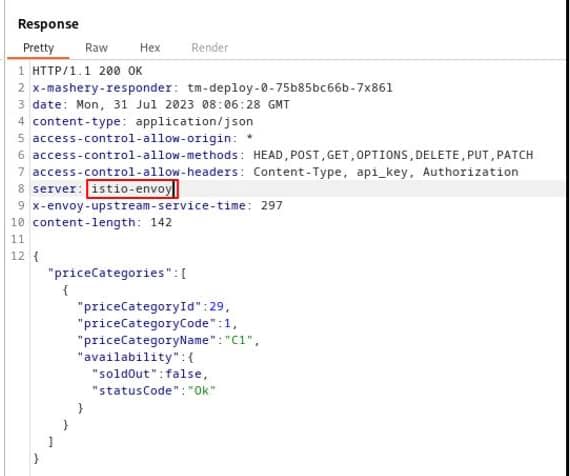
One example is the Server HTTP Header, usually included in most of the HTTP responses where you have the server that is providing this response. The values can vary depending on the stack, but matters such as Jetty, Tomcat, or similar ones are usually seen. But also, if you are using a Service Mesh such as Istio, you will see the header with a value of istio-envoy, as you can see here:

Information Disclosure of Server Implementation using Istio Service mesh

As commented, this is of such importance for several levels of security, such as:

  • Data Privacy: Server information leakage can expose confidential data, undermining user trust and violating data privacy regulations such as GDPR and HIPAA.
  • Reduced Attack Surface: By concealing server details, you minimize the attack surface available to potential attackers.
  • Security by Obscurity: While not a foolproof approach, limiting disclosure adds an extra layer of security, making it harder for hackers to gather intelligence.

How to mitigate that with Istio Service Mesh?

When using Istio, we can define different rules to add and remove HTTP headers based on our needs, as you can see in the following documentation here: https://discuss.istio.io/t/remove-header-operation/1692 using simple clauses to the definition of your VirtualService as you can see here:

apiVersion: networking.istio.io/v1alpha3
kind: VirtualService
metadata:
  name: k8snode-virtual-service
spec:
  hosts:
  - "example.com"
  gateways:
  - k8snode-gateway
  http:
    headers:
      response:
        remove:
          - "x-my-fault-source"
  - route:
    - destination:
        host: k8snode-service
        subset: version-1 

Unfortunately, this is not useful for all HTTP headers, especially the “main” ones, so the ones that are not custom added by your workloads but the ones that are mainly used and defined in the HTTP W3C standard https://www.w3.org/Protocols/

So, in the case of the Server HTTP header is a little bit more complex to do, and you need to use an EnvoyFilter, one of the most sophisticated objects part of the Istio Service Mesh. Based on the words in the official Istio documentation, an EnvoyFilter provides a mechanism to customize the Envoy configuration generated by Istio Pilot. So, you can use EnvoyFilter to modify values for certain fields, add specific filters, or even add entirely new listeners, clusters, etc.

EnvoyFilter Implementation to Remove Header

So now that we know that we need to create a custom EnvoyFilter let’s see which one we need to use to remove the Server header and how this is made to get more knowledge about this component. Here you can see the EnvoyFilter for that job:

---
apiVersion: networking.istio.io/v1alpha3
kind: EnvoyFilter
metadata:
  name: gateway-response-remove-headers
  namespace: istio-system
spec:
  workloadSelector:
    labels:
      istio: ingressgateway
  configPatches:
  - applyTo: NETWORK_FILTER
    match:
      context: GATEWAY
      listener:
        filterChain:
          filter:
            name: "envoy.filters.network.http_connection_manager"
    patch:
      operation: MERGE
      value:
        typed_config:
          "@type": "type.googleapis.com/envoy.extensions.filters.network.http_connection_manager.v3.HttpConnectionManager"
          server_header_transformation: PASS_THROUGH
  - applyTo: ROUTE_CONFIGURATION
    match:
      context: GATEWAY
    patch:
      operation: MERGE
      value:
        response_headers_to_remove:
        - "server"

So let’s focus on the parts of the specification of the EnvoyFilter where we can get for one side the usual workloadSelector, to know where this component will be applied, that in this case will be the istio ingressgateway. Then we enter into the configPatches section, that are the sections where we use the customization that we need to do, and in our case, we have two of them:

Both act on the context: GATEWAY and apply to two different objects: NETWORK\_FILTER AND ROUTE\_CONFIGURATION. You can also use filters on sidecars to affect the behavior of them. The first bit what it does is including the custom filter http\_connection\_maanger that allows the manipulation of the HTTP context, including for our primary purpose also the HTTP header, and then we have the section bit that acts on the ROUTE\_CONFIGURATION removing the server header as we can see by using the option response_header_to_remove

Conclusion

As you can see, this is not easy to implement. Still, at the same time, it is evidence of the power and low-level capabilities that you have when using a robust service mesh such as Istio to interact and modify the behavior of any tiny detail that you want for your benefit and, in this case, also to improve and increase the security of your workloads deployed behind the Service Mesh scope.

In the ever-evolving landscape of cybersecurity threats, safeguarding your servers against information disclosure is crucial to protect sensitive data and maintain your organization’s integrity. Istio empowers you to fortify your server security by providing robust tools for traffic management, encryption, and access control.

Remember, the key to adequate server security is a proactive approach that addresses vulnerabilities before they can be exploited. Take the initiative to implement Istio and elevate your server protection.