
Helm Multiple Instances Subcharts Explained: Reuse the Same Chart with Aliases

Helm Multiple Instances Subcharts Explained: Reuse the Same Chart with Aliases

Helm Multiple Instances Subchart usages as part of your main chart could be something that, from the beginning, can sound strange. We already commented about the helm charts sub-chart and dependencies in the blog because the usual use case is like that:

Multiple subchart instances enable powerful architectural patterns in Helm. Learn about this and other advanced deployment techniques in our complete Helm charts guide.

I have a chart that needs another component, and I “import” it as a sub-chart, which gives me the possibility to deploy the same component and customize its values without needing to create another chart copy and, as you can imagine simplifying a lot of the management of the charts, a sample can be like that:
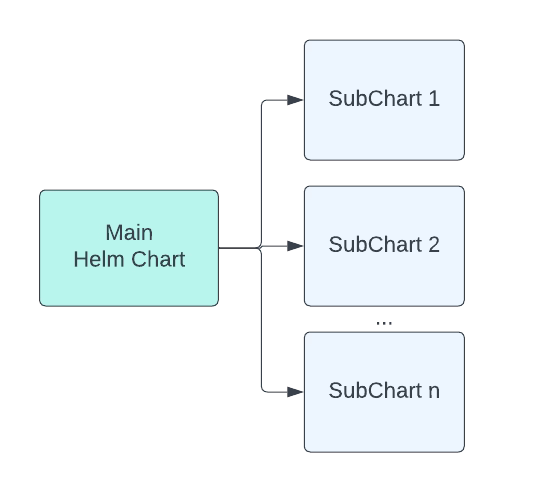
Discover how multiple subcharts can revolutionize your Helm deployments. Learn how to leverage the power of reusability and customization, allowing you to deploy identical components with unique configurations. Enhance flexibility and simplify management with this advanced Helm feature. Unlock the full potential of your microservices architecture and take control of complex application deployments. Dive into the world of multiple subcharts and elevate your Helm charts to the next level.

So, I think that’s totally clear, but what about are we talking now? The use-case is to have the same sub-chart defined twice. So, imagine this scenario, we’re talking about that instead of this:

# Chart.yaml
dependencies:
- name: nginx
  version: "1.2.3"
  repository: "https://example.com/charts"
- name: memcached
  version: "3.2.1"
  repository: "https://another.example.com/charts"

We’re having something like this

# Chart.yaml
dependencies:
- name: nginx
  version: "1.2.3"
  repository: "https://example.com/charts"
- name: memcached-copy1
  version: "3.2.1"
  repository: "https://another.example.com/charts"
- name: memcached-copy2
  version: "3.2.1"
  repository: "https://another.example.com/charts"

So we have the option to define more than one “instance” of the same sub chart. And I guess, at this moment, you can start asking to yourself: “What are the use-case where I could need this?”

Because that’s quite understandable, unless you need it you will never realize about that. It is the same that happens to me. So let’s talk a bit about possible use cases for this.

 Use-Cases For Multi Instance Helm Dependency

Imagine that you’re deploying a helm chart for a set of microservices that belongs to the scope of the same application and each of the microservices has the same technology base, that can be TIBCO BusinessWorks Container Edition or it can be Golang microservices. So all of them has the same base so it can use the same chart “bwce-microservice” or “golang-microservices” but each of them has its own configuration, for example:

  • Each of them will have its own image name that would differ from one to the other.
  • Each of them will have its own configuration that will differ from one to the other.
  • Each of them will have its own endpoints that will differ and probably even connecting to different sources such as databases or external systems.

So, this approach would help us reuse the same technology helm chart, “bwce” and instance it several times, so we can have each of them with its own configuration without the need to create something “custom” and keeping the same benefits in terms of maintainability that the helm dependency approach provides to us.

 How can we implement this?

Now that we have a clear the use-case that we’re going to support, the next step is regarding how we can do this a reality. And, to be honest, this is much simpler than you can think from the beginning, let’s start with the normal situation when we have a main chart, let’s call it a “program,” that has included a “bwce” template as a dependency as you can see here:

name: multi-bwce
description: Helm Chart to Deploy a TIBCO BusinessWorks Container Edition Application
apiVersion: v1
version: 0.2.0
icon: 
appVersion: 2.7.2

dependencies:
- name: bwce
  version: ~1.0.0
  repository: "file:///Users/avazquez/Data/Projects/DET/helm-charts/bwce"

And now, we are going to move to a multi-instance approach where we will require two different microservices, let’s call it serviceA and serviceB, and both of them we will use the same bwce helm chart.

So the first thing we will modify is the Chart.yaml as follows:

name: multi-bwce
description: Helm Chart to Deploy a TIBCO BusinessWorks Container Edition Application
apiVersion: v1
version: 0.2.0
icon: 
appVersion: 2.7.2

dependencies:
- name: bwce
  alias: serviceA
  version: ~0.2.0
  repository: "file:///Users/avazquez/Data/Projects/DET/helm-charts/bwce"
- name: bwce
  alias: serviceB
  version: ~0.2.0
  repository: "file:///Users/avazquez/Data/Projects/DET/helm-charts/bwce"

The important part here is how we declare the dependency. As you can see in the name we still keeping the same “name” but they have an additional field named “alias” and this alias is what we will help to later identify the properties for each of the instances as we required. With that, we’re already have our two serviceA and serviceB instance definition and we can start using it in the values.yml as follows:

# This is a YAML-formatted file.
# Declare variables to be passed into your templates.

serviceA:
  image: 
    imageName: 552846087011.dkr.ecr.eu-west-2.amazonaws.com/tibco/serviceA:2.5.2
    pullPolicy: Always
serviceB:  
  image: 
    imageName: 552846087011.dkr.ecr.eu-west-2.amazonaws.com/tibco/serviceB:2.5.2
    pullPolicy: Always
  

 Conclusion

The main benefit of this is that it enhances the options of using helm chart for “complex” applications that require different instances of the same kind of components and at the same time.

That doesn’t mean that you need a huge helm chart for your project because this will go against all the best practices of the whole containerization and microservices approach but at least it will give you the option to define different levels of abstraction as you want, keeping all the benefits from a management perspective.
Helm Dependencies Explained: How Chart Dependencies Work in Helm

Helm Dependencies Explained: How Chart Dependencies Work in Helm

Helm Dependency is a critical part of understanding how Helm works as it is the way to establish relationships between different helm packages. We have talked a lot here about what Helm is, and some topics around that, and we even provided some tricks if you create your charts.

Understanding chart dependencies is crucial for building scalable Helm architectures. Explore more Helm patterns and best practices in our comprehensive Helm guide.

So, as commented, Helm Chart is nothing more than a package that you put around the different Kubernetes objects that need to be deployed for your application to work. The usual comparison is that it is similar to a Software Package. When you install an application that depends on several components, all of those components are packaged together, and here is the same thing.

What is a Helm Dependency?

A Helm Dependency is nothing more than the way you define that your Chart needs another chart to work. For sure, you can create a Helm Chart with everything you need to deploy your application, but something you would like to split that work into several charts just because they are easy to maintain or the most common use case because you want to leverage another Helm Chart that is already available.

One use case can be a web application that requires a database, so you can create on your Helm Chart all the YAML files to deploy your web application and your Database in Kubernetes, or you can have your YAML files for your web application (Deployment, Services, ConfigMaps,…) and then say: And I need a database and to provide it I’m going to use this chart.

This is similar to how it works with the software packages in UNIX systems; you have your package that does the job, like, for example, A, but for that job to be done, it requires the library L, and to ensure that when you are installing A, Library L is already there or if not it will be installed you declare that your application A depends on Library L, so here is the same thing. You declare that your Chart depends on another Chart to work. And that leaves us to the next point.

How do we declare a Helm Dependency?

This is the next point; now that we understand what a Helm Dependency is conceptually and we have a use case, how can we do that in our Helm Chart?

All the work is done in the Chart.yml file. If you remember, the Chart.yml file is the file where you declare all the metadata of your Helm Chart, such as the name, the version of the chart, the application version, location URL, icon, and much more. And usually has a structure like this one:

apiVersion: v2
name: MyChart
description: My Chart Description
type: application
version: 0.2.0
appVersion: "1.16.0"

So here we can add a section dependencies and, in that section is where we are going to define the charts that we depend on. As you can see in the snippet below:

apiVersion: v2
name: MyChart
description: My Chart Description
type: application
version: 0.2.0
appVersion: "1.16.0"
dependencies:
- name: Dependency
  version: 1.0.0
  repository: "file:///location_of_my_chart"

Here we are declaring Dependency as our Helm Dependency. We specify the version that we would like to use (similar to the version we say in our chart), and that will help us to ensure that we will provide the same version that has been tested as part of the resolution of the dependency and also the location using an URL that can be an external URL is this is pointing to a Helm Chart that is available on the internet or outside your computer or using a File Path in case you are pointing to a local resource in your machine.

That will do the job of defining the helm dependency, and this way, when you install your chart using the command helm install, it will also provide the dependence.

How do I declare a Helm Conditional Dependency?

Until now, we learned how to declare a dependency, and each time I provision my application, it will also provide the dependence. But usually, we would like to have a fine-grained approach to that. Imagine the same scenario as above: We have our Web Application that depends on the Database, and we have two options, we can provision the database as part of the installation of the web application, or we can point to an external database and in that case, it makes no sense to provision the Helm Dependency. How can we do that?

So, easy, because one of the optional parameters you can add to your dependency is condition and do exactly that, condition allow you to specify a flag in your values.yml that in the case is equal to true, it will provide the dependency but in the case is equal to false it will skip that part similar to the snippet shown below:

 apiVersion: v2
name: MyChart
description: My Chart Description
type: application
version: 0.2.0
appVersion: "1.16.0"
dependencies:
- name: Dependency
  version: 1.0.0
  repository: "file:///location_of_my_chart"
  condition: database.enabled 

And with that, we will set the enabled parameter under database in our values.yml to true if we would like to provision it.

How do I declare a Helm Dependency With a Different version?

As shown in the snippets above, we offer that when we declare a Helm Dependency, we specify the version; that is a safe way to do it because it ensures that any change done to the helm chart will not affect your package. Still, at the same time, you cannot be aware of security fixes or patches to the chart that you would like to leverage in your deployment.

To simplify that, you have the option to define the version in a more flexible way using the operator ~ in the definition of the version, as you can see in the snippet below:

apiVersion: v2
name: MyChart
description: My Chart Description
type: application
version: 0.2.0
appVersion: "1.16.0"
dependencies:
- name: Dependency
  version: ~1.0.0
  repository: "file:///location_of_my_chart"
  condition: database.enabled 

This means that any patch done to the chart will be accepted, so this is similar that this chart will use the latest version of 1.0.X. Still, it will not use the 1.1.0 version, so that allows to have more flexibility, but at the same time keeping things safe and secured in case of a breaking change on the Chart you depend on. This is just one way to define that, but the flexibility is enormous as the Chart versions use “Semantic Versions,” You can learn and read more about that here: https://github.com/Masterminds/semver.