My Take on the Kubernetes CKAD Certification: Real Exam Experience and Lessons Learned

girl in black t-shirt writing on white paper

My Experience and Feelings After Clearing the Certified Kubernetes Application Developer

Last week I cleared the Certified Kubernetes Application Developer (CKAD) certification with a 95/100 score, and it was more difficult than it sounds even though this is the easiest of the Kubernetes certifications, the way the exam is designed and the skills that are evaluated on it make you unsure of your knowledge.

I have been using Kubernetes daily for more than three years now. Because of my work, it is required to deploy, define, troubleshoot Kubernetes-based workloads on different platforms (Openshift, EKS, AKS… anything), so you could think that I shouldn’t need to prepare for this kind of exam, and that could be the impression too. But this is far from reality.

I feel that there is no certification that you can clear without preparation because the certification does not measure how skilled you are on any other topic than the certification process itself. You can be the master of any technology, but if you go to a certification exam without any specific exam preparation, you have a lot of chances to fail.

Even in this case that we have shifted from the traditional theoretical test-case question to a more practical one, it is no different. Because yes, you don’t need to learn anything, and yes, it requires that you can really do things, not just know about a thing, but everything else is the same.

You will be asked about things you will never use in real life, you will need to use commands that you only are going to use in the exam, and you will need to do it in the specific way the expected too because this is how certification works. Is it bad? Probably… is there any other way to do it? We didn’t find it yet any better.

I have to admit that I think this process is much fairer than the test-case one, even though I prefer the test case just for a matter of timing during the process.

So, probably, you are asking if that is my view, why I try to clear the certification in the first place? There are several reasons to do it. First of all, I think certification is a great way to set a standard of knowledge for anyone. That doesn’t mean that people with the certification are more competent or better skilled than people without the certification. I don’t consider myself more qualified today than one month ago when I started to prepare for the certification, but at least it settled some foundation of what you can expect.

Additional to that is a challenge to yourself, to show you that you can do it, and it is always great to push your limits a bit beyond what is mandatory for work. And finally, it is something that looks good in your CV, that is for sure.

Do I learn something new? Yes, for sure, a lot of things. I even improved myself because I usually do some tasks, and just that alone made it worth it. Even if I failed, I think it was worth it because it always gives you something more to add to your toolchain, and that is always good.

Also, this exam doesn’t ensure that you are a good Kubernetes Application Developer. In my view, I think the exam approach is focused on showing that you are a fair Kubernetes Implementer. Why am I saying that? Let’s add some points:

  • You don’t get any points to provide the best solution for a problem. The ask is so specific that there is a matter of translating what is written in plain English to Kubernetes actions and objects.
  • There are troubleshooting questions, yes, but there are also quite basic ones that don’t ensure that your thought process is efficient. Again, efficiency is not evaluated on the process.

So, I am probably missing a Certified Kubernetes Architecture exam where you can have the definition of a problem, and you need to provide a solution. You will get evaluated based on that. Even with some way to justify the decision you are making and the thought process, I don’t think we ever see that. Why? Because, and that’s very important because any new certification exam we are going to face needs to be specific enough so it can be evaluated automatically.

📚 Want to dive deeper into Kubernetes? This article is part of our comprehensive Kubernetes Architecture Patterns guide, where you’ll find all fundamental and advanced concepts explained step by step.

From Docker Desktop to Rancher Desktop: Simple Migration Guide for Developers

From Docker Desktop to Rancher Desktop: Simple Migration Guide for Developers

As most of you already know, the 31st of January is the last day to use Docker Desktop without applying the new licensing model that pretty much generates a cost for any company usage. Of course, it is still free to use for open-source and small companies, but it is better to meet the requirements using Docker official documentation.

So because of that situation, I started a journey to find an alternative to Docker Desktop because I used docker-desktop a lot. The primary use I do is to startup server-like things for temporary usage that I don’t like to have installed in my machine to keep it as clean as possible (even though this is not always true, but it is an attempt).

So, on that search, I discovered Rancher Desktop was released not a long time ago and promised to be the most suitable alternative. The goal of this post is not to compare both platforms, but if you like to have more information I leave here a post that can provide it to you:

The idea here is to talk more about the journey of that migration. So I installed the Rancher Desktop 1.0.0 on my Mac and the installation was very, very easy. The main difference with Docker Desktop is that Rancher Desktop is built with Kubernetes in mind and for Docker Desktop, that came as an afterthought. So, by default we will have a Kubernetes environment running in our system, and we can even select the version of that cluster as you can see in the picture below:

But also in Rancher, they noticed the opportunity window they have in front of them, and they were very aggressive in providing an easy migration path from Docker Desktop. And the first thing you will notice is that you can configure Docker Desktop to be compliant with the Docker CLI API as you can see in the picture below.

This is not enabled by default, but it is very easy to do it and it will make you not need to change all your “docker-like” commands (docker build, docker ps.. ) so it will smooth a lot of the transition.

Maybe in the future, you want to move away from everything resembling docker even at the client-side and move to a Containers kind of approach, but for now, what I needed is to simplify the process.

So, after enabling that and restarting my Rancher Desktop, I can type my commands as you can see in the picture below:

So, the only thing I need to do is migrate my images and containers. Because I’m not a pure docker usage, I don’t follow sometimes the thing to have your container stateless and using volumes especially when you are doing a small use for some time and that’s it. So, that means that some of my containers also need to be moved to the new platform to avoid any data loss.

So, my migration journey had different steps:

  • First of all, I will commit the stateful containers that I need to keep on the new system using the command docker commit with the documentation that you can find here:
  • Then, I will export all the images that I have now in TAR files using the command docker save with the documentation that you can find it here:
  • And finally, I will load all those images on the new system using docker load command to have it available there. Again, you can find the documentation of that specific command here

To automate a little bit the process even that I don’t have much images loaded because I try to clean up from time to time using the docker system prune command:

I prefer not to do it manually, so I will use some simple scripts to do the job.

So, to perform the export job I need to run the following command:

docker image ls -q | xargs -I {} docker image save {} -o {}.tar

This script will save to have all my images on different tar files into a specific folder. Now, I just need to run the following command from the same folder I had run the previous one to have all the images back into the new system:

find . -name "*.tar" -exec docker load -i {} \;

The reason why I’m not doing both actions at the same time is that I need to have running Docker Desktop for the first part and Rancher Desktop for the other. So even though I can automate that as well, I think it is not worth it.

And that’s it, now I can remove the Docker Desktop from my laptop, and my life will continue to be the same. I will try to provide more feedback on how it feels, especially regarding resource utilization and similar topics in the near future.

📚 Want to dive deeper into Kubernetes? This article is part of our comprehensive Kubernetes Architecture Patterns guide, where you’ll find all fundamental and advanced concepts explained step by step.

Kubernetes Persistent Volume Reclaim Policies Explained: Retain, Delete, and Risks

Kubernetes Persistent Volume Reclaim Policies Explained: Retain, Delete, and Risks

Discover how the policy can affect how your data is managed inside Kubernetes Cluster

As you know, everything is fine on Kubernetes until you face a stateful workload and you need to manage its data. All the powerful capabilities that Kubernetes brings to the game face many challenges when we talk about stateful services that require a lot of data.

Most of the things challenges have a solution today. That is why many stateful workloads such as databases and other backend systems also require a lot of knowledge about how to define several things. One of them is the retain policy of the persistent volume.

First, let’s define what the Reclaim Policy is, and to do that, I will use the official definition from the documentation:

When a user is done with their volume, they can delete the PVC objects from the API that allows reclamation of the resource. The reclaim policy for a PersistentVolume tells the cluster what to do with the volume after it has been released of its claim. Currently, volumes can either be Retained, Recycled, or Deleted.

So, as you can see, we have three options: Retain, Recycle or Delete. Let’s see what the behavior for each of them is.

Retain

That means the data will still be there even if the claim has been deleted. All these policies apply when the original PVC is removed. Before that situation, the data will always remain no matter which policy we use.

So, retain means that even if we delete the PVC, the data will still be there, and it will be stored so that no other PVC can claim that data. Only an administrator can do so with the following flow:

  1. Delete the PersistentVolume.
  2. Manually clean up the data on the associated storage asset accordingly.
  3. Manually delete the associated storage asset.

Delete

That means that as soon as we remove the PVC the PV and the data will be released.

This will simplify the cleanup and housekeeping task of your volumes but at the same time, it increases the possibility that has some data loss because of unexpected behavior. As always, this is a trade-off you need to do.

We always need to remind you that if you try to delete PVC in active use by a Pod, the PVC is not removed immediately. PVC removal is postponed until the PVC is no longer actively used by any Pods to ensure that no data is lost, at least when some component is still bound to it. On the same policy similar thing happens to the PV. If an admin deletes a PV attached to a PVC, the PV is not removed immediately. PV removal is postponed until the PV is no longer bound to a PVC.

Recycle

That means something in the middle works similar to the Delete policy we explained above, but it doesn’t delete the volume itself, but it will remove the content of the PV, so in practice, it will be similar. So, in the end, it will perform a command similar to this rm -rf on the storage artifact itself.

But just for you to be aware, this policy is nowadays deprecated, and you should not use it in your new workloads, but it is still supported so you can find some workloads that are still using it.

📚 Want to dive deeper into Kubernetes? This article is part of our comprehensive Kubernetes Architecture Patterns guide, where you’ll find all fundamental and advanced concepts explained step by step.

Prometheus Agent Mode Explained: Scalable Remote Write and Stateless Metrics Ingestion

Prometheus Agent Mode Explained: Scalable Remote Write and Stateless Metrics Ingestion

Prometheus has included a new capability in the 2.32.0 release to optimize the single pane of glass approach

From the new upcoming release of Prometheus v2.32.0, we will have an important new feature at our disposal: the Agent Mode. And there is a fantastic blog post announcing this feature from our of the rockstar from the Prometheus team: Bartlomiej Plotka, that I recommend reading. I will add a reference section at the end of the article. I will try to summarise some of the most relevant points here.

Another post about Prometheus, the most critical monitoring system in nowadays cloud-native architectures, has its inception in the Borgmon monitoring system created by Google in ancient times (around the 2010–2014 period).

Based on this importance, its usage has been growing incredibly and making its relationship with the Kubernetes ecosystem stronger. We have reached a point that Prometheus is the default option for monitoring in pretty much any scenario that has a Kubernetes workload related to it; some examples are the ones shown below:

  • Prometheus is the default option, including the Openshift Monitoring System
  • Prometheus has an Amazon Managed Service at your disposal to be used for your workloads.
  • Prometheus is included in the Reference Architecture for Cloud-Native Azure Deployments.

Because of this popularity and growth, many different use-cases have raised some improvements that can be done. Some of them are related to specific use-cases such as edge deployment or providing a global view, or a single pane of glass.

Until now, if I have several Prometheus deployments, monitor a specific subset of your workloads because of their resides on different networks or because there are various clusters, you can rely on the remote write capability to aggregate that into a global view approach.

Remote Write is a capability that has existed in Prometheus since its inception. The metrics that Prometheus is scraping can be sent automatically to a different system using their integrations. This can be configured for all the metrics or just a subset. But even with all of these, they are jumping ahead on this capability, which is why they are introducing the Agent mode.

Agent Mode optimizes the remote write use case configuring the Prometheus instance in a specific mode to do this job in an optimized way. That model implies the following configuration:

  • Disable querying and alerting.
  • Switch the local storage with a customized TSDB WAL

And the remarkable thing is that everything else is the same, so we will still use the same API, discover capabilities, and related configuration. And what all of this will provide to you? Let’s take a look at the benefits you will get of doing so:

  • Efficiency: Customised TSDB WAL will keep only the data that could not be sent to the target location; as soon as it succeeds, it will remove that piece of data.
  • Scalability: It will improve scalability, enabling easier horizontal scalability for ingestion. This is because this agent mode disables some of the reasons auto-stability is complex in normal server-mode Prometheus. A stateful workload makes scalability complex, especially in scale-down scenarios. So this mode will lead to a “more-stateless” workload that will simplify this scenario and be close to the dream of an auto-scalability metric ingestion system.

This feature is available as an experimental flag in the new release, but this was already tested with Grafana Labs’ works, especially on the performance side.

If you want to take a look at more details about this feature, I would recommend taking a look at the following article: https://prometheus.io/blog/2021/11/16/agent/

📚 Want to dive deeper into Kubernetes? This article is part of our comprehensive Kubernetes Architecture Patterns guide, where you’ll find all fundamental and advanced concepts explained step by step.

Set Up an OpenShift Local Cluster Using CodeReady Containers (CRC Guide)

Set Up an OpenShift Local Cluster Using CodeReady Containers (CRC Guide)

Learn how you can use CodeReady Containers to set up the latest version of Openshift  Local just on your computer.

At this time, we all know that the default deployment mode for any application we would like to launch will be a container-based platform and, especially, it will be a Kubernetes-based platform.

But we already know that there are a lot of different flavors of Kubernetes distributions, I even wrote an article about it that you can find here:

Some of these distributions try to follow as close as they could the Kubernetes experience but others are trying to enhance and increase the capabilities the platform provides.

Because of that sometimes it is important to have a way to really test our development in the target platform without waiting for a server-based developer mode. We know that we have in our own laptop a Kubernetes-based platform to help do the job.

minikube is the most common option to do this and it will provide a very vanilla view of Kubernetes, but something we need a different kind of platform.

Openshift from RedHat is becoming one of the de-facto solutions for private cloud deployments and especially for any company that is not planning to move to a public-cloud managed solution such as EKS, GKE, or AKS. In the past we have a similar project as minikube known as minishift that allow running in their own words:

Minishift is a tool that helps you run OpenShift locally by running a single-node OpenShift cluster inside a VM. You can try out OpenShift or develop with it, day-to-day, on your localhost.

The only problem with minishift is that they only support the 3.x version of Openshift but we are seeing that most of the customers are already upgrading to the 4.x release, so we can think that are a little alone in that duty, but this is far from the truth!

Because we have CodeReady Containers or CRC to help us on that duty.

Code Ready Containers purpose is to provide to you a minimal Openshift cluster optimized for development purposes. Their installation process is very very simple.

It works in a way similar to the previous VM and OVA distribution mode, so you will need to get some binaries to be able to set up this directly from Red Hat using the following direction: https://console.redhat.com/openshift/create/local

You will need to create an account but it is free and in a few steps you will get a big binary about 3–4 GB and your sign code to be able to run the platform and that’s it, in a few minutes you will have at your disposal a complete Openshift Platform ready for you to use.

CodeReadyContainers local installation on your laptop

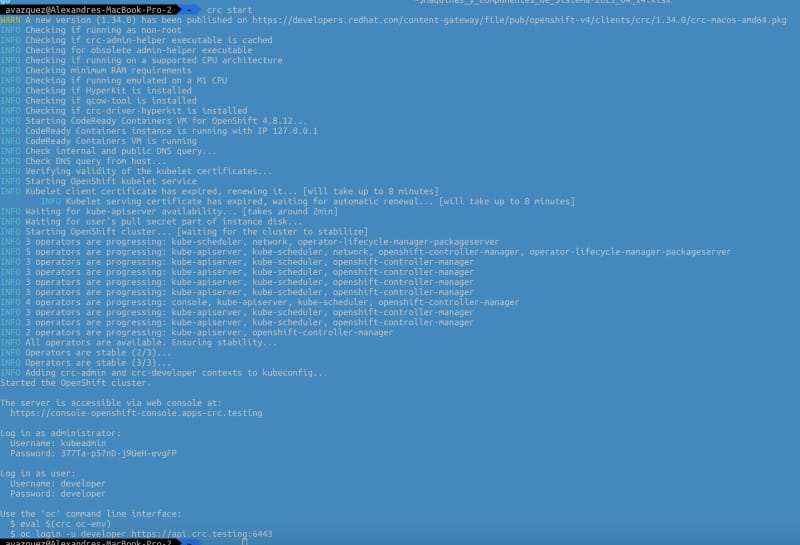
You will be able to switch on and off the platform using the commands crc start and crc stop.

Set Up an OpenShift Local Cluster Using CodeReady Containers (CRC Guide)
Console output of execution of the crc start command

As you can imagine this is only suitable for the local environment and in no way for production deployment and also it has some restrictions that can affect you such as:

  • The CodeReady Containers OpenShift cluster is ephemeral and is not intended for production use.
  • There is no supported upgrade path to newer OpenShift versions. Upgrading the OpenShift version may cause issues that are difficult to reproduce.
  • It uses a single node that behaves as both a master and worker node.
  • It disables the monitoring Operator by default. This disabled Operator causes the corresponding part of the web console to be non-functional.
  • The OpenShift instance runs in a virtual machine. This may cause other differences, particularly with external networking.

I hope you find this useful and that you can use it as part of your deployment process.

📚 Want to dive deeper into Kubernetes? This article is part of our comprehensive Kubernetes Architecture Patterns guide, where you’ll find all fundamental and advanced concepts explained step by step.

Kubernetes Init Containers Explained: Advanced Patterns for Dependencies and Startup

Kubernetes Init Containers Explained: Advanced Patterns for Dependencies and Startup

Discover how Init Containers can provide additional capabilities to your workloads in Kubernetes

There are a lot of new challenges that come with the new development pattern in a much more distributed and collaborative way, and how we manage the dependencies is crucial to our success.

Kubernetes and dedicated distributions have become the new standard of deployment for our cloud-native application and provide many features to manage those dependencies. But, of course, the most usual resource you will use to do that is the probes.

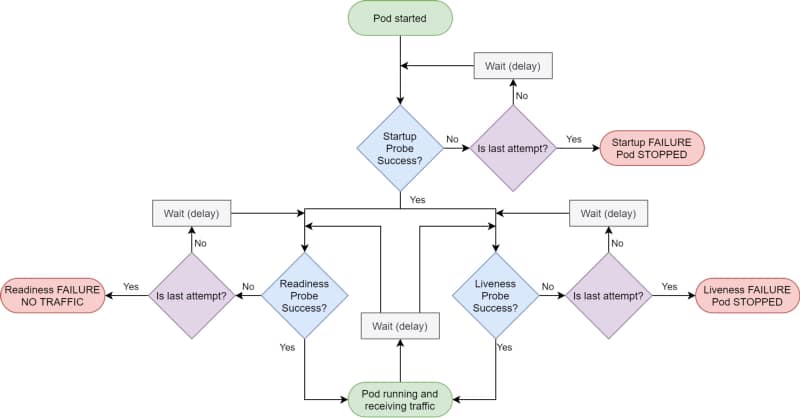
Kubernetes provides different kinds of probes that will let the platform know the status of your app. It will help us to tell if our application is “alive” (liveness probe), has been started (startup probe), and if it is ready to process requests (readiness probe).

Kubernetes Init Containers Explained: Advanced Patterns for Dependencies and Startup
Kubernetes Probes lifecycle by Andrew Lock (https://andrewlock.net/deploying-asp-net-core-applications-to-kubernetes-part-6-adding-health-checks-with-liveness-readiness-and-startup-probes/)

Kubernetes Probes are the standard way of doing so, and if you have deployed any workload to a Kubernetes cluster, you probably have used one. But there are some times that this is not enough.

That can be because the probe you would like to do is too complex or because you would like to create some startup order between your components. And in that cases, you rely on another tool: Init Containers.

The Init Containers are another kind of container in that they have their image that can have any tool that you could need to establish the different checks or probes that you would like to perform.

They have the following unique characteristics:

  • Init containers always run to completion.
  • Each init container must complete successfully before the next one starts.

Why would you use init containers?

#1 .- Manage Dependencies

The first use-case to use init containers is to define a relationship of dependencies between two components such as Deployments, and you need for one to the other to start. Imagine the following situation:

We have two components: a Web App and a Database; both are managed as containers in the platform. So if you deploy them in the usual way, both of them will try to start simultaneously, or the Kubernetes scheduler will define the order, so it could be possible the situation of the web app will try to start when the database is not available.

You could think that is not an issue because this is why you have a readiness or a liveness probe in your containers, and you are right: Pod will not be ready until the database is ready, but there are several things to note here:

  • Both probes have a limit of attempts; after that, you will enter into a CrashLoopBack scenario, and the pod will not try to start again until you manually restart it.
  • Web App pod will consume more resources than needed when you know the app will not start at all. So, in the end, you are wasting resources on the process.

So defining an init container as part of the web app deployment that checks if the database is available, maybe just including a database client to quickly see if the database and all the tables are appropriately populated, will be enough to solve both situations.

#2 .- Optimizing resources

One critical thing when you define your containers is to ensure that they have everything they need to perform their task and that they don’t have anything that is not required for that purpose.

So instead of adding more tools to check the component’s behavior, especially if this is something to manage at specific times, you can offload that to an init container and keep the main container more optimized in terms of size and resources used.

#3.- Preloading data

Sometimes you need to do some activities at the beginning of your application, and you can separate that for the usual work of your application, so you would like to avoid the kind of logic to check if the component has been initialized or not.

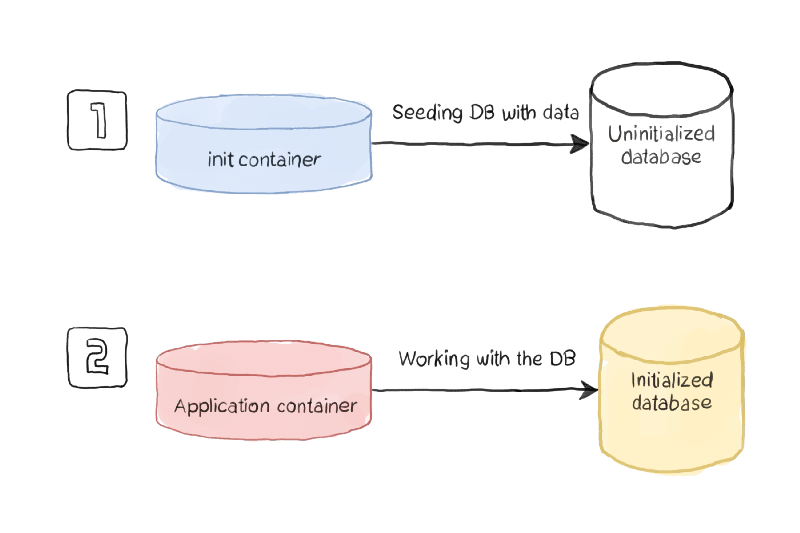
Using this pattern, you will have an init container managing all the initialization work and ensuring that all the initialization work has been performed when the main container is executed.

Kubernetes Init Containers Explained: Advanced Patterns for Dependencies and Startup
Initialization process sample (https://www.magalix.com/blog/kubernetes-patterns-the-init-container-pattern)

How to define an Init Container?

To be able to define an init container, you need to use a specific section of the specification section of your YAML file, as it is shown in the picture below:

apiVersion: v1
kind: Pod
metadata:
name: myapp-pod
labels:
app: myapp
spec:
containers:
  - name: myapp-container
image: busybox:1.28
command: ['sh', '-c', 'echo The app is running! && sleep 3600']
initContainers:
  - name: init-myservice
image: busybox:1.28
command: ['sh', '-c', "until nslookup myservice.$(cat /var/run/secrets/kubernetes.io/serviceaccount/namespace).svc.cluster.local; do echo waiting for myservice; sleep 2; done"]
  - name: init-mydb
image: busybox:1.28
command: ['sh', '-c', "until nslookup mydb.$(cat /var/run/secrets/kubernetes.io/serviceaccount/namespace).svc.cluster.local; do echo waiting for mydb; sleep 2; done"]

You can define as many Init Containers as you need. Still, you will note that all the init containers will run in sequence as described in the YAML file, and one init container can only be executed if the previous one has been completed successfully.

Summary

I hope this article will have provided you with a new way to define the management of your dependencies between workloads in Kubernetes and, at the same time, also other great use-cases where the capability of the init container can provide value to your workloads.

📚 Want to dive deeper into Kubernetes? This article is part of our comprehensive Kubernetes Architecture Patterns guide, where you’ll find all fundamental and advanced concepts explained step by step.

Kubernetes AccessModes Explained: Choosing the Right Mode for Stateful Workloads

Kubernetes AccessModes Explained: Choosing the Right Mode for Stateful Workloads

Kubernetes AccessModes provides a lot of flexibility on how the different pods can access the shared volumes

All Companies are moving towards a transformation, changing the current workloads on application servers running on virtual machines on a Data Center towards a cloud-native architecture where applications have been decomposed on different services that run as isolated components using containers and managing by a Kubernetes-based platform.

We started with the easiest use-cases and workloads moving our online services, mainly REST API that works on a load-balancing mode, but the issues began when we moved other workloads to follow the same transformation journey.

Kubernetes platform was not ready at the time. Most of their improvements have been made to support more use-cases. Does that mean that REST API is much more cloud-native than an application that requires a file-storage solution? Absolutely Not!

We were confusing different things. Cloud-native patterns are valid independent of those decisions. However, it is true that in the journey to the cloud and even before, there were some patterns that we tried to replace, especially File-based. But this is not because of the usage of the file itself. It is was more about the batch approach that was closely related to the use of files that we try to replace for several reasons, such as the ones below:

  • The online approach reduces time to action: Updates and notifications come faster to the target, so components are current.
  • File-based solutions reduce the solution’s scalability: You generate a dependency with a central component that has a more complex scalability solution.

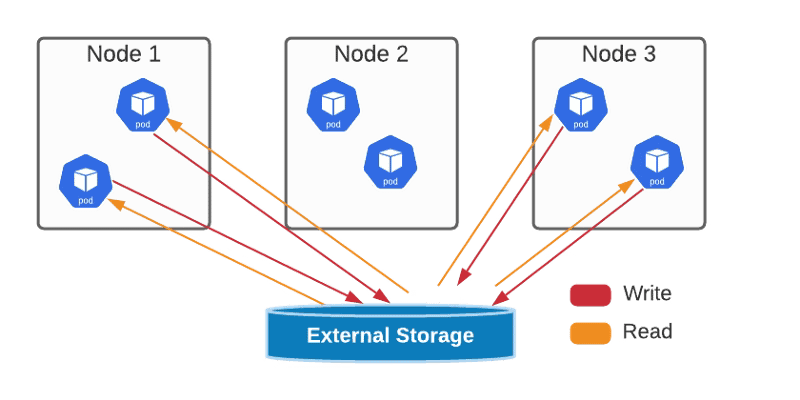
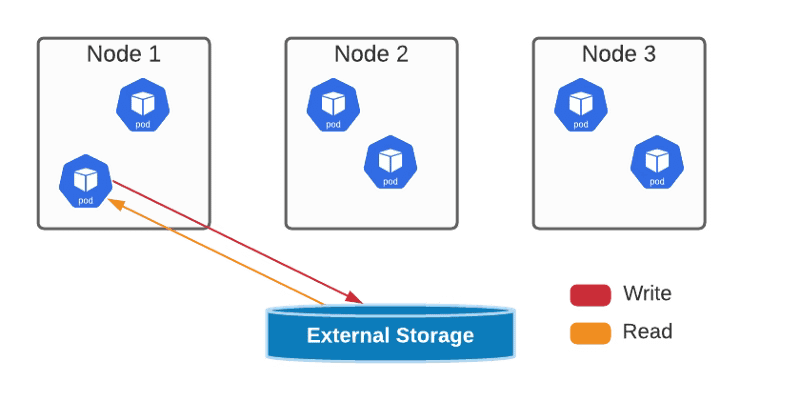
But this path is being eased, and the last update on that journey was the Access Modes introduced by Kubernetes. Access Mode defines how the different pods will interact with one specific persistent volume. The access modes are the ones shown below.

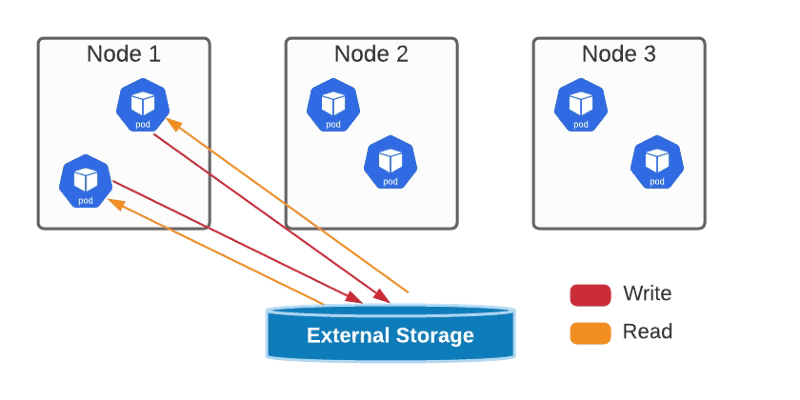
  • ReadWriteOnce — the volume can be mounted as read-write by a single node
Kubernetes AccessModes Explained: Choosing the Right Mode for Stateful Workloads
ReadWriteOnce AccessMode Graphical Representation
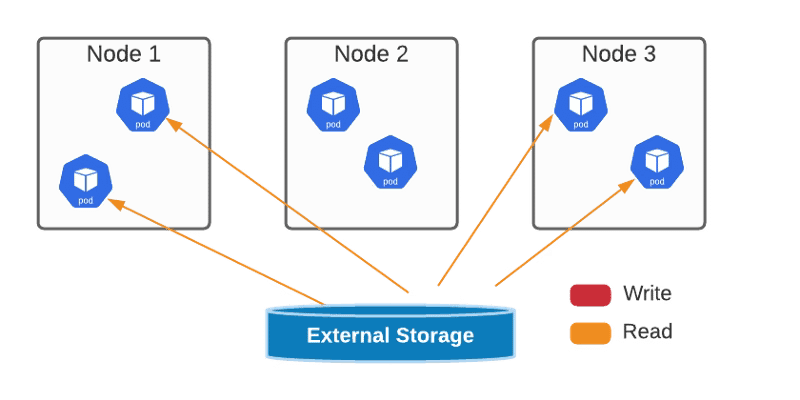
  • ReadOnlyMany — the volume can be mounted read-only by many nodes.
Kubernetes AccessModes Explained: Choosing the Right Mode for Stateful Workloads
ReadOnlyMany AccessMode Graphical Representation
  • ReadWriteMany — the volume can be mounted as read-write by many nodes
Kubernetes AccessModes Explained: Choosing the Right Mode for Stateful Workloads
ReadWriteMany AccessMode Graphical Representation
  • ReadWriteOncePod — the volume can be mounted as read-write by a single Pod. This is only supported for CSI volumes and Kubernetes version 1.22+.
Kubernetes AccessModes Explained: Choosing the Right Mode for Stateful Workloads
ReadWriteOncePod AccessMode Graphical Representation

You can define the access mode as one of the properties of your PVs and PVCs, as shown in the sample below:

kind: PersistentVolumeClaim
apiVersion: v1
metadata:
 name: single-writer-only
spec:
 accessModes:
 - ReadWriteOncePod # Allow only a single pod to access single-writer-only.
 resources:
 requests:
 storage: 1Gi

All of this will help us on our journey to have all our different kinds of workloads achieving all the benefits from the digital transformation and allowing us as architects or developers to choose the right pattern for our use-case without being restricted at all.

📚 Want to dive deeper into Kubernetes? This article is part of our comprehensive Kubernetes Architecture Patterns guide, where you’ll find all fundamental and advanced concepts explained step by step.

Portainer Explained: Evolution, Use Cases, and Why It Still Matters for Kubernetes

Portainer Explained: Evolution, Use Cases, and Why It Still Matters for Kubernetes

Discover the current state of the first graphical interfaces for docker containers and how it provides a solution for modern container platforms

I want to start this article with a story that I am not sure all of you, incredible readers, know. It was a time that there were no graphical interfaces to monitor your containers. It was a long time ago, understanding a long time as we can do in the container world. Maybe this was 2014-2015 when Kubernetes was in its initial stage, and also, Docker Swarm was just released and seemed the most reliable solution.

So most of us didn’t have a container platform as such. We just run our containers from our own laptops or small servers for cutting-edge companies using docker commands directly and without more help than the CLI tool. As you can see, things have changed a lot since then, and if you would like to refresh that view, you can check the article shared below:

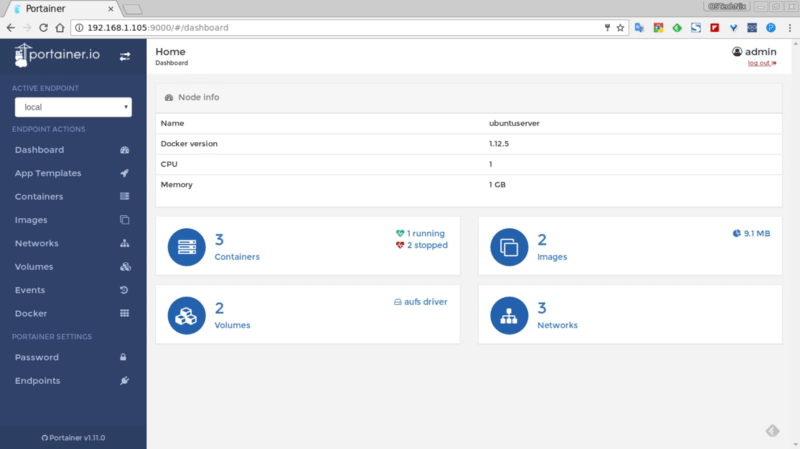
And at that time, an open-source project provides the most incredible solution because we didn’t know that we needed that until we use it, and that option was portainer. Portainer provides a very awesome web interface where you can see all the docker containers deployed on your docker host and deploy as another platform.

Portainer: A Visionary Software and an Evolution Journey
Web page of portainer in 2017 from https://ostechnix.com/portainer-an-easiest-way-to-manage-docker/

It was the first one and generated a tremendous impact, even generated a series of other projects that were named: the portainer of… like dodo the portainer of Kubernetes infrastructure at that time.

But maybe you can ask.. and how is portainer doing? is still portainer a thing? It is still alive and kicking, as you can see on their GitHub project page: https://github.com/portainer/portainer, with the last release in the last of May 2021.

Now they have a Business version but still as Comunity Edition one that is the one that I am going to be analyzing here in more detail in another article. Still, I would like to provide some initial highlights:

  • Installing process still follows the same approach as the initial releases to be another component of your cluster. The options to be used in Docker, Docker Swarm, or Kubernetes cover all the main solutions all enterprise uses.
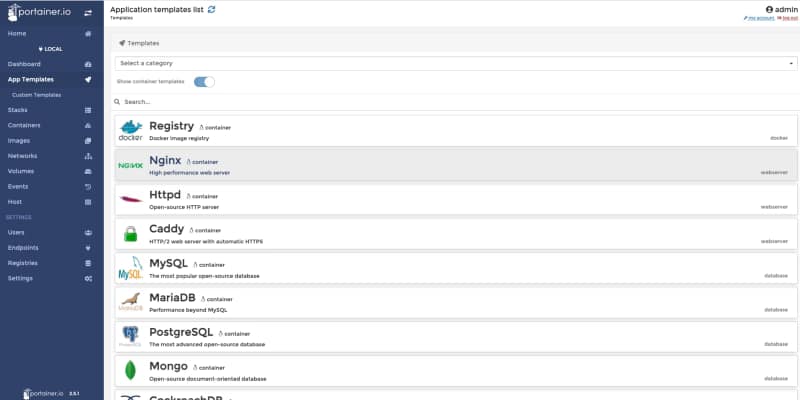
  • Provides now a list of application templates similar to the Openshift Catalog list, and also, you can create your own ones. This is very useful for companies that usually rely on these templates to allow developers to use a common deployment approach without needing to do all the work.
Portainer Explained: Evolution, Use Cases, and Why It Still Matters for Kubernetes
Portainer 2.5.1 Application Template view
  • Team Management capabilities can define users with access to the platform and group those users as part of the team to a more granular permission management.
  • Multi-registry support: By default, it will be integrated with Docker Hub, but you can add your own registries as well and be able to pull images directly from those directly from the GUI.

In summary, this is a great evolution of the portainer tool while keeping the same spirit that all the old users loved at that time: Simplicity and Focus on what an Administrator or Developer needs to know, but also adding more features and capabilities to keep the pace of the evolution in the container platform industry.

📚 Want to dive deeper into Kubernetes? This article is part of our comprehensive Kubernetes Architecture Patterns guide, where you’ll find all fundamental and advanced concepts explained step by step.

Level-Up Your Deployment Strategy with Canarying in Kubernetes

Level-Up Your Deployment Strategy with Canarying in Kubernetes

Save time and money on your application platform deploying applications differently in Kubernetes.

We have come from a time where we deploy an application using an apparent and straight-line process. The traditional way is pretty much like this:
  • Wait until a weekend or some time where the load is low, and business can tolerate some service unavailability.
  • We schedule the change and warn all the teams involved for that time to be ready to manage the impact.
  • We deploy the new version and we have all the teams during the functional test they need to do to ensure that is working fine, and we wait for the real load to happen.
  • We monitor during the first hours to see if something wrong happens, and in case it does, we establish a rollback process.
  • As soon as everything goes fine, we wait until the next release in 3–4 months.
But this is not valid anymore. Business demands IT to be agile, change quickly, and not afford to do that kind of resource effort each week or, even worse, each day. Do you think that it’s possible to gather all teams each night to deploy the latest changes? It is not feasible at all. So, technology advance to help us solve that issue better, and here is where Canarying came here to help us.

Introducing Canary Deployments

Canary deployments (or just Canarying as you prefer) are not something new, and a lot of people has been talking a lot about it: It has been here for some time, but before, it was neither easy nor practical to implement it. Basically is based on deploying the new version into production, but you still keeping the traffic pointing to the old version of the application and you just start shifting some of the traffic to the new version.
Level-Up Your Deployment Strategy with Canarying in Kubernetes
Canary release in Kubernetes environment graphical representation
Based on that small subset of requests you monitor how the new version performs at different levels, functional level, performance level, and so on. Once you feel comfortable with the performance that is providing you just shift all the traffic to the new version, and you deprecate the old version
Level-Up Your Deployment Strategy with Canarying in Kubernetes
Removal of old version after all traffic has been shifted to the newly deployed version.
The benefits that come with this approach are huge:
  • You don’t need a big staging environment as before because you can do some of the tests with real data into the production while not affecting your business and the availability of your services.
  • You can reduce time to market and increase the frequency of deployments because you can do it with less effort and people involved.
  • Your deployment window has been extended a lot as you do not need to wait for a specific time window, and because of that, you can deploy new functionality more frequently.

Implementing Canary Deployment in Kubernetes

To implement Canary Deployment in Kubernetes, we need to provide more flexibility to how the traffic is routed among our internal components, which is one of the capabilities that get extended from using a Service Mesh. We already discussed the benefits of using a Service Mesh as part of your environment, but if you would like to retake a look, please refer to this article: We have several technology components that can provide those capabilities, but this is how you will be able to create the traffic routes to implement this. To see how you can take a look at the following article about one of the default options that is Istio: But be able to route the traffic is not enough to implement a complete canary deployment approach. We also need to be able to monitor and act based on those metrics to avoid manual intervention. To do this, we need to include different tools to provide those capabilities: Prometheus is the de-facto option to monitor workloads deployed on the Kubernetes environment, and here you can get more info about how both projects play together. And to manage the overall process, you can have a Continuous Deployment tool to put some governance around that using options like Spinnaker or using our of the extensions for the Continuous integration tools like GitLab or GitHub:

Summary

In this article, we covered how we can evolve a traditional deployment model to keep pace with innovation that businesses require today and how canary deployment techniques can help us on that journey, and the technology components needed to set up this strategy in your own environment.

📚 Want to dive deeper into Kubernetes? This article is part of our comprehensive Kubernetes Architecture Patterns guide, where you’ll find all fundamental and advanced concepts explained step by step.
Best Kubernetes Management Tools: Dashboard, CLI, and GUI Options Compared

Best Kubernetes Management Tools: Dashboard, CLI, and GUI Options Compared

Maximizing the productivity of working with Kubernetes Environment with a tool for each persona

We all know that Kubernetes is the default environment for all our new applications we developed we will build. The flavor of that Kubernetes platform can be of different ways and forms, but one thing is clear, it is complex.

The reasons behind this complexity is being able to provide all the flexibility but it is also true that the k8s project never has put much effort to provide a simple way to manage your clusters and kubectl is the point of access to send commands leaving this door open to the community to provide its own solution and these are the things that we are going to discuss today.

Kubernetes Dashboard: The Default Option

Kubernetes Dashboard is the default option for most of the installations. It is a web-based interface that is part of the K8s project but not deployed by default when you install the cluster

Best Kubernetes Management Tools: Dashboard, CLI, and GUI Options Compared

K9S: The CLI option

K9S is one of the most common options for the ones that love a very powerful command-line interface with a lot of options at your disposal

Best Kubernetes Management Tools: Dashboard, CLI, and GUI Options Compared

It is a mix between all the power of a command-line interface with all the keyboard options at your disposals with a very fancy graphical view to have a quick overview of the status of your cluster at glance.

Lens — The Graphical Option

The lens is a very vitaminized GUI option that goes beyond that just showing the status of the K8S cluster or allowing modifications on the components. With integration with other projects such as Helm or support for the CRD. It provides a very pleasant experience of managing clusters with multi-cluster support as well. To know more about Lens you can take a look at this article that we cover its main features:

Octant — The Web Option

Octant provides an improved experience compared with the default web option discussed in this article using the Kubernetes dashboard. Built for extension with a plug-in system that allows you to extend or customize the behavior of octant to maximize your productivity managing K8S clusters. Including CRD support and graphical visualization of dependencies provides an awesome experience.

Best Kubernetes Management Tools: Dashboard, CLI, and GUI Options Compared

Summary

The have provided in this article different tools that will help you during the important task to manage or inspect your Kubernetes cluster. Each of them with its own characteristics and each of them focuses on different ways to provide the information (CLI, GUI and Web) so you can always find one that works best for your situation and preferences.

📚 Want to dive deeper into Kubernetes? This article is part of our comprehensive Kubernetes Architecture Patterns guide, where you’ll find all fundamental and advanced concepts explained step by step.