
Top kubectl Commands and Tips to Boost Kubernetes Productivity

Top kubectl Commands and Tips to Boost Kubernetes Productivity

Kubectl command can be the most used command you can type when working with the Kubernetes ecosystem. As you know, kubectl is the open the door to all the Kubernetes world as pretty much all of our interactions go through that part, unless you are using a CLI approach.

So, based on the productivity principles, if you can improve just 1% in the task that you perform the most, the global improvement will be massive. So, let’s see how we can do that here.

kubectl is a command with many different options that could help boost your productivity a lot. But at the same time, as it has so many options, it is pretty complex to know all of them or be aware that there is a faster way to do the job, and that’s why I would like to add some options here to try to help you with this set of kubectl tips.

Kubectl Commands Tips

Let’s start with the first kubectl commands that help a lot to improve your productivity:

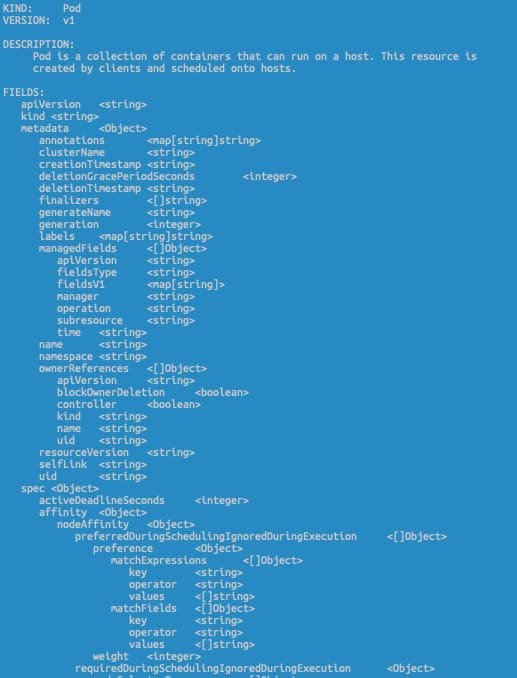
kubectl explain <resource-object>

This command will show the API reference for any Kubernetes Object, so it would help you know the exact spelling of the option that you always miswrite.

kubectl get <resource-object> —watch-output

The —watch-output option added to any kubectl command will work in the same way as the watch command itself, so it will refresh the same command every 2.0 seconds to see the real-time version of that command and avoid that you need to type it again or rely on an external command such as watch

kubectl get events --sort-by=".lastTimestamp"

This command will help you when you want to see the events in your current context, but the main difference is that it will sort the output by the timestamp from more recent to older, so you will avoid needing to scroll to find the latest events.

kubectl logs --previous

We always talk about one of the needs for a Log Aggregation Architecture because the logs are disposable, but what about if you want to get the logs in a killed container? You can use the --previous flag to access the logs for a recently terminated container. This will not remove the need for a logging aggregation technique, but it will help troubleshoot when Kubernetes start killing things and you need to know what happened.

kubectl create <object> <options> -o=yaml --dry-run=client

kubectl create allows us to create an object of our preference by providing the required arguments imperatively, but if we add the -o=yaml --dry-run=client option, we will not get our object created. Instead, we will have a YAML file defining that object. So we can easily modify it to our needs without needing to make it from scratch by searching Google for a sample to start with.

kubectl top pods --all-namespaces --sort-by='memory'

This command will alter the standard top pods order to show the pods and the resources they are consuming, and at the same time, it will sort that output by the memory usage. So, in environments with many pods, it will provide just at the top the ones you should focus on first to optimize the resources for your whole cluster.

Kubectl Alias

One step beyond that is to simplify those commands by adding an alias to this. As you can see, most of these commands are pretty long as they have many options, so writing each of these options will take a while.

So, if you want to go one step further on this optimization, you can always add an alias to that command to simplify it a lot. And if you want to learn more about those aliases, I strongly recommend the GitHub repo from Ahmet Alp Balkan:

📚 Want to dive deeper into Kubernetes? This article is part of our comprehensive Kubernetes Architecture Patterns guide, where you’ll find all fundamental and advanced concepts explained step by step.

CKAD Exam Preparation: Practical Tips to Pass the Kubernetes Developer Certification

person writing on white paper

Learn From My Own Experience To Clear Your Kubernetes Certification Exam

But I would also like to provide some practical advice based on my own experience if this can help anyone else going through the same process. I know there are a lot of similar articles, and most of them are worth it because each of them provides a different perspective and approach. So here it is mine:

  • Fast but Safe. You will have around 2 hours to complete between 15 to 20 practical questions, which pretty much gives you about 6 minutes each on average. That’s enough time to do it, but also you must go fast. So, try to avoid the approach of reading the whole exam first or moving across questions. It is better to start with the first one right away and if you are blocked, move to the next one. At the same time, you must validate the output you are getting to ensure that you are not missing anything. Try to run any command to validate if the objects have been created correctly and have the right attributes and configuration before moving to the next one. Time is precious. I had a lot of time at the end of the exam to review the questions, but it is also true that I spent 20 minutes because I wrote ngnix instead of nginx, and I was unable to see it!!
  • Imperative commands is the way to go: You must learn the YAML structure for the main objects. Deployment, Pod, CronJob, Jobs, etc. You will also need to master the imperative commands to generate the initial output quickly. Imperative commands such as kubectl run, kubectl create, kubectl expose will not provide 100% of the answer, but maybe 80% is the base to make arrangements to have the solution to your question quickly. I recommend taking a look at this resource:
  • kubectl explain to avoid going through documentation on thinking a lot. I have a problem learning the exact name of a field or the location in the YAML file. So I used a lot of the kubectl explain, especially with the —rescursive flag. It provides the YAML structure so, if you don’t remember if the key name is configMap or ConfigMapRef or claimName or persitentVolumeClaim, this will be an incredible help. If you also add a grep -A 10 -B 5 command to find your field and its context, you will master it. This doesn’t replace knowing the YAML structure, but it will help to be efficient when you don’t remember the exact name or location.
CKAD Exam Preparation: Practical Tips to Pass the Kubernetes Developer Certification
kubectl explain pod –recursive
  • Don’t forget about docker/podman and helm: With the changes in the certification in September 2021 also, the building process is essential, so it is excellent if you have enough time in your preparation to play with tools such as docker/podman or helm so you will master any question related to that that you could find.
  • Use the simulator: LinuxFoundation is providing you two sessions on the simulator that, from one side, will give you an authentic exam experience, so you will face similar kinds of questions and interface to feel that you are not the first time that you are facing and at the same time you could feel familiar with the environment. I recommend using both sessions (both have the same question), one in the middle of your training and the second one just one or two days before your exam.

So, here are my tips, and I hope you will like them. If they were helpful to you, please let me know on social networks or by mail or another way of contacting your preference! All the best in your preparation, and I’m sure you will get your goals!

📚 Want to dive deeper into Kubernetes? This article is part of our comprehensive Kubernetes Architecture Patterns guide, where you’ll find all fundamental and advanced concepts explained step by step.

My Take on the Kubernetes CKAD Certification: Real Exam Experience and Lessons Learned

girl in black t-shirt writing on white paper

My Experience and Feelings After Clearing the Certified Kubernetes Application Developer

Last week I cleared the Certified Kubernetes Application Developer (CKAD) certification with a 95/100 score, and it was more difficult than it sounds even though this is the easiest of the Kubernetes certifications, the way the exam is designed and the skills that are evaluated on it make you unsure of your knowledge.

I have been using Kubernetes daily for more than three years now. Because of my work, it is required to deploy, define, troubleshoot Kubernetes-based workloads on different platforms (Openshift, EKS, AKS… anything), so you could think that I shouldn’t need to prepare for this kind of exam, and that could be the impression too. But this is far from reality.

I feel that there is no certification that you can clear without preparation because the certification does not measure how skilled you are on any other topic than the certification process itself. You can be the master of any technology, but if you go to a certification exam without any specific exam preparation, you have a lot of chances to fail.

Even in this case that we have shifted from the traditional theoretical test-case question to a more practical one, it is no different. Because yes, you don’t need to learn anything, and yes, it requires that you can really do things, not just know about a thing, but everything else is the same.

You will be asked about things you will never use in real life, you will need to use commands that you only are going to use in the exam, and you will need to do it in the specific way the expected too because this is how certification works. Is it bad? Probably… is there any other way to do it? We didn’t find it yet any better.

I have to admit that I think this process is much fairer than the test-case one, even though I prefer the test case just for a matter of timing during the process.

So, probably, you are asking if that is my view, why I try to clear the certification in the first place? There are several reasons to do it. First of all, I think certification is a great way to set a standard of knowledge for anyone. That doesn’t mean that people with the certification are more competent or better skilled than people without the certification. I don’t consider myself more qualified today than one month ago when I started to prepare for the certification, but at least it settled some foundation of what you can expect.

Additional to that is a challenge to yourself, to show you that you can do it, and it is always great to push your limits a bit beyond what is mandatory for work. And finally, it is something that looks good in your CV, that is for sure.

Do I learn something new? Yes, for sure, a lot of things. I even improved myself because I usually do some tasks, and just that alone made it worth it. Even if I failed, I think it was worth it because it always gives you something more to add to your toolchain, and that is always good.

Also, this exam doesn’t ensure that you are a good Kubernetes Application Developer. In my view, I think the exam approach is focused on showing that you are a fair Kubernetes Implementer. Why am I saying that? Let’s add some points:

  • You don’t get any points to provide the best solution for a problem. The ask is so specific that there is a matter of translating what is written in plain English to Kubernetes actions and objects.
  • There are troubleshooting questions, yes, but there are also quite basic ones that don’t ensure that your thought process is efficient. Again, efficiency is not evaluated on the process.

So, I am probably missing a Certified Kubernetes Architecture exam where you can have the definition of a problem, and you need to provide a solution. You will get evaluated based on that. Even with some way to justify the decision you are making and the thought process, I don’t think we ever see that. Why? Because, and that’s very important because any new certification exam we are going to face needs to be specific enough so it can be evaluated automatically.

📚 Want to dive deeper into Kubernetes? This article is part of our comprehensive Kubernetes Architecture Patterns guide, where you’ll find all fundamental and advanced concepts explained step by step.