Inject Secrets into Kubernetes Pods Using HashiCorp Vault (Agent Injector Guide)

Inject Secrets into Kubernetes Pods Using HashiCorp Vault (Agent Injector Guide)

Introduction

This article will cover how to inject secrets in Pods using Hashicorp Vault. In previous articles, we covered how to install Hashicorp Vault in Kubernetes, configure and create secrets in Hashicorp, and how tools such as TIBCO BW can retrieve them. Still, today, we are going to go one step ahead.

The reason why Inject secrets in pods is very important is that it allows the application inside the pod to be transparent around any communication to Hashicorp. After all, for the applications, the secret will be just a regular file located in a specific path inside the container. It doesn’t need to worry if this file came from a Hashicorp Secret or a total of different resources.

This injection approach facilitates the Kubernetes ecosystem’s polyglot approach because it frees any responsibility for the underlying application. The same happens with injector approaches such as Istio or much more.

But, let’s explain how this approach works to inject secrets in Pods using Hashicorp Vault. As part of the installation alongside the vault server we have installed (or several ones if you have done a distributed installation), we have seen another pod under the name of value-agent-injector, as you can see in the picture below:

Inject Secrets In Pods: Vault Injector Pod

This agent will be responsible for listening to the new deployments you do and, based on the annotations this deployment has, will launch a sidecar alongside your application and send the configuration to be able to connect to the vault and download the secrets required and mount it as files inside your pod as shown in the picture below:

To do that, we need to do several steps as part of the configuration as we are going to include in the upcoming sections of the article

Enabling Kubernetes Authentication in Hashicorp

The first thing we need to do at this stage is to enable the Kubernetes Authentication in Hashicorp. This method allows clients to authenticate with a Kubernetes Service Account Token. We do that with the following command:

 Vault auth enable kubernetes

Vault accepts a service token from any client in the Kubernetes cluster. During authentication, Vault verifies that the service account token is valid by querying a token review Kubernetes endpoint. Now, we need to configure this authentication method providing the location our the Kubernetes API, and to do that, we need to run the following command:

 vault write auth/kubernetes/config \
    kubernetes_host="https://$KUBERNETES_PORT_443_TCP_ADDR:443"

Defining a Kubernetes Services Account and Defining a Policy

Now, we will create a Kubernetes Service Account that will run our pods, and this service account will be allowed to retrieve the secret we generated in the previous post.

To do that, we will start with the creation of the service account by running this command from outside the pod:

kubectl create sa internal-app

This will create a new service account under the name of internal-app, and now we are going to generate a policy inside the Hashicorp Vault server by using this command inside the vault server pod:

 vault policy write internal-app - <<EOF
path "internal/data/database/config" {
  capabilities = ["read"]
}
EOF

And now, we associated this policy with the service account by running this command also inside the vault server pod:

  vault write auth/kubernetes/role/internal-app \
    bound_service_account_names=internal-app \
    bound_service_account_namespaces=default \
    policies=internal-app \
    ttl=24h

And that’s pretty much all the configuration we need to do at the Vault side to be able to inject secrets in pods using Hashicorp Vault. Now, we need to configure our application accordingly by doing the following modifications:

  • Specify the ServiceAccountName to the deployment to be the one we created previously: internal-app
  • Specify the specific annotations to inject the vault secrets and the configuration of those secrets.

Let’s start with the first point. We need to add the serviceAccountName to our Kubernetes Manifest YAML file as shown below:
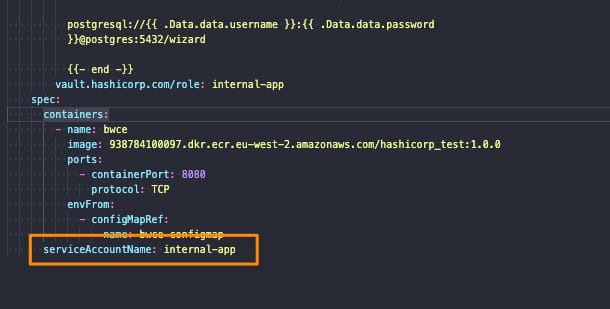
Inject Secrets In Pods: Service Account Name definition

And regarding the second point, we would solve it by adding several annotations to our deployment, as shown below:
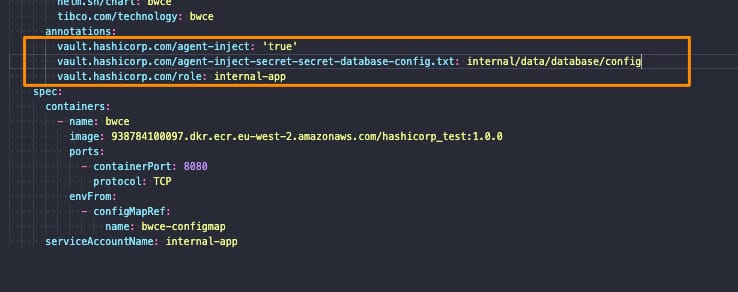
Inject Secrets In Pods: Annotations

The annotations used to inject secrets in pods are the following ones:

  • vault.hashicorp.com/agent-inject: ‘true’: This tells the vault injector that we would like to inject the sidecar agent in this deployment and have the Vault configuration. This is required to do any further configuration
  • vault.hashicorp.com/role: internal-app: This is the vault role we are going to use when we’re asking for secrets and information to the vault to be sure that we only access the secrets we have allowed based on the policy we created in the previous section
  • vault.hashicorp.com/agent-inject-secret-secret-database-config.txt: internal/data/database/config: This will be one annotation per secret we plan to add, and it is composed of three parts:
    • vault.hashicorp.com/agent-inject-secret- this part is fixed
    • secret-database-config.txt this part will be the filename that is created under /vault/secrets inside our pod
    • internal/data/database/config This is the path inside the vault of our secret to being linked to that file.

And that’s it! If we deploy now our deployment we will see the following things:

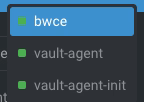
  • Our deployment application has been launched with three containers instead of one because two of them are Hashicorp Vault related, as you can see in the picture below:
Inject Secrets into Kubernetes Pods Using HashiCorp Vault (Agent Injector Guide)
  • vault-agent-init will be the container that establishes the connection to the vault-server because any container starts and does the first download and injecting secrets in the pod based on the configuration provided.
  • vault-agent will be the container running as a watcher to detect any modification on the related secrets and update them.
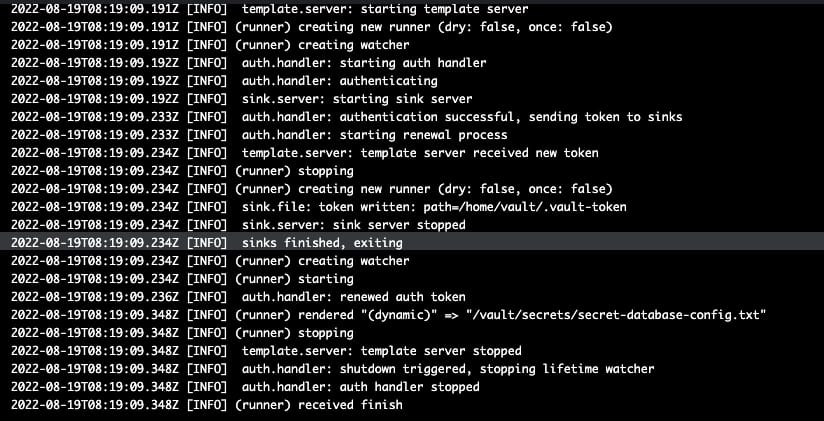
Inject Secrets into Kubernetes Pods Using HashiCorp Vault (Agent Injector Guide)

And now, if we go to the main container, we will see in the /vault/secrets path the secret has been finally injected as expected:

Inject Secrets into Kubernetes Pods Using HashiCorp Vault (Agent Injector Guide)

And this is how easily and without any knowledge about the underlying app we can inject secrets in pods using Hashicorp Vault.

📚 Want to dive deeper into Kubernetes? This article is part of our comprehensive Kubernetes Architecture Patterns guide, where you’ll find all fundamental and advanced concepts explained step by step.

TIBCO BusinessWorks HashiCorp Vault Integration: Secure Secrets in 3 Steps

TIBCO BusinessWorks HashiCorp Vault Integration: Secure Secrets in 3 Steps

Introduction

This article aims to show the TIBCO BW Hashicorp Vault Configuration to integrate your TIBCO BW application with the secrets stored in Hashicorp Vault, mainly for the externalization and management of password and credentials resources.

This article is part of my comprehensive TIBCO Integration Platform Guide where you can find more patterns and best practices for TIBCO integration platforms.

As you probably know, in the TIBCO BW application, the configuration is stored in Properties at different levels (Module or Application properties). You can read more about them here. And the primary purpose of that properties is to provide flexibility to the application configuration.

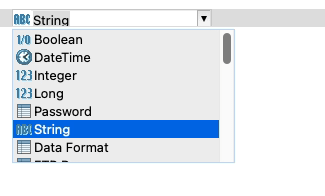
These properties can be of different types, such as String, Integer, Long, Double, Boolean, and DateTime, among other technical resources inside TIBCO BW, as shown in the picture below:

TIBCO BW Hashicorp Vault Configuration: BW Property Types

The TIBCO BW Hashicorp Vault integration will affect only those properties of Password type (at least up to 2.7.2/6.8.1 BW version). The reason behind that is that those properties are the kind of data relevant to the information that is sensitive and needs to be secure. Other concepts can be managed through standard Kubernetes components such as ConfigMaps.

BW Application Definition

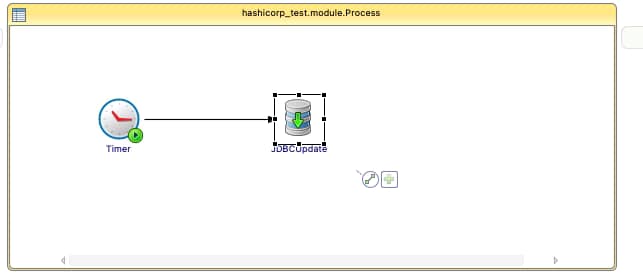
We are going to start with a straightforward application, as you can see in the picture below:

TIBCO BW Hashicorp Vault Configuration: Property sample

Just a simple timer that will be executed once and insert the current time into the PostgreSQL database. We will use Hashicorp Vault to store the password of the database user to be able to connect to it. The username and the connection string will reside on a ConfigMap.

We will skip the part of the configuration regarding the deployment of the TIBCO BW application Containers and link to a ConfigMap you have an article covering that in detail in case you need to follow it, and we will focus just on the topic regarding TIBCO BW Hashicorp Vault integration.

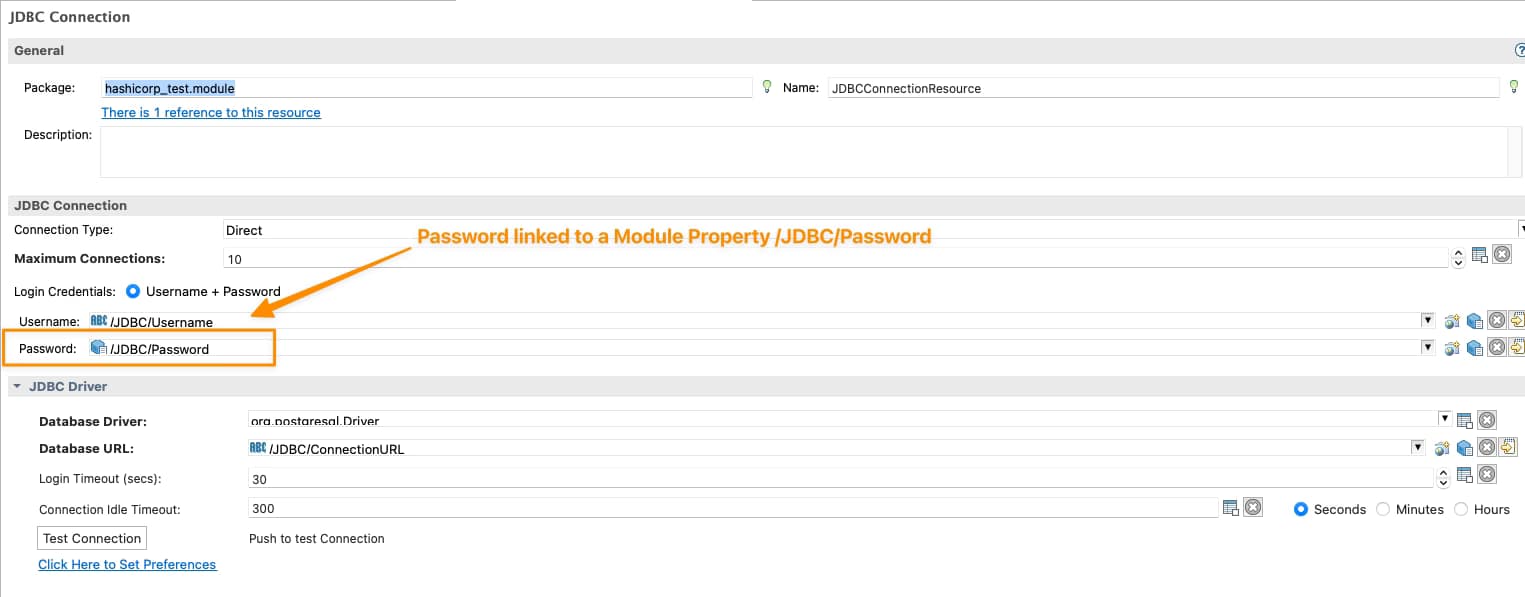
So we will need to tell TIBCO BW that the password of the JDBC Shared Resource will be linked to Hashicorp Vault configuration, and to do that, the first thing is to have tied the Password of the Shared Resources to a Module Property as shown in the picture below:

TIBCO BW Hashicorp Vault Configuration: Password linked to Module Property

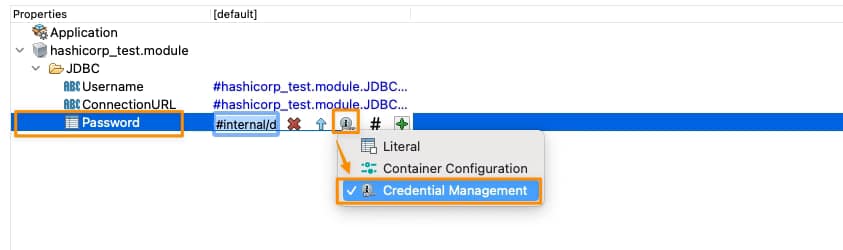
Now, we need to tell this Module Property that is Linked to Hashicorp Vault, and we will do that on the Application Property View, selecting that this property is linked to a Credential Management Solution as shown in the picture below:

TIBCO BW Hashicorp Vault Configuration: Credential Management Configuration for Property

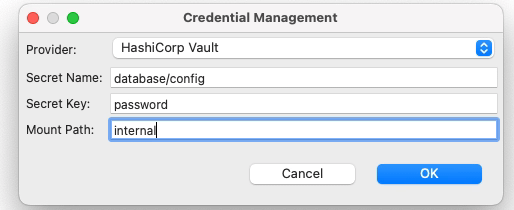
And it is now when we establish the TIBCO BW Hashicorp Vault relationship. We need to click directly on the green plus sign, and we will have a modal window asking for the technology of credentials management that we’re going to use and the data needed for each of them, as you can see in the following picture:

TIBCO BW Hashicorp Vault Configuration: Credential Management Configuration for Property

We will select Hashicorp Vault as the provided. Then we will need to provide three attributes that we already commented on in the previous article when we start creating secrets in Hashicorp Vault:

  • Secret Name: this is the secret name path after the root path of the element.
  • Secret Key: This is the key inside the secret itself
  • Mount Path: This is the root path of the secret

To get more details about these three concepts, please look at our article about how to create secrets in Hashicorp Vault.

So with all this, we have pretty much everything we need to connect to Hashicorp Vault and grab the secret, and from the TIBCO BW BusinessStudio side, everything is done; we can generate the EAR file and deploy it into Kubernetes because here it is the last part of our configuration.

 Kubernetes Deployment

Until this moment, we have the following information already provided:

  • BW Process that has the login to connect to the Database and insert information
  • Link between the password property used to connect and the Hashicorp Secret definition

So, pretty much everything is there, but one concept is missing. How will the Kubernetes Pod connect to Hashicorp once the pod is deployed? Until this point, we didn’t provide the Hashicorp Vault server location of the authentication method to connect to it. This is the missing part of the TIBCO BW Hashicorp Vault integration and will be part of the Kubernetes Deployment YAML file.

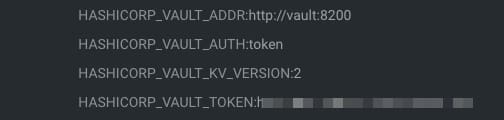
We will do that using the following environment properties in this sample:

TIBCO BW Hashicorp Vault Configuration: Hashicorp Environment Variables
  • HASHICORP_VAULT_ADDR: This variable will point to where the Hashicorp Vault server is located
  • HASHICORP_VAULT_AUTH: This variable will indicate which authentication options will be used. In our case, we will use the token one as we used in the previous article
  • HASHICORP_VAULT_KV_VERSION: This variable indicates which version of the KV storage solution we are using and will be two by default.
  • HASHICORP_VAULT_TOKEN: This will be just the token value to be able to authentication against the Hashicorp Vault server

If you are using other authentication methods or just want to know more about those properties please take a look at this documentation from TIBCO.

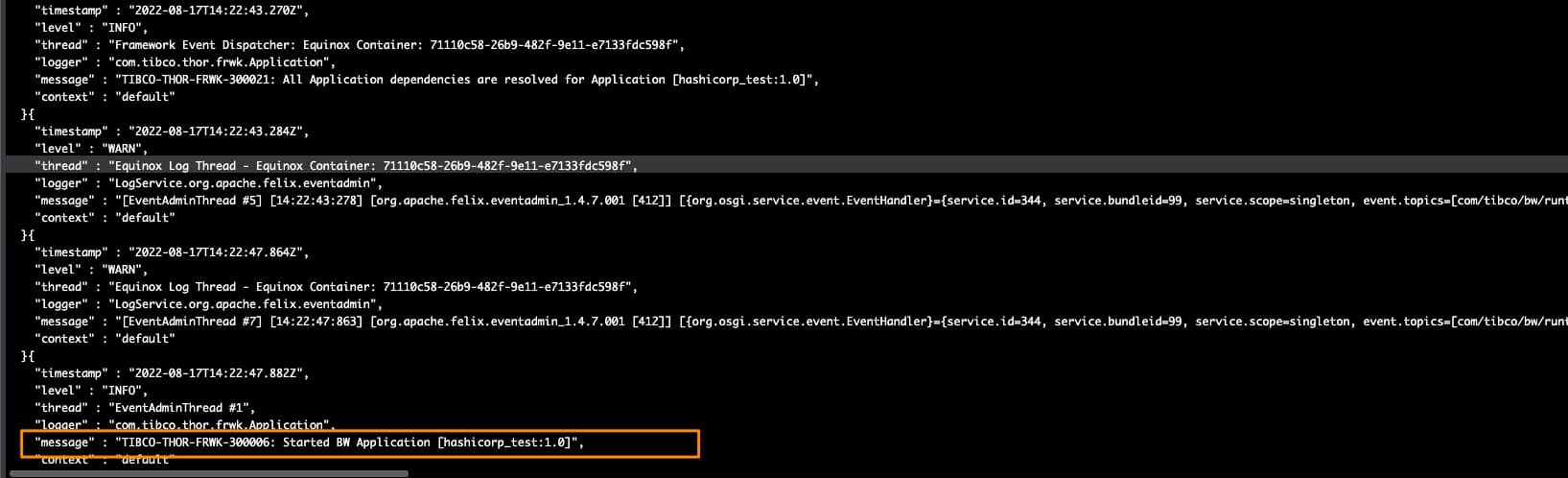
With all that added to the environment properties of our TIBCO BW application, we can run it, and we will get an output similar to this one, and that shows that the TIBCO BW Hashicorp Vault integration has been done and the application was able to start without any issue

TIBCO BW Hashicorp Vault Configuration: Running sample