How To Improve Your Kubernetes Workload Development Productivity

timelapse photo of highway during golden hour

Telepresence is the way to reduce the time between your lines of code and a cloud-native workload running.

timelapse photo of highway during golden hour
Photo by Joey Kyber on Unsplash

We all know how cloud-native workloads and Kubernetes have changed how we do things. There are a lot of benefits that come with the effect of containerization and orchestration platforms such as Kubernetes, and we have discussed a lot about it: scalability, self-healing, auto-discovery, resilience, and so on.

But some challenges have been raised, most of them on the operational aspect that we have a lot of projects focused on tackling, but usually, we forget about what the ambassador has defined as the “inner dev cycle.”

The “inner dev cycle” is the productive workflow that each developer follows when working on a new application, service, or component. This iterative flow is where we code, test what we’ve coded, and fix what is not working or improve what we already have.

This flow has existed since the beginning of time; it doesn’t matter if you were coding in C using STD Library or COBOL in the early 1980 or doing nodejs with the latest frameworks and libraries at your disposal.

We have seen movements towards making this inner cycle more effective, especially in front-end development. We have many options to see the last change we have done in code, just saving the file. But for the first time when the movement to a container-based platform, this flow makes devs less productive.

The main reason is that the number of tasks a dev needs to do has increased. Imagine this set of steps that we need to perform:

  • Build the app
  • Build the container image
  • Deploy the container image in Kubernetes

These actions are not as fast as testing your changes locally, making devs less productive than before, which is what the “telepresence” project is trying to solve.

Telepresence is an incubator project from the CNCF that has recently focused a lot of attention because it has included OOTB in the latest releases of the Docker Desktop component. Based on its own words, this is the definition of the telepresence project:

Telepresence is an open-source tool that lets developers code and test microservices locally against a remote Kubernetes cluster. Telepresence facilitates more efficient development workflows while relieving the need to worry about other service dependencies.

Ok, so let’s see how we can start? Let’s dive in together. The first thing we need to do is to install telepresence in our Kubernetes cluster:

Note: It is also a way to install telepresence using Helm in your cluster following these steps:

helm repo add datawire  https://app.getambassador.io
helm repo update
kubectl create namespace ambassador
helm install traffic-manager --namespace ambassador datawire/telepresence

Now I will create a simple container that will host a Golang application that exposes a simple REST service and make it more accessible; I will follow the tutorial that is available below; you can do it as well.

Once we have our golang application ready, we are going to generate the container from it, using the following Dockerfile:

FROM golang:latest

RUN apt-get update
RUN apt-get upgrade -y

ENV GOBIN /go/bin

WORKDIR /app

COPY *.go ./
RUN go env -w GO111MODULE=off
RUN go get .
RUN go build -o /go-rest
EXPOSE 8080
CMD [ "/go-rest" ]

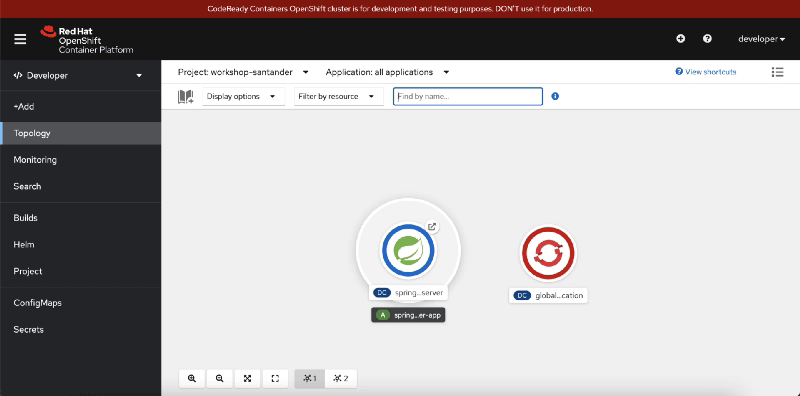
Then once we have the app, we’re going to upload to the Kubernetes server and run it as a deployment, as you can see in the picture below:

kubectl create deployment rest-service --image=quay.io/alexandrev/go-test  --port=8080
kubectl expose deploy/rest-service

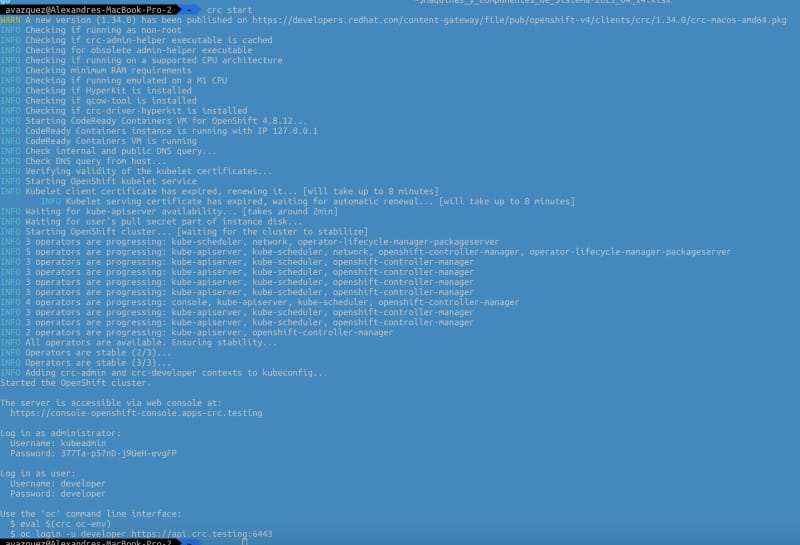
Once we have that, it is the moment to start executing the telepresence, and we will start connecting to the cluster using the following command telepresence connect, and it will show an output like this one:

How To Improve Your Kubernetes Workload Development Productivity

Then we are going to list the endpoints available to intercept with the command telepresence listand we will see our rest-service that we have exposed before:

How To Improve Your Kubernetes Workload Development Productivity

Now, we will run the specific interceptor, but before that, we’re going to do the trick so we can connect it to our Visual Studio Code. We will generate a launch.json file in Visual Studio Code with the following content:

{
    // Use IntelliSense to learn about possible attributes.
    // Hover to view descriptions of existing attributes.
    // For more information, visit: https://go.microsoft.com/fwlink/?linkid=830387
    "version": "0.2.0",
    "configurations": [
        {
            "name": "Launch with env file",
            "type": "go",
            "request": "launch",
            "mode": "debug",
            "program": "1",
            "envFile": "NULL/go-debug.env"
           }
    ]
}

The interesting part here is the envFile argument that points to a non-existent file go-debug.env on the same folder, so we need to make sure that we generate that file when we do the interception. So we will use the following command:

telepresence intercept rest-service --port 8080:8080 --env-file /Users/avazquez/Data/Projects/GitHub/rest-golang/go-debug.env

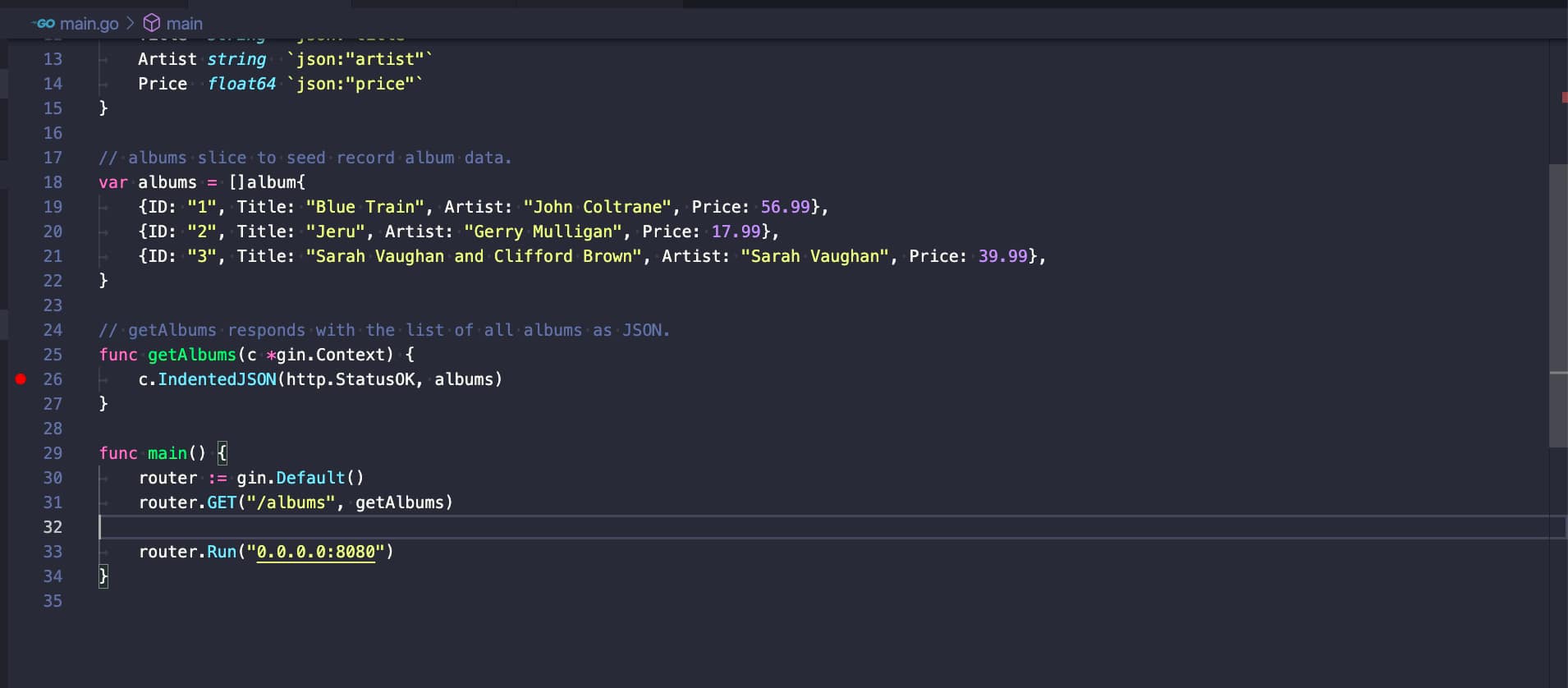
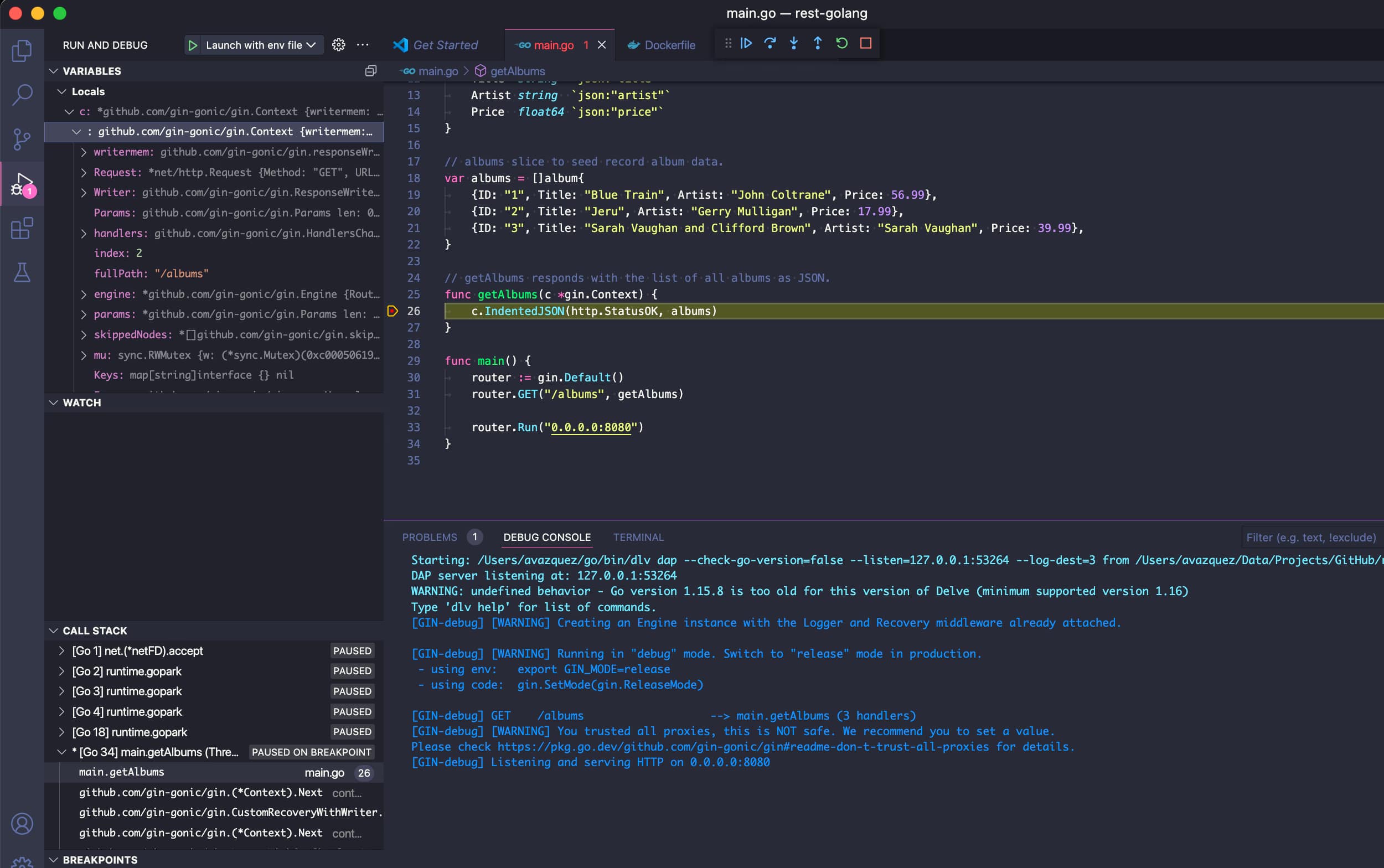
And now, we can start our debug session in Visual Studio code and maybe add a breakpoint and some lines, as you can see in the picture below:
How To Improve Your Kubernetes Workload Development Productivity

So, now, if we hit the pod in Kubernetes, we will see how the breakpoint is being reached as we were in a local debugging session.
How To Improve Your Kubernetes Workload Development Productivity

That means that we can inspect variables and everything, change the code, or do whatever we need to speed up our development!

📚 Want to dive deeper into Kubernetes? This article is part of our comprehensive Kubernetes Architecture Patterns guide, where you’ll find all fundamental and advanced concepts explained step by step.

Scale to Zero in Kubernetes: Bringing the Serverless Experience to Your Cluster

brown and beige weighing scale

Bringing the Serverless Experience To Your Kubernetes Cluster

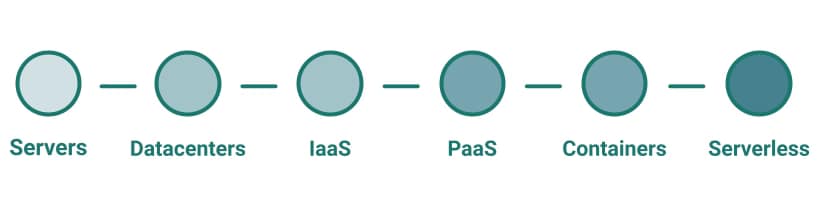
Serverless always has been considered the next step in the cloud journey. You know what I mean: you start from your VM on-premises, then you move to have containers on a PaaS platform, and then you try to find your next stop in this journey that is serverless.

Scale to Zero in Kubernetes: Bringing the Serverless Experience to Your Cluster
Technological evolution defined based on infrastructure abstraction perspective

Serverless is the idea of forgetting about infrastructure and focusing only on your apps. There is no need to worry about where it will run or the management of the underlying infrastructure. Serverless has started as a synonym of the Function as a Service (FaaS) paradigm. It has been populated first by the Amazon Lambda functions and later by all the major cloud providers.

It started as an alternative to the containerized approach that probably requires a lot of technical skills to manage and run at a production scale, but this is not the case anymore.

We have seen how the serverless approach has reached any platform despite this starting point. Following the same principles, we have different platforms that its focus is to abstract all technical aspects for the operational part and provide a platform where you can put your logic running. Pretty much every SaaS platform covers this approach but I would like to highlight some samples to clarify:

  • netlify is a platform that allows you to deploy your web application without needing to manage anything else that the code needed to run it.
  • TIBCO Cloud Integration is an iPaaS solution that provides all the technical resources you could need so you can focus on deploying your integration services.

But going beyond that, pretty much each service provided by the major cloud platform such as Azure, AWS, or GCP follows the same principle. Most of them (messaging, machine learning, storage, and so on) abstract all the infrastructure underlying it so you can focus on the real service.

Going back to the Kubernetes ecosystem we have two different layers of that approach. The main one is the managed Kubernetes services that all big platforms provide where all the management of the Kubernetes (master nodes, internal Kubernetes components) are transparent to you and you center everything on the workers. And the second level is what you can get in the AWS world with the EKS + Fargate kind of architecture where not even the worker nodes exist, you have your pods that will be deployed on a machine that belongs to your cluster but you don’t need to worry about it, or manage anything related to that.

So as we have seen serverless approach is coming to all areas but this is not the scope of this article. The idea here is to try to focus on the serverless as a synonym of Function as a Service and (FaaS) and How we can bring the FaaS experience to our productive K8S ecosystem. But let’s start with the initial questions:

Why would we like to do that?

This is the most exciting thing to ask: what are the benefits this approach provides? Function as a Service follows the zero-scale approach. That means that the function is not loaded if they are not being executed, and this is important, especially when you are responsible for your infrastructure or at least paying for it.

Imagine a normal microservices written in any technology, the amount of resources it can use depends on its load, but even without any load, you need some resources to keep it running; mainly, we are talking about memory that you need to stay in use. The actual amount will depend on the technology and the development itself, but it can be moved from some MB to some hundreds. If we consider all the microservices a significant enterprise can get, you will get a difference of several GB that you are paying for that are not providing any value.

But beyond the infrastructure management, this approach also plays very well with another of the latest architectural approaches, the Event-Driven Application (EDA), because we can have services that are asleep just waiting for the right event to wake them up and start processing.

So, in a nutshell, the serverless approach helps you get your optimized infrastructure dream and enable different patterns also in an efficient way. But what happens is I already own the infrastructure? It will be the same because you will run more services in the same infrastructure, so you will still get the optimized use of your current infrastructure.

What do we need to enable that?

The first thing that we need to know is that not all technologies or frameworks are suitable to run on this approach. That is because you need to meet some requirements to be able to do that as a successful approach, as shown below:

  • Quick Startup: If your logic is not loaded before a request hits the service, you will need to make sure the logic can load quickly to avoid impacting the consumer of the service. So that means that you will need a technology that can load in a small amount of time, usually talking in the microsecond range.
  • Stateless: As your logic is not going to be loaded in a continuous mode it is not suitable for stateful services.
  • Disposability: Similar to the previous point it should be ready for graceful shutdown in a robust way

How do we do that?

Several frameworks allow us to get all those benefits that we can incorporate into our Kubernetes ecosystem, such as the following ones:

  • KNative: This is the framework that the CNCF Foundation supports and is being included by default in many Kubernetes distributions such as Red Hat Openshift Platform.
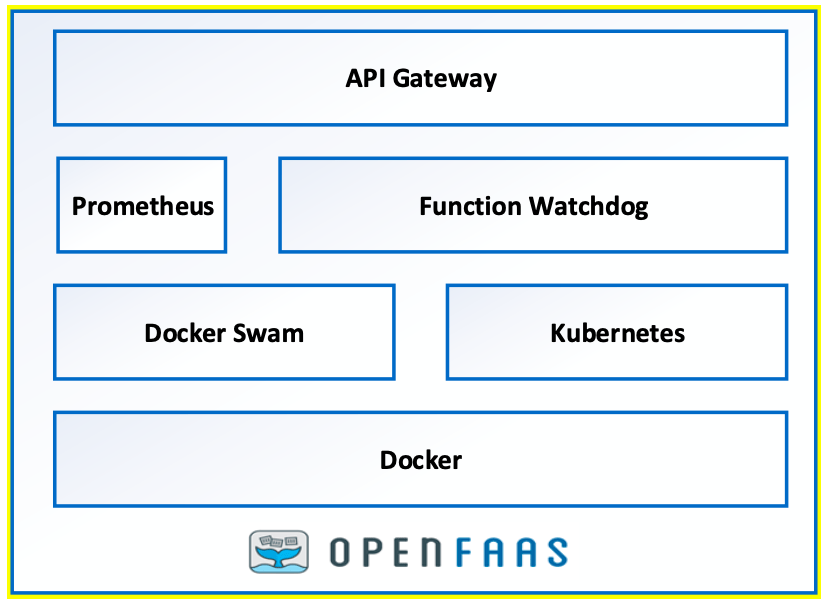
  • OpenFaaS: This is a well-used framework created by Alex Ellis that supports the same idea.

It is true that there are other alternatives such as Apache OpenWhisk, Kubeless, or Fission but there less used in today’s world and mainly most alternative has been chosen between OpenFaaS and KNative but if you want to read more about other alternatives I will let you an article about the CNCF covering them so you can take a look for yourself:

📚 Want to dive deeper into Kubernetes? This article is part of our comprehensive Kubernetes Architecture Patterns guide, where you’ll find all fundamental and advanced concepts explained step by step.

Troubleshoot Network Connections in Kubernetes Workloads (Live Traffic Debugging)

blue UTP cord

Discover Mizu: Traffic Viewer for Kubernetes to ease this challenge and improve your daily work.

One of the most common things we have to do when testing and debugging our cloud-native workloads on Kubernetes is to check the network communication.

This article is part of my comprehensive TIBCO Integration Platform Guide where you can find more patterns and best practices for TIBCO integration platforms.

It could be to check the incoming traffic you are getting so we can inspect the requests we are receiving and see what we are replying to and similar kinds of use-cases. I am sure this sounds familiar to most of you.

I usually solve that using tcpdump on the container, similar to what I would do in a traditional environment, but this is not always easy. Depending on the environment and configuration, you cannot do so because you need to include a new package in your container image, do a new deployment, so it is available, etc.

So, to solve that and other similar problems, I discovered a tool named Mizu, which I would like to have found a few months ago because it would help me a lot. Mizu is precisely that. In its own words:

Mizu is a simple-yet-powerful API traffic viewer for Kubernetes, enabling you to view all API communication between microservices across multiple protocols to help you debug and troubleshoot regressions.

To install, it is pretty straightforward. You need to grab the binary and provide the correct permission on your computer. You have a different binary for each architecture, and in my case (Mac Intel-based), these are the commands that I executed:

curl -Lo mizu github.com/up9inc/mizu/releases/latest/download/mizu_darwin_amd64 && chmod 755 mizu && mv mizu /usr/local/bin

And that’s it, then you have a binary in your laptop that connects to your Kubernetes cluster using Kubernetes API, so you need to have configured the proper context.

In my case, I have deployed a simple nginx server using the command:

 kubectl run simple-app --image=nginx --port 80

And once that the component has been deployed, as it is shown in the Lens screenshot below:

I ran the command to launch mizu from my laptop:

mizu tap

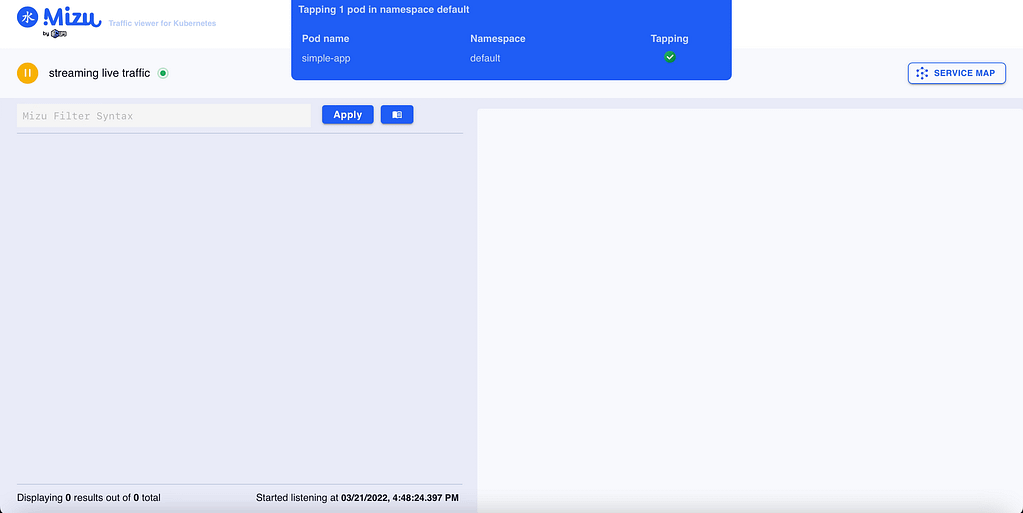
And after a few seconds, I have in front of me a webpage opened monitoring all traffic happening in this pod:

Troubleshoot Network Connections in Kubernetes Workloads (Live Traffic Debugging)

I have made the nginx port expose using the kubectl expose command:

 kubectl expose pod/simple-app

And after that, I deployed a temporary pod using the curl image to start sending some requests with the command shown below:

 kubectl run -it --rm --image=curlimages/curl curly -- sh

now I’ve started to send some requests to my nginx pod using curl:

 curl -vvv http://simple-app:80 

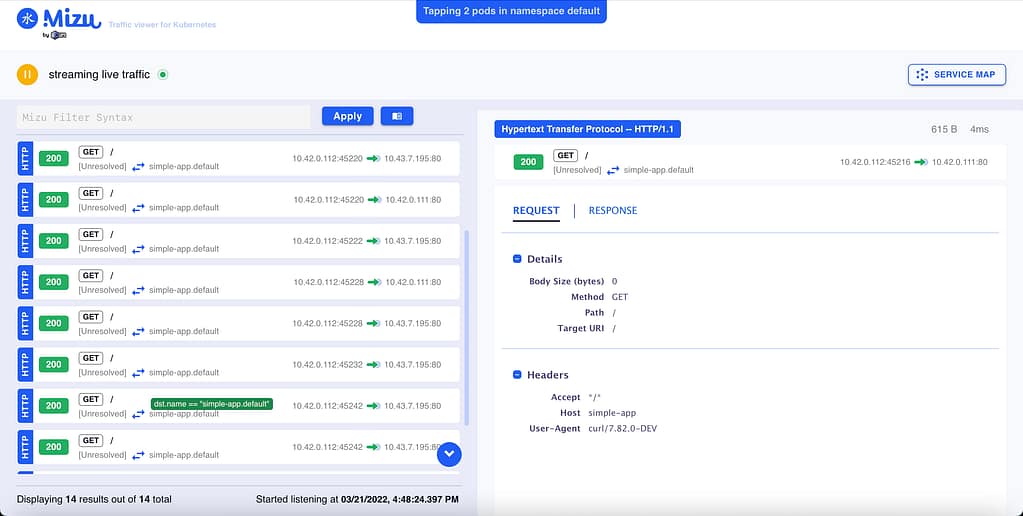
And after a few calls, I could see a lot of information in front of me. First of all, I can see the requests I was sending with all the details of it:

Troubleshoot Network Connections in Kubernetes Workloads (Live Traffic Debugging)

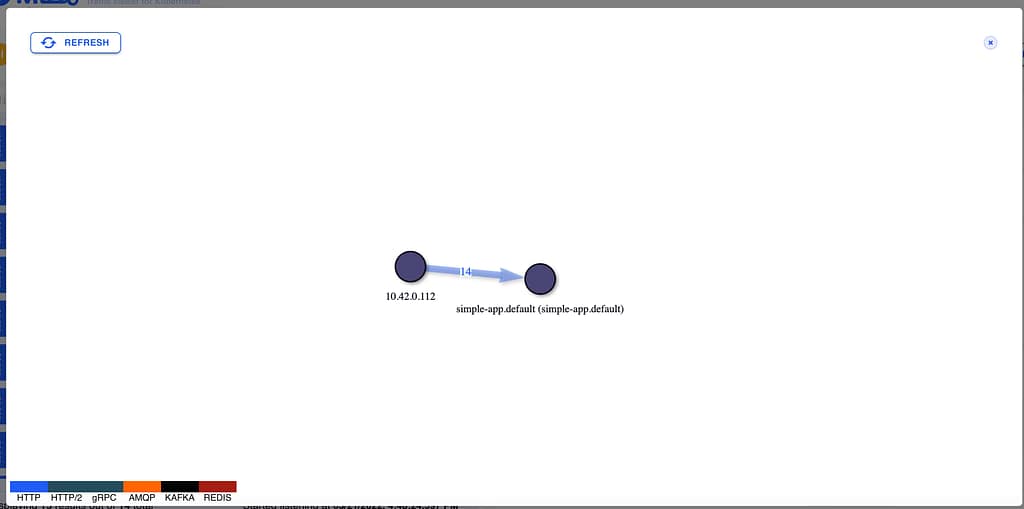
But even more important, I can see a service map diagram showing the dependencies and the calls graphically happening to the pod with the response time and also the protocol usage:

Troubleshoot Network Connections in Kubernetes Workloads (Live Traffic Debugging)

This will not certainly replace a complete observability solution on top of a service mesh. Still, it will be a beneficial tool to add to your toolchain when you need to debug a specific communication between components or similar kinds of scenarios. As commented, it is like a high-level tcpdump for pod communication.

📚 Want to dive deeper into Kubernetes? This article is part of our comprehensive Kubernetes Architecture Patterns guide, where you’ll find all fundamental and advanced concepts explained step by step.
Discovering The Truth Behind Kubernetes Secrets

man in white dress shirt wearing black framed eyeglasses

We have been talking recently about ConfigMap being one of the objects to store a different configuration for Kubernetes based-workloads. But what happens with sensitive data?

This is an interesting question, and the initial answer from the Kubernetes platform was to provide a Secrets object. Based on its definition from the Kubernetes official website, they define secrets like this:

A Secret is an object that contains a small amount of sensitive data such as a password, a token, or a key. Such information might otherwise be put in a Pod specification or in a container image. Using a Secret means that you don’t need to include confidential data in your application code

So, by default, secrets are what you should use to store your sensitive data. From the technical perspective, to use them, they behave very similar to ConfigMap, so you can link it to the different environment variables, mount it inside a pod, or even have specific usages for managing credentials for different kinds of accounts such as Service Accounts. This classifies the different types of secrets that you can create:

  • Opaque: This defines a generic secret that you can use for any purpose (mainly configuration data or configuration files)
  • Service-Account-Token: This defines the credentials for service accounts, but this is deprecated and no longer in use since Kubernetes 1.22.
  • Docker-Registry Credentials: This defines credentials to connect to the Docker registry to download images as part of your deployment process.
  • Basic or SSH Auth: This defines specific secrets to handle authentication.
  • TLS Secret:
  • Bootstrap Secrets:

But is it safe to use Kubernetes Secrets to store sensitive data? The main answer for any question in any tech-related topic is: It depends. But some controversy has arisen that this topic is also covered in the official Kubernetes page, highlighting the following aspects:

Kubernetes Secrets are, by default, stored unencrypted in the API server’s underlying data store (etcd). Anyone with API access can retrieve or modify a Secret, and so can anyone with access to etcd. Additionally, anyone who is authorized to create a Pod in a namespace can use that access to read any Secret in that namespace; this includes indirect access such as the ability to create a Deployment.

So, the main thing is, by default, this is a very, very insecure way. It seems more like a categorization of the data than a proper secure handle. Also, Kubernetes provide some tips to try to make this alternative more secure:

  • Enable Encryption at Rest for Secrets.
  • Enable or configure RBAC rules that restrict reading data in Secrets (including indirect means).
  • Where appropriate, also use mechanisms such as RBAC to limit which principals are allowed to create new Secrets or replace existing ones.

But that can be not enough, and that has created room for third-party and cloud providers to provide their solution that covers these needs and at the same time also offer additional features. Some of these options are the ones shown below:

  • Cloud Key Management Systems: Pretty much all the big cloud providers provide some way of Secret Management to go beyond these features and mitigate those risks. If we talk about AWS, there is AWS Secrets Manager , if we are talking about Azure, we have Azure Key Vault , and in the case of Google, we also have Google Secret Manager.
  • Sealed Secrets is a project that tries to extend Secrets to provide more security, especially on the Configuration as a Code approach, offers a safe way to store those objects in the same kind of repositories as you expose any other Kubernetes resource file. In its own words, “ The SealedSecret can be decrypted only by the controller running in the target cluster, and nobody else (not even the original author) can obtain the original Secret from the SealedSecret.”
  • Third-party Secrets Managers that are similar to the ones from the Cloud Providers that allows a more independent approach, and there are several players here such as Hashicorp Vault or CyberArk Secret Manager
  • Finally also, Spring Cloud Config can provide security to store data that are related to sensitive configuration concepts such as passwords and at the same time covers the same need as the ConfigMap provides from a unified perspective.

I hope this article has helped to understand the purpose of the Secrets in Kubernetes and, at the same time, the risks regarding its security and how we can mitigate them or even rely on other solutions that provide a more secure way to handle this critical piece of information.

📚 Want to dive deeper into Kubernetes? This article is part of our comprehensive Kubernetes Architecture Patterns guide, where you’ll find all fundamental and advanced concepts explained step by step.
Kubernetes ConfigMaps Explained: Best Practices to Manage Configuration Properly

black and silver laptop computer beside yellow ceramic mug

ConfigMaps is one of the most known and, at the same time, less used objects in the Kubernetes ecosystem. It is one of the primary objects that has been there from the beginning, even if we tried so many other ways to implement a Config Management solution (such as Consul, Spring Cloud Config, and others).

Based on its own documentation words:

A ConfigMap is an API object used to store non-confidential data in key-value pairs.

https://kubernetes.io/docs/concepts/configuration/configmap/

Its motivation was to provide a native solution for configuration management for cloud-native deployments. A way to manage and deploy configuration focusing on different code from the configuration. Now, I still remember the WAR files with the application.properties file inside of it.

ConfigMap is a resource as simple as you can see in the snippet below:

apiVersion: v1
kind: ConfigMap
metadata:
  name: game-demo
data:
  player_initial_lives: "3"
  ui_properties_file_name: "user-interface.properties"

ConfigMaps are objects that belong to a namespace. They have a strong relationship with Deployment and Pod and enable the option to have different logical environments using namespace where they can deploy the same application. Still, with a specific configuration, so they will need a particular configMap to support that, even if it is based on the same resource YAML file.

From a technical perspective, the content of the ConfigMap is stored in the etcd database as it happens for any information that is related to the Kubernetes environment, and you should remember that etcd by default is not encrypted, so all the data can be retrieved for anyone that has access to it.

Purposes of ConfigMaps

Configuration Parameters

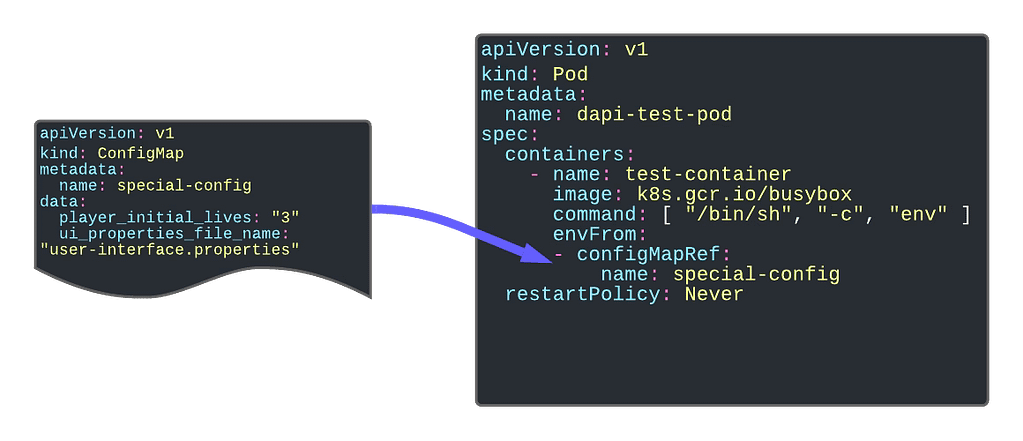
The first and foremost purpose of the configMap is to provide configuration parameters to your workload. An industrialized way to remove the need for env variables is to link the environment configuration from your application.

Kubernetes ConfigMaps Explained: Best Practices to Manage Configuration Properly

Providing Environment Dependent Files

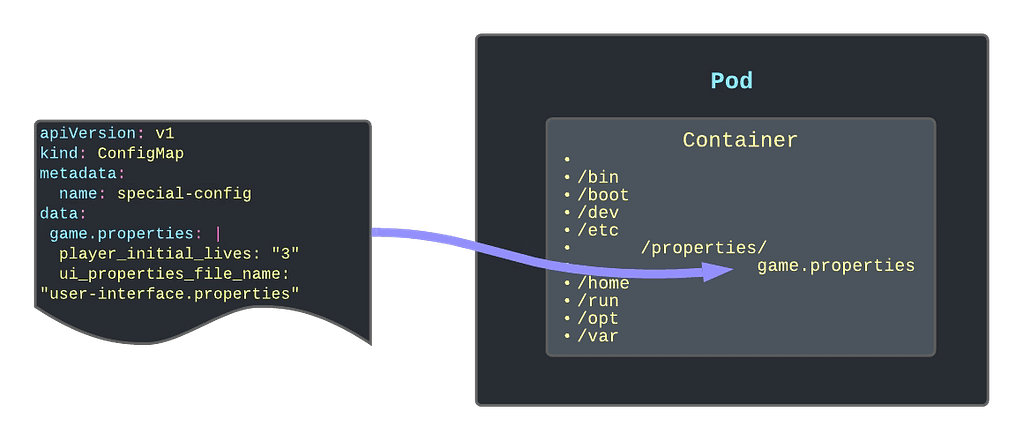
Another significant usage is providing or replacing files inside your containers containing the critical configuration file. One of the primary samples that illustrate this is to give a logging configuration for your app if your app is using the logback library. In this case, you need to provide a logback.xml file, so it knows how to apply your logging configuration.

Other options can be properties. The file needs to be located there or even public-key certificates to handle SSL connections with safelisted servers only.

Kubernetes ConfigMaps Explained: Best Practices to Manage Configuration Properly

Read-Only Folders

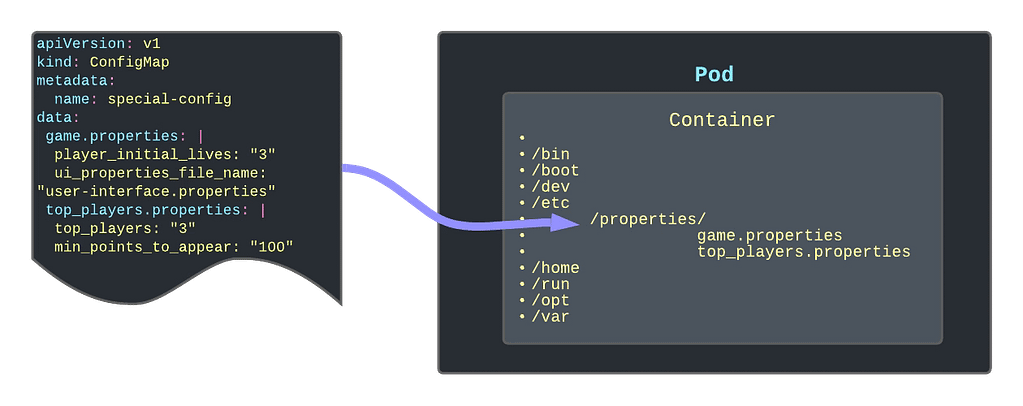
Another option is to use the ConfigMap as a read-only folder to provide an immutable way to link information to the container. One use-case of this can be Grafana Dashboards that you are adding to your Grafana pod (if you are not using the Grafana operator)

Kubernetes ConfigMaps Explained: Best Practices to Manage Configuration Properly

Different ways to create a ConfigMap

You have several ways to create a ConfigMap using the interactive mode that simplifies its creation. Here are the ones that I use the most:

Create a configMap to host key-value pairs for configuration purposes

kubectl create configMap name  --from-literal=key=value

Create a configMap using a Java-like properties file to populate the ConfigMap in a key-value pair.

 kubectl create configMap name --from-env-file=filepath

Create a configMap using a file to be part of the content of the ConfigMap

 kubectl create configMap name --from-file=filepath

 ConfigMap Refresh Lifecycle

ConfigMaps are updated in the same way as any other Kubernetes object, and you can use even the same commands such as kubctl apply to do that. But you need to be careful because one thing is to update the ConfigMap itself and another thing is that the resource using this ConfigMap is updated.

In all the use-cases that we have described here, the content of the ConfigMap depends on the Pod’s lifecycle. That means that the content of the ConfigMap is read on the initialization process of the Pod. So to update the ConfigMap data inside the pod, you will need to restart or bring a new instance of the pod after you have modified the ConfigMap object itself.

📚 Want to dive deeper into Kubernetes? This article is part of our comprehensive Kubernetes Architecture Patterns guide, where you’ll find all fundamental and advanced concepts explained step by step.

From Docker Desktop to Rancher Desktop: Simple Migration Guide for Developers

From Docker Desktop to Rancher Desktop: Simple Migration Guide for Developers

As most of you already know, the 31st of January is the last day to use Docker Desktop without applying the new licensing model that pretty much generates a cost for any company usage. Of course, it is still free to use for open-source and small companies, but it is better to meet the requirements using Docker official documentation.

So because of that situation, I started a journey to find an alternative to Docker Desktop because I used docker-desktop a lot. The primary use I do is to startup server-like things for temporary usage that I don’t like to have installed in my machine to keep it as clean as possible (even though this is not always true, but it is an attempt).

So, on that search, I discovered Rancher Desktop was released not a long time ago and promised to be the most suitable alternative. The goal of this post is not to compare both platforms, but if you like to have more information I leave here a post that can provide it to you:

The idea here is to talk more about the journey of that migration. So I installed the Rancher Desktop 1.0.0 on my Mac and the installation was very, very easy. The main difference with Docker Desktop is that Rancher Desktop is built with Kubernetes in mind and for Docker Desktop, that came as an afterthought. So, by default we will have a Kubernetes environment running in our system, and we can even select the version of that cluster as you can see in the picture below:

But also in Rancher, they noticed the opportunity window they have in front of them, and they were very aggressive in providing an easy migration path from Docker Desktop. And the first thing you will notice is that you can configure Docker Desktop to be compliant with the Docker CLI API as you can see in the picture below.

This is not enabled by default, but it is very easy to do it and it will make you not need to change all your “docker-like” commands (docker build, docker ps.. ) so it will smooth a lot of the transition.

Maybe in the future, you want to move away from everything resembling docker even at the client-side and move to a Containers kind of approach, but for now, what I needed is to simplify the process.

So, after enabling that and restarting my Rancher Desktop, I can type my commands as you can see in the picture below:

So, the only thing I need to do is migrate my images and containers. Because I’m not a pure docker usage, I don’t follow sometimes the thing to have your container stateless and using volumes especially when you are doing a small use for some time and that’s it. So, that means that some of my containers also need to be moved to the new platform to avoid any data loss.

So, my migration journey had different steps:

  • First of all, I will commit the stateful containers that I need to keep on the new system using the command docker commit with the documentation that you can find here:
  • Then, I will export all the images that I have now in TAR files using the command docker save with the documentation that you can find it here:
  • And finally, I will load all those images on the new system using docker load command to have it available there. Again, you can find the documentation of that specific command here

To automate a little bit the process even that I don’t have much images loaded because I try to clean up from time to time using the docker system prune command:

I prefer not to do it manually, so I will use some simple scripts to do the job.

So, to perform the export job I need to run the following command:

docker image ls -q | xargs -I {} docker image save {} -o {}.tar

This script will save to have all my images on different tar files into a specific folder. Now, I just need to run the following command from the same folder I had run the previous one to have all the images back into the new system:

find . -name "*.tar" -exec docker load -i {} \;

The reason why I’m not doing both actions at the same time is that I need to have running Docker Desktop for the first part and Rancher Desktop for the other. So even though I can automate that as well, I think it is not worth it.

And that’s it, now I can remove the Docker Desktop from my laptop, and my life will continue to be the same. I will try to provide more feedback on how it feels, especially regarding resource utilization and similar topics in the near future.

📚 Want to dive deeper into Kubernetes? This article is part of our comprehensive Kubernetes Architecture Patterns guide, where you’ll find all fundamental and advanced concepts explained step by step.

How to Develop APIs Efficiently: Contract-First Design Without Losing Agility

How to Develop APIs Efficiently: Contract-First Design Without Losing Agility

Learn some tips about efficiently creating your API and dealing with the actual work simultaneously.

When creating an API to expose a capability or integrate different systems, there are mainly two ways to do it: Contract-first or Contract-Last approach. The difference is about the methodology you will follow to create the API.

In a contract-first approach, the definition of the contract is the starting point. It does not matter which language or technology you are using. This reality has been the same since the beginning of the distributed system in times of RMI and CORBA and continues to be the same in the extraordinary times of gRPC and GraphQL.

You start with the definition of the contract between both parties: the one that exposes the capability and the initial consumer of the information. That implies the definition of several aspects of it:

  • Purpose of the operations.
  • Fields that each operation has.
  • Return information depending on each scenario.
  • Error information reported, and so on.

After that, you will start to design the API itself and the implementation to meet the definition agreed between the parties.

This approach has several advantages and disadvantages, but today it is the most “acceptable” way of developing API. As advantages we can comment about the following ones:

  • Reducing Rework Activities: As you start defining the contract, you can quickly validate that all parties are OK with the contract before writing any implementation work. That would avoid any re-coding activity or re-work because of a misunderstanding or just adaption of the expectations and become more efficient.
  • Separation of Duties: It will also provide the separation of duties for both parties, the provider and the consumers. Because as soon as you have the contract, both teams can start working on that. Even you can provide a mock for the consumer to test any scenario quickly without the need to wait for the actual service to be created.

But the contract First approach has some requirements or assumptions to be successful that are not very easy to meet in a real-world scenario. This situation is expected. There are a lot of methodologies, tips, or advices that you learn when you are studying that are not applicable in real-life. To validate that comment, let me ask you a question:

Did you create an API and the interface you created was 100% the same one you had at the end?

The answer to that question in my case is “No, never.” And you can think that I am a lousy API designer, and you can be right. I am sure that most people reading this article would define their contracts much better than I do, but this is not the point. Because when we are on the implementation phase, we usually detect something that we didn’t think about in the design phase, or when we try to do a low-level design, there are other concepts that we did not contemplate at the point that makes another solution the best suited for the scenario so that you will impact the API, and that has a cost.

It can be possible that you mitigate that risk by just spending more time on the contract definition phase to make sure that nothing is well-considered or even create some prototypes to ensure that the API generated will be the final one. But if you do this, you are just lowering the probability for this to happen, never removing it, and at the same time, you are reducing the benefits of the approach.

One of the critical points we commented on above was efficiency. Suppose we think about the efficiency now when you will spend more time on that phase. That means that it will be less efficient. Also, we commented on the great thing of doing separation of Duties: but in this case, while the interface creation time is extended, it is also extended the time that both teams need to wait until they can work on their parts.

But implementing the other approach will not provide much benefit. It can lead to even more expensive work because you will get no validation for the customer until the API is implemented. And again, another question:

Did you ever share something with your customer for the first time and they didn’t ask for any change?

Again, the answer is the same: “No, never.” And that cost will always be higher than the one talking about the change in the definition, because as you know, the change is much more costly the further you detect it in the development cycle, and it is not a linear increase. It is much more close to an exponential rise.

So, what is my recommendation here? Follow the contract-first approach and accept real life. So do your best shot of defining the API and have an agreement between parties and if you detect something that can impact the API, notify it as soon as possible to the parties. In the end, this is nothing else than an interactive approach also for the API definition, and there is nothing wrong with it.

Let’s be honest there is no silver bullet that will provide the green path in your daily work, and that is the great thing about doing it and why we enjoyed it so much. Because in each of our work decision as it happens in any other aspect of life, there is so many aspects, so many situations, so many details that always impacts the awesome beautiful methodology that you can see in an article, a paper, a class, or a tweet.

Kubernetes Persistent Volume Reclaim Policies Explained: Retain, Delete, and Risks

Kubernetes Persistent Volume Reclaim Policies Explained: Retain, Delete, and Risks

Discover how the policy can affect how your data is managed inside Kubernetes Cluster

As you know, everything is fine on Kubernetes until you face a stateful workload and you need to manage its data. All the powerful capabilities that Kubernetes brings to the game face many challenges when we talk about stateful services that require a lot of data.

Most of the things challenges have a solution today. That is why many stateful workloads such as databases and other backend systems also require a lot of knowledge about how to define several things. One of them is the retain policy of the persistent volume.

First, let’s define what the Reclaim Policy is, and to do that, I will use the official definition from the documentation:

When a user is done with their volume, they can delete the PVC objects from the API that allows reclamation of the resource. The reclaim policy for a PersistentVolume tells the cluster what to do with the volume after it has been released of its claim. Currently, volumes can either be Retained, Recycled, or Deleted.

So, as you can see, we have three options: Retain, Recycle or Delete. Let’s see what the behavior for each of them is.

Retain

That means the data will still be there even if the claim has been deleted. All these policies apply when the original PVC is removed. Before that situation, the data will always remain no matter which policy we use.

So, retain means that even if we delete the PVC, the data will still be there, and it will be stored so that no other PVC can claim that data. Only an administrator can do so with the following flow:

  1. Delete the PersistentVolume.
  2. Manually clean up the data on the associated storage asset accordingly.
  3. Manually delete the associated storage asset.

Delete

That means that as soon as we remove the PVC the PV and the data will be released.

This will simplify the cleanup and housekeeping task of your volumes but at the same time, it increases the possibility that has some data loss because of unexpected behavior. As always, this is a trade-off you need to do.

We always need to remind you that if you try to delete PVC in active use by a Pod, the PVC is not removed immediately. PVC removal is postponed until the PVC is no longer actively used by any Pods to ensure that no data is lost, at least when some component is still bound to it. On the same policy similar thing happens to the PV. If an admin deletes a PV attached to a PVC, the PV is not removed immediately. PV removal is postponed until the PV is no longer bound to a PVC.

Recycle

That means something in the middle works similar to the Delete policy we explained above, but it doesn’t delete the volume itself, but it will remove the content of the PV, so in practice, it will be similar. So, in the end, it will perform a command similar to this rm -rf on the storage artifact itself.

But just for you to be aware, this policy is nowadays deprecated, and you should not use it in your new workloads, but it is still supported so you can find some workloads that are still using it.

📚 Want to dive deeper into Kubernetes? This article is part of our comprehensive Kubernetes Architecture Patterns guide, where you’ll find all fundamental and advanced concepts explained step by step.
Prometheus Agent Mode Explained: Scalable Remote Write and Stateless Metrics Ingestion

Prometheus Agent Mode Explained: Scalable Remote Write and Stateless Metrics Ingestion

Prometheus has included a new capability in the 2.32.0 release to optimize the single pane of glass approach

From the new upcoming release of Prometheus v2.32.0, we will have an important new feature at our disposal: the Agent Mode. And there is a fantastic blog post announcing this feature from our of the rockstar from the Prometheus team: Bartlomiej Plotka, that I recommend reading. I will add a reference section at the end of the article. I will try to summarise some of the most relevant points here.

Another post about Prometheus, the most critical monitoring system in nowadays cloud-native architectures, has its inception in the Borgmon monitoring system created by Google in ancient times (around the 2010–2014 period).

Based on this importance, its usage has been growing incredibly and making its relationship with the Kubernetes ecosystem stronger. We have reached a point that Prometheus is the default option for monitoring in pretty much any scenario that has a Kubernetes workload related to it; some examples are the ones shown below:

  • Prometheus is the default option, including the Openshift Monitoring System
  • Prometheus has an Amazon Managed Service at your disposal to be used for your workloads.
  • Prometheus is included in the Reference Architecture for Cloud-Native Azure Deployments.

Because of this popularity and growth, many different use-cases have raised some improvements that can be done. Some of them are related to specific use-cases such as edge deployment or providing a global view, or a single pane of glass.

Until now, if I have several Prometheus deployments, monitor a specific subset of your workloads because of their resides on different networks or because there are various clusters, you can rely on the remote write capability to aggregate that into a global view approach.

Remote Write is a capability that has existed in Prometheus since its inception. The metrics that Prometheus is scraping can be sent automatically to a different system using their integrations. This can be configured for all the metrics or just a subset. But even with all of these, they are jumping ahead on this capability, which is why they are introducing the Agent mode.

Agent Mode optimizes the remote write use case configuring the Prometheus instance in a specific mode to do this job in an optimized way. That model implies the following configuration:

  • Disable querying and alerting.
  • Switch the local storage with a customized TSDB WAL

And the remarkable thing is that everything else is the same, so we will still use the same API, discover capabilities, and related configuration. And what all of this will provide to you? Let’s take a look at the benefits you will get of doing so:

  • Efficiency: Customised TSDB WAL will keep only the data that could not be sent to the target location; as soon as it succeeds, it will remove that piece of data.
  • Scalability: It will improve scalability, enabling easier horizontal scalability for ingestion. This is because this agent mode disables some of the reasons auto-stability is complex in normal server-mode Prometheus. A stateful workload makes scalability complex, especially in scale-down scenarios. So this mode will lead to a “more-stateless” workload that will simplify this scenario and be close to the dream of an auto-scalability metric ingestion system.

This feature is available as an experimental flag in the new release, but this was already tested with Grafana Labs’ works, especially on the performance side.

If you want to take a look at more details about this feature, I would recommend taking a look at the following article: https://prometheus.io/blog/2021/11/16/agent/

📚 Want to dive deeper into Kubernetes? This article is part of our comprehensive Kubernetes Architecture Patterns guide, where you’ll find all fundamental and advanced concepts explained step by step.
Set Up an OpenShift Local Cluster Using CodeReady Containers (CRC Guide)

Set Up an OpenShift Local Cluster Using CodeReady Containers (CRC Guide)

Learn how you can use CodeReady Containers to set up the latest version of Openshift  Local just on your computer.

At this time, we all know that the default deployment mode for any application we would like to launch will be a container-based platform and, especially, it will be a Kubernetes-based platform.

But we already know that there are a lot of different flavors of Kubernetes distributions, I even wrote an article about it that you can find here:

Some of these distributions try to follow as close as they could the Kubernetes experience but others are trying to enhance and increase the capabilities the platform provides.

Because of that sometimes it is important to have a way to really test our development in the target platform without waiting for a server-based developer mode. We know that we have in our own laptop a Kubernetes-based platform to help do the job.

minikube is the most common option to do this and it will provide a very vanilla view of Kubernetes, but something we need a different kind of platform.

Openshift from RedHat is becoming one of the de-facto solutions for private cloud deployments and especially for any company that is not planning to move to a public-cloud managed solution such as EKS, GKE, or AKS. In the past we have a similar project as minikube known as minishift that allow running in their own words:

Minishift is a tool that helps you run OpenShift locally by running a single-node OpenShift cluster inside a VM. You can try out OpenShift or develop with it, day-to-day, on your localhost.

The only problem with minishift is that they only support the 3.x version of Openshift but we are seeing that most of the customers are already upgrading to the 4.x release, so we can think that are a little alone in that duty, but this is far from the truth!

Because we have CodeReady Containers or CRC to help us on that duty.

Code Ready Containers purpose is to provide to you a minimal Openshift cluster optimized for development purposes. Their installation process is very very simple.

It works in a way similar to the previous VM and OVA distribution mode, so you will need to get some binaries to be able to set up this directly from Red Hat using the following direction: https://console.redhat.com/openshift/create/local

You will need to create an account but it is free and in a few steps you will get a big binary about 3–4 GB and your sign code to be able to run the platform and that’s it, in a few minutes you will have at your disposal a complete Openshift Platform ready for you to use.

CodeReadyContainers local installation on your laptop

You will be able to switch on and off the platform using the commands crc start and crc stop.

Set Up an OpenShift Local Cluster Using CodeReady Containers (CRC Guide)
Console output of execution of the crc start command

As you can imagine this is only suitable for the local environment and in no way for production deployment and also it has some restrictions that can affect you such as:

  • The CodeReady Containers OpenShift cluster is ephemeral and is not intended for production use.
  • There is no supported upgrade path to newer OpenShift versions. Upgrading the OpenShift version may cause issues that are difficult to reproduce.
  • It uses a single node that behaves as both a master and worker node.
  • It disables the monitoring Operator by default. This disabled Operator causes the corresponding part of the web console to be non-functional.
  • The OpenShift instance runs in a virtual machine. This may cause other differences, particularly with external networking.

I hope you find this useful and that you can use it as part of your deployment process.

📚 Want to dive deeper into Kubernetes? This article is part of our comprehensive Kubernetes Architecture Patterns guide, where you’ll find all fundamental and advanced concepts explained step by step.