
Flogo Test is one of the main steps in your CI/CD lifecycle if you are using Flogo. You probably have done it previously in all your other developments like Java developments or even using BusinessWorks 6 using the bw6-maven-plugin:
This article is part of my comprehensive TIBCO Integration Platform Guide where you can find more patterns and best practices for TIBCO integration platforms.
So, you’re probably wondering… How this is going to be done by Flogo? Ok!! I’ll tell you.
First of all, you need to keep in mind that Flogo Enterprise is a product that was designed with all those aspects in mind, so you don’t need to worry about it.
Regarding testing, when we need to include inside a CI/CD lifecycle approach, these testing capabilities should meet the following requirements:
- It should be defined in some artifacts.
- It should be executed automatically
- It should be able to check the outcome.
Flogo Enterprise includes by default Testing capabilities in the Web UI where you can not only test your flows using the UI from a debug/troubleshooting perspective but also able to generate the artifacts that are going to allow you to perform more sophisticated testing
So, we need to go to our Web UI and when we’re inside a flow we have a “Start Testing” button:
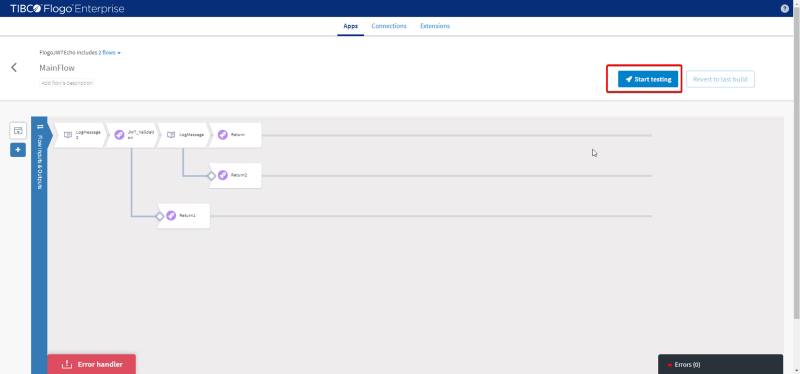
And we can see all our Launch Configuration change and most important part for this topic be able to export it and download it to your local machine:
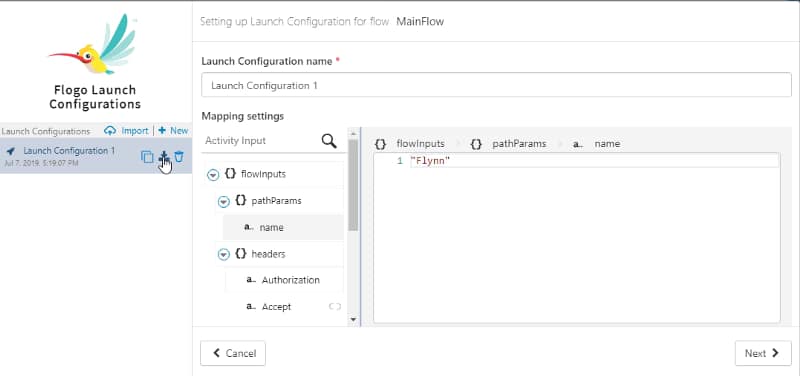
Once everything is downloaded and we have the binary for our application we can execute the tests in an automatic way from the CLI using the following command
.\FlogoJWTEcho-windows_amd64.exe' -test -flowin .\MainFlow_Launch_Configuration_1.json -flowout MainFlow_out.json
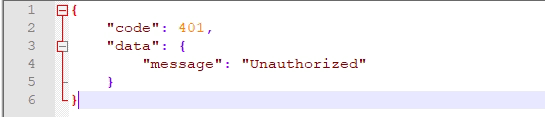
This is going to generate an output file with the output of the execution test:

And if we open the file we will get the exact same output the flow is returned so we can perform any assert on it
That was easy, right? Let’s do some additional tweaks to avoid your need to go to the Web UI. You can generate the launch configuration using only the CLI.
To do that, you only need to execute the following command:
.\FlogoJWTEcho-windows_amd64.exe' -test -flowdata MainFlow

But, how do you know the flows in your application without going to the Flogo Web UI? Just with the following command:
.\FlogoJWTEcho-windows_amd64.exe' -test -flows
