My Take on the Kubernetes CKAD Certification: Real Exam Experience and Lessons Learned

girl in black t-shirt writing on white paper

My Experience and Feelings After Clearing the Certified Kubernetes Application Developer

Last week I cleared the Certified Kubernetes Application Developer (CKAD) certification with a 95/100 score, and it was more difficult than it sounds even though this is the easiest of the Kubernetes certifications, the way the exam is designed and the skills that are evaluated on it make you unsure of your knowledge.

I have been using Kubernetes daily for more than three years now. Because of my work, it is required to deploy, define, troubleshoot Kubernetes-based workloads on different platforms (Openshift, EKS, AKS… anything), so you could think that I shouldn’t need to prepare for this kind of exam, and that could be the impression too. But this is far from reality.

I feel that there is no certification that you can clear without preparation because the certification does not measure how skilled you are on any other topic than the certification process itself. You can be the master of any technology, but if you go to a certification exam without any specific exam preparation, you have a lot of chances to fail.

Even in this case that we have shifted from the traditional theoretical test-case question to a more practical one, it is no different. Because yes, you don’t need to learn anything, and yes, it requires that you can really do things, not just know about a thing, but everything else is the same.

You will be asked about things you will never use in real life, you will need to use commands that you only are going to use in the exam, and you will need to do it in the specific way the expected too because this is how certification works. Is it bad? Probably… is there any other way to do it? We didn’t find it yet any better.

I have to admit that I think this process is much fairer than the test-case one, even though I prefer the test case just for a matter of timing during the process.

So, probably, you are asking if that is my view, why I try to clear the certification in the first place? There are several reasons to do it. First of all, I think certification is a great way to set a standard of knowledge for anyone. That doesn’t mean that people with the certification are more competent or better skilled than people without the certification. I don’t consider myself more qualified today than one month ago when I started to prepare for the certification, but at least it settled some foundation of what you can expect.

Additional to that is a challenge to yourself, to show you that you can do it, and it is always great to push your limits a bit beyond what is mandatory for work. And finally, it is something that looks good in your CV, that is for sure.

Do I learn something new? Yes, for sure, a lot of things. I even improved myself because I usually do some tasks, and just that alone made it worth it. Even if I failed, I think it was worth it because it always gives you something more to add to your toolchain, and that is always good.

Also, this exam doesn’t ensure that you are a good Kubernetes Application Developer. In my view, I think the exam approach is focused on showing that you are a fair Kubernetes Implementer. Why am I saying that? Let’s add some points:

  • You don’t get any points to provide the best solution for a problem. The ask is so specific that there is a matter of translating what is written in plain English to Kubernetes actions and objects.
  • There are troubleshooting questions, yes, but there are also quite basic ones that don’t ensure that your thought process is efficient. Again, efficiency is not evaluated on the process.

So, I am probably missing a Certified Kubernetes Architecture exam where you can have the definition of a problem, and you need to provide a solution. You will get evaluated based on that. Even with some way to justify the decision you are making and the thought process, I don’t think we ever see that. Why? Because, and that’s very important because any new certification exam we are going to face needs to be specific enough so it can be evaluated automatically.

📚 Want to dive deeper into Kubernetes? This article is part of our comprehensive Kubernetes Architecture Patterns guide, where you’ll find all fundamental and advanced concepts explained step by step.

How to Develop APIs Efficiently: Contract-First Design Without Losing Agility

How to Develop APIs Efficiently: Contract-First Design Without Losing Agility

Learn some tips about efficiently creating your API and dealing with the actual work simultaneously.

When creating an API to expose a capability or integrate different systems, there are mainly two ways to do it: Contract-first or Contract-Last approach. The difference is about the methodology you will follow to create the API.

In a contract-first approach, the definition of the contract is the starting point. It does not matter which language or technology you are using. This reality has been the same since the beginning of the distributed system in times of RMI and CORBA and continues to be the same in the extraordinary times of gRPC and GraphQL.

You start with the definition of the contract between both parties: the one that exposes the capability and the initial consumer of the information. That implies the definition of several aspects of it:

  • Purpose of the operations.
  • Fields that each operation has.
  • Return information depending on each scenario.
  • Error information reported, and so on.

After that, you will start to design the API itself and the implementation to meet the definition agreed between the parties.

This approach has several advantages and disadvantages, but today it is the most “acceptable” way of developing API. As advantages we can comment about the following ones:

  • Reducing Rework Activities: As you start defining the contract, you can quickly validate that all parties are OK with the contract before writing any implementation work. That would avoid any re-coding activity or re-work because of a misunderstanding or just adaption of the expectations and become more efficient.
  • Separation of Duties: It will also provide the separation of duties for both parties, the provider and the consumers. Because as soon as you have the contract, both teams can start working on that. Even you can provide a mock for the consumer to test any scenario quickly without the need to wait for the actual service to be created.

But the contract First approach has some requirements or assumptions to be successful that are not very easy to meet in a real-world scenario. This situation is expected. There are a lot of methodologies, tips, or advices that you learn when you are studying that are not applicable in real-life. To validate that comment, let me ask you a question:

Did you create an API and the interface you created was 100% the same one you had at the end?

The answer to that question in my case is “No, never.” And you can think that I am a lousy API designer, and you can be right. I am sure that most people reading this article would define their contracts much better than I do, but this is not the point. Because when we are on the implementation phase, we usually detect something that we didn’t think about in the design phase, or when we try to do a low-level design, there are other concepts that we did not contemplate at the point that makes another solution the best suited for the scenario so that you will impact the API, and that has a cost.

It can be possible that you mitigate that risk by just spending more time on the contract definition phase to make sure that nothing is well-considered or even create some prototypes to ensure that the API generated will be the final one. But if you do this, you are just lowering the probability for this to happen, never removing it, and at the same time, you are reducing the benefits of the approach.

One of the critical points we commented on above was efficiency. Suppose we think about the efficiency now when you will spend more time on that phase. That means that it will be less efficient. Also, we commented on the great thing of doing separation of Duties: but in this case, while the interface creation time is extended, it is also extended the time that both teams need to wait until they can work on their parts.

But implementing the other approach will not provide much benefit. It can lead to even more expensive work because you will get no validation for the customer until the API is implemented. And again, another question:

Did you ever share something with your customer for the first time and they didn’t ask for any change?

Again, the answer is the same: “No, never.” And that cost will always be higher than the one talking about the change in the definition, because as you know, the change is much more costly the further you detect it in the development cycle, and it is not a linear increase. It is much more close to an exponential rise.

So, what is my recommendation here? Follow the contract-first approach and accept real life. So do your best shot of defining the API and have an agreement between parties and if you detect something that can impact the API, notify it as soon as possible to the parties. In the end, this is nothing else than an interactive approach also for the API definition, and there is nothing wrong with it.

Let’s be honest there is no silver bullet that will provide the green path in your daily work, and that is the great thing about doing it and why we enjoyed it so much. Because in each of our work decision as it happens in any other aspect of life, there is so many aspects, so many situations, so many details that always impacts the awesome beautiful methodology that you can see in an article, a paper, a class, or a tweet.

Kubernetes Persistent Volume Reclaim Policies Explained: Retain, Delete, and Risks

Kubernetes Persistent Volume Reclaim Policies Explained: Retain, Delete, and Risks

Discover how the policy can affect how your data is managed inside Kubernetes Cluster

As you know, everything is fine on Kubernetes until you face a stateful workload and you need to manage its data. All the powerful capabilities that Kubernetes brings to the game face many challenges when we talk about stateful services that require a lot of data.

Most of the things challenges have a solution today. That is why many stateful workloads such as databases and other backend systems also require a lot of knowledge about how to define several things. One of them is the retain policy of the persistent volume.

First, let’s define what the Reclaim Policy is, and to do that, I will use the official definition from the documentation:

When a user is done with their volume, they can delete the PVC objects from the API that allows reclamation of the resource. The reclaim policy for a PersistentVolume tells the cluster what to do with the volume after it has been released of its claim. Currently, volumes can either be Retained, Recycled, or Deleted.

So, as you can see, we have three options: Retain, Recycle or Delete. Let’s see what the behavior for each of them is.

Retain

That means the data will still be there even if the claim has been deleted. All these policies apply when the original PVC is removed. Before that situation, the data will always remain no matter which policy we use.

So, retain means that even if we delete the PVC, the data will still be there, and it will be stored so that no other PVC can claim that data. Only an administrator can do so with the following flow:

  1. Delete the PersistentVolume.
  2. Manually clean up the data on the associated storage asset accordingly.
  3. Manually delete the associated storage asset.

Delete

That means that as soon as we remove the PVC the PV and the data will be released.

This will simplify the cleanup and housekeeping task of your volumes but at the same time, it increases the possibility that has some data loss because of unexpected behavior. As always, this is a trade-off you need to do.

We always need to remind you that if you try to delete PVC in active use by a Pod, the PVC is not removed immediately. PVC removal is postponed until the PVC is no longer actively used by any Pods to ensure that no data is lost, at least when some component is still bound to it. On the same policy similar thing happens to the PV. If an admin deletes a PV attached to a PVC, the PV is not removed immediately. PV removal is postponed until the PV is no longer bound to a PVC.

Recycle

That means something in the middle works similar to the Delete policy we explained above, but it doesn’t delete the volume itself, but it will remove the content of the PV, so in practice, it will be similar. So, in the end, it will perform a command similar to this rm -rf on the storage artifact itself.

But just for you to be aware, this policy is nowadays deprecated, and you should not use it in your new workloads, but it is still supported so you can find some workloads that are still using it.

📚 Want to dive deeper into Kubernetes? This article is part of our comprehensive Kubernetes Architecture Patterns guide, where you’ll find all fundamental and advanced concepts explained step by step.

Prometheus Agent Mode Explained: Scalable Remote Write and Stateless Metrics Ingestion

Prometheus Agent Mode Explained: Scalable Remote Write and Stateless Metrics Ingestion

Prometheus has included a new capability in the 2.32.0 release to optimize the single pane of glass approach

From the new upcoming release of Prometheus v2.32.0, we will have an important new feature at our disposal: the Agent Mode. And there is a fantastic blog post announcing this feature from our of the rockstar from the Prometheus team: Bartlomiej Plotka, that I recommend reading. I will add a reference section at the end of the article. I will try to summarise some of the most relevant points here.

Another post about Prometheus, the most critical monitoring system in nowadays cloud-native architectures, has its inception in the Borgmon monitoring system created by Google in ancient times (around the 2010–2014 period).

Based on this importance, its usage has been growing incredibly and making its relationship with the Kubernetes ecosystem stronger. We have reached a point that Prometheus is the default option for monitoring in pretty much any scenario that has a Kubernetes workload related to it; some examples are the ones shown below:

  • Prometheus is the default option, including the Openshift Monitoring System
  • Prometheus has an Amazon Managed Service at your disposal to be used for your workloads.
  • Prometheus is included in the Reference Architecture for Cloud-Native Azure Deployments.

Because of this popularity and growth, many different use-cases have raised some improvements that can be done. Some of them are related to specific use-cases such as edge deployment or providing a global view, or a single pane of glass.

Until now, if I have several Prometheus deployments, monitor a specific subset of your workloads because of their resides on different networks or because there are various clusters, you can rely on the remote write capability to aggregate that into a global view approach.

Remote Write is a capability that has existed in Prometheus since its inception. The metrics that Prometheus is scraping can be sent automatically to a different system using their integrations. This can be configured for all the metrics or just a subset. But even with all of these, they are jumping ahead on this capability, which is why they are introducing the Agent mode.

Agent Mode optimizes the remote write use case configuring the Prometheus instance in a specific mode to do this job in an optimized way. That model implies the following configuration:

  • Disable querying and alerting.
  • Switch the local storage with a customized TSDB WAL

And the remarkable thing is that everything else is the same, so we will still use the same API, discover capabilities, and related configuration. And what all of this will provide to you? Let’s take a look at the benefits you will get of doing so:

  • Efficiency: Customised TSDB WAL will keep only the data that could not be sent to the target location; as soon as it succeeds, it will remove that piece of data.
  • Scalability: It will improve scalability, enabling easier horizontal scalability for ingestion. This is because this agent mode disables some of the reasons auto-stability is complex in normal server-mode Prometheus. A stateful workload makes scalability complex, especially in scale-down scenarios. So this mode will lead to a “more-stateless” workload that will simplify this scenario and be close to the dream of an auto-scalability metric ingestion system.

This feature is available as an experimental flag in the new release, but this was already tested with Grafana Labs’ works, especially on the performance side.

If you want to take a look at more details about this feature, I would recommend taking a look at the following article: https://prometheus.io/blog/2021/11/16/agent/

📚 Want to dive deeper into Kubernetes? This article is part of our comprehensive Kubernetes Architecture Patterns guide, where you’ll find all fundamental and advanced concepts explained step by step.

Set Up an OpenShift Local Cluster Using CodeReady Containers (CRC Guide)

Set Up an OpenShift Local Cluster Using CodeReady Containers (CRC Guide)

Learn how you can use CodeReady Containers to set up the latest version of Openshift  Local just on your computer.

At this time, we all know that the default deployment mode for any application we would like to launch will be a container-based platform and, especially, it will be a Kubernetes-based platform.

But we already know that there are a lot of different flavors of Kubernetes distributions, I even wrote an article about it that you can find here:

Some of these distributions try to follow as close as they could the Kubernetes experience but others are trying to enhance and increase the capabilities the platform provides.

Because of that sometimes it is important to have a way to really test our development in the target platform without waiting for a server-based developer mode. We know that we have in our own laptop a Kubernetes-based platform to help do the job.

minikube is the most common option to do this and it will provide a very vanilla view of Kubernetes, but something we need a different kind of platform.

Openshift from RedHat is becoming one of the de-facto solutions for private cloud deployments and especially for any company that is not planning to move to a public-cloud managed solution such as EKS, GKE, or AKS. In the past we have a similar project as minikube known as minishift that allow running in their own words:

Minishift is a tool that helps you run OpenShift locally by running a single-node OpenShift cluster inside a VM. You can try out OpenShift or develop with it, day-to-day, on your localhost.

The only problem with minishift is that they only support the 3.x version of Openshift but we are seeing that most of the customers are already upgrading to the 4.x release, so we can think that are a little alone in that duty, but this is far from the truth!

Because we have CodeReady Containers or CRC to help us on that duty.

Code Ready Containers purpose is to provide to you a minimal Openshift cluster optimized for development purposes. Their installation process is very very simple.

It works in a way similar to the previous VM and OVA distribution mode, so you will need to get some binaries to be able to set up this directly from Red Hat using the following direction: https://console.redhat.com/openshift/create/local

You will need to create an account but it is free and in a few steps you will get a big binary about 3–4 GB and your sign code to be able to run the platform and that’s it, in a few minutes you will have at your disposal a complete Openshift Platform ready for you to use.

CodeReadyContainers local installation on your laptop

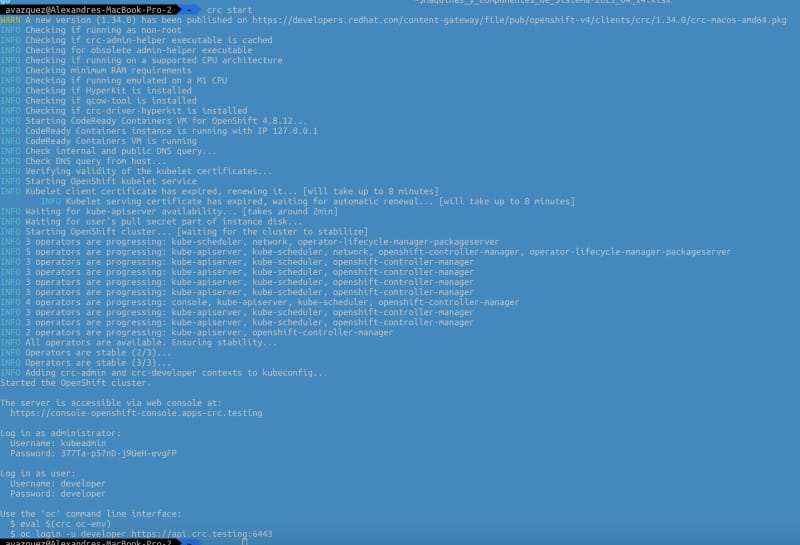
You will be able to switch on and off the platform using the commands crc start and crc stop.

Set Up an OpenShift Local Cluster Using CodeReady Containers (CRC Guide)
Console output of execution of the crc start command

As you can imagine this is only suitable for the local environment and in no way for production deployment and also it has some restrictions that can affect you such as:

  • The CodeReady Containers OpenShift cluster is ephemeral and is not intended for production use.
  • There is no supported upgrade path to newer OpenShift versions. Upgrading the OpenShift version may cause issues that are difficult to reproduce.
  • It uses a single node that behaves as both a master and worker node.
  • It disables the monitoring Operator by default. This disabled Operator causes the corresponding part of the web console to be non-functional.
  • The OpenShift instance runs in a virtual machine. This may cause other differences, particularly with external networking.

I hope you find this useful and that you can use it as part of your deployment process.

📚 Want to dive deeper into Kubernetes? This article is part of our comprehensive Kubernetes Architecture Patterns guide, where you’ll find all fundamental and advanced concepts explained step by step.

Kubernetes Init Containers Explained: Advanced Patterns for Dependencies and Startup

Kubernetes Init Containers Explained: Advanced Patterns for Dependencies and Startup

Discover how Init Containers can provide additional capabilities to your workloads in Kubernetes

There are a lot of new challenges that come with the new development pattern in a much more distributed and collaborative way, and how we manage the dependencies is crucial to our success.

Kubernetes and dedicated distributions have become the new standard of deployment for our cloud-native application and provide many features to manage those dependencies. But, of course, the most usual resource you will use to do that is the probes.

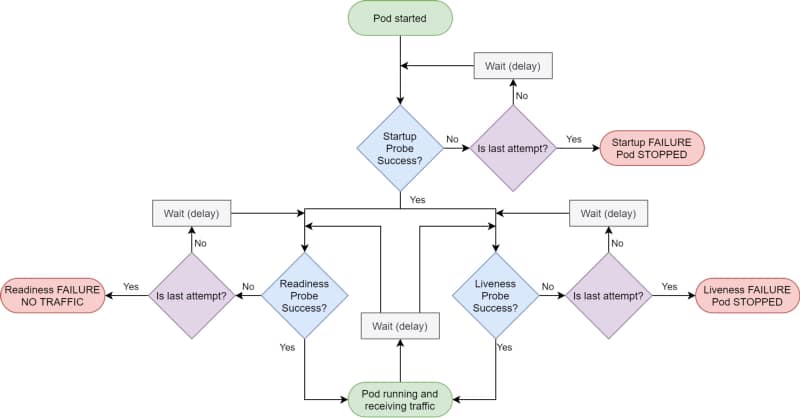
Kubernetes provides different kinds of probes that will let the platform know the status of your app. It will help us to tell if our application is “alive” (liveness probe), has been started (startup probe), and if it is ready to process requests (readiness probe).

Kubernetes Init Containers Explained: Advanced Patterns for Dependencies and Startup
Kubernetes Probes lifecycle by Andrew Lock (https://andrewlock.net/deploying-asp-net-core-applications-to-kubernetes-part-6-adding-health-checks-with-liveness-readiness-and-startup-probes/)

Kubernetes Probes are the standard way of doing so, and if you have deployed any workload to a Kubernetes cluster, you probably have used one. But there are some times that this is not enough.

That can be because the probe you would like to do is too complex or because you would like to create some startup order between your components. And in that cases, you rely on another tool: Init Containers.

The Init Containers are another kind of container in that they have their image that can have any tool that you could need to establish the different checks or probes that you would like to perform.

They have the following unique characteristics:

  • Init containers always run to completion.
  • Each init container must complete successfully before the next one starts.

Why would you use init containers?

#1 .- Manage Dependencies

The first use-case to use init containers is to define a relationship of dependencies between two components such as Deployments, and you need for one to the other to start. Imagine the following situation:

We have two components: a Web App and a Database; both are managed as containers in the platform. So if you deploy them in the usual way, both of them will try to start simultaneously, or the Kubernetes scheduler will define the order, so it could be possible the situation of the web app will try to start when the database is not available.

You could think that is not an issue because this is why you have a readiness or a liveness probe in your containers, and you are right: Pod will not be ready until the database is ready, but there are several things to note here:

  • Both probes have a limit of attempts; after that, you will enter into a CrashLoopBack scenario, and the pod will not try to start again until you manually restart it.
  • Web App pod will consume more resources than needed when you know the app will not start at all. So, in the end, you are wasting resources on the process.

So defining an init container as part of the web app deployment that checks if the database is available, maybe just including a database client to quickly see if the database and all the tables are appropriately populated, will be enough to solve both situations.

#2 .- Optimizing resources

One critical thing when you define your containers is to ensure that they have everything they need to perform their task and that they don’t have anything that is not required for that purpose.

So instead of adding more tools to check the component’s behavior, especially if this is something to manage at specific times, you can offload that to an init container and keep the main container more optimized in terms of size and resources used.

#3.- Preloading data

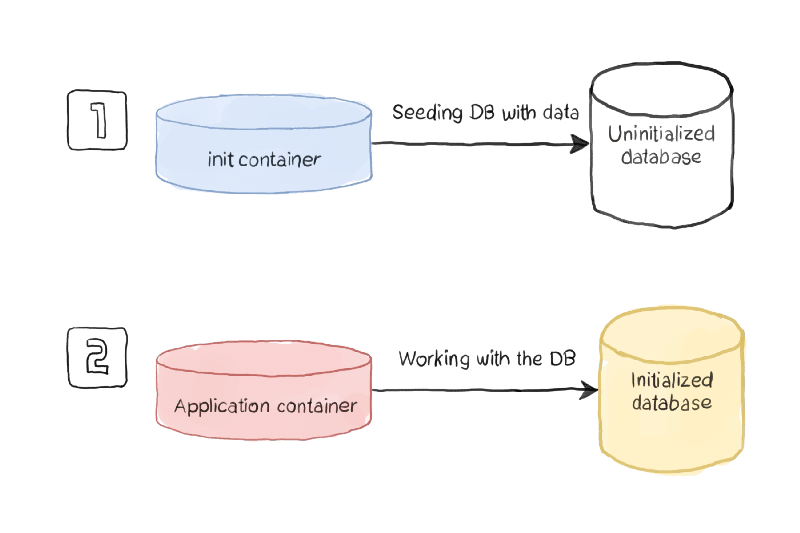
Sometimes you need to do some activities at the beginning of your application, and you can separate that for the usual work of your application, so you would like to avoid the kind of logic to check if the component has been initialized or not.

Using this pattern, you will have an init container managing all the initialization work and ensuring that all the initialization work has been performed when the main container is executed.

Kubernetes Init Containers Explained: Advanced Patterns for Dependencies and Startup
Initialization process sample (https://www.magalix.com/blog/kubernetes-patterns-the-init-container-pattern)

How to define an Init Container?

To be able to define an init container, you need to use a specific section of the specification section of your YAML file, as it is shown in the picture below:

apiVersion: v1
kind: Pod
metadata:
name: myapp-pod
labels:
app: myapp
spec:
containers:
  - name: myapp-container
image: busybox:1.28
command: ['sh', '-c', 'echo The app is running! && sleep 3600']
initContainers:
  - name: init-myservice
image: busybox:1.28
command: ['sh', '-c', "until nslookup myservice.$(cat /var/run/secrets/kubernetes.io/serviceaccount/namespace).svc.cluster.local; do echo waiting for myservice; sleep 2; done"]
  - name: init-mydb
image: busybox:1.28
command: ['sh', '-c', "until nslookup mydb.$(cat /var/run/secrets/kubernetes.io/serviceaccount/namespace).svc.cluster.local; do echo waiting for mydb; sleep 2; done"]

You can define as many Init Containers as you need. Still, you will note that all the init containers will run in sequence as described in the YAML file, and one init container can only be executed if the previous one has been completed successfully.

Summary

I hope this article will have provided you with a new way to define the management of your dependencies between workloads in Kubernetes and, at the same time, also other great use-cases where the capability of the init container can provide value to your workloads.

📚 Want to dive deeper into Kubernetes? This article is part of our comprehensive Kubernetes Architecture Patterns guide, where you’ll find all fundamental and advanced concepts explained step by step.

Kubernetes AccessModes Explained: Choosing the Right Mode for Stateful Workloads

Kubernetes AccessModes Explained: Choosing the Right Mode for Stateful Workloads

Kubernetes AccessModes provides a lot of flexibility on how the different pods can access the shared volumes

All Companies are moving towards a transformation, changing the current workloads on application servers running on virtual machines on a Data Center towards a cloud-native architecture where applications have been decomposed on different services that run as isolated components using containers and managing by a Kubernetes-based platform.

We started with the easiest use-cases and workloads moving our online services, mainly REST API that works on a load-balancing mode, but the issues began when we moved other workloads to follow the same transformation journey.

Kubernetes platform was not ready at the time. Most of their improvements have been made to support more use-cases. Does that mean that REST API is much more cloud-native than an application that requires a file-storage solution? Absolutely Not!

We were confusing different things. Cloud-native patterns are valid independent of those decisions. However, it is true that in the journey to the cloud and even before, there were some patterns that we tried to replace, especially File-based. But this is not because of the usage of the file itself. It is was more about the batch approach that was closely related to the use of files that we try to replace for several reasons, such as the ones below:

  • The online approach reduces time to action: Updates and notifications come faster to the target, so components are current.
  • File-based solutions reduce the solution’s scalability: You generate a dependency with a central component that has a more complex scalability solution.

But this path is being eased, and the last update on that journey was the Access Modes introduced by Kubernetes. Access Mode defines how the different pods will interact with one specific persistent volume. The access modes are the ones shown below.

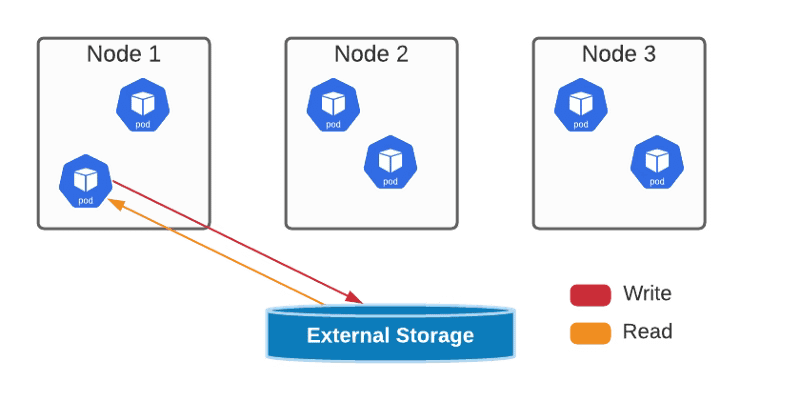
  • ReadWriteOnce — the volume can be mounted as read-write by a single node
Kubernetes AccessModes Explained: Choosing the Right Mode for Stateful Workloads
ReadWriteOnce AccessMode Graphical Representation
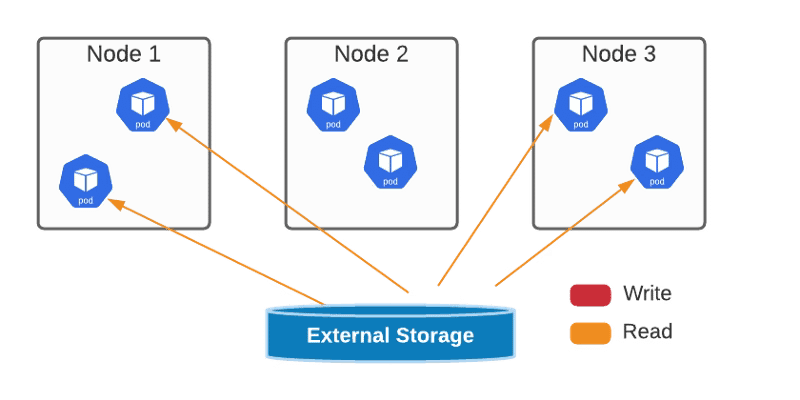
  • ReadOnlyMany — the volume can be mounted read-only by many nodes.
Kubernetes AccessModes Explained: Choosing the Right Mode for Stateful Workloads
ReadOnlyMany AccessMode Graphical Representation
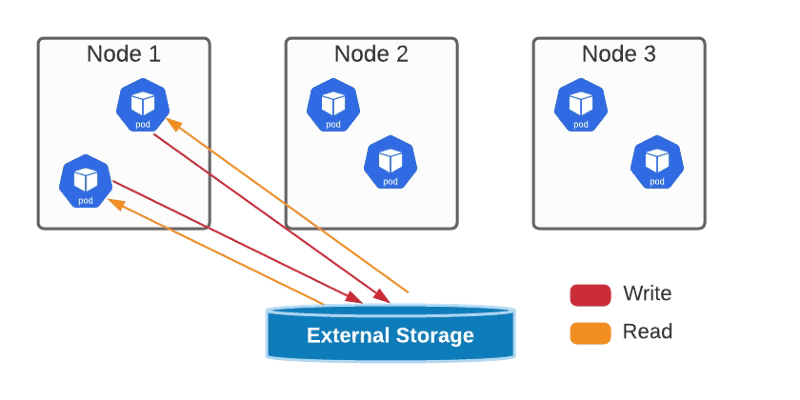
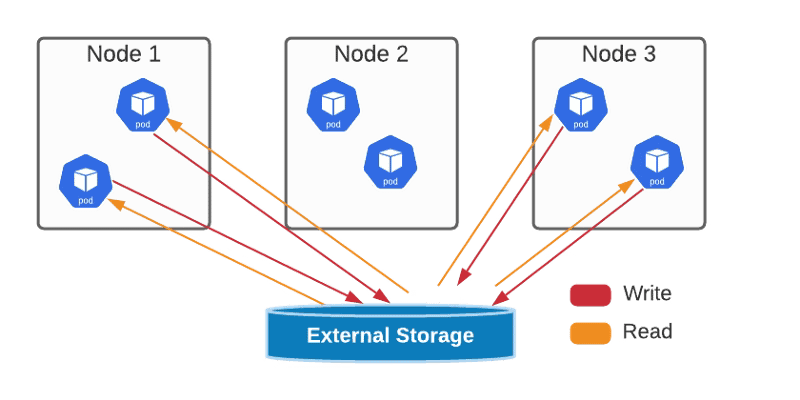
  • ReadWriteMany — the volume can be mounted as read-write by many nodes
Kubernetes AccessModes Explained: Choosing the Right Mode for Stateful Workloads
ReadWriteMany AccessMode Graphical Representation
  • ReadWriteOncePod — the volume can be mounted as read-write by a single Pod. This is only supported for CSI volumes and Kubernetes version 1.22+.
Kubernetes AccessModes Explained: Choosing the Right Mode for Stateful Workloads
ReadWriteOncePod AccessMode Graphical Representation

You can define the access mode as one of the properties of your PVs and PVCs, as shown in the sample below:

kind: PersistentVolumeClaim
apiVersion: v1
metadata:
 name: single-writer-only
spec:
 accessModes:
 - ReadWriteOncePod # Allow only a single pod to access single-writer-only.
 resources:
 requests:
 storage: 1Gi

All of this will help us on our journey to have all our different kinds of workloads achieving all the benefits from the digital transformation and allowing us as architects or developers to choose the right pattern for our use-case without being restricted at all.

📚 Want to dive deeper into Kubernetes? This article is part of our comprehensive Kubernetes Architecture Patterns guide, where you’ll find all fundamental and advanced concepts explained step by step.

gRPC vs REST Performance: Real Benchmarks and Latency Comparison

gRPC vs REST Performance: Real Benchmarks and Latency Comparison

Let’s find if gRPC protocol that is raising as one of the strong alternatives against traditional REST service can show all the benefits that people are claiming

If you already have been around the tech industry lately you know that gRPC is becoming one of the most popular protocols for integration among components, mainly microservices because of its benefits comparing with other standard solutions such as REST or SOAP.

There are other alternatives that are also becoming much popular on a daily basis such as GraphQL but today’s focus is on gRPC. If you would like to take a look at GraphQL benefits you can take a look at the article displayed below:

So, what are the main benefits that are usually exposed regarding gRPC usage and why companies such as Netflix or Uber is using it?

  • Lightweight messages
  • High performance
  • Streaming pattern support

So it seems a good alternative from a renovated version of the traditional remote procedure call that has been using on the 90’s but let’s try it in some real-use cases to try to measure the benefits that everyone is claiming, especially regarding performance and lightweight of the messages, so I decided it to define a very easy scenario of a request/response pattern between two application and test them with a normal REST call and a gRPC call.

gRPC vs REST Performance: Real Benchmarks and Latency Comparison
Simple Test Scenario Definition

Tecnology Stack

We are going to use TIBCO Flogo to create the application to use a visual no-code to simplify the application generating. If you would like to take a look more in detail about this technology please take a look at the post below:

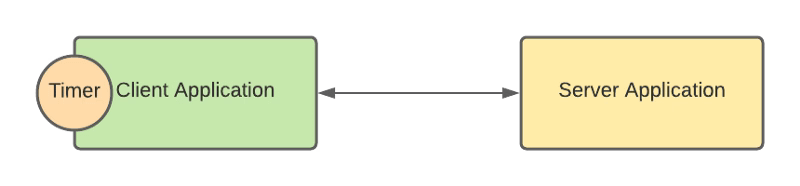
So, we are going to create two application: First one will be activated on a scheduled bases each 100 ms and it will call using gRPC to the second application that we just return the data to the call application hard-coded to avoid any other third party system could impact on the performance measure.

Regarding the data that we are going to transmit this will be a simple Hello world approach. First application will send a name to the second application that it will return the “Hello, name, This is my gRPC (or REST) application” to be able to print that in console.

REST Approach

Below are shown the application for the test case using TIBCO Flogo technology to define it:

gRPC vs REST Performance: Real Benchmarks and Latency Comparison
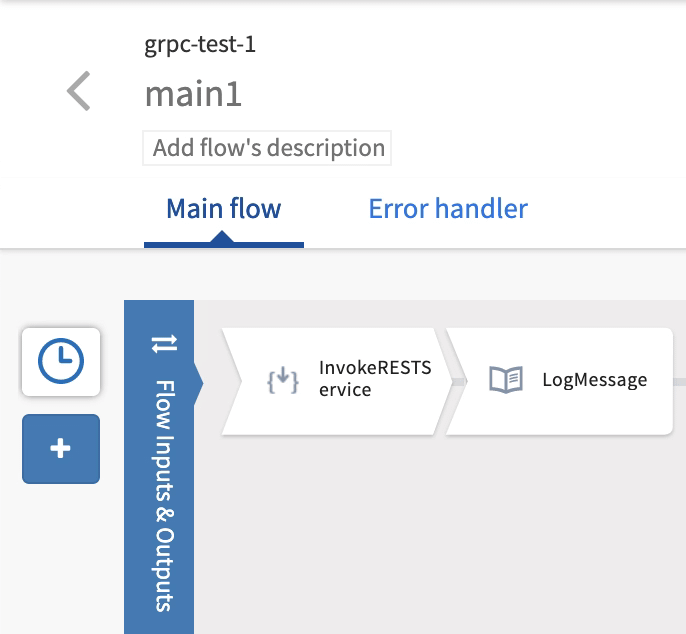
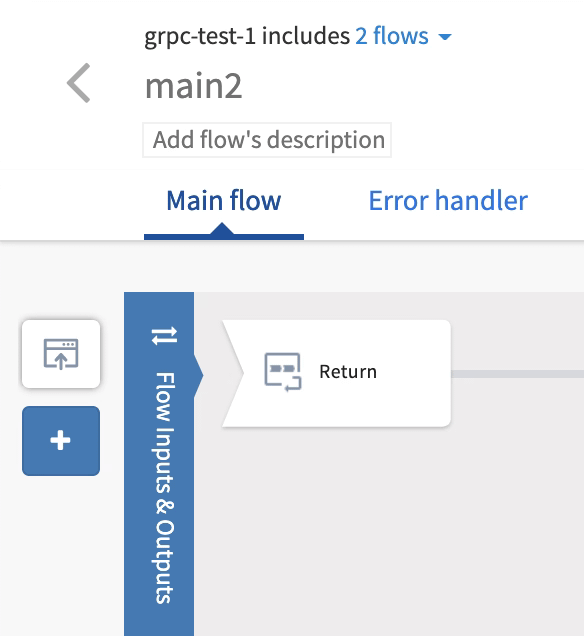
Flogo Applications for the REST case

As you could see it is simple and intuitive we have the first application activated by a Trigger and with a REST Invoke activity and then a Log Message to print what it has been received. Second application is even simpler, just expone the REST API and return the hard-coded data.

gRPC Approach

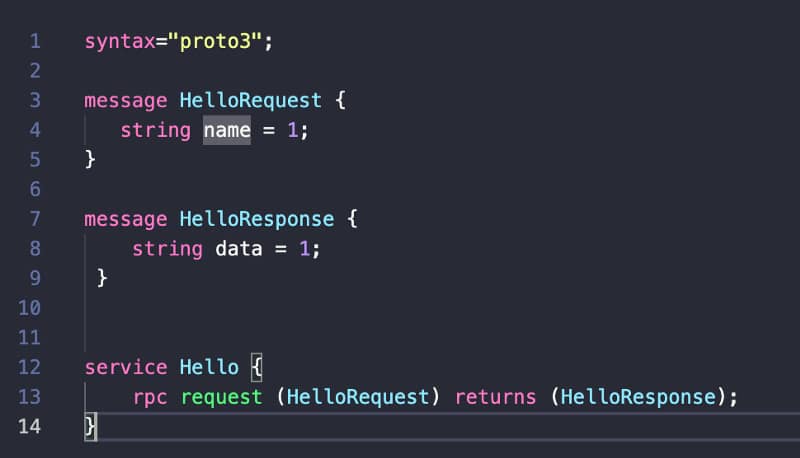
gRPC approach will be a little bit more difficult because we need to create the protobuf definition for the gRPC client and server. So we will start with a simple definition of the Hello service as you can see in the picture below:

gRPC vs REST Performance: Real Benchmarks and Latency Comparison
Protobuf definition for the gRPC Test Scenario

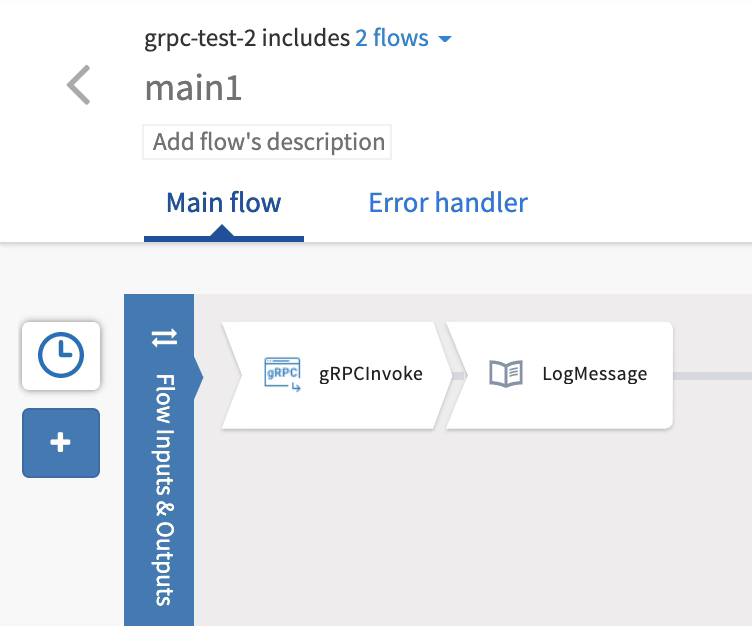
And based on that we can generate the different applications both the client and the server of this simple test:

gRPC vs REST Performance: Real Benchmarks and Latency Comparison
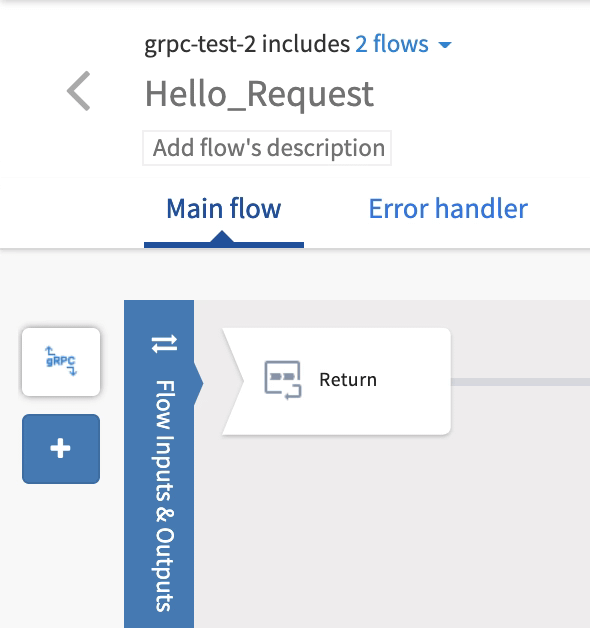
gRPC Apps in TIBCO Flogo

As you can see application are very similar to the one for REST just changing one protocol for the other and that is one of the awesome things of TIBCO Flogo, we can just have a simple implementation without knowing the details of the newest protocols but getting all the advantages that they provide.

Test Results

After 100 executions of the REST service those are the metrics we were able to get using the Prometheus exporter that the tool provides:

gRPC vs REST Performance: Real Benchmarks and Latency Comparison
Prometheus metrics for the REST Scenario Execution

So we have around 4 ms for the client flow and 0.16 ms for the REST service itself, so they are already low numbers. Do you really think that a gRPC version could improve it? Let’s watch it. Here are the same metrics for 100 invokes of the second flow using gRPC:

gRPC vs REST Performance: Real Benchmarks and Latency Comparison
Prometheus metrics for the gRPC Scenario Execution

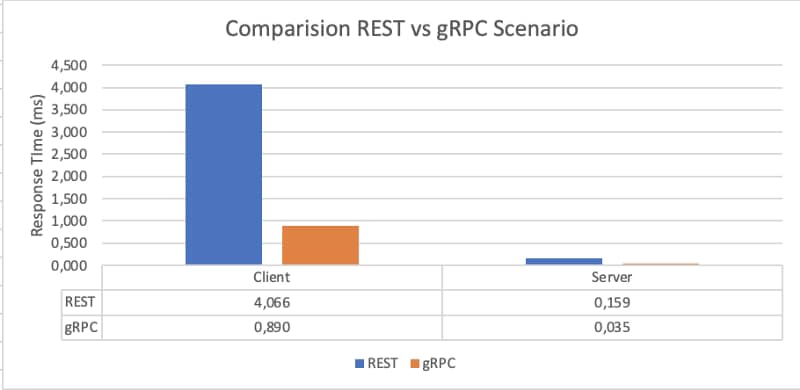
So as you can see the improvement is awesome even for a simple service running on localhost. The gRPC service had a metrics of 0.035 ms vs the 0.159 that it had the REST version pretty much an improvement of 77.98% vs the REST API, this is just incredible.. but what about the client? It went from 4.066 ms to at 0.89 ms what means another 78.1% of improvement.

gRPC vs REST Performance: Real Benchmarks and Latency Comparison
Graphical Representation of Both Scenario Executions

So the rationale should be if this can be done with a simple service where data exchanged is pretty much nothing, what it can do when the payload is big? the options are just unimaginable..

Summary

We tested the good things we have heard online of the gRPC method that most of the cutting-edge technologies are using today and we have been impressed just a simple scenario comparing it with the performance of a REST interface. For sure gRPC has its cons like any other option but in terms of performance and message optimization the data speaks for itself, it is just amazing. Stay tuned for new tests regarding gRPC benefits and also some of its cons to try to see if could be a great option for your next development!

API Terminology Explained: Why We Are Misusing the Term “API” Everywhere

API Terminology Explained: Why We Are Misusing the Term “API” Everywhere

When marketing steals a technical word, it leads to madness and a complete change of its meaning.

API is the next on the list. It is always the same pattern regarding technical terms when they go beyond the normal really techy forum and reach a more “mainstream” level in the industry. As soon as this happens, the term starts to lose its meaning, and it starts to be like a wildcard word that can be very different things to very different people. If you don’t believe me come with me to this set of examples.

You can argue that terms need to evolve and that the same word can mean different things as long as the industry continues to evolve, and that is true. For example, the package term that in the past is referred to way to package software to be able to share it usually through mail or an FTP server as a TAR package it has been re-defined with the eclosion of the package managers in the 90’s and after that with the artifact management to handle dependencies with approaches such as Maven, npm and so on.

But I am not talking about these examples. I am talking about when a term is used a lot because it is fancy and means evolution, or modernization, so you try to use it as much as possible, even to mean different things. And one of these terms is API.

API stands for Application Programming Interface, and as its name states, it is an interface. Since the beginning of computer time, it has been created to reference the contract and how you need to interact with a specific application program. However, the term was mainly used for libraries to define their contract for other applications that needed the capability.

So If we would like to show this in a graphical form, this is the API referring to:

API Terminology Explained: Why We Are Misusing the Term “API” Everywhere

With the eclosion of the REST Services and mobile apps, the term of API will expand beyond its normal usage and become a normal word in today’s world because all devs need some API to do work. Starting from the common capabilities such as Authentication until just concrete capabilities are needed to perform its work.

The explosion of services that exposed their own API required a way to provide central management to exposed interfaces, especially when we start to publish some of these capabilities to the outside world. We needed to secure them, identify who was using them and at what level, and a way for devs to find the needed documentation to be able to use their services. And because of that, we have the rise of API Management solutions.

And then microservices came to revolutionize how applications are performed, and that suppose that now we have more services each of them providing its own API at a level that pretty much we have one service for one capability and because of that one API for one capability something as you can see in the picture below:

API Terminology Explained: Why We Are Misusing the Term “API” Everywhere

And the usage of API became so popular that some people started to use the term to refer to the interface and the whole service implementing this API, which leads and is leading to a lot of confusion. So because of that, when we talk now about API Development, we can talk about very different things:

  • We can talk about the definition and model of the interface itself and its management.
  • We can talk about a service implementation with an API exposed to be used and managed appropriately.
  • We can even talk about a service that uses several APIs as part of its capability implementation.

And the main problem when we use the same term to differ to so many different things is that the word loses all its meaning and with that to complicate our understanding in any conversation and that leads to many problems we could avoid just using the proper words and try to keep all the buzz and marketing a little bit out of the technical conversations.

GraalVM for Microservices: Improve Startup Time and Reduce Memory Usage

GraalVM for Microservices: Improve Startup Time and Reduce Memory Usage

GraalVM provides the capabilities to make Java a first-class language to create microservices at the same level as Go-Lang, Rust, NodeJS, and others.

Java language has been the language leader for generations. Pretty much every piece of software has been created with Java: Web Servers, Messaging System, Enterprise Application, Development Frameworks, and so on. This predominance has been shown in the most important indexes like the TIOBE index, as is shown below:

GraalVM for Microservices: Improve Startup Time and Reduce Memory Usage
TIOBE index image from https://www.tiobe.com/tiobe-index/

But always, Java has some trade-offs that you need to make. The promise of the portability code is because the JVM allows us to run the same code in different OS and ecosystems. Still, at the same time, the interpreter approach will also provide a little bit of overhead compared with other compiled options like C.

That overhead was never a problem until we go inside the microservices route. When we have a server-based approach with an overhead of 100–200 MB, it is not a big problem compared with all the benefits it provides. Still, if we transform that server into, for example, hundreds of services, and each of them has a 50 MB overhead, this starts to become something to worry about.

Another trade-off was start-up time, again the abstraction layer provides a slower start-up time, but in client-service architecture, that was not an important issue if we need few more seconds to start serving requests. Still, today in the scalability era, this becomes critical if we talk about second-based startup time compared with milliseconds-based startup time because this provides better scalability and more optimized infrastructure usage.

So, how to provide all the benefits from Java and provide a solution for these trade-offs that were now starting to be an issue? And GraalVM becomes to be the answer to all of this.

GraalVM is based on its own words: “a high-performance JDK distribution designed to accelerate the execution of applications written in Java and other JVM languages,” which provides an Ahead-of-Time Compilation process to generate binary process from Java code that removes the traditional overhead from the JVM running process.

Regarding its use in microservices, this is a specific focus that they have given, and the promise of around 50x faster startup and 5x less memory footprint is just amazing. And this is why GraalVM becomes the foundation for high-level microservice development frameworks in Java-like Quarkus from RedHat, Micronaut, or even the Spring-Boot version powered by GraalVM.

So, probably you are just asking: How can I start using this? The first thing that we need to do is to go to the GitHub release page of the project and find the version for our OS and follow the instructions provided here:

When we have this installed, this is the moment to start testing it, and what better of doing so than creating a REST/JSON service and comparing it with a traditional OpenJDK 11-powered solution?

To create this REST service as simple as possible to focus on the difference between both modes, I will use the Spark Java Framework which is a minimal framework to create REST Services.

I will share all the code in this GitHub repository, so if you would like to take a look, clone it from here:

The code that we are going to use looks very simple, just a single line to create a REST service:

GraalVM for Microservices: Improve Startup Time and Reduce Memory Usage

Then, we will use a GraalVM maven plugin for all the compilation processes. You can check all the options here:

GraalVM for Microservices: Improve Startup Time and Reduce Memory Usage

The compilation process takes a while (around 1–2 min). Still, you need to understand that this compiles everything to a binary process because the only output you will get out of this is a single binary process (named in my case rest-service-test) that will have all the things you need to run your application.

GraalVM for Microservices: Improve Startup Time and Reduce Memory Usage

And finally, we will have a single binary that is everything that we need to run our application:

GraalVM for Microservices: Improve Startup Time and Reduce Memory Usage

This binary is an exceptional one because it does not require any JVM on your local machine, and it can start in a few milliseconds. And the total size of the binary is 32M on disk and less than 5MB of RAM.

GraalVM for Microservices: Improve Startup Time and Reduce Memory Usage

The output of this first tiny application is straightforward, as you saw, but I think you can get the point. But let’s see it in action I will launch a small load test with my computer with 16 threads launching requests to this endpoint:

GraalVM for Microservices: Improve Startup Time and Reduce Memory Usage

As you can see, this is just incredible, even with the lack of latency as this is just triggered by the same machine we are reaching with a single service a rate of TPS in 1 minute of more than 1400 requests/sec with a response time of 2ms for each of those.

And how does that compare with a normal JAR-based application with the same code exactly? For example, you can see in the table below:

GraalVM for Microservices: Improve Startup Time and Reduce Memory Usage

In a nutshell, we have seen how using tools such as GraalVM we can make our JVM-based programs ready for our microservices environment avoiding the normal issues regarding high-memory footprint or small startup time that are critical when we are adopting a full cloud-native strategy in our companies or projects.

But, the truth must be told. This is not always as simple as we showed on this sample because depending on the libraries you are using, generating the native image can be much more complex and require a lot of configuration or just be impossible. So it is not everything already done but the future looks bright and full of hope.