With the transition to a more agile development process where the number of deployments has been increased in an exponential way. That situation has made it quite complex to keep pace to make sure we’re not just deploying code more often into production that provides the capabilities that are required by the business. But, also, at the same time, we’re able to do it securely and safely.
That need is leading toward the DevSecOps idea to include security as part of the DevOps culture and practices as a way to ensure safety from the beginning on development and across all the standard steps from the developer machine to the production environment.
Additional to that, because of the container paradigm we have a more polyglot approach with different kinds of components running on our platform using a different base image, packages, libraries, and so on. We need to make sure they’re still secure to use and we need tools to be able to govern that in a natural way. To help us on that duty is where components like Harbor help us to do that.
Harbor is a CNCF project at the incubator stage at the moment of writing this article, and it provides several capabilities regarding how to manage container images from a project perspective. It gives a project approach with its docker registry and also a chart museum if we’d like to use Helm Charts as part of our project development. But it includes security features too, and that’s the one that we’re going to cover in this article:
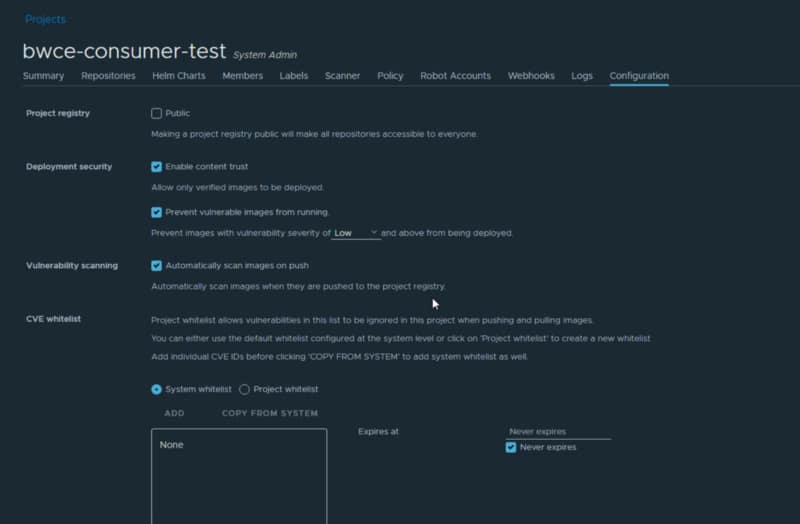
Vulnerabilities Scan: it allows you to scan all the docker images registered in the different repositories to check if they have vulnerabilities. It also provides automation during that process to make sure that every time we push a new image, this is scanned automatically. Also, it will enable defining policies to avoid pulling any image with vulnerabilities and also set the level of vulnerabilities (low, medium, high, or critical) that we’d like to tolerate it. By default, it comes with Clair as the default scanner, but you can introduce others as well.
Signed images: Harbor registry provides options to deploy notary as part of its components to be able to sign images during the push process to make sure that no modifications are done to that image
Tag Inmuttability and Retention Rules: Harbor registry also provides the option to define tag immutability and retention rules to make sure that we don’t have any attempt to replace images with others using the same tag.
Harbor registry is based on docker so you can run it locally using docker and docker-compose using the procedure that is available on its official web page. But it also supports being installed on top of your Kubernetes platform using the helm chart and operator that is available.
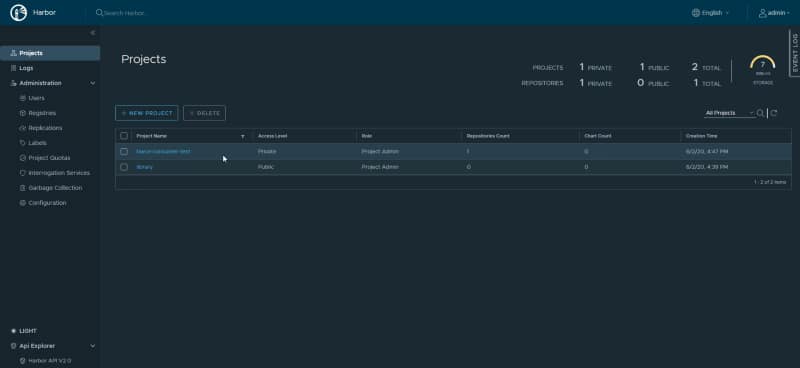
Once the tool is installed, we have access to the UI Web Portal, and we’re able to create a project that has repositories as part of it.
Project List inside the Harbor Portal UI
As part of the project configuration, we can define the security policies that we’d like to provide to each project. That means that different projects can have different security profiles.
Security settings inside a Project in Harbor Porta UI
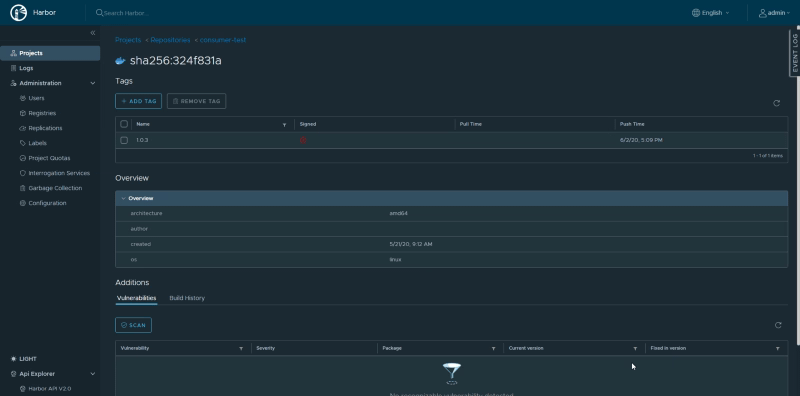
And once we push a new image to the repository that belongs to that project we’re going to see the following details:
In this case, I’ve pushed a TIBCO BusinessWorks Container Edition application that doesn’t contain any vulnerability and just shows that and also where this was checked.
Also, if we see the details, we can check additional information like if the image has been signed or not, or be able to check it again.
Image details inside Harbor Portal UI
Summary
So, this is just a few features that Harbor provides from the security perspective. But Harbor is much more than only that so probably we cover more of its features in further articles I hope based on what you read today you’d like to give it a chance and start introducing it in your DevSecOps toolset.
When we talk about communication in a distributed cloud-native world and especially when we are talking about container-based architectures based on Kubernetes platform like AKS, EKS, Openshift, and so on, two technologies generate a lot of confusion because they seem to be covering the same capabilities: Those are Service Mesh and API Management Solutions.
It is has been a controversial topic where different bold statements have been made: People who think that those technologies to work together in a complementary mode, others who believe that they’re trying to solve the same problems in different ways and even people who think one is just the evolution of the other to the new cloud-native architecture.
API Management Solutions
API Management Solutions have been part of our architectures for so long. It is a crucial component of any architecture nowadays that is created following the principles of the API-Led Architecture, and they’re an evolution of the pre-existent API Gateway we’ve included as an evolution of the pure proxies in the late 90s and early 2000.
API Management Solutions is a critical component of your API Strategy because it enable your company to work on an API Led Approach. And that is much more than the technical aspect of it. We usually try to simplify the API Led Approach to the technical side with the API-based development and the microservices we’re creating and the collaborative spirit in mind we use today to make any piece of software that is deployed on the production environment.
But it is pretty much more than that. API Lead Architectures is about creating products from our API, providing all the artifacts (technical and non-technical) that we need to do that conversion. A quick list of those artifacts (but it is not an exhaustive list are the following ones)
API Documentation Support
Package Plans Definition
Subscription capabilities
Monetization capabilities
Self-Service API Discovery
Versioning capabilities
Traditionally, the API Management solution also comes with API Gateway capabilities embedded to cover even the technical aspect of it, and that also provide some other capabilities more in the technical level:
Exposition
Routing
Security
Throttling
Service Mesh
Service Mesh is more a buzz word these days and a technology that is now trending because it has been created to solve some of the challenges that are inherent to the microservice and container approach and everything under the cloud-native label.
In this case, it comes from the technical side so, it is much more a bottom-top approach because their existence is to be able to solve a technical problem and try to provide a better user experience to the new developers and system administrators in this new world much more complicated. And what are the challenges that have been created in this transition? Let’s take a look at them:
Service Registry & Discovery is one of the critical things that we need to cover because with the elastic paradigm of the cloud-native world makes that the services are switching its location from time to time being started in new machines when needed, remove of them when there is no enough load to require its presence, so it is essential to provide a way to easily manage that new reality that we didn’t need in the past when our services were bounded to a specific machine or set of devices.
Security is another important topic in any architecture we can create today, and with the polyglot approach we’ve incorporated in our architectures is another challenging thing because we need to provide a secure way to communicate our services that are supported by any technology we’re using and anyone we can use in the future. And we’re not talking just about pure Authentication but also Authorization because in a service-to-service communication we also need to provide a way to check if the microservice that is calling another one is allowed to do so and do that in an agile way not to stop all the new advantages that your cloud-native architecture provides because of its conception.
Routing requirements also have been changed in these new architectures. If you remember how we usually deploy in traditional architectures, we typically try to find a zero down-time approach (when possible) but a very standard procedure. Deploy a new version, validate its working, and open the traffic for anyone, but today the requirements claim for much more complex paradigms. The Service Mesh technologies support rollout strategies like A/B Testing, Weight-based routing, Canary deployments.
Rival or Companion?
So, after doing a quick view of the purpose of these technologies and the problem they tried to solve, are they rivals or companions? Should we choose one or the other or try to place both of them in our architecture?
Like always, the answer to those questions is the same: “It depends!”. It depends on what you’re trying to do, what your company is trying to achieve, what you’re building..
API Management solution is needed as long as you’re implementing an API Strategy in your organization. Service Mesh technology is not trying to fill that gap. They can provide technical capabilities to cover that traditional has been done the API Gateway component, but this is just one of the elements of the API Management Solution. The other parts that provide the management and the governance capabilities are not covered by any Service Mesh today.
Service Mesh is needed if you have a cloud-native architecture based on the container platform that is firmly based on HTTP communication for synchronous communication. It provides so many technical capabilities that will make your life much more manageable that as soon as you include it into your architecture, you cannot live without it.
Service Mesh is only going to provide its capabilities in a container platform approach. So, if you have a more heterogeneous landscape as much of the enterprise do today, (you have a container platform but also other platforms like SaaS application, some systems still on-prem and traditional architectures that all of them are providing capabilities that you’d like to leverage as part of the API products), you will need to include an API Management Solution.
So, these technologies can play together in a complete architecture to cover different kinds of requirements, especially when we’re talking about complex heterogeneous-architectures with a need to include an API Lead approach.
In upcoming articles, we will cover how we can integrate both technologies from the technical aspect and how the data flow among the different components of the architecture.
Bash hacks knowledge is one of the ways to improve your performance. We spend many hours inside of them and have been developing patterns and habits when we log inside a computer. For example, if you have two people with a similar skill level and provide the same task to do, probably, they’re different tools aa nd different comet to the same path.
And that’s because the number of options available to do any task is so significant that each of us learns one or two way to do something, and we sticks to them, and we just automate those, so we’re not thinking when we’re typing them.
So, the idea today is to provide a list of some commands that I use all the time that probably you’re aware of, but for me are like time savings each day of my work life. So, let’s start with those.
1.- CTRL + R
This command is my predliect bash hack. It is the one I use all the time; as soon as I log into a remote machine that is new or just coming back to them, I use it for pretty much everything. Unfortunately, this command only allows you to search into the command history.
It helps you autocomplete based on the commands you’re already typing. It’s like the same thing as typing history | grep <something> but just faster and more natural for me.
This bash hack also allows me to autocomplete paths that I don’t remember the exact subfolder name or whatever. I do this tricky command every two weeks to clean some process memory or apply some configuration. Or just to troubleshoot in which machine I’m logging at a specific moment.
2.- find + action
Find command is something we all know, but most of you probably use it as a limited functionality from all the ones available from the find command. And that’s it because that command is incredible. It provides so many features. But this time, I’m just going to cover one specific topic. Actions after locating the files that we’re looking for.
We usually use the find command to find files or folders, which is evident for a command that it’s called that way. But also it allows us to add the -execparameter to concatenate an action to be done for each of the files that match your criteria, for example, something like this
Find all the yaml files in your current folder and just rename them to move them to a different folder. You can do it directly with this command:
So simple and so helpful bash hack. Just like our bash command to CTRL-Z. The command cd -allows us to go back to the previous folder we’re in.
So valuable for we got wrong the folder that we like to go, just to switch between two folders and so on quickly. It’s like going back to your browser or the CTRL -Z in your Word processor.
Wrap up
I hope you love this command as much as I do, and if you already know it, please let me in the responses to the bash hacks that are the most relevant for you daily. It can be because you use it all the time as I do with these or because even if you’re not using it so many times, the times that you do, it saves you a massive amount of time!
“May you live in interesting times” is the English translation of the Chinese curse, and this couldn’t be more true as a description of the times that we’re living regarding our application architecture and application development.
All the changes from the cloud-native approach, including all the new technologies that come with it like containers, microservices, API, DevOps, and so on has transformed the situation entirely for any architecture, developer, or system administration.
It’s something similar if you went to bed in 2003, and you wake up in 2020 all the changes, all the new philosophies, but also all the unique challenges that come with the changes and new capabilities are things that we need to deal with today.
I think we all can agree the present is polyglot in terms of application development. Today is not expected for any big company or enterprise to find an available technology, an available language to support all their in-house products. Today we all follow and agree on the “the right tool for the right job principle” to try to create our toolset of technologies that we are going to use to solve different use cases or patterns that you need to face.
But that agreement and movement also come with its challenge regarding things that we usually don’t think about like Tracing and Observability in general.
When we use a single technology, everything is more straightforward. To define a common strategy to trace your end to end flows is easy; you only need to embed the logic into your common development framework or library all your developments are using. Probably define a typical header architecture with all the data that you need to be able to effectively trace all the requests and define a standard protocol to send all those traces to a standard system that can store and correlate all of them and explain the end to end flow. But try to move that to a polyglot ecosystem: Should I write my framework or library for each language or technology I’d need to use, or I can also use in the future? Does that make sense?
But not only that, should I slow the adoption of a new technology that can quickly help the business because I need to provide from a shared team this kind of standard components? That is the best case that I have enough people that know how the internals of my framework work and have the skills in all the languages that we’re adopting to be able to do it quickly and in an efficient way. It seems unlikely, right?
So, to new challenges also new solutions. I’m already have been talking about Service Mesh regarding the capabilities that provide from a communication perspective, and if you don’t remember you can take a look at those posts:
But it also provides capabilities from other perspectives and Tracing, and Observability is one of them. Because when we cannot include those features in any technology, we need to use, we can do it in a general technology that is supported by all of them, and that’s the case with Service Mesh.
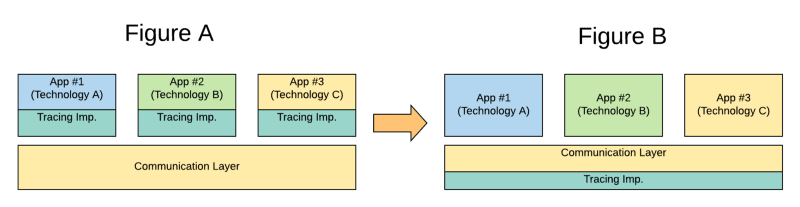
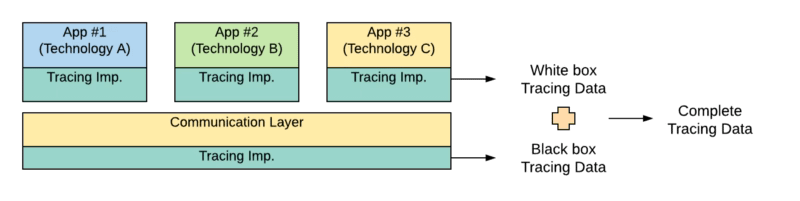
As Service Mesh is the standard way to communicate synchronously, your microservices in an east-west communication fashion covering the service-to-service communication. So, if you’re able to include in that component also the tracing capability, you can have an end-to-end tracing without needed to implement anything in each of the different technologies that you can use to implement the logic that you need, so, you’ve been changing from Figure A to Figure B in the picture below:
In-App Tracing logic implementation vs. Service Mesh Tracing Support
And that what most of the Service Mesh technologies are doing. For example, Istio, as one of the default choices when it comes to Service Mesh, includes an implementation of the OpenTracing standard that allows integration with any tool that supports the standard to be able to collect all the tracing information for any technology that is used to communicate across the mesh.
So, that mind-change allows us to easily integrates different technologies without needed any exceptional support of those standards for any specific technology. Does that mean that the implementation of those standards for those technologies is not required? Not at all, that is still relevant, because the ones that also support those standards can provide even more insights. After all, the Service Mesh only knows part of the information that is the flow that’s happening outside of each technology. It’s something similar to a black-box approach. But also adding the support for each technology to the same standard provides an additional white-box approach as you can see graphically in the image below:
Merging White Box Tracing Data and Black Box Tracing Data
We already talked about the compliance of some technologies with the OpenTracing standard like TIBCO BusinessWorks Container Edition that you can remember it here:
So, also, the support from these technologies of the industry standards is needed and even a competitive advantage because without needing to develop your tracing framework, you’re able to achieve a Complete Tracing Data approach additional to that is already provided by the Service Mesh level itself.
Prometheus has become the new standard when we’re talking about monitoring our new modern application architecture, and we need to make sure we know all about its options to make sure we can get the best out of it. I’ve been using it for some time until I realized about a feature that I was desperate to know how to do, but I couldn’t find anywhere clearly define. So as I didn’t found it easily, I thought about writing a small article to show you how to do it without needed to spend the same time as I did.
We have plenty of information about how to configure Prometheus and use some of the usual configuration plugins, as we can see on its official webpage [1]. Even I already write about some configuration and using it for several purposes, as you can see also in other posts [2][3][4].
One of these configuration plugins is about relabeling, and this is a great thing. We have that each of the exporters can have its labels and meaning for those, and when you try to manage different technologies or components makes complex that all of them match together even if all of them follow the naming convention that Prometheus has [5].
But I had this situation, and I’m sure you have gone or will go towards that as well, that I have similar metrics for different technologies that for me are the same, and I need to keep them with the same name, but as they belong to other technologies they are not. So I need to find a way to rename the metric, and the great thing is that you can do that.
To do that, you just need to do a metric_relabel configuration. This configuration applies to relabel (as the name already indicates) labels of your prometheus metrics in this case before being ingested but also allow us to use some notable terms to do different things, and one of these notable terms is __name__. __name__ is a particular label that will enable you to rename your prometheus metrics before being ingested in the Prometheus Timeseries Database. And after that point, this will be as it will have that name since the beginning.
How to use that is relatively easy, is as any other relabel process, and I’d like to show you a sample about how to do it.
- source_labels: [__name__]
regex: 'jvm_threads_current'
target_label: __name__
replacement: 'process_thread_count'
Here it is a simple sample to show how we can rename a metric name jvm_threads_current to count the threads inside the JVM machine to do it more generic to be able to include the threads for the process in a process_thread_count prometheus metrics that we can use now as it was the original name.
Four arguments that change your thinking about those expenses.
Online Services are part of our new life, and we should evaluate them as we do for the physical ones.
If you are in your mid-thirties, you are probably like me, and you should remember the old age of this world where every online service was free. We lived in a world where piracy was a normal situation. Everything from movies to music, from books to software was for free. You can quickly found a torrent, a direct download link, or even if you’re older, a Mule link. Do you still remember Mule? Haha, Yep, I do too.
Our generation moved away from an “all for free without the best quality” era to a “pay-per-service” approach. And this transition is being complicated. So, if that’s your case or you know someone that usually has this kind of thinking, I’ll try to explain why you should care less about the cost of those services.
1. We’re not evaluating those expenses equally as we do for physical services
That’s the first topic, and I’d like to explain it a little bit more. Imagine the Medium subscription, If I’m not wrong, this is 50€ per year for unlimited access to those articles, and I know a lot of people that think that’s expensive that it doesn’t worth what they provide.
The same people can spend 50€ per month for a Gym subscription and they don’t think this is expensive at all. So, now, probably you’re thinking something like this: Come on! You’re not fair! How you dare to compare Medium subscription to a Gym subscription.
The gym has a physical infrastructure they need to maintain. They have people working there, at the reception, cleaning services, personal trainers and so on. They also have additional cost because of the use of the infrastructure like Electricity, Water, Taxes and so on.
Yes, that’s true! And what about Medium? doesn’t it have the same situation? They have a cloud infrastructure they need to maintain, servers, network, storage, backups, and so on. They also have people working on it: On the site itself, curators, but also developers, system administrators, and so on, to do all the housekeeping tasks to keep the place at the best possible level for you to use. So, this is not different at all in both cases. But this is not just the only argument.
2. Online services are incredible cheaper!
Now, instead of talking about Medium, let’s talk about an Application that you could think it’s expensive. Let’s talk about Netflix with depending on your country can be a monthly fee of about 15–20€.
And you can argue, but I don’t watch even 0.1% of their catalog, why should I pay for all of it if I’m not going to use it everything it provides?
But think about how much cinema tickets cost you the last time you were able to go outside (Yeah yeah I know, this is not the best time to talk about cinemas and going out in this situation but bear with me on this one).
Let’s do the maths with me: Two people going to the cinema, 10 € each for the tickets. If you have something else to drink or eat, you could quickly go for 35 € per just a 2 hours session.
For sure, even with the best home cinema system, it is not comparable at all at what you can feel in a cinema session, but that’s not the topic. The argument is if you’re able to afford one cinema session per month (Yes, just one per month) and you don’t feel you’re wasting your money, you can afford Netflix + Disney + Prime Video at the same rate.
And this applies to everything. I always recommend when talking about this with other people to compare with something physical they do without thinking a lot about it — for example, a morning coffee. A lot of us grab a cup of coffee to go each day of our working life. Imagine an average cost of 1.5€, and each month has 20 working days than means you’re spending 30 € per month just on your morning coffee. Once again, the same amount for three top video streaming services.
The main idea of this argument is not for you to stop grabbing this first cup of coffee that you need to get your body working and prepare for the day. Still, you think if you’re not feeling a lot about that morning coffee, you shouldn’t be so worried about the online service fee as well.
3. You can reevaluate your decision anytime
Also, another argument to not worry a lot about this is because you can review this every time you want. The procedure here is not just the same as you use to evaluate the purchase of your new iPad, or you need a laptop or a car. That you need to be very sure that you’re going to make the most of it.
In this case, this is a recurring fee that you can cancel anytime if you think you’re not going to use it or you see it is not useful as you think too. So, there is no problem trying it for a few months, and if it doesn’t work, just cancel it. So, if you have that power and options in your hand, what are you so worried about making that step to pay for the first time just to try.
We do all time in other aspects of life. Imagine the following situation in the market, when you see a new brand of something you’re going to buy. It can be fresh yogurt, fresh juice, or even a new beer. How many times do you get something from a new brand, just to a try? Probably the answer is ALL THE TIME! And yes, you’re paying for it, it is not like you go to the cashier and tell him/her: No, no, Let me just try this for several months and probably next year I can see it is worth it.
4. We’re investing in ourselves
This argument can be strange at the beginning because it seems more: No, no, no. I’m investing in this company, its developers, and I can feel happy about it, but this is a transaction. Yes, that also right, but imagine that. What happens to you if all the services that you’re using online disappear because this is not a substantial business for them anymore. Is going to be your life affected? Yes, for sure.
I just remember the first application that I used a lot that was deprecated and removed. I always have been a Linux guy, and I’ve used a lot of a task management tool named BasKet as part of the KDE environment that was similar to what today is OneNote. You can put a lot of kind of content together and manage it as you’d like.
It was amazing, but finally, they decide to stop working on the tool, and the tool was not updated, and yet, they remove the tool. My life changed a lot. I need to find another tool to do the same job and imagine what: There was none at the time (I was talking about 2006 🙂 ). So my life was worse because nobody supports their effort at the level they needed to keep it doing it. So, you should also think that, how much will it cost to me it this X application disappeared?
Wrap up
So, I hope these arguments can help you to change your mind or be useful in your conversations with other people that have this all-should-be free in the online world to be more coherent with the reality we’re living now. So, let’s try new online services, and probably we will find our online life can be better!
Nowadays, we’re in a new age of Event-Driven Architecture, and this is not the first time we’ve lived that. Before microservices and cloud, EDA was the new normal in enterprise integration. Based on different kinds of standards, there where protocols like JMS or AMQP used in broker-based products like TIBCO EMS, Active MQ, or IBM Websphere MQ, so this approach is not something new.
With the rise of microservices architectures and the API lead approach, it seemed that we’ve forgotten about the importance of the messaging systems, and we had to go through the same challenges we saw in the past to come to a new messaging solution to solve that problem. So, we’re coming back to EDA Architecture, pub-sub mechanism, to help us decouple the consumers and producers, moving from orchestration to choreography, and all these concepts fit better in nowaday worlds with more and more independent components that need cooperation and integration.
During this effort, we started to look at new technologies to help us implement that again. Still, with the new reality, we forgot about the heavy protocols and standards like JMS and started to think about other options. And we need to admit that we felt that there is a new king in this area, and this is one of the critical components that seem to be no matter what in today’s architecture: Apache Kafka.
And don’t get me wrong. Apache Kafka is fantastic, and it has been proven for so long, a production-ready solution, performant, with impressive capabilities for replay and powerful API to ease the integration. Apache Kafka has some challenges in this cloud-native world because it doesn’t play so well with some of its rules.
If you have used Apache Kafka for some time, you are aware that there are particular challenges with it. Apache Kafka has an architecture that comes from its LinkedIn days in 2011, where Kubernetes or even Docker and container technologies were not a thing, that makes to run Apache Kafka (purely stateful service) in a container fashion quite complicated. There are improvements using helm charts and operators to ease the journey, but still, it doesn’t feel like pieces can integrate well into that fashion. Another thing is the geo-replication that even with components like MirrorMaker, it is not something used, works smooth, and feels integrated.
Other technologies are trying to provide a solution for those capabilities, and one of them is also another Apache Foundation project that has been donated by Yahoo! and it is named Apache Pulsar.
Don’t get me wrong; this is not about finding a new truth, that single messaging solution that is perfect for today’s architectures: it doesn’t exist. In today’s world, with so many different requirements and variables for the different kinds of applications, one size fits all is no longer true. So you should stop thinking about which messaging solution is the best one, and think more about which one serves your architecture best and fulfills both technical and business requirements.
We have covered different ways for general communication, with several specific solutions for synchronous communication (service mesh technologies and protocols like REST, GraphQL, or gRPC) and different ones for asynchronous communication. We need to go deeper into the asynchronous communication to find what works best for you. But first, let’s speak a little bit more about Apache Pulsar.
Apache Pulsar
Apache Pulsar, as mentioned above, has been developed internally by Yahoo! and donated to the Apache Foundation. As stated on their official website, they are several key points to mention as we start exploring this option:
Pulsar Functions: Easily deploy lightweight compute logic using developer-friendly APIs without needing to run your stream processing engine
Proven in production: Apache Pulsar has run in production at Yahoo scale for over three years, with millions of messages per second across millions of topics
Low latency with durability: Designed for low publish latency (< 5ms) at scale with strong durability guarantees
Geo-replication: Designed for configurable replication between data centers across multiple geographic regions
Multi-tenancy: Built from the ground up as a multi-tenant system. Supports Isolation, Authentication, Authorization, and Quotas
Persistent storages: Persistent message storage based on Apache BookKeeper. Provides IO-level isolation between write and read operations
Client libraries: Flexible messaging models with high-level APIs for Java, C++, Python and GO
Operability: REST Admin API for provisioning, administration, tools, and monitoring. Deploy on bare metal or Kubernetes.
So, as we can see, in its design, Apache Pulsar is addressing some of the main weaknesses of Apache Kafka as Geo-replication and their cloud-native approach.
Apache Pulsar provides support for the pub/sub pattern, but also provides so many capabilities that also place as a traditional queue messaging system with their concept of exclusive topics where only one of the subscribers will receive the message. Also provides interesting concepts and features used in other messaging systems:
Dead Letter Topics: For messages that were not able to be processed by the consumer.
Persistent and Non-Persistent Topics: To decide if you want to persist your messages or not during the transition.
Namespaces: To have a logical distribution of your topics, so an application can be grouped in namespaces as we do, for example, in Kubernetes so we can isolate some applications from the others.
Failover: Similar to exclusive, but when the attached consumer failed to process another takes the chance to process the messages.
Shared: To be able to provide a round-robin approach similar to the traditional queue messaging system where all the subscribers will be attached to the topic, but the only one will receive the message, and it will distribute the load along all of them.
Multi-topic subscriptions: To be able to subscribe to several topics using a regexp (similar to the Subject approach from TIBCO Rendezvous, for example, in the 90s) that has been so powerful and popular.
But also, if you require features from Apache Kafka, you will still have similar concepts as partitioned topics, key-shared topics, and so on. So you have everything at your hand to choose which kind of configuration works best for you and your specific use cases, you also have the option to mix and match.
Apache Pulsar Architecture
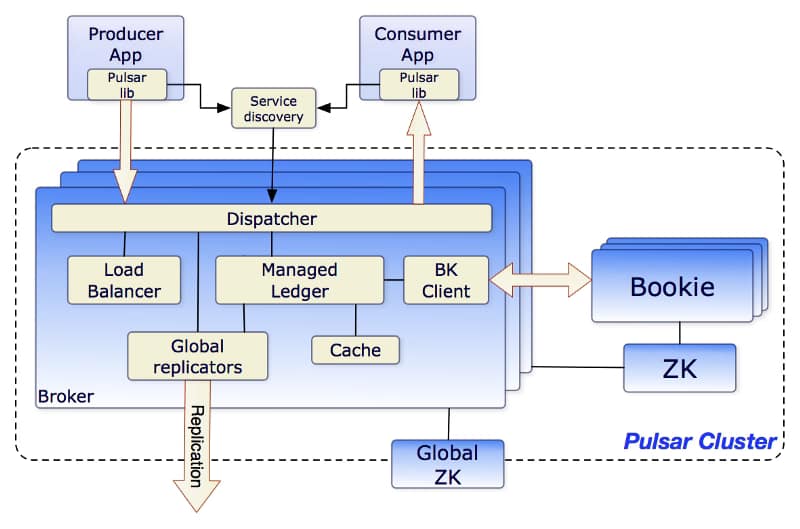
Apache Pulsar Architecture is similar to other comparable messaging systems today. As you can see in the picture below from the Apache Pulsar website, those are the main components of the architecture:
Brokers: One or more brokers handles incoming messages from producers, dispatches messages to consumers
So you can see this architecture is also quite similar to the Apache Kafka one again with the addition of a new concept of the BookKeeper Cluster.
Broker in Apache Pulsar are stateless components that mainly will run two pieces
HTTP Server that exposes a REST API for management and is used by consumers and producers for topic lookup.
TCP Server using a binary protocol called dispatcher that is used for all the data transfers. Usually, Messages are dispatched out of a managed ledger cache for performance purposes. But also if this cache grows too big, it will interact with the BookKeeper cluster for persistence reasons.
To support the Global Replication (Geo-Replication), the Brokers manage replicators that tail the entries published in the local region and republish them to the remote regions.
Apache BookKeeper Cluster is used as persistent message storage. Apache BookKeeper is a distributed write-ahead log (WAL) system that manages when messages should be persisted. It also supports horizontal scaling based on the load and multi-log support. Not only messages are persistent but also the cursors that are the consumer position for a specific topic (similar to the offset in Apache Kafka terminology)
Finally, Zookeeper Cluster is used in the same role as Apache Kafka as a metadata configuration storage cluster for the whole system.
Hello World using Apache Pulsar
Let’s see how we can create a quick “Hello World” case using Apache Pulsar as a protocol, and to do that, we’re going to try to implement it in a cloud-native fashion. So we will do a single-node cluster of Apache Pulsar in a Kubernetes installation and deploy a producer application using Flogo technology and a consumer application using Go. Something similar to what you can see in the diagram below:
Diagram about the test case we’re doing
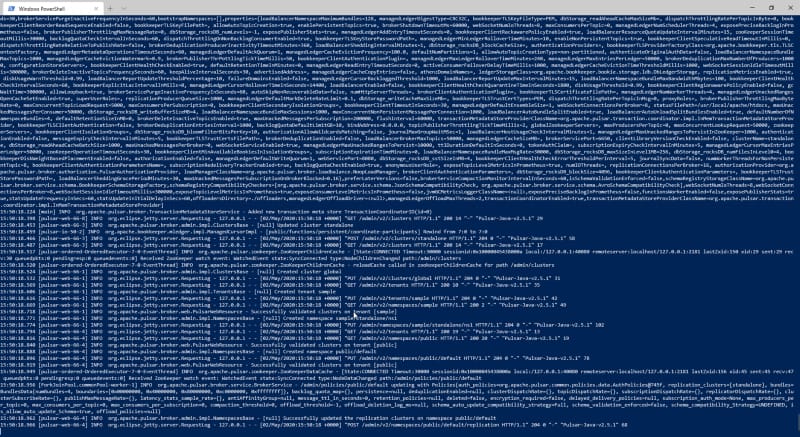
And we’re going to try to keep it simple, so we will just use pure docker this time. So, first of all, just spin up the Apache Pulsar server and to do that we will use the following command:
Now, we need to create simple applications, and for that, Flogo and Go will be used.
Let’s start with the producer, and in this case, we will use the open-source version to create a quick application.
First of all, we will just use the Web UI (dockerized) to do that. Run the command:
docker run -it -p 3303:3303 flogo/flogo-docker eula-accept
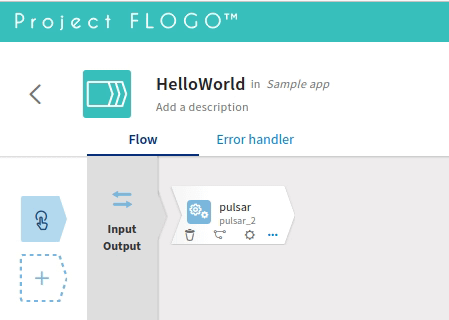
And we install a new contribution to enable the Pulsar publisher activity. To do that we will click on the “Install new contribution” button and provide the following URL:
// Receive messages from channel. The channel returns a struct which contains message and the consumer from where
 // the message was received. It’s not necessary here since we have 1 single consumer, but the channel could be
 // shared across multiple consumers as well
 for cm := range channel {
 msg := cm.Message
 fmt.Printf(“Received message msgId: %v — content: ‘%s’\n”,
 msg.ID(), string(msg.Payload()))
consumer.Ack(msg)
}
}
And after running both programs, you can see the following output as you can see, we were able to communicate both applications in an effortless flow.
This article is just a starting point, and we will continue talking about how to use Apache Pulsar in your architectures. If you want to take a look at the code we’ve used in this sample, you can find it here:
I know that we all live in a very complicated situation that has been forced all of us to work by a different set of rules, trying to catch up to be productive and work as we used to do it but in full remote work mode.
For some of us, this has been quite easy because people working in the Tech industry are, at some level, working remotely. Especially the people, like me, that works for International companies with teams from different locations, time zones and so, we were usual to some parts of the process. The tools we were using like Slack, Zoom, Microsoft Team, or Google Meet were not a new thing from us.
Also, we were used to managing different time zones from our meetings to be able to find a quite valid spot for all of us to be able to share our experience and so on. So, it seemed we were going to doing it perfectly. But, that’s not the case, and it is been pretty much for everyone.
Just let me ask you one question: How is your calendar now comparing to how it was before the pandemic? How many hours do you have just entirely for internal meetings?
If you search a little bit around even here in Medium you could find so many examples about this, also if you listening to the podcast you are already aware of this situation, each of us knows about that situation or we’re just experienced ourselves.
Because it seems we were trying to switch from the usual conversations we had in the office or with customers to an online conference about 30 minutes to catch up on any other topic that we usually managed in a quick coffee in the office or just a quick 2 minutes call.
Even that most of us have been grown in the Instant Messing world and I don’t want to talk about the “new things” if we can call WhatsApp, Telegram or Slack that way, we were doing that since long long time ago, with AOL, ICQ or IRC.
We’ve been trained ourselves in asynchronous communication but it seems we didn’t learn anything from it. How many meetings could be replaced by an email thread? How many meetings could be replaced by a slack channel?
We’re used to thinking the other way that the meeting is quite more effective than a mail thread, and that’s possibly true in some cases. We finally have all the stakeholders at the same time in the same place talking about the same topic makes that the matter of time dedicated to the issue is going to be less.
But the problem is where the number of conversations and topics grows exponentially because we also need to work based on that. We just heard a colleague of mine a few days ago saying something like this:
Now I have all day blocked with meetings
For each of these meetings, I end up with action items that I need to work on.
But based on how full my calendar is I have less time to work on them
Each day I have more work to do and not able to meet my deadlines
And this loop goes over and over and makes the situation worse each day, because it is true that we’re spending a lot of times in meetings but not only that, also meetings are quite more exhausted what makes you also with less energy to work on those action point you collected.
Also, there is the calendar schedule, as you have so many meetings you are not able to block some of your most productive time to work on those items, and you’re forced to work on them only of the free slots you’ve available between all those meetings. That means that you’re not choosing what you’re going to do now, you just need to fight to be able to find some slot to be able to clear your desk a little bit of those pending tasks.
So, it seems that email and asynchronous communication is the answer to everything we’re suffering now? No. Probably not, but at least asynchronous communication is focused on several key concepts that are important to keep in mind:
Your time is as valuable as anyone else.
When you are an organizer of a meeting and you have a list of attendees probably the importance of the topic to discuss will not be the same for each of them. Probably for you as the organizer you’re the most interested to host that meeting and get some output from it, but others probably have other important things in their minds too at those levels.
So, asynchronous communication allows everyone to handle their priorities and act on each item as they can be based on their priority list.
Flexibility is the key
I’m not forced to be at 9 PM my time to be able to meet my US colleagues or my Indian colleagues are not forced to do it at the same time with me. Asynchronous communication makes anyone be able to attend the important business during the time they’re most productive and also being able to manage their own schedule and time.
For me can be better to respond to those questions during my morning hours or the other way around I prefer to focus on some tasks at the beginning of my day and use the afternoon to cover those.
Management is required for asynchronous conversations too
The problem of the asynchronous communication as we know is that things can be slowed because based on the previous topics, questions could need more time to answer, but this can be solved using the management of those conversations. Things like deadlines, reminders, catchup 1 on 1 conversation could help to get closure to the topics. The role is the same as the meeting organizer does in the online meeting but using asynchronous tools.
Written versus Speaking misunderstanding
Usually, we said that is easier to not get the complete meaning of the conversation in an asynchronous world because we lack a lot of resources we have in our online meeting or even better in our face to face meetings. And that’s true. Even, with emojis and so on, we don’t have the same toolbox as we have using our voice or our body to do that, but this is not something that is not solved also in the other kinds of communication. How many times do we think that what another person was telling using his voice has a different meaning compared to what he really tried to say? We try to solve that with the meeting minutes and trying to put it into writing to be able to have a common understanding. And probably this is something that we avoid in asynchronous communication because this is already been written, but this shouldn’t be avoided as it also helps us to put all together again on the same page about our common understanding.
Wrap-up
So, I hope that we all learn about this situation to try to improve the way we communicate with each other to be more productive and more efficient and also to improve our time management purpose. And I’m aware that this probably not the situation for all of us, but this is quite usual and it’s important to keep those in mind even if we’re able to succeed during this meeting tsunami we’re facing each day.
Also, my expectations are that probably all we learn in this situation can help us to be more prepared for the next one or for our daily work when we go back to the new normal situation if this is going to happen at any point.
Serverless is already here. We know that. Even for companies that are starting their cloud journey moving to container-based platforms, they already know that serverless is in their future view at least for some specific use cases.
Its simplicity without needed to worry about anything related to the platform just focuses on the code and also the economics that comes with them makes this computing model a game-changer.
The mainstream platform for this approach at this moment is AWS Lambda from Amazon, we have read and heard a lot of AWS Lamba, but all the platforms are going to that path. Google with its Google Functions, Microsoft with its Azure. This is not just a thing for public cloud providers, also if you’re running on a private cloud approach you can use this deployment mode using frameworks like KNative or OpenFaaS. If you need more details about it, also we had some articles about this topic:
All of these platforms are updating and enhancing its option to execute any kind of code that you want on it, and this is what Azure Function just announced some weeks ago, the release of a Custom Handler approach to support any kind of language that you could think about:
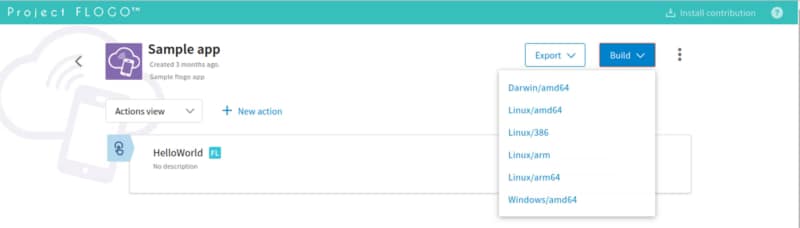
The first thing we need to do is to create our Flogo Application. I’m going to use Flogo Enterprise to do that, but you can do the same using the Open Source version as well:
We’re going to create a simple application just a Hello World REST service. As you can see here:
The JSON file of the Flogo Application you can find it in the GitHub repository shown below:
But the main configurations are the following ones:
Server will listen on the port specified by the environment variable FUNCTIONS_HTTPWORKER_PORT
Server will listen for a GET request on the URI /hello-world
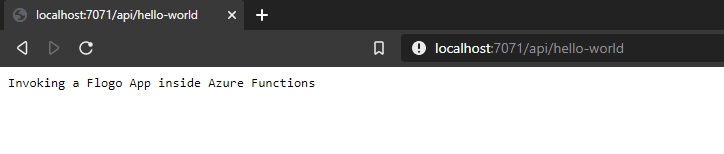
Response will be quite simple “Invoking a Flogo App inside Azure Functions”
Now, that we have the JSON file, we only need to start creating the artifacts needed to run an Azure Function.
We will need to install the npm package for the Azure Functions. To do that we need to run the following command:
npm i -g azure-functions-core-tools@3 --unsafe-perm true
It is important to have the “@3” because that way we reference the version that has this new Custom Handler logic to be able to execute it.
We will create a new folder call flogo-func and run the following command inside that folder:
func init --docker
Now we should select node as the runtime to be used and javascriptas the language. That could be something strange because we are going to use neither node, nor dotnet or pythonor powershell. But we will select that to keep it simple as we just try to focus on the Docker approach to do that.
After that we just need to create a new function, and to do that we need to type the following command:
func new
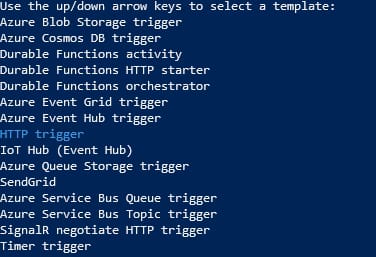
In the CLI-based interface that the Azure Function Core Tools shows us, we just need to select HTTP trigger and provide a name.
In our case, we will use hello-world as the name to keep it similar to what we defined as part of our Flogo Application. We will end up with the following folder structure:
Now we need to open the folder that is has been created and we need to do several things:
First of all, we need to remove the index.js file because we don’t need that file as this will not be a node JS function.
We need to copy the HelloWorld.json (our Flogo application) to the root folder of the function.
We need to change the host.json file to the following content:
Now, we need to generate the engine-windows-amd64.exe and to be able to do that we need to go to the FLOGO_HOME in our machine and go to the folder FLOGO_HOME/flogo/<VERSION>/bin and launch the following command:
./builder-windows-amd64.exe build
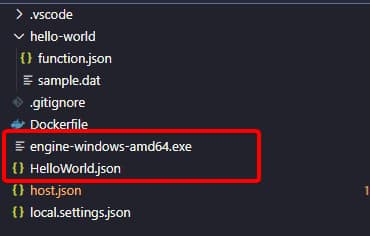
And you should get the engine-windows-amd64.exe as the output as you can see in the picture below:
Now, you just need to copy that file inside the folder of your function, and you should have the following folder structure as you can see here:
And once you have that, you just need to run your function to be able to test it locally:
func start
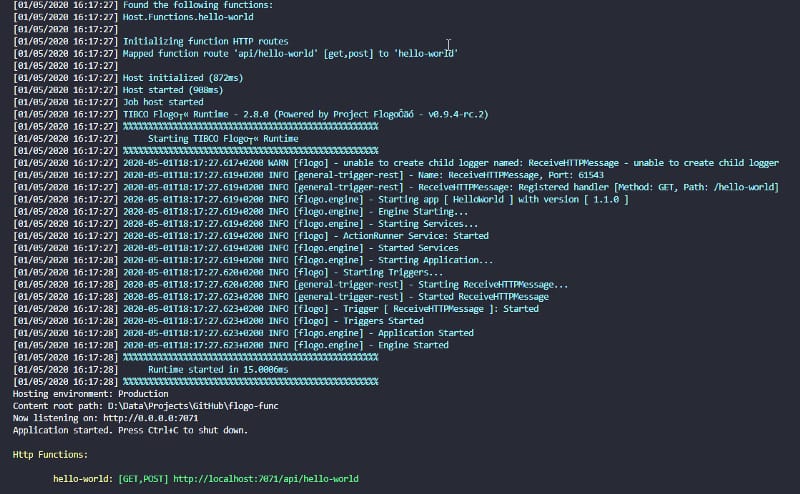
After running that command you should see an output similar to the one shown below:
I’d just like to highlight the startup time for our Flogo application around 15 milliseconds!!! Now, you only need to test it using any browser and just go to the following URL:
http://localhost:7071/api/hello-world
This has been just the first step on our journey but it was the steps needed to be able to run our Flogo application as part of your serverless environment hosted by Microsoft Azure platform!
We’re living in an age where technologies are switching standards are changing all the time. You forget to read Medium/Stackoverflow/Reddit and you found there are at least five (5) new industry standards that are taking the place of the existing ones that you know (those that have been releasing something like a year ago 🙂 ).
Do you still remember the old ages when SOAP was the unbeatable format? How much time did we spend building our SOAP Services in our enterprises? REST replace it as the new standard.. but just a few years and we’re back in a new battle just for synchronous communication: gRPC, GraphQL, are here to conquer everything again. It is crazy, huh?
But the situation is similar to asynchronous communication. Asynchronous communication has been here for a long time. Even, a long time before the terms Event-Driven Architecture or Streaming was really a “cool” term or a thing you be aware of.
We’ve been using these patterns for so long in our companies. Big enterprises have been using this model into their enterprise integrations for so long. Pub/Sub based protocols and technologies like TIBCO Rendezvous has been using since the late 90, and then we also incorporate more standards approaches like JMS using a different kind of servers to have all these event-based communications.
But now with the cloud-native revolution, the need for distributed computing, more agility, more scalability, centralized solutions are not valid anymore, and we’ve seen an explosion in the number of options to communicate based on these patterns.
You could think that this is the same situation as we were discussing at the beginning of this article regarding REST predominance and new cutting-edge technologies trying to replace it, but this is something quite different. Because experience has told us that a single size doesn’t fit all.
You cannot find a single technology or component that can provide all the communication needs that you need for all your use-cases. You can name any technology or protocol that you want: Kafka, Pulsar, JMS, MQTT, AMQP, Thrift, FTL, and so on.
Think about each of them and you probably will find some use-cases that one technology plays better than the others, so it makes no sense to just trying to find a single technology solution to cover all the needs. What it is needed is more a polyglot approach when you have different technologies that play well together and use the one that works best for your use case (the right tool for the right job approach) as we’re doing for the different technologies we’re deploying in our cluster.
Probably we’re not going to use the same technology to do a Machine Learning based Microservice, than a Streaming Application, right? The same principle applies here.
But the problem here when we try to talk about different technologies playing together is about standardization. If we think about REST, gRPC, or GraphQL even that they’re different they play based some common grounds. They rely on the same base HTTP protocol for a standard so it is easy to support all of them in the same architecture.
But this is not true with the technologies about Asynchronous Communication. And I’d like to focus on standardization and specification today. And that’s what AsyncAPI Initiative is trying to solve. And to define what AsyncAPI is I’d like to use their own words from their official website:
AsyncAPI is an open source initiative that seeks to improve the current state of Event-Driven Architectures (EDA). Our long-term goal is to make working with EDA’s as easy as it is to work with REST APIs. That goes from documentation to code generation, from discovery to event management. Most of the processes you apply to your REST APIs nowadays would be applicable to your event-driven/asynchronous APIs too.
So, their goal is to provide a set of tools to have a better world in all those EDA architectures that all companies have or starting to have at this moment and everything pivots around one thing: The OpenAPI Specification.
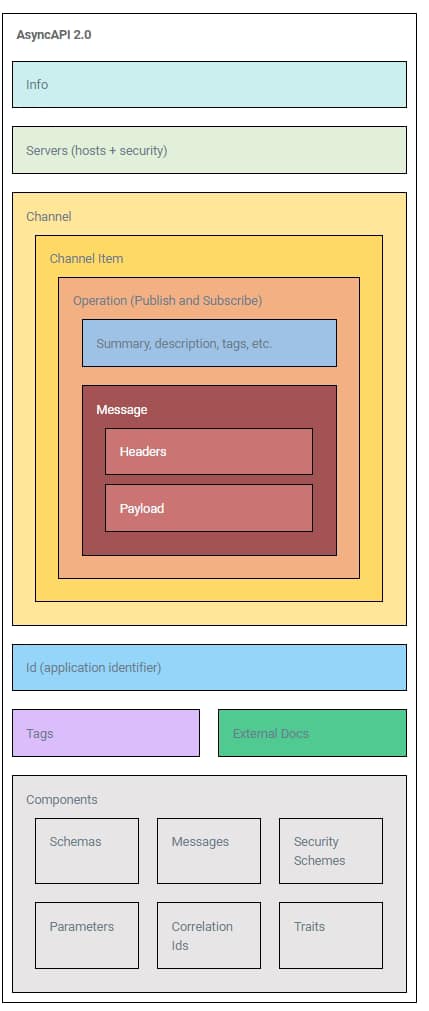
Similar to the OpenAPI specification it allows us to define a common interface for our EDA Interfaces and the most important part is that this is multi-channel. So the same specification can be used for your MQTT-based API or your Kafka API. Let’s take a look at how it looks like this AsyncAPI Specification:
As you can see it is very similar to the OpenAPI 3.0 and they already done that with the purpose to ease the transition between OpenAPI 3.0 and AsyncAPI and also to try to join both worlds together: It is more about just API, no matter if they’re synchronous or asynchronous and provide the same benefits regarding the ecosystem from one to the other.
Show me the code!!
But let’s stop talking and let’s start coding and to do that I’d like to use one of the tools that in my view has the greater support for AsyncAPI, and that’s it Project Flogo.
Probably you remember some of the different posts I’ve been done regarding Project Flogo and TIBCO Flogo Enterprise as a great technology to use for your microservices development (low-code/all-code approach, Golang based, a lot of connectors and open source extensions as well).
But today we’re going to use it to create our first AsyncAPI compliant microservice. And we’re going to rely on that because it provides a set of extensions to support the AsyncAPI initiative as you can see here:
GitHub – project-flogo/asyncapi: Flogo extensions to support AsyncAPI
Flogo extensions to support AsyncAPI. Contribute to project-flogo/asyncapi development by creating an account on GitHub.
So the first thing that we’re going to do is to create our AsyncAPI definition and to do it simpler, we’re going to use the sample one that we have available in the OpenAsync API with a simple change: We’re going to change from AMQP protocol to Kafka protocol because this is cool these days, isn’t it? 😉
asyncapi: '2.0.0'
info:
  title: Hello world application
  version: '0.1.0'
servers:
  production:
    url: broker.mycompany.com
    protocol: kafka
    description: This is "My Company" broker.
    security:
      - user-password: []
channels:
  hello:
    publish:
      message:
        $ref: '#/components/messages/hello-msg'
  goodbye:
    publish:
      message:
        $ref: '#/components/messages/goodbye-msg'
components:
  messages:
    hello-msg:
      payload:
        type: object
        properties:
          name:
            type: string
          sentAt:
            $ref: '#/components/schemas/sent-at'
    goodbye-msg:
      payload:
        type: object
        properties:
          sentAt:
            $ref: '#/components/schemas/sent-at'
  schemas:
    sent-at:
      type: string
      description: The date and time a message was sent.
      format: datetime
  securitySchemes:
    user-password:
      type: userPassword
As you can see something simple. Two operations “hello” and “goodbye” with easy payload:
name: Name that we’re going to use for the greeting.
sentAt: The date and time a message was sent.
So the first thing we’re going to do is to create a Flogo Application that complies to that AsyncAPI specification:
git clone https://github.com/project-flogo/asyncapi.git
cd asyncapi/
go install
Now we have the generator installer so we only need to execute and provide our YML as the input in the following command:
And we will create a HelloWorld application for us, that we need to tweak a little bit. Only to make you be up & running quickly, I’m just sharing the code in my GitHub repository that you can borrow from them (But I really encourage you to take the time to take a look at the code to see the beauty of the Flogo App Development 🙂 )
Now, that we already have the app, we have just a simple dummy application that allows us to receive the message that complies with the specification, and in our case just log the payload, which can be our starting point to build our new Event-Driven Microservices compliant with AsyncAPI.
So, let’s try it but to do so, we need a few things. First of all, we need a Kafka server running and to do that in a quick way we’re going to leverage on the following docker-compose.yml file:
And to run that we just need to fire the following command from the same folder we have this file named as docker-compose.yml:
docker-compose up -d
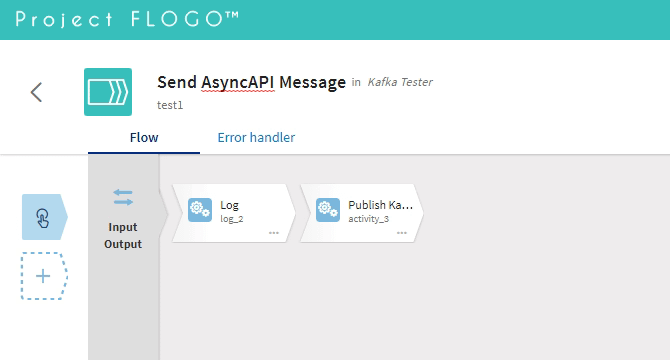
And after doing that, we just need a sample application and what better that use Flogo again to create it but this time, let’s use the Graphical Viewer to create it right away:
Simple Flogo Application to send a AsyncAPI complaint-message each minute using Kafka as a protocol
So we need just to configure the Publish Kafka activity to provide the broker (localhost:9092), the topic (hello) and the message :
{
"name": "hello world",
"sentAt": "2020-04-24T00:00:00"
}
And that’s it! Let’s run it!!!:
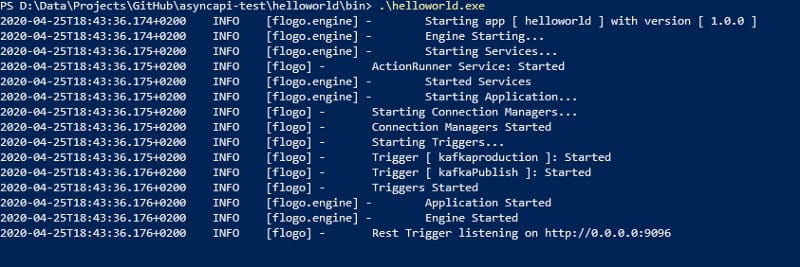
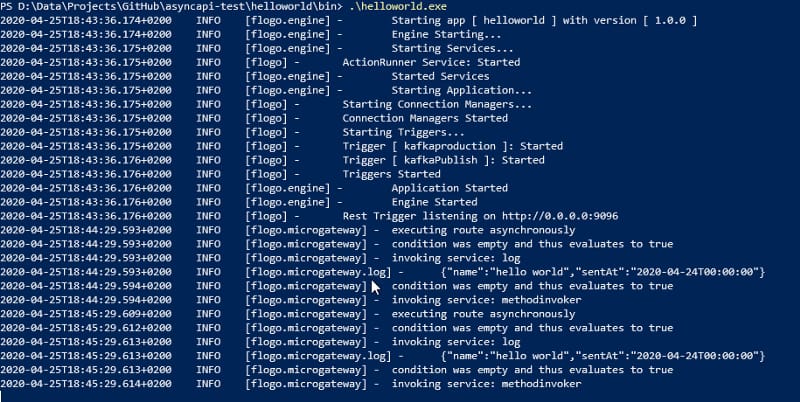
First we start the AsyncAPI Flogo Microservice:
Async API Flogo Microservices Started!
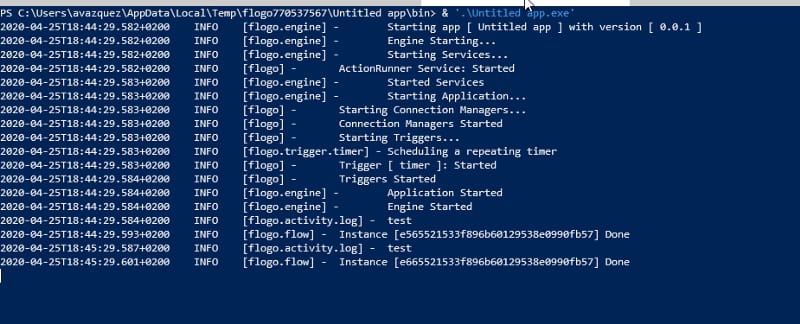
And then we just launch the tester, that is going to send the same message each minute, as you can see in the picture below:
Sample Tester sending sample messages
And each time we sent that message, is going to be received in our Async API Flogo Microservice:
So, I hope this first introduction to the AsyncAPI world has been of the interest of you, but don’t forget to take a look at more resources in their own website:
GitHub – project-flogo/asyncapi: Flogo extensions to support AsyncAPI
Flogo extensions to support AsyncAPI. Contribute to project-flogo/asyncapi development by creating an account on GitHub.
GitHub – alexandrev/asyncapi-flogo-test: This is the material that supports the post on Medium regarding “Welcome to the AsyncAPI Revoluton” and provide the flogo code needed to run the same sample that is being shown in the article
This is the material that supports the post on Medium regarding "Welcome to the AsyncAPI Revoluton" and provide the flogo code needed to run the same sample that is being shown in the art…