SoapUI is a popular open-source tool used for testing SOAP and REST APIs. It comes with a user-friendly interface and a variety of features to help you test API requests and responses. In this article, we will explore how to use SoapUI integrated with Maven for automation testing.
Why Use SoapUI with Maven?
Maven is a popular build automation tool that simplifies building and managing Java projects. It is widely used in the industry, and it has many features that make it an ideal choice for automation testing with SoapUI.
By integrating SoapUI with Maven, you can easily run your SoapUI tests as part of your Maven build process. This will help you to automate your testing process, reduce the time required to test your APIs, and ensure that your tests are always up-to-date.
Setting Up SoapUI and Maven
Before we can start using SoapUI with Maven, we must set up both tools on our system. First, download and install SoapUI from the official website. Once SoapUI is installed, we can proceed with installing Maven.
To install Maven, follow these steps:
Download the latest version of Maven from the official website.
Extract the downloaded file to a directory on your system.
Add the bin directory of the extracted folder to your system’s PATH environment variable.
Verify that Maven is installed by opening a terminal or command prompt and running the command mvn -version.
Creating a Maven Project for SoapUI Tests
Now that we have both SoapUI and Maven installed, we can create a Maven project for our SoapUI tests. To create a new Maven project, follow these steps:
Open a terminal or command prompt and navigate to the directory where you want to create your project.
Run the following command: mvn archetype:generate -DgroupId=com.example -DartifactId=my-soapui-project -DarchetypeArtifactId=maven-archetype-quickstart -DinteractiveMode=false
This will create a new Maven project with the group ID com.example and the artifact ID my-soapui-project.
Adding SoapUI Tests to the Maven Project
Now that we have a Maven project, we can add our SoapUI tests to the project. To do this, follow these steps:
Create a new SoapUI project by opening SoapUI and selecting File > New SOAP Project.
Follow the prompts to create a new project, including specifying the WSDL file and endpoint for your API.
Once your project is created, create a new test suite and add your test cases.
Save your SoapUI project.
Next, we need to add our SoapUI project to our Maven project. To do this, follow these steps:
In your Maven project directory, create a new directory called src/test/resources.
Copy your SoapUI project file (.xml) to this directory.
In the pom.xml file of your Maven project, add the following code:
This code configures the SoapUI Maven plugin to run our SoapUI tests during the test phase of the Maven build process.
Creating Assertions in SoapUI Projects
Now that we have our SoapUI tests added to our Maven project, we can create assertions to validate the responses of our API calls. To create assertions in SoapUI, follow these steps:
Open your SoapUI project and navigate to the test case where you want to create an assertion.
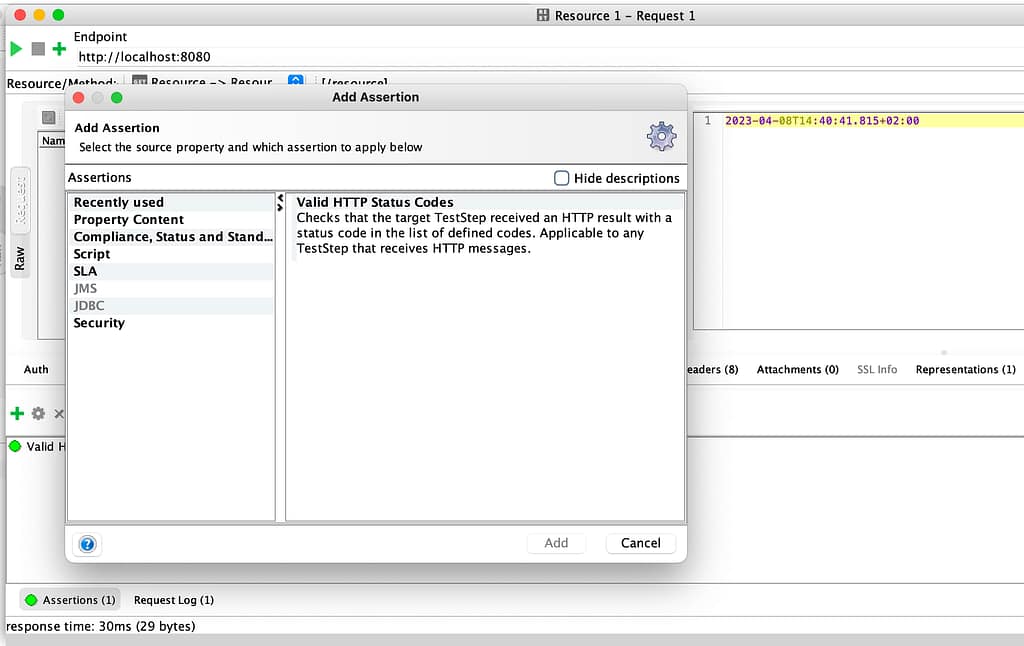
Right-click on the step that you want to validate and select Add Assertion.
Choose the type of assertion that you want to create (e.g. Contains, XPath Match, Valid HTTP Status Codes, etc.).
Configure the assertion according to your needs.
Save your SoapUI project.
Running SoapUI Tests with Assertions Using Maven
Now that we have our SoapUI tests and assertions added to our Maven project, we can run them using Maven. To run your SoapUI tests with Maven and validate the responses using assertions, follow these steps:
Open a terminal or command prompt and navigate to your Maven project directory.
Run the following command: mvn clean test
This will run your SoapUI tests and generate a report in the target/surefire-reports directory of your Maven project.
During the test execution, if any assertion fails, the test will fail and an error message will be displayed in the console. By creating assertions, we can ensure that our API calls are returning the expected responses.
Conclusion
In this article, we have learned how to use SoapUI integrated with Maven for automation testing, including how to create assertions in SoapUI projects. By using these two tools together, we can automate our testing process, reduce the time required to test our APIs, and ensure that our tests are always up-to-date. If you are looking to get started with automation testing using SoapUI and Maven, give this tutorial a try!
DevSecOps is a concept you probably have heard extensively in the last few months. You will see it in alignment with the traditional idea of DevOps. This probably, at some point, makes you wonder about a DevSecOps vs DevOps comparison, even trying to understand what are the main differences between them or if they are the same concept. And also, with other ideas starting to appear, such as Platform Engineering or Site Reliability, it is beginning to create some confusion in the field that I would like to clarify today in this article.
What is DevSecOps?
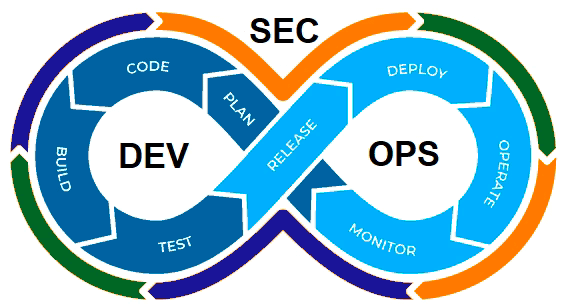
DevSecOps is an extension of the DevOps concept and methodology. Now, it is not a joint effort between Development and Operation practices but a joint effort among Development, Operation, and Security.
Diagram by GeekFlare: A DevSecOps Introduction (https://geekflare.com/devsecops-introduction/)
DevSecOps, or to be more explicit, including security practices as part of the DevOps process, is critical because we are moving to hybrid and cloud architectures where we incorporate new design, deployment, and development patterns such as containers, microservices, and so on.
This situation makes that we are moving from one side to having hundreds of applications in the most complex cases to thousands of applications, and to have dozens of servers to thousands of containers, each of them with different base images and third-party libraries that can be obsolete, have a security hole or just be raised new vulnerabilities such as we have seen in the past with the Spring Framework or the Log4J library to shout some of the most recent global substantial security issues that the companies dealt with.
So, even the most extensive security team cannot be at pace checking manually or with a set of scripting all the different new challenges to the security if we don’t include them as part of the overall process of the development and deployment of the components. This is where the concept of shift-left security is usually considered, and we already covered that in this article you can read here.
DevSecOps vs DevOps: Is DevSecOps just updated DevOps?
So based on the above definition, you can think: “Ok, so when somebody talks about DevOps as not thinking about security”. This is not true.
In the same aspect, when we talk about DevOps, it is not explicitly all the detailed steps, such as software quality assurance, unit testing, etc. So, as happens with many extensions in this industry, the original, global or generic concept includes the contents of the wings as well.
So, in the end, DevOps and DevSecOps are the same things, especially today when all companies and organizations are moving to the cloud or hybrid environments where security is critical and non-negotiable. Hence, every task that we do, from developing software to access to any service, needs to be done with Security in mind. But I used both concepts in different scenarios. I will use DevSecOps when I would like to explicitly highlight the security aspect because of the audience, the context, or the topic we are discussing to do differentiation.
Still, in any generic context, DevOps will include the security checks will be retained for sure because if it is not, it is just useless. Me.
Summary
So, in the end, when somebody speaks today about DevOps, it implicitly includes the security aspect, so there is no difference between both concepts. But you will see and also find it helpful to use the specific term DevSecOps when you want to highlight or differentiate this part of the process.
We have been talking recently about ConfigMap being one of the objects to store a different configuration for Kubernetes based-workloads. But what happens with sensitive data?
This is an interesting question, and the initial answer from the Kubernetes platform was to provide a Secrets object. Based on its definition from the Kubernetes official website, they define secrets like this:
A Secret is an object that contains a small amount of sensitive data such as a password, a token, or a key. Such information might otherwise be put in a Pod specification or in a container image. Using a Secret means that you don’t need to include confidential data in your application code
So, by default, secrets are what you should use to store your sensitive data. From the technical perspective, to use them, they behave very similar to ConfigMap, so you can link it to the different environment variables, mount it inside a pod, or even have specific usages for managing credentials for different kinds of accounts such as Service Accounts. This classifies the different types of secrets that you can create:
Opaque: This defines a generic secret that you can use for any purpose (mainly configuration data or configuration files)
Service-Account-Token: This defines the credentials for service accounts, but this is deprecated and no longer in use since Kubernetes 1.22.
Docker-Registry Credentials: This defines credentials to connect to the Docker registry to download images as part of your deployment process.
Basic or SSH Auth: This defines specific secrets to handle authentication.
TLS Secret:
Bootstrap Secrets:
But is it safe to use Kubernetes Secrets to store sensitive data? The main answer for any question in any tech-related topic is: It depends. But some controversy has arisen that this topic is also covered in the official Kubernetes page, highlighting the following aspects:
Kubernetes Secrets are, by default, stored unencrypted in the API server’s underlying data store (etcd). Anyone with API access can retrieve or modify a Secret, and so can anyone with access to etcd. Additionally, anyone who is authorized to create a Pod in a namespace can use that access to read any Secret in that namespace; this includes indirect access such as the ability to create a Deployment.
So, the main thing is, by default, this is a very, very insecure way. It seems more like a categorization of the data than a proper secure handle. Also, Kubernetes provide some tips to try to make this alternative more secure:
Enable Encryption at Rest for Secrets.
Enable or configure RBAC rules that restrict reading data in Secrets (including indirect means).
Where appropriate, also use mechanisms such as RBAC to limit which principals are allowed to create new Secrets or replace existing ones.
But that can be not enough, and that has created room for third-party and cloud providers to provide their solution that covers these needs and at the same time also offer additional features. Some of these options are the ones shown below:
Cloud Key Management Systems: Pretty much all the big cloud providers provide some way of Secret Management to go beyond these features and mitigate those risks. If we talk about AWS, there is AWS Secrets Manager , if we are talking about Azure, we have Azure Key Vault , and in the case of Google, we also have Google Secret Manager.
Sealed Secrets is a project that tries to extend Secrets to provide more security, especially on the Configuration as a Code approach, offers a safe way to store those objects in the same kind of repositories as you expose any other Kubernetes resource file. In its own words, “ The SealedSecret can be decrypted only by the controller running in the target cluster, and nobody else (not even the original author) can obtain the original Secret from the SealedSecret.”
Third-party Secrets Managers that are similar to the ones from the Cloud Providers that allows a more independent approach, and there are several players here such as Hashicorp Vault or CyberArk Secret Manager
Finally also, Spring Cloud Config can provide security to store data that are related to sensitive configuration concepts such as passwords and at the same time covers the same need as the ConfigMap provides from a unified perspective.
I hope this article has helped to understand the purpose of the Secrets in Kubernetes and, at the same time, the risks regarding its security and how we can mitigate them or even rely on other solutions that provide a more secure way to handle this critical piece of information.
GraalVM provides the capabilities to make Java a first-class language to create microservices at the same level as Go-Lang, Rust, NodeJS, and others.
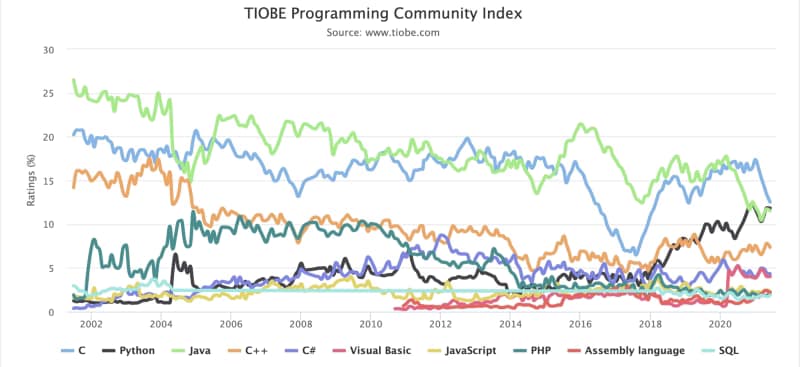
Java language has been the language leader for generations. Pretty much every piece of software has been created with Java: Web Servers, Messaging System, Enterprise Application, Development Frameworks, and so on. This predominance has been shown in the most important indexes like the TIOBE index, as is shown below:
But always, Java has some trade-offs that you need to make. The promise of the portability code is because the JVM allows us to run the same code in different OS and ecosystems. Still, at the same time, the interpreter approach will also provide a little bit of overhead compared with other compiled options like C.
That overhead was never a problem until we go inside the microservices route. When we have a server-based approach with an overhead of 100–200 MB, it is not a big problem compared with all the benefits it provides. Still, if we transform that server into, for example, hundreds of services, and each of them has a 50 MB overhead, this starts to become something to worry about.
Another trade-off was start-up time, again the abstraction layer provides a slower start-up time, but in client-service architecture, that was not an important issue if we need few more seconds to start serving requests. Still, today in the scalability era, this becomes critical if we talk about second-based startup time compared with milliseconds-based startup time because this provides better scalability and more optimized infrastructure usage.
So, how to provide all the benefits from Java and provide a solution for these trade-offs that were now starting to be an issue? And GraalVM becomes to be the answer to all of this.
GraalVM is based on its own words: “a high-performance JDK distribution designed to accelerate the execution of applications written in Java and other JVM languages,” which provides an Ahead-of-Time Compilation process to generate binary process from Java code that removes the traditional overhead from the JVM running process.
Regarding its use in microservices, this is a specific focus that they have given, and the promise of around 50x faster startup and 5x less memory footprint is just amazing. And this is why GraalVM becomes the foundation for high-level microservice development frameworks in Java-like Quarkus from RedHat, Micronaut, or even the Spring-Boot version powered by GraalVM.
So, probably you are just asking: How can I start using this? The first thing that we need to do is to go to the GitHub release page of the project and find the version for our OS and follow the instructions provided here:
GraalVM
GraalVM is a high-performance JDK distribution designed to accelerate the execution of applications written in Java and other JVM languages along with suppor...
Releases · graalvm/graalvm-ce-builds
GraalVM CE binaires built by the GraalVM community - graalvm/graalvm-ce-builds
When we have this installed, this is the moment to start testing it, and what better of doing so than creating a REST/JSON service and comparing it with a traditional OpenJDK 11-powered solution?
To create this REST service as simple as possible to focus on the difference between both modes, I will use the Spark Java Framework which is a minimal framework to create REST Services.
I will share all the code in this GitHub repository, so if you would like to take a look, clone it from here:
GitHub - alexandrev/graalvm-sample-rest-service: Sample REST Service Using GraalVM
Sample REST Service Using GraalVM . Contribute to alexandrev/graalvm-sample-rest-service development by creating an account on GitHub.
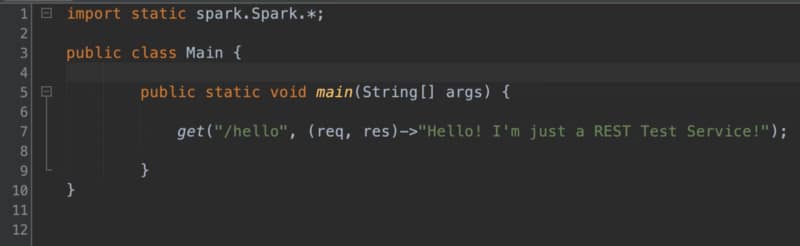
The code that we are going to use looks very simple, just a single line to create a REST service:
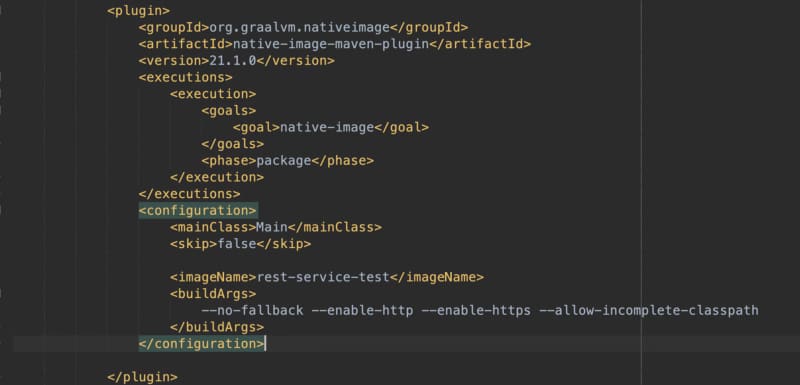
Then, we will use a GraalVM maven plugin for all the compilation processes. You can check all the options here:
GraalVM
GraalVM is a high-performance JDK distribution designed to accelerate the execution of applications written in Java and other JVM languages along with suppor...
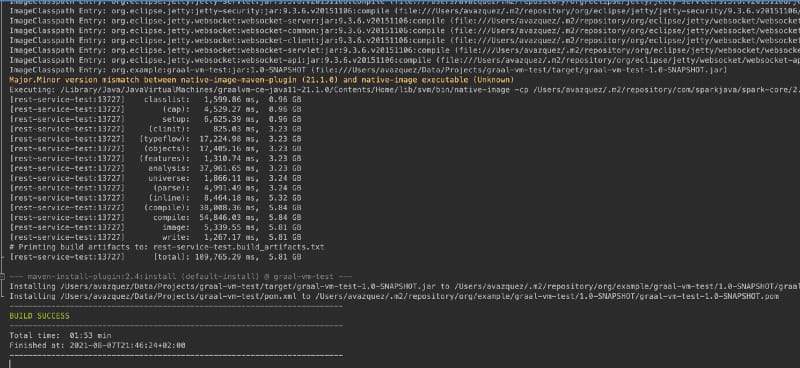
The compilation process takes a while (around 1–2 min). Still, you need to understand that this compiles everything to a binary process because the only output you will get out of this is a single binary process (named in my case rest-service-test) that will have all the things you need to run your application.
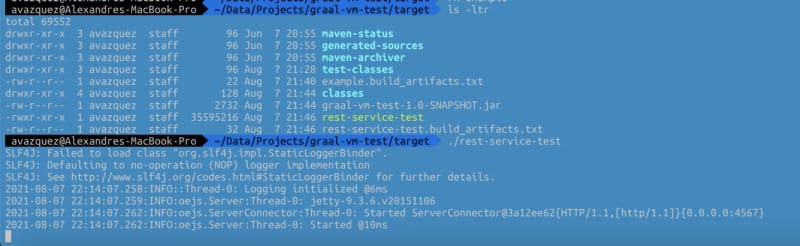
And finally, we will have a single binary that is everything that we need to run our application:
This binary is an exceptional one because it does not require any JVM on your local machine, and it can start in a few milliseconds. And the total size of the binary is 32M on disk and less than 5MB of RAM.
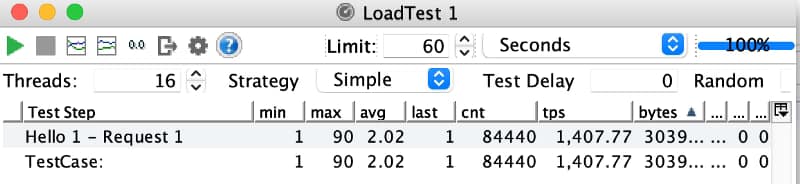
The output of this first tiny application is straightforward, as you saw, but I think you can get the point. But let’s see it in action I will launch a small load test with my computer with 16 threads launching requests to this endpoint:
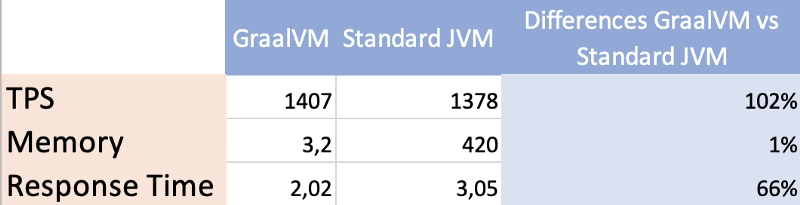
As you can see, this is just incredible, even with the lack of latency as this is just triggered by the same machine we are reaching with a single service a rate of TPS in 1 minute of more than 1400 requests/sec with a response time of 2ms for each of those.
And how does that compare with a normal JAR-based application with the same code exactly? For example, you can see in the table below:
In a nutshell, we have seen how using tools such as GraalVM we can make our JVM-based programs ready for our microservices environment avoiding the normal issues regarding high-memory footprint or small startup time that are critical when we are adopting a full cloud-native strategy in our companies or projects.
But, the truth must be told. This is not always as simple as we showed on this sample because depending on the libraries you are using, generating the native image can be much more complex and require a lot of configuration or just be impossible. So it is not everything already done but the future looks bright and full of hope.
Discover new options that you have at your disposal to do efficient disk usage in your Docker installation
The rise of the container has been a game-changer for all of us, not only at the server-side where pretty much any new workload that we deploy is deployed in a container form but also in our local environments happens same change.
We embrace containers to easily manage the different dependencies that we need to handle as developers. Even if the task at hand was not a container-related thing. Do you need a Database up & running? You use a containerized version of it. Do you need a Messaging System to test some of your applications? You quickly start a container providing that functionality.
And as soon as you don’t need them, those are killed, and your system is still as clean as it was before starting this task. But there are always things that we need to handle even when we have a wonderful solution in front of us, and in the case of a local docker environment, Disk Usage is one of the most critical ones.
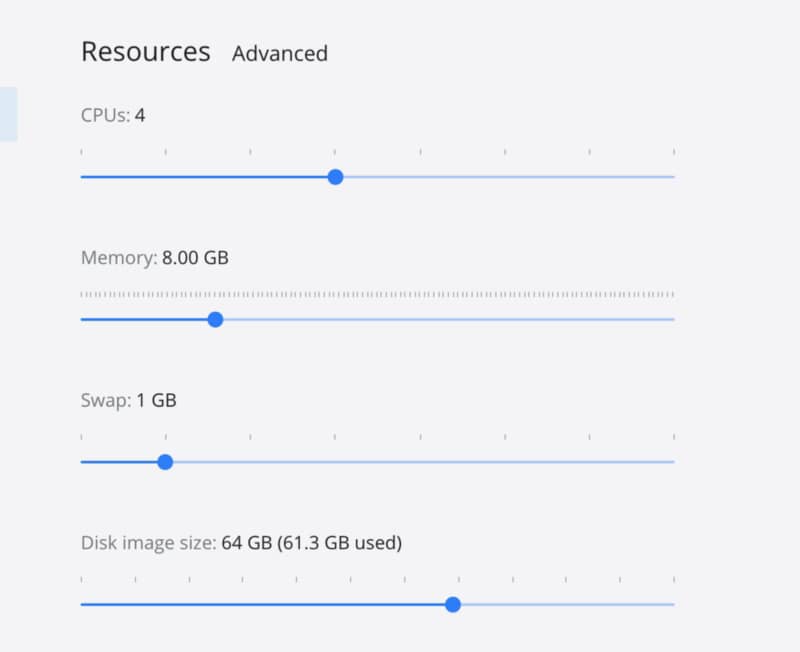
This process of launching new things over and over and then we get rid of them is true in some way because all these images that we have needed and all these containers we have launched are still there in our system waiting for a new round and during that time using our disk resources as you can see in a current picture of my local Docker environment with more than 60 GB used for that purpose.
Docker dashboard settings page image showing the amount of disk Docker is using.
The first thing we need to do is to check what is using this amount of space to see if we can release some of them. To do that, we can leverage on the docker system df command the docker CLI provides to us:
The output of the execution of the docker system df command
As you can see, the 61 GB that is in use are 20.88 GB per the images that I have in use, 21.03 MB just for the containers that I have defined, 1.25 GB for the local volumes 21.07 for the build cache. As I only have active 18 of the 26 images defined I can reclaim up to 9.3 GB that is an important amount.
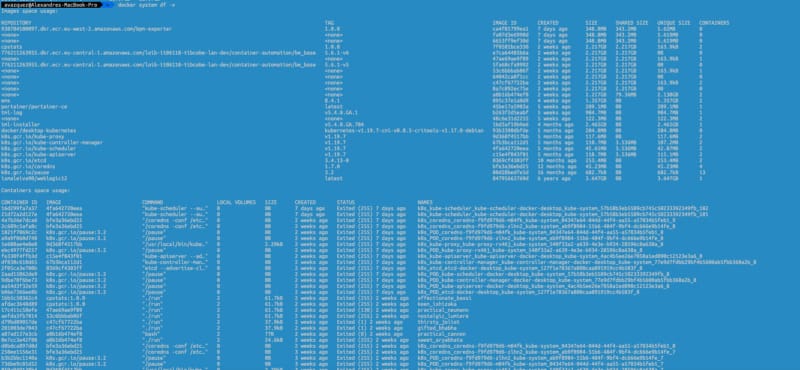
If we would like to get more details about this data, we can always use the verbose option as an append to the command, as you can see in the picture below:
Detailed verbose output of the docker system df -v command
So, after getting all this information, we can go ahead and execute a prune of your system. This activity will get rid of any unused container and image that you have in your system, and to execute that, you only need to type this:
docker system prune -af
It has several options to turn a little bit the execution that you can check on the Docker Oficial web page :
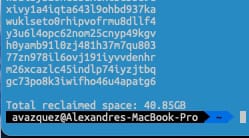
In my case, that help me to recover up to 40.8 GB of my system, as you can see in the picture below.
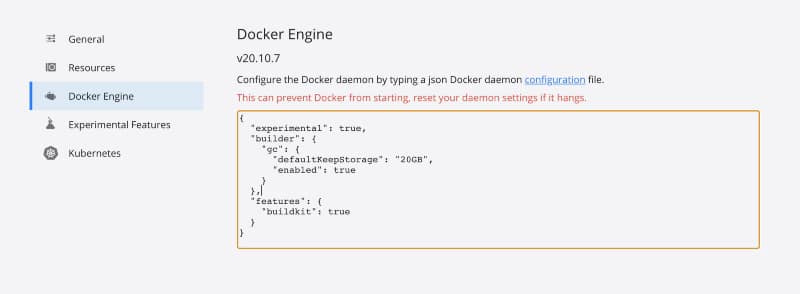
But if you would like to move one step ahead, you can also tune some properties to consider where you are executing this prune. For example, the defaultKeepStorage will help you define how much disk you want to use for this build-cache system to optimize the amount of network usage you do when building images with common layers.
To do that, you need to have the following snippet in your Docker Engine configuration section, as shown in the image below:
Docker Engine configuration with the defaultKeepStorage up to 20GB
I hope that all this housekeeping process will help your location environments to shine again and get the most of it without needing to waste a lot of resources in the process
Bash hacks knowledge is one of the ways to improve your performance. We spend many hours inside of them and have been developing patterns and habits when we log inside a computer. For example, if you have two people with a similar skill level and provide the same task to do, probably, they’re different tools aa nd different comet to the same path.
And that’s because the number of options available to do any task is so significant that each of us learns one or two way to do something, and we sticks to them, and we just automate those, so we’re not thinking when we’re typing them.
So, the idea today is to provide a list of some commands that I use all the time that probably you’re aware of, but for me are like time savings each day of my work life. So, let’s start with those.
1.- CTRL + R
This command is my predliect bash hack. It is the one I use all the time; as soon as I log into a remote machine that is new or just coming back to them, I use it for pretty much everything. Unfortunately, this command only allows you to search into the command history.
It helps you autocomplete based on the commands you’re already typing. It’s like the same thing as typing history | grep <something> but just faster and more natural for me.
This bash hack also allows me to autocomplete paths that I don’t remember the exact subfolder name or whatever. I do this tricky command every two weeks to clean some process memory or apply some configuration. Or just to troubleshoot in which machine I’m logging at a specific moment.
2.- find + action
Find command is something we all know, but most of you probably use it as a limited functionality from all the ones available from the find command. And that’s it because that command is incredible. It provides so many features. But this time, I’m just going to cover one specific topic. Actions after locating the files that we’re looking for.
We usually use the find command to find files or folders, which is evident for a command that it’s called that way. But also it allows us to add the -execparameter to concatenate an action to be done for each of the files that match your criteria, for example, something like this
Find all the yaml files in your current folder and just rename them to move them to a different folder. You can do it directly with this command:
So simple and so helpful bash hack. Just like our bash command to CTRL-Z. The command cd -allows us to go back to the previous folder we’re in.
So valuable for we got wrong the folder that we like to go, just to switch between two folders and so on quickly. It’s like going back to your browser or the CTRL -Z in your Word processor.
Wrap up
I hope you love this command as much as I do, and if you already know it, please let me in the responses to the bash hacks that are the most relevant for you daily. It can be because you use it all the time as I do with these or because even if you’re not using it so many times, the times that you do, it saves you a massive amount of time!
Apache Kafka seems to be the standard solution in nowadays architecture, but we should focus if it is the right choice for our needs.
Nowadays, we’re in a new age of Event-Driven Architecture, and this is not the first time we’ve lived that. Before microservices and cloud, EDA was the new normal in enterprise integration. Based on different kinds of standards, there where protocols like JMS or AMQP used in broker-based products like TIBCO EMS, Active MQ, or IBM Websphere MQ, so this approach is not something new.
With the rise of microservices architectures and the API lead approach, it seemed that we’ve forgotten about the importance of the messaging systems, and we had to go through the same challenges we saw in the past to come to a new messaging solution to solve that problem. So, we’re coming back to EDA Architecture, pub-sub mechanism, to help us decouple the consumers and producers, moving from orchestration to choreography, and all these concepts fit better in nowaday worlds with more and more independent components that need cooperation and integration.
During this effort, we started to look at new technologies to help us implement that again. Still, with the new reality, we forgot about the heavy protocols and standards like JMS and started to think about other options. And we need to admit that we felt that there is a new king in this area, and this is one of the critical components that seem to be no matter what in today’s architecture: Apache Kafka.
And don’t get me wrong. Apache Kafka is fantastic, and it has been proven for so long, a production-ready solution, performant, with impressive capabilities for replay and powerful API to ease the integration. Apache Kafka has some challenges in this cloud-native world because it doesn’t play so well with some of its rules.
If you have used Apache Kafka for some time, you are aware that there are particular challenges with it. Apache Kafka has an architecture that comes from its LinkedIn days in 2011, where Kubernetes or even Docker and container technologies were not a thing, that makes to run Apache Kafka (purely stateful service) in a container fashion quite complicated. There are improvements using helm charts and operators to ease the journey, but still, it doesn’t feel like pieces can integrate well into that fashion. Another thing is the geo-replication that even with components like MirrorMaker, it is not something used, works smooth, and feels integrated.
Other technologies are trying to provide a solution for those capabilities, and one of them is also another Apache Foundation project that has been donated by Yahoo! and it is named Apache Pulsar.
Don’t get me wrong; this is not about finding a new truth, that single messaging solution that is perfect for today’s architectures: it doesn’t exist. In today’s world, with so many different requirements and variables for the different kinds of applications, one size fits all is no longer true. So you should stop thinking about which messaging solution is the best one, and think more about which one serves your architecture best and fulfills both technical and business requirements.
We have covered different ways for general communication, with several specific solutions for synchronous communication (service mesh technologies and protocols like REST, GraphQL, or gRPC) and different ones for asynchronous communication. We need to go deeper into the asynchronous communication to find what works best for you. But first, let’s speak a little bit more about Apache Pulsar.
Apache Pulsar
Apache Pulsar, as mentioned above, has been developed internally by Yahoo! and donated to the Apache Foundation. As stated on their official website, they are several key points to mention as we start exploring this option:
Pulsar Functions: Easily deploy lightweight compute logic using developer-friendly APIs without needing to run your stream processing engine
Proven in production: Apache Pulsar has run in production at Yahoo scale for over three years, with millions of messages per second across millions of topics
Low latency with durability: Designed for low publish latency (< 5ms) at scale with strong durability guarantees
Geo-replication: Designed for configurable replication between data centers across multiple geographic regions
Multi-tenancy: Built from the ground up as a multi-tenant system. Supports Isolation, Authentication, Authorization, and Quotas
Persistent storages: Persistent message storage based on Apache BookKeeper. Provides IO-level isolation between write and read operations
Client libraries: Flexible messaging models with high-level APIs for Java, C++, Python and GO
Operability: REST Admin API for provisioning, administration, tools, and monitoring. Deploy on bare metal or Kubernetes.
So, as we can see, in its design, Apache Pulsar is addressing some of the main weaknesses of Apache Kafka as Geo-replication and their cloud-native approach.
Apache Pulsar provides support for the pub/sub pattern, but also provides so many capabilities that also place as a traditional queue messaging system with their concept of exclusive topics where only one of the subscribers will receive the message. Also provides interesting concepts and features used in other messaging systems:
Dead Letter Topics: For messages that were not able to be processed by the consumer.
Persistent and Non-Persistent Topics: To decide if you want to persist your messages or not during the transition.
Namespaces: To have a logical distribution of your topics, so an application can be grouped in namespaces as we do, for example, in Kubernetes so we can isolate some applications from the others.
Failover: Similar to exclusive, but when the attached consumer failed to process another takes the chance to process the messages.
Shared: To be able to provide a round-robin approach similar to the traditional queue messaging system where all the subscribers will be attached to the topic, but the only one will receive the message, and it will distribute the load along all of them.
Multi-topic subscriptions: To be able to subscribe to several topics using a regexp (similar to the Subject approach from TIBCO Rendezvous, for example, in the 90s) that has been so powerful and popular.
But also, if you require features from Apache Kafka, you will still have similar concepts as partitioned topics, key-shared topics, and so on. So you have everything at your hand to choose which kind of configuration works best for you and your specific use cases, you also have the option to mix and match.
Apache Pulsar Architecture
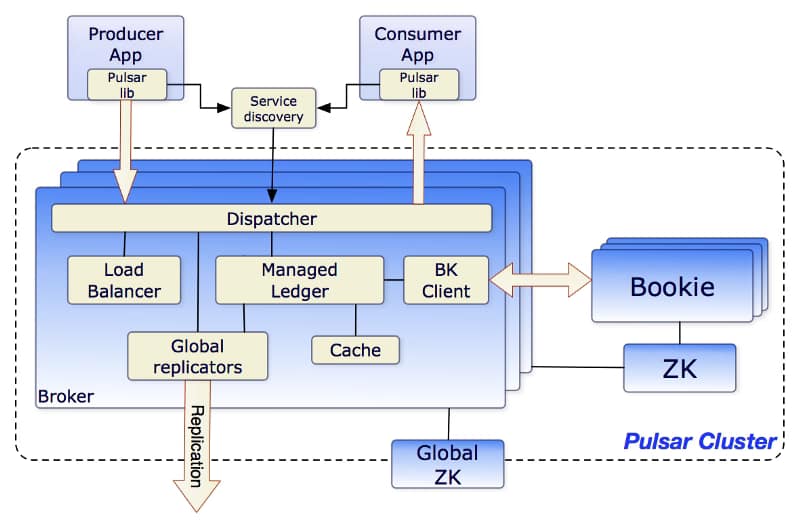
Apache Pulsar Architecture is similar to other comparable messaging systems today. As you can see in the picture below from the Apache Pulsar website, those are the main components of the architecture:
Brokers: One or more brokers handles incoming messages from producers, dispatches messages to consumers
So you can see this architecture is also quite similar to the Apache Kafka one again with the addition of a new concept of the BookKeeper Cluster.
Broker in Apache Pulsar are stateless components that mainly will run two pieces
HTTP Server that exposes a REST API for management and is used by consumers and producers for topic lookup.
TCP Server using a binary protocol called dispatcher that is used for all the data transfers. Usually, Messages are dispatched out of a managed ledger cache for performance purposes. But also if this cache grows too big, it will interact with the BookKeeper cluster for persistence reasons.
To support the Global Replication (Geo-Replication), the Brokers manage replicators that tail the entries published in the local region and republish them to the remote regions.
Apache BookKeeper Cluster is used as persistent message storage. Apache BookKeeper is a distributed write-ahead log (WAL) system that manages when messages should be persisted. It also supports horizontal scaling based on the load and multi-log support. Not only messages are persistent but also the cursors that are the consumer position for a specific topic (similar to the offset in Apache Kafka terminology)
Finally, Zookeeper Cluster is used in the same role as Apache Kafka as a metadata configuration storage cluster for the whole system.
Hello World using Apache Pulsar
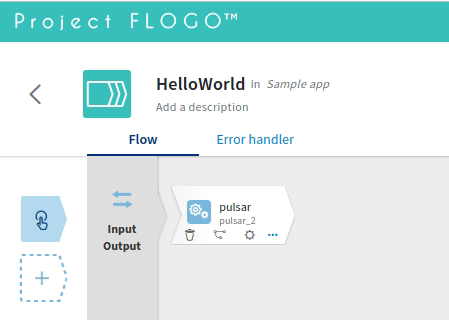
Let’s see how we can create a quick “Hello World” case using Apache Pulsar as a protocol, and to do that, we’re going to try to implement it in a cloud-native fashion. So we will do a single-node cluster of Apache Pulsar in a Kubernetes installation and deploy a producer application using Flogo technology and a consumer application using Go. Something similar to what you can see in the diagram below:
Diagram about the test case we’re doing
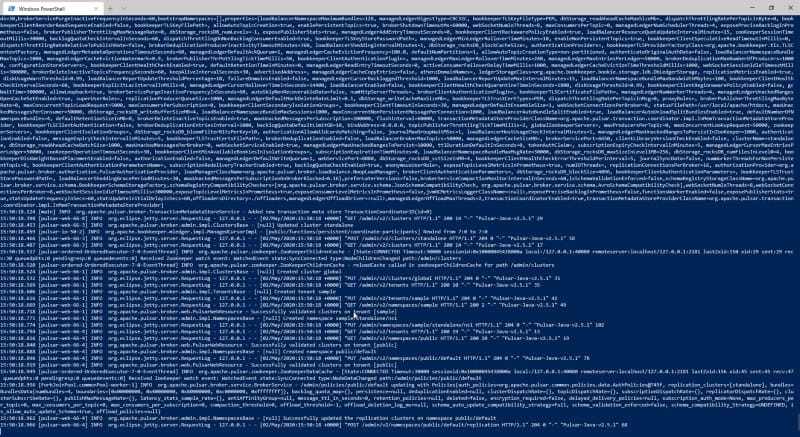
And we’re going to try to keep it simple, so we will just use pure docker this time. So, first of all, just spin up the Apache Pulsar server and to do that we will use the following command:
Now, we need to create simple applications, and for that, Flogo and Go will be used.
Let’s start with the producer, and in this case, we will use the open-source version to create a quick application.
First of all, we will just use the Web UI (dockerized) to do that. Run the command:
docker run -it -p 3303:3303 flogo/flogo-docker eula-accept
And we install a new contribution to enable the Pulsar publisher activity. To do that we will click on the “Install new contribution” button and provide the following URL:
// Receive messages from channel. The channel returns a struct which contains message and the consumer from where
 // the message was received. It’s not necessary here since we have 1 single consumer, but the channel could be
 // shared across multiple consumers as well
 for cm := range channel {
 msg := cm.Message
 fmt.Printf(“Received message msgId: %v — content: ‘%s’\n”,
 msg.ID(), string(msg.Payload()))
consumer.Ack(msg)
}
}
And after running both programs, you can see the following output as you can see, we were able to communicate both applications in an effortless flow.
This article is just a starting point, and we will continue talking about how to use Apache Pulsar in your architectures. If you want to take a look at the code we’ve used in this sample, you can find it here: