Grafana Alerting vs Prometheus Alertmanager: Key Differences and When to Use Each

Grafana Alerting vs Prometheus Alertmanager: Key Differences and When to Use Each

Introduction

Grafana Alerting capabilities continue to improve in each new release the GrafanaLabs team does. Especially with the changes done in Grafana 8 and Grafana 9, many questions have been raised regarding its usage, the capabilities supported, and the comparison with other alternatives.

We want to start setting the context about Grafana Alerting based on the usual stack we deployed to improve the observability of our workloads. Grafana can be used for any workload; there is a preference for some specific ones being the most used solution when we talk about Kubernetes workloads.

In this kind of deployment, the stack we usually deploy is Grafana as the visualization tool and Prometheus as the core to gather all metrics, so all responsibilities are differentiated. Grafana draws all the information using its excellent dashboarding capabilities, gathering the information from Prometheus.

Grafana Alerting vs AlertManager: A Comparison of Two Leading Monitoring Tools

When we plan to start including alerts, as we cannot accept that we need to have a specific team just watching dashboards to detect where something is going wrong, we need to implement a way to push alerts.

Alerting capabilities in Grafana have been present since the beginning, but its capabilities in the early stages have been limited to generating graphical alerts focused on the dashboards. Instead of that, Prometheus acting as the brain, includes a side-card component called AlertManager that can handle the creation and notification of any alerts generated from all the information stored in Prometheus.

As main capabilities that Alert Manager provides are the definition of the alerts, a grouping of the alerts, dismiss rules to mute some notifications, and finally, the way to send that alert to any system based on a plugin system and a webhook to be able to extend it to any component available.

Grafana Alerting vs AlertManager: A Comparison of Two Leading Monitoring Tools

So, this is the initial stage, but this has been changed with the latest releases of Grafana in the last months, as commented, and now the barrier between both components is much fuzzier, as we’re going to see.

What are the main capabilities Grafana Alerting provides today?

Grafana Alerting allows you to define Alert rules defining the criteria under which this alert should fire. It can have different queries, conditions, evaluation frequency, and the duration over which the condition is met.

This alert can be generated from any of the sources supported in Grafana, and that’s a very relevant topic as this is not limited to the Prometheus data. With the eclosion of the GrafanaLabs stack with many new products such as Grafana Loki and Grafana Mimir, among others, this is especially relevant.

Once each of the alerts once it fires, you can define a Notification policy to decide where, when, and how each of these alerts is routed to. A notification policy also has a contact point associated with one or more notifiers.

Additionally, you can silence alerts to stop receiving notifications of a specific alert instance and mute alerts when you can define some period where new alerts will not be generated or notified.

All of that with powerful dashboarding capabilities using all the power of the Grafana dashboard features.

Grafana Alerting vs AlertManager: A Comparison of Two Leading Monitoring Tools

 Grafana Alerting vs Prometheus Alert Manager

After reading the previous section probably, you are confused because most of the new features added are very similar to the ones we have available on Prometheus AlertManager.

So, in that case, what tool should we use? Should we replace Prometheus AlertManager and start using Grafana Alerting? Should we use both? As you can imagine, this is one of these questions that doesn’t have clear answers as it will depend a lot on the context and your specific scenario, but let me give you some pointers around it.

  • Grafana Alerting can be very powerful if you are already inside the Grafana stack. If you are already using Grafana Loki (and require to generate alerts from it), Grafana Mimir, or directly Grafana cloud, probably Grafana Alert would provide a better fit for your ecosystem.
  • If you require complex alerts defined with complex queries and calculations, Prometheus AlertManager will provide a much more complex and rich ecosystem to generate your alerts.
  • If you are looking for a SaaS approach, Grafana Alerting is also provided as part of Grafana Cloud, so it can be used without the requirement to be installed in your ecosystem.
  • If you are using Grafana Alerting, you need to consider that the same component serving the dashboards is computing and generating the alerts, which would require additional HA capabilities. It will be a non-evitable relationship between both features (dashboards and alerts). Suppose that doesn’t resonate well with you because the criticality of your dashboard is not the same as the alerts, or you think your dashboard’s usage can affect the alerts’ performance. In that case, Prometheus Alert Manager will provide a better approach as it runs in a specific pod in isolation.
  • At this moment, Grafana Alerting uses a SQL Database to manage duplication among other features, so depending on the number of alerts you need to work on could not be enough in terms of performance, and the usage of the time series database from Prometheus can be a better fit.

Summary

Grafana Alerting is incredible progress on the journey of the Grafana Labs team to provide an end-to-end observability stack with a great fit on the rest of the ecosystem with the option to run it in SaaS mode and focus on ease of use. But there are better options than depending on your needs.

📚 Want to dive deeper into Kubernetes? This article is part of our comprehensive Kubernetes Architecture Patterns guide, where you’ll find all fundamental and advanced concepts explained step by step.

Grafana LDAP Integration: Secure Authentication in Less Than 5 Minutes

Grafana LDAP Integration: Secure Authentication in Less Than 5 Minutes

This article will cover how to quickly integrate Grafana and LDAP server to increase the security of your application

Grafana is one of the most used dashboard tools, mainly for the observability platforms on cloud-workload environments. But none of these tools is complete until you can configure them to meet your security standards. Security is becoming each time more and more important and this is especially true when we are talking about any cloud-related component. So this topic should always something that any cloud architect has in mind when they are defining or implementing any piece of software today.

And at that point, the LDAP integration is one of the main things you will always need to do. I don’t know any enterprise, big or small, that allows the usage of any tool with a Graphical User Interface if it is not connected to the corporate directory.

So, let’s see how we can implement this with a popular tool such as Grafana. In my case, I’m going to use a containerized version of grafana, but the steps and things to do remains the same no matter the deployment model.

The task that we are going to perform is based on three steps:

  • Enable the LDAP settings
  • Basic LDAP settings configuration
  • Group mapping configuration

The first thing we need to modify is the grafana.ini adding the following snippet:

    [auth.ldap]
    enabled = true
    config_file = /etc/grafana/ldap.toml

That means that we are enabling the authentication based on LDAP and setting the location of the LDAP configuration file. This ldap.toml has all the configuration needed for the LDAP:

    [[servers]]
    host = "localhost"
    port = 389
    use_ssl = false
    start_tls = false
    ssl_skip_verify = false
  
    bind_dn = "XXXXXX-XXXXXXXXX"
    bind_password = "XXXXXX"
    
	search_filter = "(&(sAMAccountName=%s)(memberOf=ADMIN_GROUP))"
    search_base_dns = [DC=example,DC=org"]

  
    [servers.attributes]
    member_of = "member"
    email =  "mail"
    name = "givenName"
    surname = "sn"
    username = "sAMAccountName"

    [[servers.group_mappings]]
    group_dn = "*"
    org_role = "Admin"

The first part is regarding the primary connection. We will establish the host location and port, the admin user, and the password. After that, we will need a second section that definesearch_filter and search_base_dns to define the users that can access the system.

Finally, we have another section to define the mapping between the LDAP attributes and the grafana attributes to be able to gather the data from the LDAP.

    [servers.attributes]
    member_of = "member"
    email =  "mail"
    name = "givenName"
    surname = "sn"
    username = "sAMAccountName"

Also, we can define the privileges that the different groups allow to have to the various org_rolesin Grafana, as you can see in the snippet below:

    [[servers.group_mappings]]
    group_dn = "*"
    org_role = "Admin"

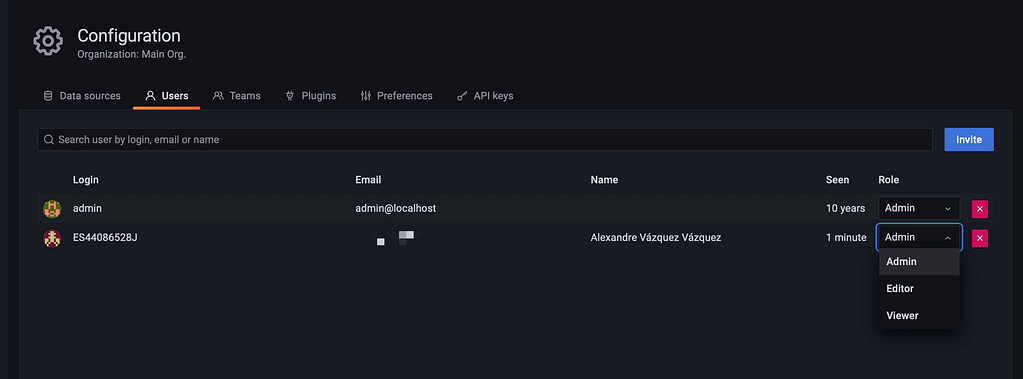
With all those changes in place, you need to restart the Grafana server to see all this configuration applied. After that point, you can log in using the LDAP credentials as you can see in the picture below and see all the data retrieved from the LDAP Server:
Grafana LDAP Integration: Secure Authentication in Less Than 5 Minutes

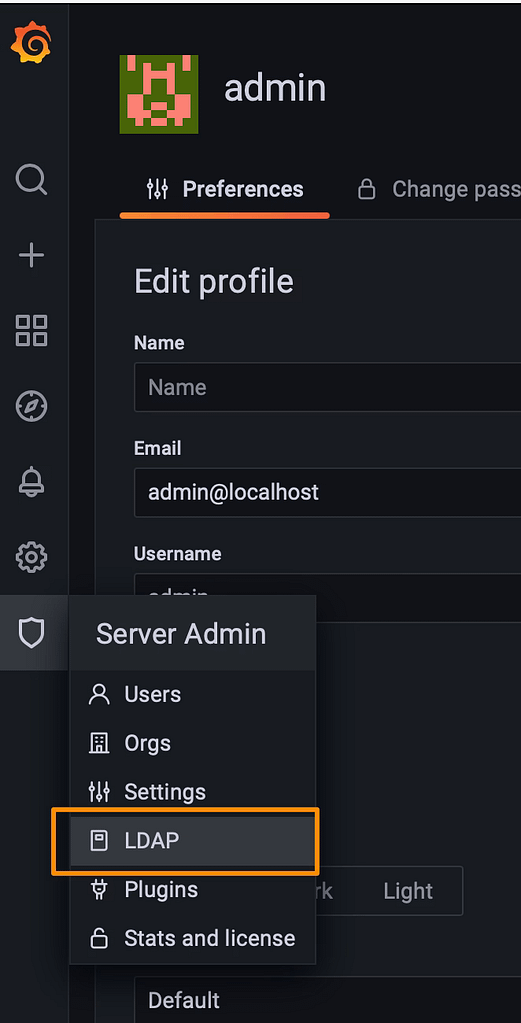
Using the default admin server, you can also use a new feature to test the LDAP configuration using the LDAP option that you can see in the picture below:
Grafana LDAP Integration: Secure Authentication in Less Than 5 Minutes

And then you can search for a User and you will see how this user will play on the Grafana Server:

  • Check the attributes will map from the LDAP server to the Grafana server
  • Also check the status of activity and the role allowed to this user

You can see one sample in the picture below:

I hope that this article helps you in a way to level up the security settings on your Grafana installations to integrate with the LDAP server. If you want to see more information about this and similar topics I encourage you to take a look at the links that you would find below these sentences.

Top 3 Ways to Deploy Grafana Loki on Kubernetes for Scalable Logging

Top 3 Ways to Deploy Grafana Loki on Kubernetes for Scalable Logging

Deployment Models for a Scalable Log Aggregation Architecture using Loki

Deploy a scalable Loki is not an straightforward task. We already have talked about Loki in previous posts on the site, and it is becoming more and more popular, and usage becomes much more regular each day. That is why I think it makes sense to include another post regarding Loki Architecture.

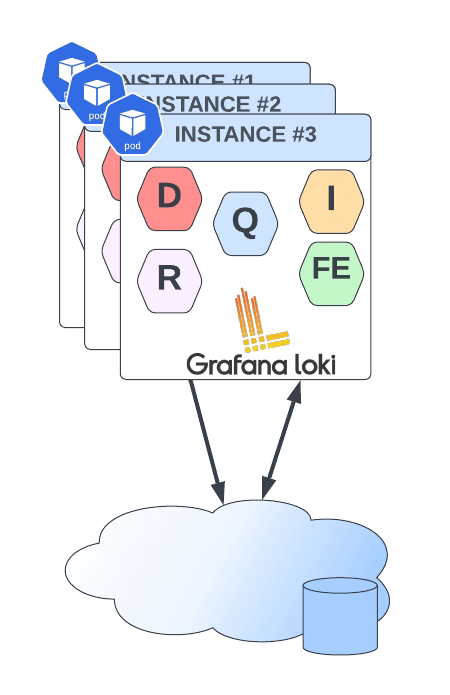
Loki has several advantages that promote it as a default choice to deploy a Log Aggregation Stack. One of them is its scalability because you can see across different deployment models how many components you like to deploy and their responsibilities. So the target of the topic is to show you how to deploy an scalable Loki solution and this is based on two concepts: components available and how you group them.

So we will start with the different components:

  • ingester: responsible for writing log data to long-term storage backends (DynamoDB, S3, Cassandra, etc.) on the write path and returning log data for in-memory queries on the read path.
  • distributor: responsible for handling incoming streams by clients. It’s the first step in the write path for log data.
  • query-frontend: optional service providing the querier’s API endpoints and can be used to accelerate the read path
  • querier: service handles queries using the LogQL query language, fetching logs from the ingesters and long-term storage.
  • ruler: responsible for continually evaluating a set of configurable queries and performing an action based on the result.

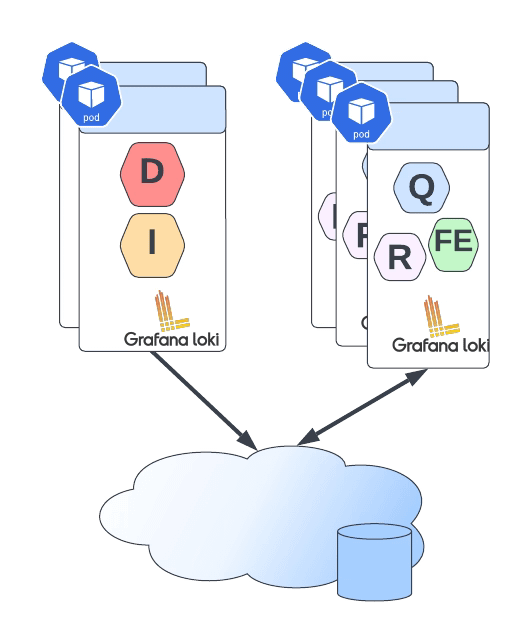
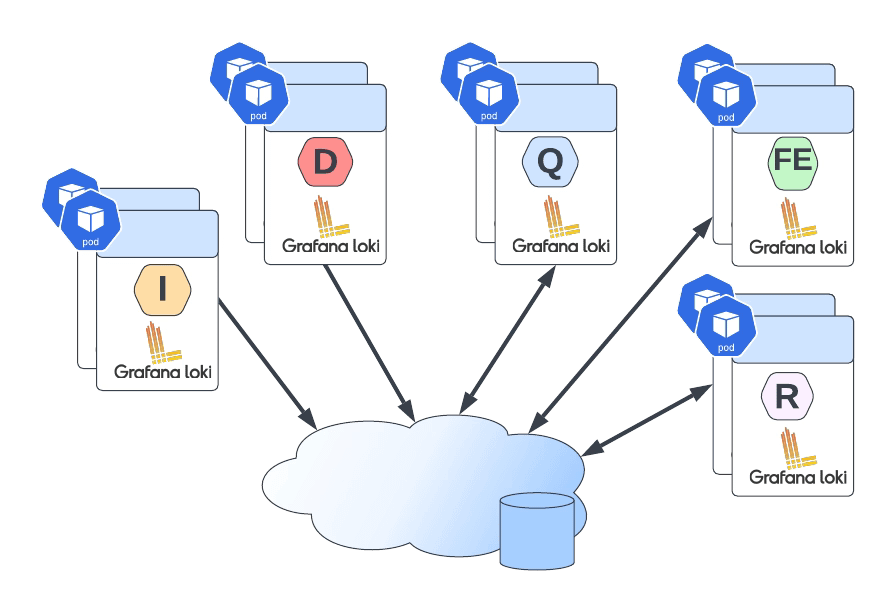
Then you can join them into different groups, and depending on the size of these groups, you have a different deployment topology, as shown below:

Top 3 Ways to Deploy Grafana Loki on Kubernetes for Scalable Logging
Loki Monolith Deployment Mode
  • Monolith: As you can imagine, all components are running together in a single instance. This is the simplest option and is recommended as a 100 GB / day starting point. You can even scale this deployment, but it will scale all components simultaneously, and it should have a shared object state.
Top 3 Ways to Deploy Grafana Loki on Kubernetes for Scalable Logging
Loki Simple Scalable Deployment Mode
  • Simple Scalable Deployment Model: This is the second level, and it can scale up at several TB of logs per day. It consists of splitting the components into two different profiles: read and write.
Top 3 Ways to Deploy Grafana Loki on Kubernetes for Scalable Logging
Loki Microservice Deployment Mode
  • Microservices: That means that each component will be managed independently, giving you all the power at your hand to scale each of these components alone.

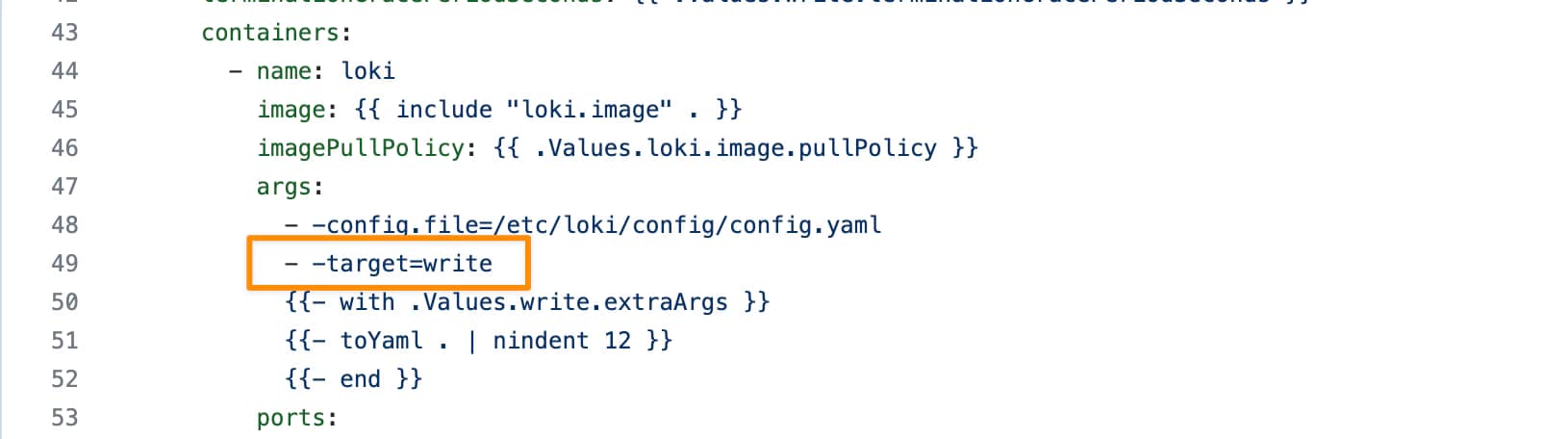
Defining the deployment model of each instance is very easy, and it is based on a single parameter named target. So depending on the value of the target it will follow one of the previous deployment models:

  • all (default): It will deploy as in monolith mode.
  • write: It will be the write path on the simple scalable deployment model
  • read: It will be the reading group on the simple, scalable deployment model
  • ingester, distributor, query-frontend, query-scheduler, querier, index-gateway, ruler, compactor: Individual values to deploy a single component for the microservice deployment model.

The target argument will help for an on-premises kind of deployment. Still, if you are using Helm for the installation, Loki already provides different helm charts for the other deployment models:

But all those helm charts are based on the same principle commented above on defining the role of each instance using the argument target, as you can see in the picture below:

Top 3 Ways to Deploy Grafana Loki on Kubernetes for Scalable Logging

📚 Want to dive deeper into Kubernetes? This article is part of our comprehensive Kubernetes Architecture Patterns guide, where you’ll find all fundamental and advanced concepts explained step by step.