Kubernetes Security Best Practices: A Shared Responsibility Between Developers and Operators

Kubernetes Security Best Practices: A Shared Responsibility Between Developers and Operators

Kubernetes Security is one of the most critical aspects today in IT world. Kubernetes has become the backbone of modern infrastructure management, allowing organizations to scale and deploy containerized applications with ease. However, the power of Kubernetes also brings forth the responsibility of ensuring robust security measures are in place. This responsibility cannot rest solely on the shoulders of developers or operators alone. It demands a collaborative effort where both parties work together to mitigate potential risks and vulnerabilities.

Even though DevOps and Platform Engineering approaches are pretty standard, there are still tasks responsible for different teams, even though nowadays you have platform and project teams.

Here you will see three easy ways to improve your Kubernetes security from both dev and ops perspectives:

No Vulnerabilities in Container Images

Vulnerability Scan on Container Images is something crucial in nowadays developments because the number of components deployed on the system has grown exponentially, and also the opacity of them as well. Vulnerabilities Scan using tools such as Trivy or the integrated options in our local docker environments such as Docker Desktop or Rancher Desktop is mandatory, but how can you use it to make your application more secure?

  • Developer’s responsibility:
    • Use only allowed standard base images, well-known
    • Reduce, at minimum, the number of components and packages to be installed with your application (better Alpine than Debian)
    • Use a Multi-Stage approach to only include what you will need in your images.
    • Run a vulnerability scan locally before pushing
  • Operator’s responsibility:
    • Force to download all base images for the corporate container registry
    • Enforce vulnerability scan on push, generating alerts and avoiding deployment if the quality criteria are unmet.
    • Perform regular vulnerability scans for runtime images and generate incidents for the development teams based on the issues discovered.

No Additional Privileges in Container Images

Now that our application doesn’t include any vulnerability, we need to ensure the image is not allowed to do what it should, such as elevating privileges. See what you can do depending on your role:

  • Developer responsibility:
    • Never create images with root user and use security context options in your Kubernetes Manifest files
    • Test your images with all the possible capabilities dropped unless needed for some specific reason
    • Make your filesystem read-only and use volumes for the required folders on your application.
  • Operator’s responsibility:

Restrict visibility between components

When we design applications nowadays, it is expected that they require to connect to other applications and components, and the service discovery capabilities in Kubernetes are excellent in how we can interact. Still, also this allows other apps to connect to services that maybe they shouldn’t. See what you can do to help on that aspect depending on your role and responsibility:

  • Developer responsibility:
    • Ensure your application has proper authentication and authorization policies in place to avoid any unauthorized use of your application.
  • Operation responsibility:
    • Manage at the platform level the network visibility of the components but deny all traffic by default and allow the connections required by design by using Network Policies.
    • Use Service Mesh tools to have a central approach for authentication and authorization.
    • Use tools like Kiali to monitor the network traffic and detect unreasonable traffic patterns.

Conclusion

In conclusion, the importance of Kubernetes security cannot be overstated. It requires collaboration and shared responsibility between developers and operators. By focusing on practices such as vulnerability scanning, restricting additional privileges, and restricting visibility between components, organizations can create a more secure Kubernetes environment. By working together, developers and operators can fortify the container ecosystem, safeguarding applications, data, and critical business assets from potential security breaches. With a collaborative approach to Kubernetes security, organizations can confidently leverage the full potential of this powerful orchestration platform while maintaining the highest standards of security. By adopting these practices, organizations can create a more secure Kubernetes environment, protecting their applications and data from potential threats.

📚 Want to dive deeper into Kubernetes? This article is part of our comprehensive Kubernetes Architecture Patterns guide, where you’ll find all fundamental and advanced concepts explained step by step.

Multi-Stage Dockerfiles Explained: Reduce Docker Image Size the Right Way

Multi-Stage Dockerfiles Explained: Reduce Docker Image Size the Right Way

Multi-Stage Dockerfile is the pattern you can use to ensure that your docker image is at an optimized size. We already have covered the importance of keeping the size of your docker image at a minimum level and what tools you could use, such as dive, to understand the size of each of your layers. But today, we are going to follow a different approach and that approach is a multi-stage build for our docker containers.

What is a Multi-Stage Dockerfile Pattern?

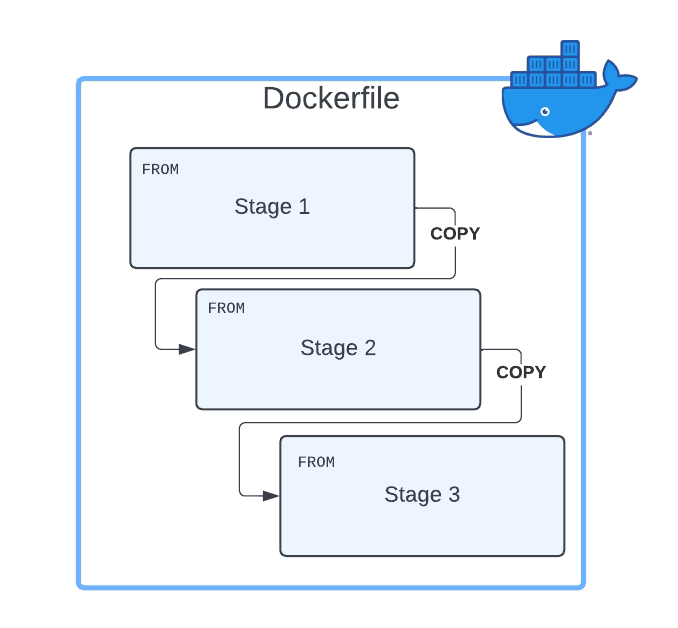
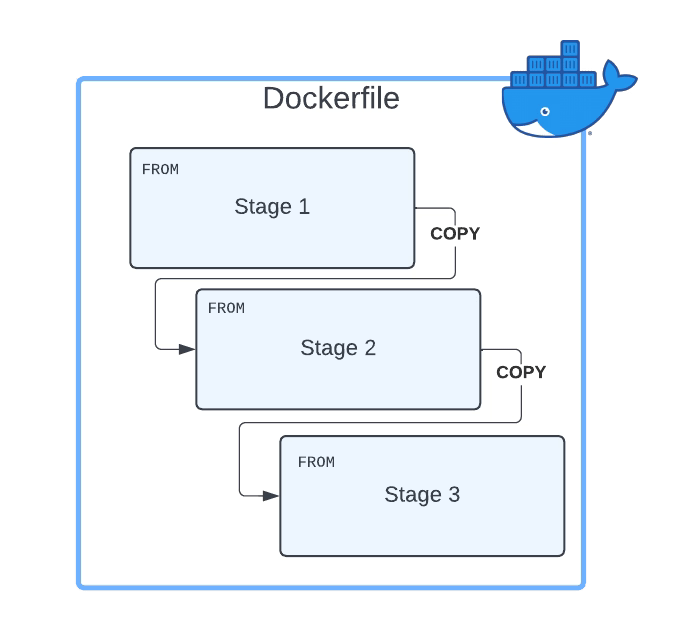
The multi-Stage Dockerfile is based on the principle that the same Dockerfile can have different FROM sentences and each of the FROM sentences starts a new stage of the build.

Multi-Stage Dockerfile Pattern

Why Multi-Stage Build Pattern Helps Reducing The Size of Container Images?

The main reason the usage of multi-stage build patterns helps reduce the size of the containers is that you can copy any artifact or set of artifacts from one stage to the other. And that is the most important reason. Why? Because that means that everything you do not copy is discarded and you are not carrying all these not required components from layer to layer and generating a bigger unneeded size of the final Docker image.

How do you define a Multi-Stage Dockerfile

First, you need to have a Dockerfile with more than one FROM. As commented, each of the FROM will indicate the start of one stage of the multi-stage dockerfile. To differentiate them or reference them, you can name each of the stages of the Dockerfile by using the clause AS alongside the FROM command, as shown below:

 FROM eclipse-temurin:11-jre-alpine AS builder

As a best practice, you can also add a new label stage with the same name you provided before, but that is not required. So, in a nutshell, a Multi-Stage Dockerfile will be something like this:

FROM eclipse-temurin:11-jre-alpine AS builder
LABEL stage=builder
COPY . /
RUN apk add  --no-cache unzip zip && zip -qq -d /resources/bwce-runtime/bwce-runtime-2.7.2.zip "tibco.home/tibcojre64/*"
RUN unzip -qq /resources/bwce-runtime/bwce*.zip -d /tmp && rm -rf /resources/bwce-runtime/bwce*.zip 2> /dev/null


FROM  eclipse-temurin:11-jre-alpine 
RUN addgroup -S bwcegroup && adduser -S bwce -G bwcegroup

How do you copy resources from one stage to another?

This is the other important part here. Once we have defined all the stages we need, and each is doing its part of the job, we need to move data from one stage to the next. So, how can we do that?

The answer is by using the command COPY. COPY is the same command you use to move data from your local storage to the container image, so you will need a way to differentiate that this time you are not copying it from your local storage but another stage, and here is where we are going to use the argument --from. The value will be the name of the stage we learned in the previous section to declare. So a complete COPYcommand will be something like the snippet shown below:

 COPY --from=builder /resources/ /resources/

What is the Improvement you can get?

That is the essential part and will depend on how your Dockerfiles and images are created, but the primary factor you can consider is the number of layers your current image has. The bigger the number of layers, the more significant that you can probably save on the amount of the final container image in a multi-stage dockerfile.

The main reason is that each layer will duplicate part of the data, and I am sure you will not need all of the layer’s data in the next one. And using the approach comments in this article, you will get a way to optimize it.

 Where can I read more about this?

If you want to read more, you would need to know that the multi-stage dockerfile is documented as one of the best practices on the Docker official web page, and they have a great article about this by Alex Ellis that you can read here.

📚 Want to dive deeper into Kubernetes? This article is part of our comprehensive Kubernetes Architecture Patterns guide, where you’ll find all fundamental and advanced concepts explained step by step.

Helm Loops Explained: A Practical Helm Hack to Avoid Deployment Issues

Helm Loops Explained: A Practical Helm Hack to Avoid Deployment Issues

Introduction


When working with complex Helm deployments, mastering loops is just one piece of the puzzle. For a comprehensive understanding of Helm from fundamentals to advanced patterns, check out our complete Helm Charts & Kubernetes Package Management Guide.
Helm Charts are becoming the default de-factor solution when you want to package your Kubernetes deployment to be able to distribute or quickly install it in your system.

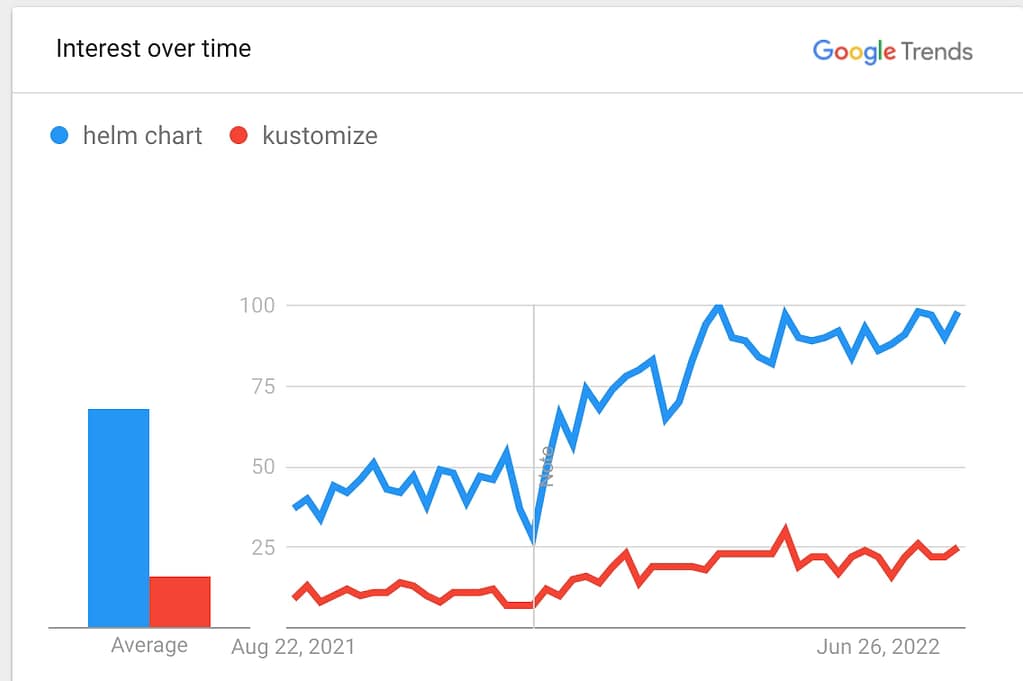
Defined several times as the apt for Kubernetes for its similarity with the ancient package manager from GNU/Linux Debian-like distributions, it seems to continue to grow in popularity each month compared with other similar solutions even more tightly integrated into Kubernetes such as Kustomize, as you can see in the Google Trends picture below:

Helm Loops: Helm Charts vs Kustomize

But creating these helm charts is not as easy as it shows. If you already have been on the work of doing so, you probably get stuck at some point, or you spend a lot of time trying to do some things. If this is the first time you are creating one or trying to do something advanced, I hope all these tricks will help you on your journey. Today we are going to cover one of the most important tricks, and those are Helm Loops.

Helm Loops Introduction

If you see any helm chart for sure, you will have a lot of conditional blocks. Pretty much everything is covered under an if/else structure based on the values.yml files you are creating. But this gets a little bit tricky when we talk about loops. But the great thing is that you will have the option to execute a helm loop inside your helm charts using the rangeprimitive.

How to create a Helm Loop?

The usage of the rangeprimitive is quite simple, as you only need to specify the element you want to iterate across, as shown in the snippet below:

{{- range .Values.pizzaToppings }}
- {{ . | title | quote }}
{{- end }}    

This is a pretty simple sample where the yaml will iterate over the values that you have assigned to the pizzaToppings structure in your values.yml

There are some concepts to keep in mind in this situation:

  • You can easily access everything inside this structure you are looping across. So, if pizza topping has additional fields, you can access them with something similar to this:
{{- range.Values.pizzaToppings }}
- {{ .ingredient.name | title | quote }}
{{- end }}    

And this will access a structure similar to this one in your values.yml:

 pizzaToppings:
	- ingredient:
		name: Pinneaple
		weight: 3

The good thing is that you can access their underlying attribute without replicating all the parent hierarchy until you reach the looping structure because inside the range section, the scope has changed. We will refer to the root of each element we are iterating across.

How to access parent elements inside a Helm Loop?

In the previous section, we covered how easily we can access the inner attribute inside the loop structure because of the change of scope, which also has an issue. In case I want to access some element in the parent of my values.yml file or somewhere outside the structure, how can I access them?

The good thing is that we also have a great answer to that, but you can get there. We need to understand a little bit about the scopes in Helm.

As commented, . refers to the root element in the current scope. If you have never defined a range section or another primitive that switches the context, .always will refer to the root of your values.yml. That is why when you see a helm chart, you see all the structures with the following way of working: .Values.x.y.z, but we already have seen that when we have a range section, this is changing, so this is not a good way.

To solve that, we have the context $ that constantly refers to the root of the values. ymlno matter which one is the current scope. So that means that if I have the following values.yml:

base:
	- type: slim 
pizzaToppings:
	- ingredient:
		name: Pinneaple
		weight: 3
	- ingredient:
		name: Apple
		weight: 3

And I want to refer to the base type inside the range section similar to before I can do it using the following snippet:

{{- range .Values.pizzaToppings }}
- {{ .ingredient.name | title | quote }} {{ $.Values.base.type }}
{{- end }}    

That will generate the following output:

 - Pinneaple slim
 - Apple slim

So I hope this helm chart trick will help you with the creation, modification, or improvement of your upgraded helm charts in the future by using helm loops without any further concern!

3 Unusual Developer Tools That Seriously Boost Productivity (Beyond VS Code)

3 Unusual Developer Tools That Seriously Boost Productivity (Beyond VS Code)

A non-VS Code list for software engineers

This is not going to be one of those articles about tools that can help you develop code faster. If you’re interested in that, you can check out my previous articles regarding VS Code extensions, linters, and other tools that make your life as a developer easier.

My job is not only about software development but also about solving issues that my customers have. While their issues can be code-related, they can be an operation error or even a design problem.

I usually tend to define my role as a lone ranger. I go out there without knowing what I will face, and I need to be ready to adapt, solve the problem, and make customers happy. This experience has helped me to develop a toolchain that is important for doing that job.

Let’s dive in!


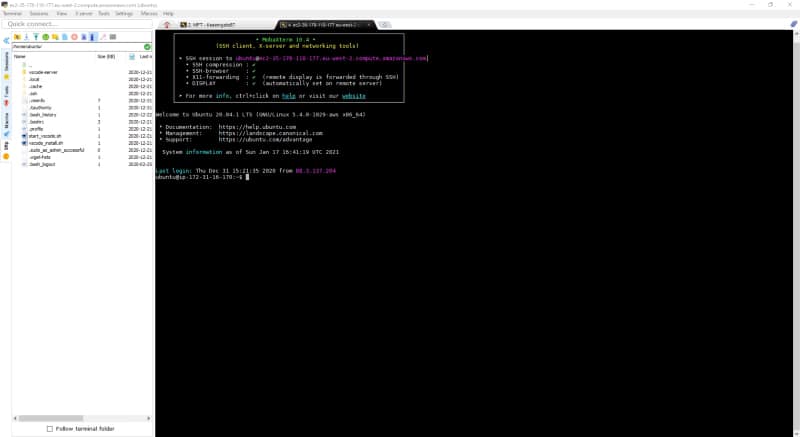
1. MobaXterm

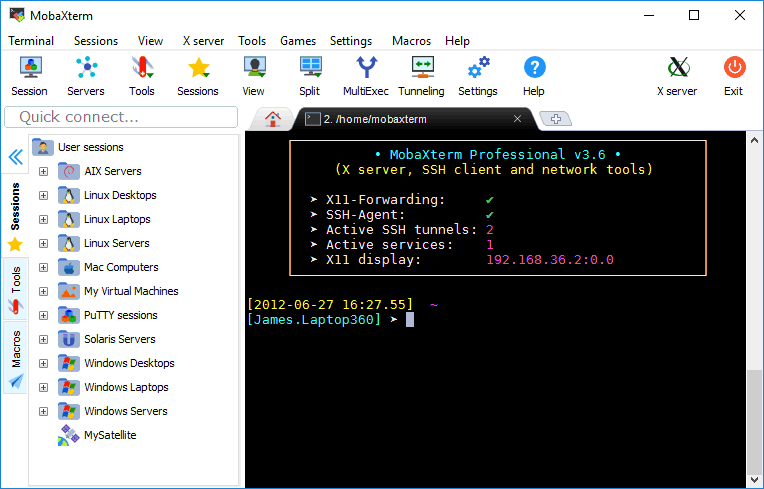
This is the best tool to manage different connections to different servers (SSH access for a Linux server, RDP for a Windows server, etc.). Here are some of its key features:

  • Graphical SSH port-forwarding for those cases when you need to connect to a server you don’t have direct access to.
  • Easy identity management to save the passwords for the different servers. You can organize them hierarchically for ease of access, especially when you need to access so many servers for different environments and even different customers.
  • SFTP automatic connection when you connect to an SSH server. It lets you download and upload files as easily as dropping files there.
  • Automatical X11 forwarding so you can launch graphical applications from your Linux servers without needing to configure anything or use other XServers like XMing.
MobaXterm in action
MobaXterm in action

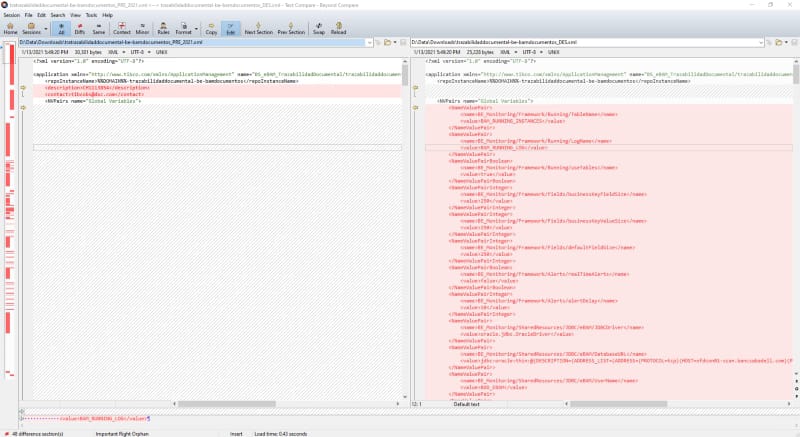
2. Beyond Compare

There are so many tools to compare files, and I think I have used all of them — from standalone applications like WinMerge, Meld, Araxis, KDiff, and others to extensions for text editors like VS Code and Notepad++.

However, none of those can compare to the one and only Beyond Compare.

I covered Beyond Compare when I started working on software engineering in 2010, and it is a tool that comes with me on each project I have. I use it every day. So, what makes this tool different from the rest?

It is simply the best tool to make any comparison because it does not just compare text and folders. It does that perfectly, but at the same time, it also compares ZIP files while browsing the content, JAR files, and so on. This is very important when we’d like to check if two JAR files that are uploaded in DEV and PROD are the same version of the tool or to know if a ZIP file has the right content when it is uploaded.

Beyond Compare in action
Beyond Compare 4

3. Vi Editor

This is the most important one — the best text editor of all time — and it is available pretty much on every server.

It is a command-line text editor with a huge number of shortcuts that allows you to be very productive when you are inside a server checking logs and configuration files to see where the problem is.

For a long time, I have had a Vi cheat sheet printed out to make sure I can master the most important shortcuts and thus increase my productivity while fighting inside the enemy lines (the customer’s servers).

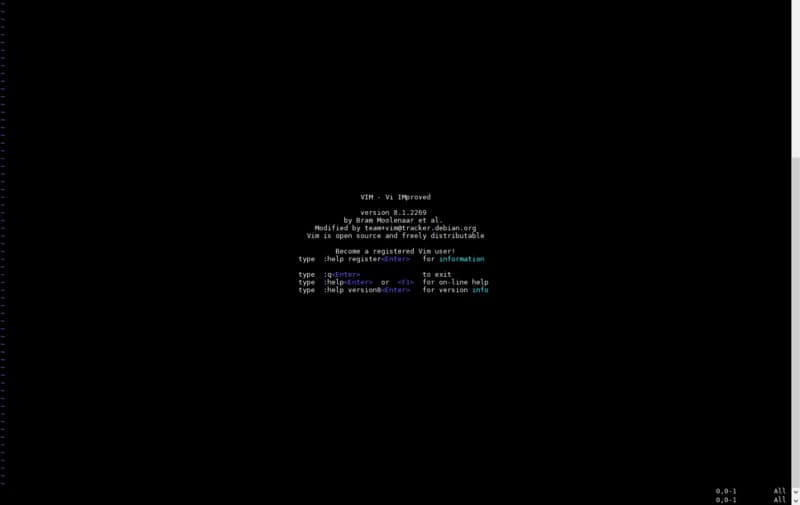
Vi text editor
VIM — Vi improved the ultimate text editor.

Shell XML Processing: How To Update value in XML file in 5 Minutes

Shell XML Processing: How To Update value in XML file in 5 Minutes

Learn how to use xmlstarlet to update value in XML file and handle complex XML payloads efficiently in your shell scripts

If you work in IT or even if you think about IT as one of your main hobbies, you have been written a shell script at some point. If you also work on the business’s operation side, this can be your daily task. To create, maintain, or to upgrade the existing process.

Nowadays, it is more usual to interact with external systems that use payload in XML files or even configuration files written using this format.

Native shell script does not provide an easy way to do that or support libraries to handle that as we can in modern programming languages like Python, Java, or Go. So, probably you have found yourself writing code to parse this kind of payload. But this is not the only way to do that, and we can (and we should!) leverage existing utilities to do this job for us.

xmlstarlet

I could not find a better way to explain what xmlstarlet does than the definition the owners do in their source code repository:

XMLStarlet is a command line XML toolkit which can be used to transform,
query, validate, and edit XML documents and files using simple set of shell
commands in similar way it is done for plain text files using grep/sed/awk/
tr/diff/patch.

So, xmlstarlet provides all the power to do anything you can imagine when dealing with XML similarly, as this was plain text files.

Installation

The installation process for this utility is quite easy and depends on the operating system you are using. I will assume that most of the shell scripts are with a Unix machine target in mind. Installing this is quite easy as most of the package repositories have a version of this tool.

So, if you are using an apt-based system, you need to execute the command:

sudo apt-get install xmlstarlet

If you are using another platform, do not worry because they have available versions for all the most used operating systems and platforms, as you can see in the link below:

Usage

As soon as we have this software installed, the first thing we will do is launch it to see the options available.

XMLStarlet Toolkit: Command line utilities for XML
Usage: D:\Data\Downloads\xmlstarlet-1.6.1-win32\xmlstarlet-1.6.1\xmlstarlet.exe [<options>] <command> [<cmd-options>]
where <command> is one of:
  ed    (or edit)      - Edit/Update XML document(s)
  sel   (or select)    - Select data or query XML document(s) (XPATH, etc)
  tr    (or transform) - Transform XML document(s) using XSLT
  val   (or validate)  - Validate XML document(s) (well-formed/DTD/XSD/RelaxNG)
  fo    (or format)    - Format XML document(s)
  el    (or elements)  - Display element structure of XML document
  c14n  (or canonic)   - XML canonicalization
  ls    (or list)      - List directory as XML
  esc   (or escape)    - Escape special XML characters
  unesc (or unescape)  - Unescape special XML characters
  pyx   (or xmln)      - Convert XML into PYX format (based on ESIS - ISO 8879)
  p2x   (or depyx)     - Convert PYX into XML
<options> are:
  -q or --quiet        - no error output
  --doc-namespace      - extract namespace bindings from input doc (default)
  --no-doc-namespace   - don't extract namespace bindings from input doc
  --version            - show version
  --help               - show help
Wherever file name mentioned in command help it is assumed
that URL can be used instead as well.

Type: xmlstarlet <command> --help <ENTER> for command help

So the first thing we need to decide is which command we need to use, and these commands are one-to-one related to the action that we like to perform. I will focus on the main commands in this post, but as you can see, this covers from select values an XML, update it or even validate it.

Use case 1: Selecting a value.

We are going to start with the most simple use case try to select a value from an XML (file.xml) like this:

<root>
<object1 name="attribute_name">value in XML</object1>
</root>

So, we are going to start with the most simple command:

./xmlstarlet  sel  -t -v "/root/object1"  ./file.xml

value in XML

This provides the value inside the object1 element, using -t to define a new template and -v to specify the value-of sentence. If now, we would like to get the attribute value, we can do it pretty much similar to the previous command:

./xmlstarlet  sel  -t -v "/root/object1/@name"  ./file.xml

attribute_name

Use case 2: Updating value.

Now, we will follow the other approach based on the same file. We will update the value of the object1 element to set the text “updated text”.

To do that, we execute the following command:

./xmlstarlet ed -u "/root/object1" -v "updated text" ./file.xml

<?xml version="1.0"?>
<root>
  <object1 name="attribute_name">updated text</object1>
</root>

Summary

xmlstarlet will provide us all the options to manage something complicated as there are XML and do all the tasks that you can imagine simply without needed to code yourself all the parsing logic. I hope you are a happier developer since now when you need to manage an XML inside a shell script.

Top 3 Bash Hacks To Boost Your Performance

Top 3 Bash Hacks To Boost Your Performance

Find the list of the bash performance hacks I use all the time and they can help you save a lot of time in your daily job.

Bash hacks knowledge is one of the ways to improve your performance. We spend many hours inside of them and have been developing patterns and habits when we log inside a computer. For example, if you have two people with a similar skill level and provide the same task to do, probably, they’re different tools aa nd different comet to the same path.

And that’s because the number of options available to do any task is so significant that each of us learns one or two way to do something, and we sticks to them, and we just automate those, so we’re not thinking when we’re typing them.

So, the idea today is to provide a list of some commands that I use all the time that probably you’re aware of, but for me are like time savings each day of my work life. So, let’s start with those.

1.- CTRL + R

This command is my predliect bash hack. It is the one I use all the time; as soon as I log into a remote machine that is new or just coming back to them, I use it for pretty much everything. Unfortunately, this command only allows you to search into the command history.

It helps you autocomplete based on the commands you’re already typing. It’s like the same thing as typing history | grep <something> but just faster and more natural for me.

This bash hack also allows me to autocomplete paths that I don’t remember the exact subfolder name or whatever. I do this tricky command every two weeks to clean some process memory or apply some configuration. Or just to troubleshoot in which machine I’m logging at a specific moment.

2.- find + action

Find command is something we all know, but most of you probably use it as a limited functionality from all the ones available from the find command. And that’s it because that command is incredible. It provides so many features. But this time, I’m just going to cover one specific topic. Actions after locating the files that we’re looking for.

We usually use the find command to find files or folders, which is evident for a command that it’s called that way. But also it allows us to add the -execparameter to concatenate an action to be done for each of the files that match your criteria, for example, something like this

Find all the yaml files in your current folder and just rename them to move them to a different folder. You can do it directly with this command:

find . -name “*.yaml” -exec mv {} /tmp/folder/yamlFiles/ \;

3.- cd –

So simple and so helpful bash hack. Just like our bash command to CTRL-Z. The command cd -allows us to go back to the previous folder we’re in.

So valuable for we got wrong the folder that we like to go, just to switch between two folders and so on quickly. It’s like going back to your browser or the CTRL -Z in your Word processor.

Wrap up

I hope you love this command as much as I do, and if you already know it, please let me in the responses to the bash hacks that are the most relevant for you daily. It can be because you use it all the time as I do with these or because even if you’re not using it so many times, the times that you do, it saves you a massive amount of time!

Detect Performance Bottlenecks in TIBCO BusinessWorks Container Edition Using Statistics

Detect Performance Bottlenecks in TIBCO BusinessWorks Container Edition Using Statistics

Usually, when you’re developing or running your container application you will get to a moment when something goes wrong. But not in a way you can solve with your logging system and with testing.

A moment when there is some bottleneck, something that is not performing as well as you want, and you’d like to take a look inside. And that’s what we’re going to do. We’re going to watch inside.
Because our BusinessWorks Container Edition provides so great features to do it that you need to use it into your favor because you’re going to thank me for the rest of your life. So, I don’t want to spend one more minute about this. I’d like to start telling you right now.

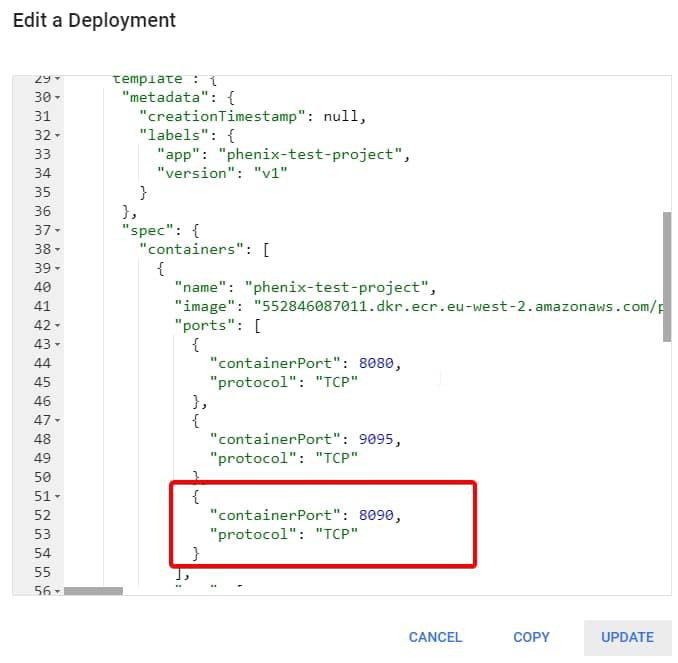
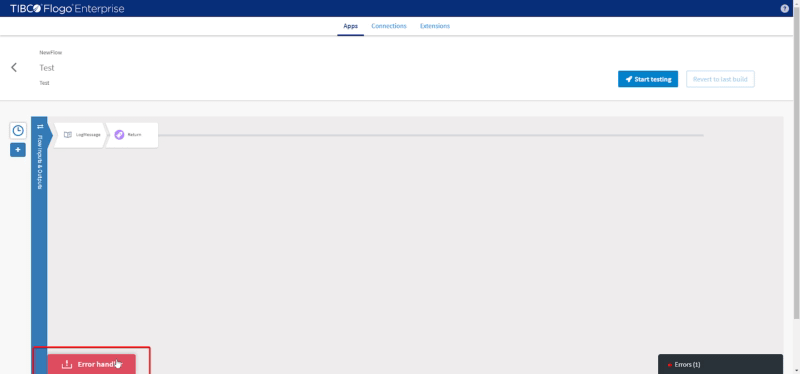
The first thing we need to do, we need to go inside the OSGi console from the container. So, the first thing we do is to expose the 8090 port as you can see in the picture below

Detect Performance Bottlenecks in TIBCO BusinessWorks Container Edition Using Statistics

Now, we can expose that port to your host, using the port-forward command

kubectl port-forward deploy/phenix-test-project-v1 8090:8090

And then we can execute an HTTP Request to execute any info using commands like this:

curl -v http://localhost:8090/bw/framework.json/osgi?command=<command>

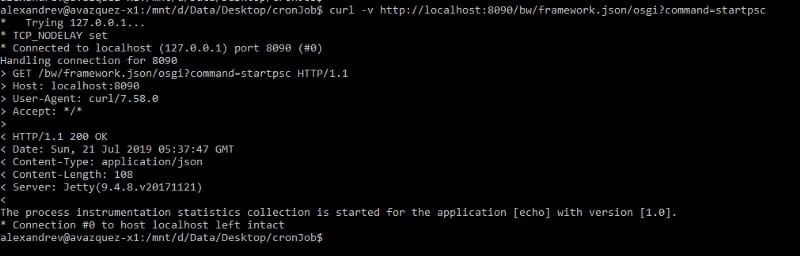
And we’re are going to execute first the activation of the process statistics like this:

curl -v http://localhost:8090/bw/framework.json/osgi?command=startpsc
Detect Performance Bottlenecks in TIBCO BusinessWorks Container Edition Using Statistics

And as you can see it says that statistics has been enabled for echo application, so using that application name we’re going to gather the statistics at the level

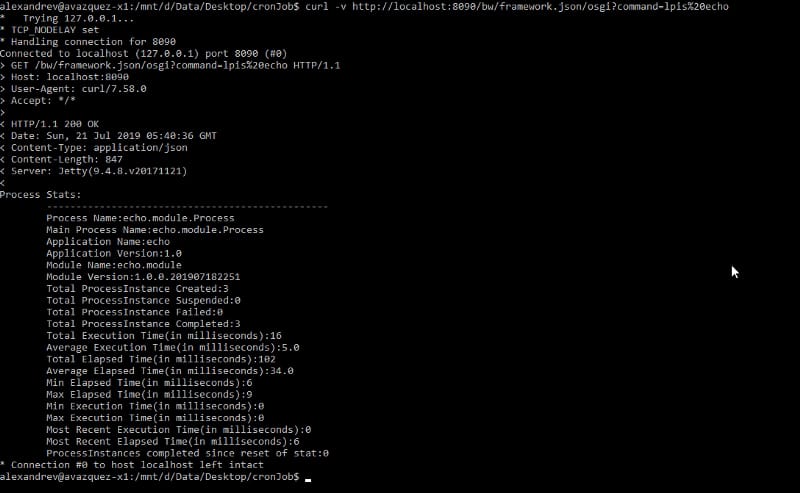
curl -v http://localhost:8090/bw/framework.json/osgi?command=lpis%20echo
Detect Performance Bottlenecks in TIBCO BusinessWorks Container Edition Using Statistics

And you can see the statistics at the process level where you can see the following metrics:

  • Process metadata (name, parent process and version)
  • Total instance by status (create, suspended, failed and executed)
  • Execution time (total, average, min, max, most recent)
  • Elapsed time (total, average, min, max, most recent)

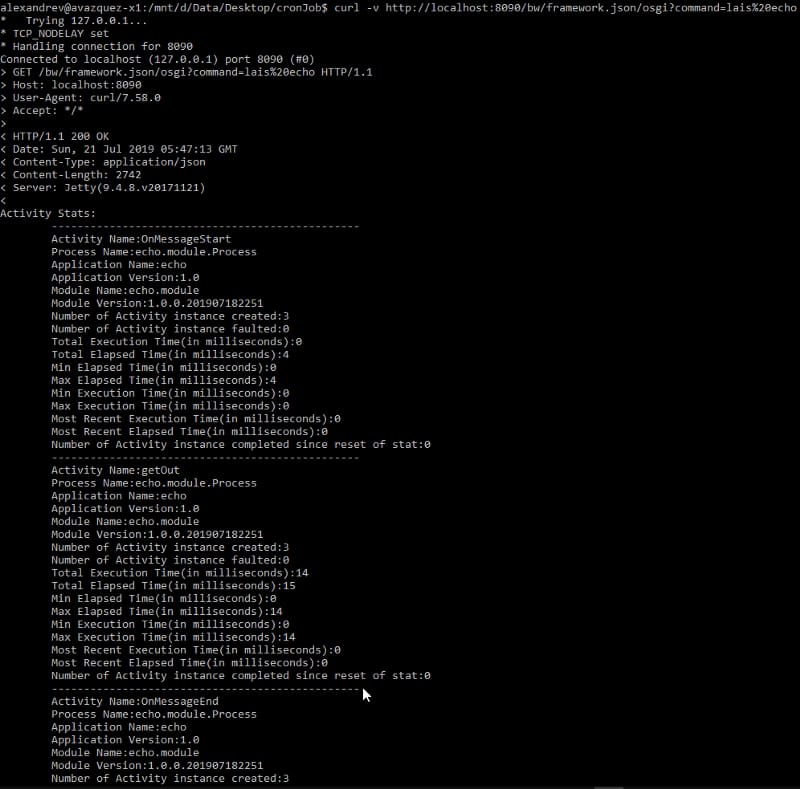
And we can get the statistics at the activity level:

Detect Performance Bottlenecks in TIBCO BusinessWorks Container Edition Using Statistics

And with that, you can detect any bottleneck you’re facing into your application and also be sure which activity or which process is responsible for it. So you can solve it in a quick way.

Have fun and use the tools at your disposal!