Solution for Transformation failed for XSLT input in BusinessWorks

Solution for Transformation failed for XSLT input in BusinessWorks

Solving one of the most common developer issues using BusinessWorks

The Transformation failed for XSLT input is one of the most common error messages you could see when developing using the TIBCO BusinessWorks tools. Understanding what the message is saying is essential to provide a quick solution.

This article is part of my comprehensive TIBCO Integration Platform Guide where you can find more patterns and best practices for TIBCO integration platforms.

I have seen developers needing hours and hours trying to troubleshoot this kind of error when most of the time, all the information you are receiving is just in front of you, but you need to understand why the engine is aching for it.

But let’s provide a little bit of context first. What is this error that we’re talking about? I’m talking about something like what you can see in the log trace below:

...
com.tibco.pvm.dataexch.xml.util.exceptions.PmxException: PVM-XML-106027: Transformation failed for XSLT input '<?xml version="1.0" encoding="UTF-8"?>
<xsl:stylesheet xmlns:xsl="http://www.w3.org/1999/XSL/Transform" xmlns:tns1="http://www.tibco.com/pe/WriteToLogActivitySchema" xmlns:xsd="http://www.w3.org/2001/XMLSchema" xmlns:tib="http://www.tibco.com/bw/xslt/custom-functions" version="2.0"><xsl:param name="Mapper2"/><xsl:template name="Log-input" match="/"><tns1:ActivityInput><message><xsl:value-of select="tib:add-to-dateTime($Mapper2/primitive,0,0,1,0,0,0)"/></message></tns1:ActivityInput></xsl:template></xsl:stylesheet>'
	at com.tibco.pvm.infra.dataexch.xml.genxdm.expr.IpmxGenxXsltExprImpl.eval(IpmxGenxXsltExprImpl.java:65)
	at com.tibco.bx.core.behaviors.BxExpressionHelper.evalAsSubject(BxExpressionHelper.java:107)
...

Sounds more familiar now? As I already said, all TIBCO BusinessWorks developers have faced that. As I said, I have seen some of them struggling or even re-doing the job repeatedly without finding a proper solution. But the idea here is to try to solve it efficiently and quickly.

I will start with the initial warnings: Let’s avoid re-coding, re-doing something that should work but is not working, because you are not winning in any scenario:

  • If you re-do it again and it didn’t work, you lose x2 time creating something you already have, and you are still stuck.
  • If you re-do it again and it works, you don’t know what was wrong, so that you will face it again shortly.

So, how do this works? Let’s use this process:

Collect —> Analyze —> Understand —> Fix.

Scenario

So first, we need to collect data, and most of the time, as I said, it is enough with the log trace that we have, but at some moment, you could need to require the code of your process to detect the error the solution.

So we will start with this source code that you can see in the screenshot below and the following explanation:
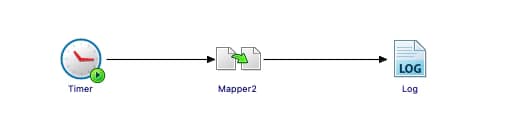
Solution for Transformation failed for XSLT input in BusinessWorks

We have a Mapper that is defining a schema with an int element that is an option, and we’re not providing any value:
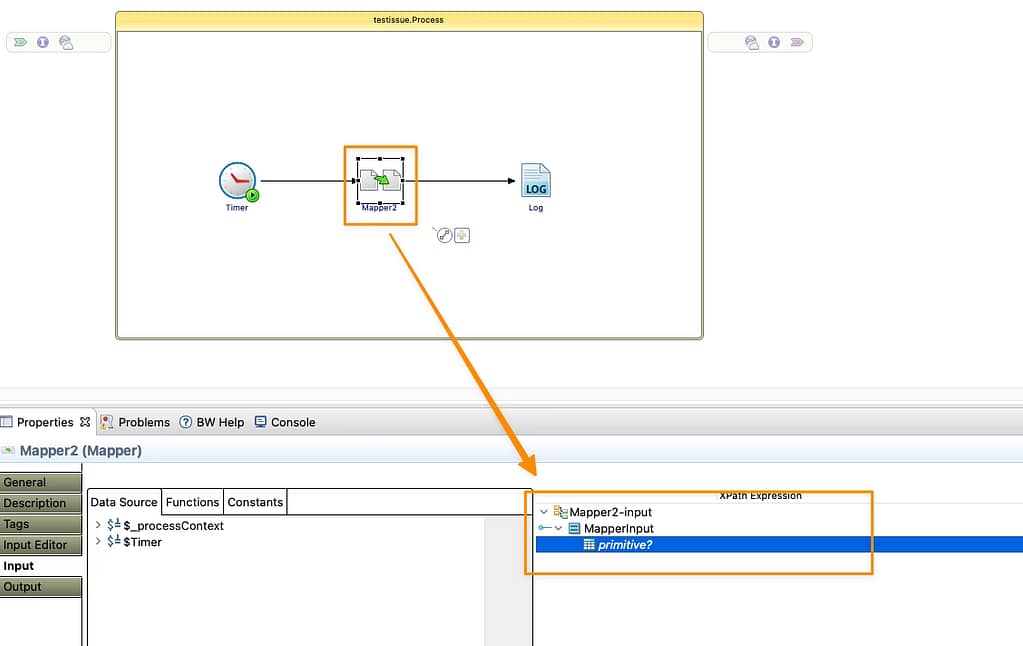
Solution for Transformation failed for XSLT input in BusinessWorks

And then we’re using the date to print a log, adding one more day to that date:
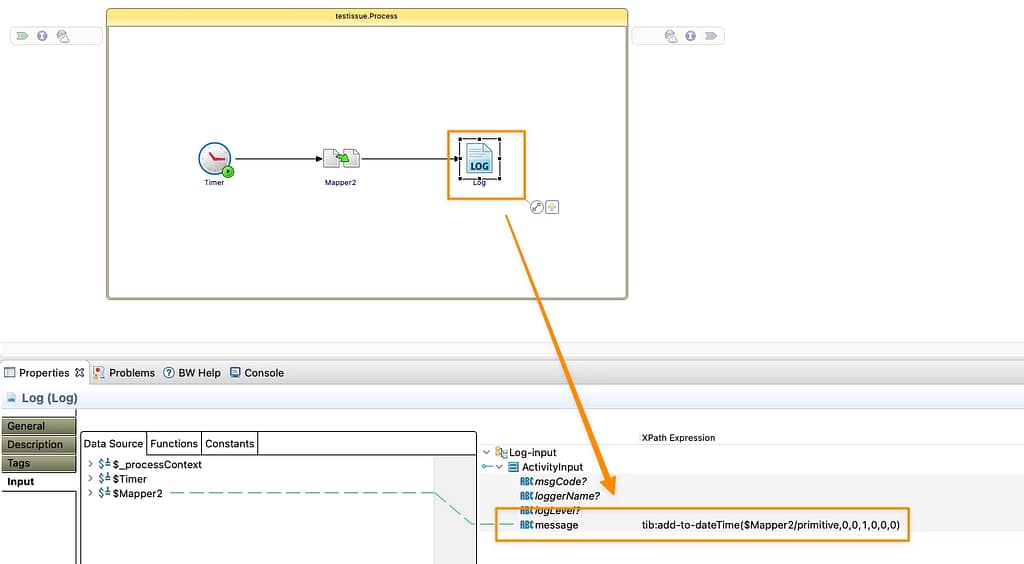
Solution for Transformation failed for XSLT input in BusinessWorks

Solution

First, we need to understand the error message. When we’re getting an error message titled `Transformation failed for XSLT input that says precisely this:

I tried to execute the XSLT that is related to one activity, and I failed because of a technical error

As probably you already know, each of the BusinessWorks activities executed an XSL Transformation internally to do the Input mapping; you can see it in the Business Studio directly. So, this error is telling you that this internal XSL is failing.
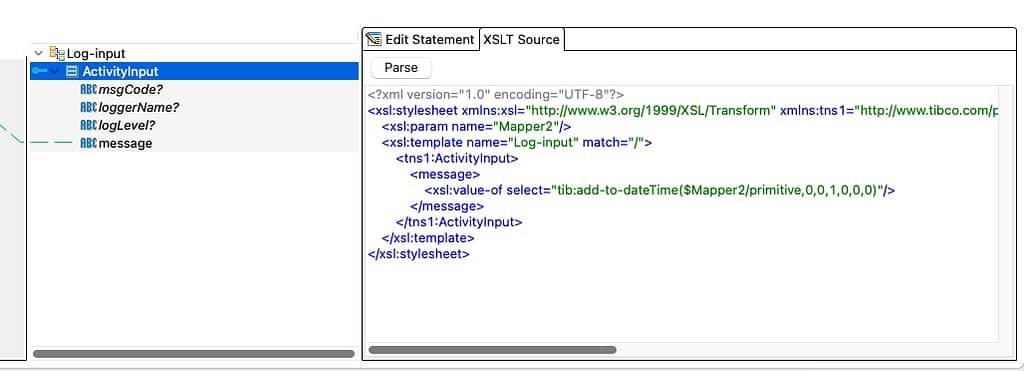
Solution for Transformation failed for XSLT input in BusinessWorks

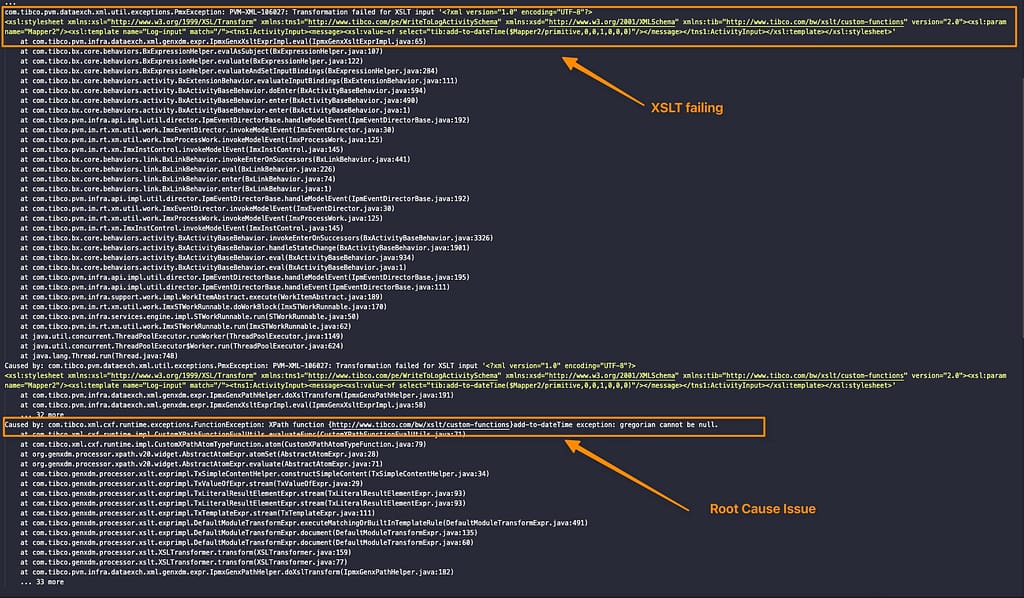
And the reason is a run-time issue that cannot be detected at design time. So, to make it clear, the values of some of your variables and transforming fail. So first, you should focus on this. Usually, all the information is in the log trace itself, so let’s start analyzing that:
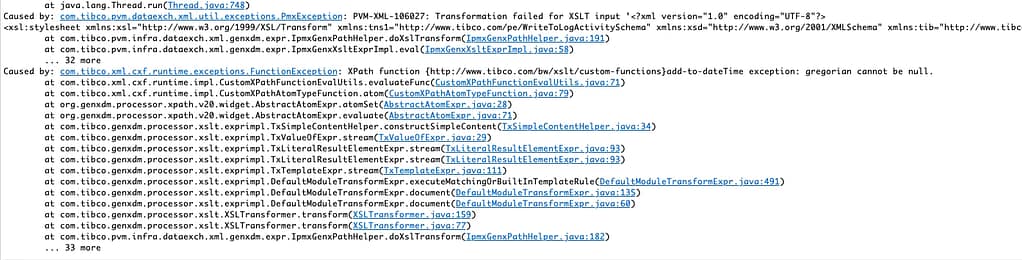
Solution for Transformation failed for XSLT input in BusinessWorks

So, let’s see all the information that we have here:

  • First of all, we can detect what activity is failing. You can easily do that if you are debugging locally, but if this is happening on the server can be more tricky; but with this information, you have: All the XSLT itself that is printed on the log trace, so you can easily
  • You also have a Caused by that is telling you why this is failing:
    • You can have several Caused by sentences that should be reading in cascading mode, so the lower one is the root issue generating the error for all the others above, so we should locate that first.
Solution for Transformation failed for XSLT input in BusinessWorks

In this case, the message is quite evident, as you can see in the trace below.

 com.tibco.xml.cxf.runtime.exceptions.FunctionException: XPath function {http://www.tibco.com/bw/xslt/custom-functions}add-to-dateTime exception: gregorian cannot be null.

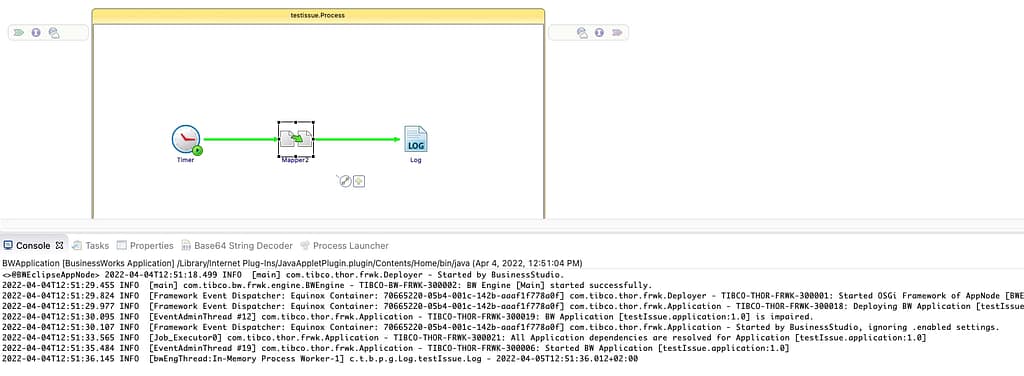
So the add-to-dateTime function fails because one Gregorian argument (so, a date) is null. And that’s precisely what is happening in my case. If I provide a value to the parameter… Voilà, it is working!
Solution for Transformation failed for XSLT input in BusinessWorks

 Summary

Similar situations can happen with different root causes, but the most commons are:

  • Issue with optional and not optional elements so a null reaches a point where it should.
  • Validation errors because the input parameter doesn’t match the field definition.
  • Extended XML Types that are not supported by the function used.

All these issues can be easily and quickly solved following the reasoning we explained in this post!

So, let’s put it into practice next time you see a colleague with that issue and help them have a more efficient programming experience!
Optimize TIBCO BW SOAP API Response Time for Large Payloads

Optimize TIBCO BW SOAP API Response Time for Large Payloads

Discover how to fine-tune your SOAP services to be able to be efficient for massive payload requests

We all know that when we are implementing API, we need to carefully design the size that we can manage as the maximum of request size. So, for example, you should know that for an online request, the usual upper limit is 1 MB, everything beyond that we should be able to manage it differently (options to drive can be slicing the requests or using other protocols rather than HTTP to handle this kind of loads). But then real-life comes to tackle us there.

This article is part of my comprehensive TIBCO Integration Platform Guide where you can find more patterns and best practices for TIBCO integration platforms.

Not always this is possible to stick to the plan. Not always we are the ones making that decision. And we can argue as long as we like that this is not a good idea and that is great, but at the same time, we need to do something that is working.

By default, when we are exposing a SOAP Service on TIBCO BusinessWorks, it relies on third-party libraries to manage the request, parse it, and help us access the requests’ content. Some of them come from the Apache Foundation, and the one that we are going to talk about is Apache Commons.

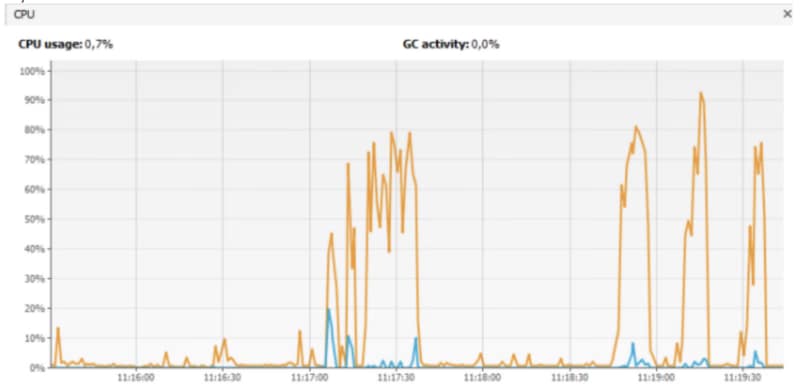
When we are sending a big request to our SOAP service, in my case, this is an 11 MB SOAP request to my system, and I start to see the following behavior:

Optimize TIBCO BW SOAP API Response Time for Large Payloads
  • Service is not responding to my consumer.
  • I can see significant usage of the HTTP Connector thread handling the request before sending it to the actual service.
  • CPU and memory are increasing a lot.

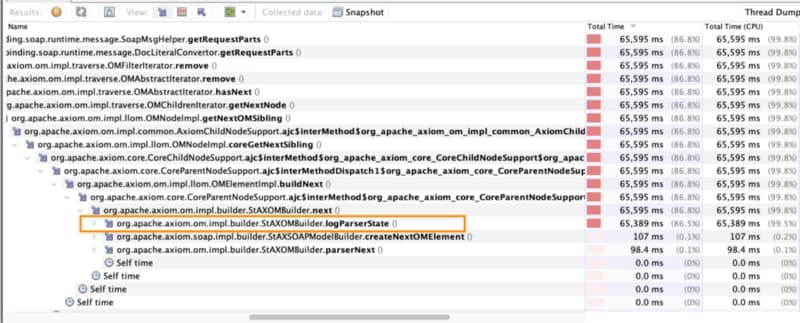
So, how can we improve that? The first thing is to go more into the details about that extensive CPU usage. For example, if we go into the stack trace that the HTTP Connector threads are running, you can see the following stack trace:

Optimize TIBCO BW SOAP API Response Time for Large Payloads

You can get that information from several sources:

  • One is using the JVisual VM and going to the snapshot details in the samples as I did.
  • You can also get a thread dump and use tools such as https://fastthread.io/index.jsp to visualize it graphically.

Here we can see that we’re stuck at the log method. And that is strange why I am logging these requests if I’m not doing that in the BusinessWorks configuration. The answer is quite simple: Apache libraries have their logging system that is not affected by the logback configuration BusinessWorks uses.

So, we can disable that using the following JVM property:

-Dorg.apache.commons.logging.Log=org.apache.commons.logging.impl.NoOpLog

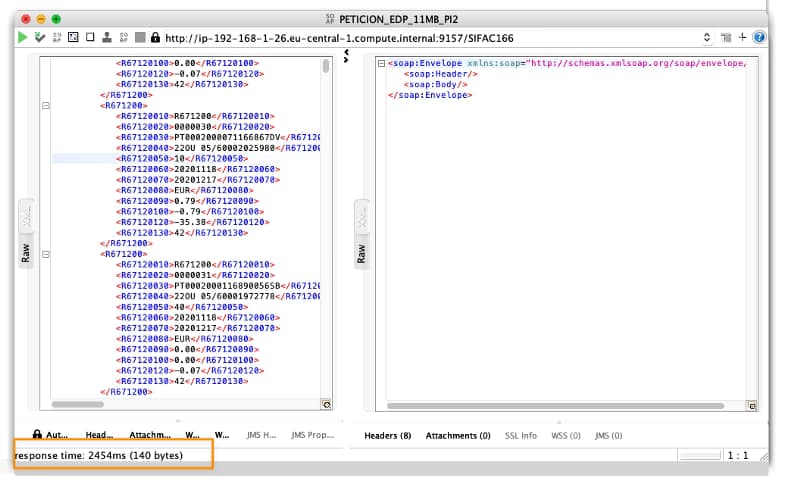
Response time has improved from 120 seconds for 11 MB to less than 3 seconds, including all the logic the service was doing. Pretty impressive, right?

Optimize TIBCO BW SOAP API Response Time for Large Payloads

Summary

I hope you find this interesting, and if you are one of those facing this issue now, you have information not to be stopped by this one. If you would like to submit your questions feel free to use one of the following options:

  • Twitter: You can send me a mention at @alexandrev on Twitter or a DM or even just using the hashtag #TIBFAQS that I will monitor.
  • Email: You can email me to alexandre.vazquez at gmail.com with your question.
  • Instagram: You can send me a DM on Instagram at @alexandrev
Optimize TIBCO BW SOAP API Response Time for Large Payloads

#TIBFAQS Enabling Remote Debugging for TIBCO BusinessWorks Application on Kubernetes

#TIBFAQS Enabling Remote Debugging for TIBCO BusinessWorks Application on Kubernetes

Provide more agility to your troubleshooting efforts by debugging exactly where the error is happening using Remote Debugging techniques

#TIBFAQS Enabling Remote Debugging for TIBCO BusinessWorks Application on Kubernetes
Photo by Markus Winkler on Unsplash

Container revolution has provided a lot of benefits, as we have been discussed in-depth in other articles, and at the same time, it has also provided some new challenges that we need to tackle.

This article is part of my comprehensive TIBCO Integration Platform Guide where you can find more patterns and best practices for TIBCO integration platforms.

All agility that we have now in the hands of our developers needs to be also extended to the maintenance work and fixing things. We need to be agile as well. We know some of the main issues that we have regarding this: It works on my environment, with the data set that I have, I couldn’t see the issue, or I couldn’t reproduce the error, are just sentences that we listen to over and over and delay the resolution of some errors or improvements even when the solution is simple we struggle in getting a real scenario to test.

And here is where Remote Debugging comes in. Remote Debugging is, just as its own name clearly states, to be able to debug something that is not local that is remote. It has been focused since its conception in Mobile Development because it doesn’t matter how good the simulator is. You will always need to test in a real device to make sure everything is working properly.

So this is the same concept but applicable to a container, so that means that I have a TIBCO BusinessWorks application running on Kubernetes. We want to debug it as it has been running locally, as shown in the image before. To be able to do that, we need to follow these steps:

Enabling the Remote Debugging in the pod

The first step is to enable the remote debug option in the application and to do that, we need to use the internal API that the BusinessWorks provides, and to do that, we need to execute from inside the container:

curl -XPOST http://localhost:8090/bw/bwengine.json/debug/?interface=0.0.0.0&port=5554&engineName=Main

In case that we do not have any tool like curl or wget to hit a URL inside the container, you can always use the port-forward strategy to make the 8090 port from the pod accessible to enable the debug port using a command similar to the one below:

kubectl port-forward hello-world-test-78b6f9b4b-25hss 8090:8090

And then, we can hit it from our local machine to enable remote debugging

Make the Debug Port accessible to the Studio

To do the remote debugging, we need to be able to connect our local TIBCO BusinessStudio to this specific pod that is executing the load and, to do that, we need to have access to the Debug port. To get this, we have mainly two options that are the ones shown in the subsections below: Expose the port at the pod level and port-forwarding option.

Expose the port at the Pod Level

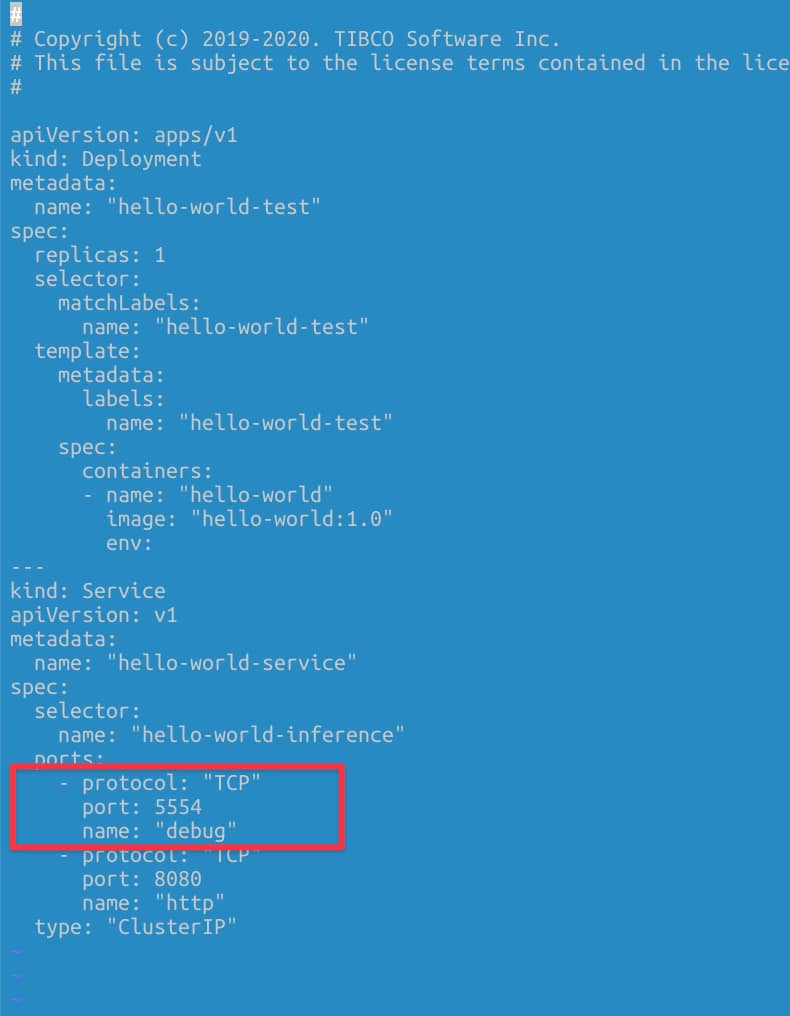
We need to have the debug port opened in our pod. To do that, we need to define another port that is not in use by the application, and it is not the default administration port (8090) to the one to be exposed. For example, in my case, I will use 5554 as the debug port, and to do that, I define another port to be accessed.

#TIBFAQS Enabling Remote Debugging for TIBCO BusinessWorks Application on Kubernetes
Definition of the debug port as a Service

Port-Forwarding Option

Another option if we do not want to expose the debug port all the time, even if this is not going to be used unless we’re executing the remote debug, we have another option to do a port-forward to the debug port in our local.

kubectl port-forward hello-world-test-78b6f9b4b-cctgh 5554:5554

Connection to the TIBCO Business Studio

Now that we have everything ready, we need to connect our local TIBCO Business Studio to the pod, and to do that, we need to follow these steps:

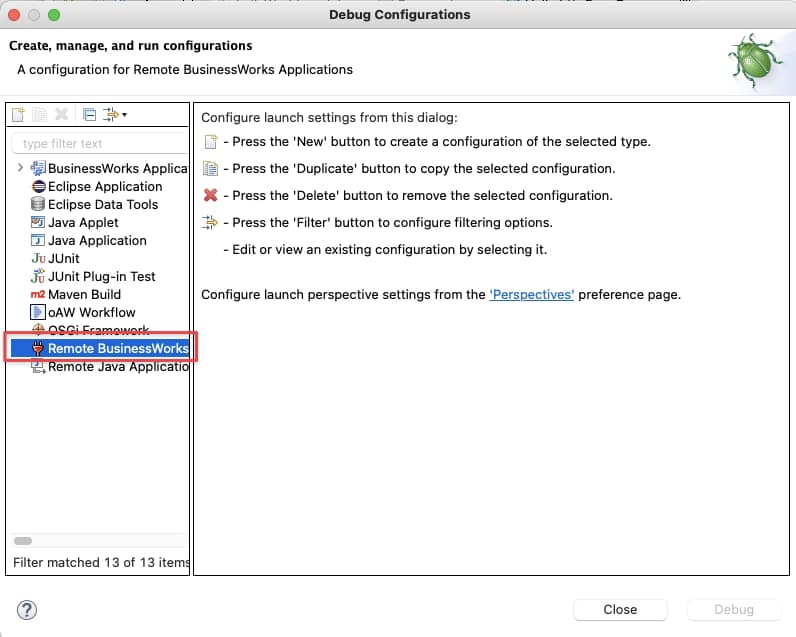
Run → Debug Configurations, and we select the Remote BusinessWorks

#TIBFAQS Enabling Remote Debugging for TIBCO BusinessWorks Application on Kubernetes
Selection of the Remote BusinessWorks application option in the Debug Configuration

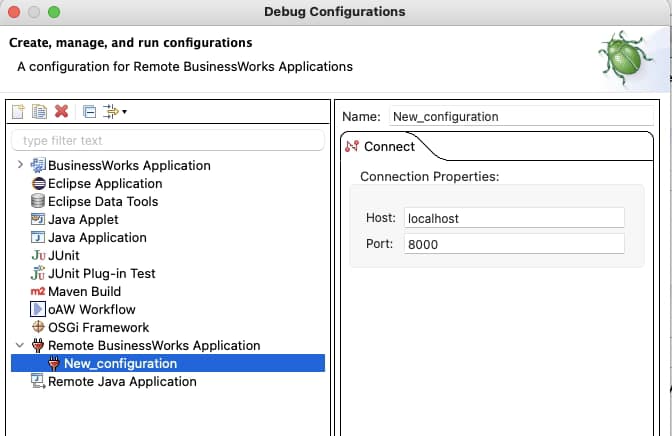
And now we need to provide the connection details. For this case, we will use the localhost and port 5554 and click on the Debug button.

#TIBFAQS Enabling Remote Debugging for TIBCO BusinessWorks Application on Kubernetes
Setting the connection properties for the Remote Debugging

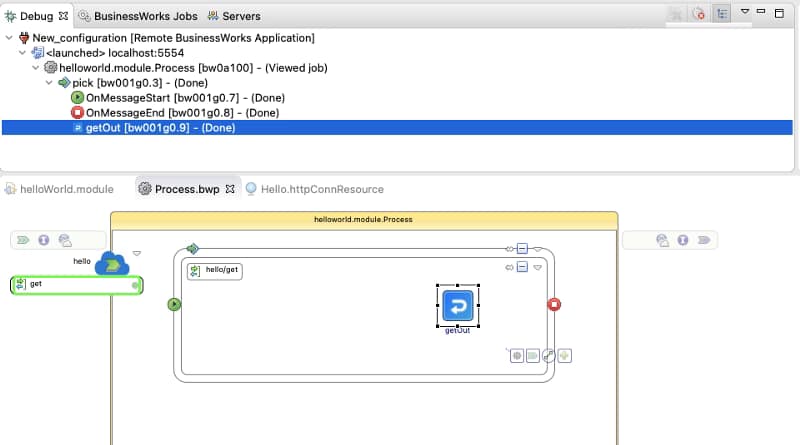
After that moment, we will establish a connection between both environments: the pod running on our Kubernetes cluster and our local TIBCO BusinessStudio. And as soon as we hit the container, we can see the execution in our local environment:

#TIBFAQS Enabling Remote Debugging for TIBCO BusinessWorks Application on Kubernetes
Remote Debugging execution from our TIBCO BusinesStudio instance

Summary

I hope you find this interesting, and if you are one of those facing this issue now, you have information not to be stopped by this one. If you would like to submit your questions feel free to use one of the following options:

  • Twitter: You can send me a mention at @alexandrev on Twitter or a DM or even just using the hashtag #TIBFAQS that I will monitor.
  • Email: You can send me an email to alexandre.vazquez at gmail.com with your question.
  • Instagram: You can send me a DM on Instagram at @alexandrev
#TIBFAQS Enabling Remote Debugging for TIBCO BusinessWorks Application on Kubernetes

How to Check TIBCO BusinessWorks Configuration at Runtime (OSGi lcfg Command)

How to Check TIBCO BusinessWorks Configuration at Runtime (OSGi lcfg Command)

Discover how the OSGI lcfg command can help you be sure which is the configuration at runtime.

Knowing the TIBCO BW configuration at runtime is became critical as you always need to know if the latest changes has been applied or just want to check the specific value for a Module Property as part of your development.

This article is part of my comprehensive TIBCO Integration Platform Guide where you can find more patterns and best practices for TIBCO integration platforms.

When we are talking about applications deployed on the cloud one of the key things is Configuration Management. Especially if we include into the mix things like Kubernetes, Containers, External Configuration Management System things got tricky.

Usual configuration when we are talking about a Kubernetes environment for configuration management is the use of Config Maps or Spring Cloud Config.

When you can upload the configuration in a separate step as deploying the application, you can get into a situation where you are not sure about what is the running configuration that a BusinessWorks application has.

To check TIBCO BW configuration there is an easy way to know exactly the current values:

  • We just need to get inside the container to be able to access the internal OSGI console that allows us to execute administrative commands.
  • We have spoken other times about that API but in case you would like to take a deeper look you just need to check this link:
  • And one of the commands is lcfg that allows knowing which configuration is being used by the application that is running:
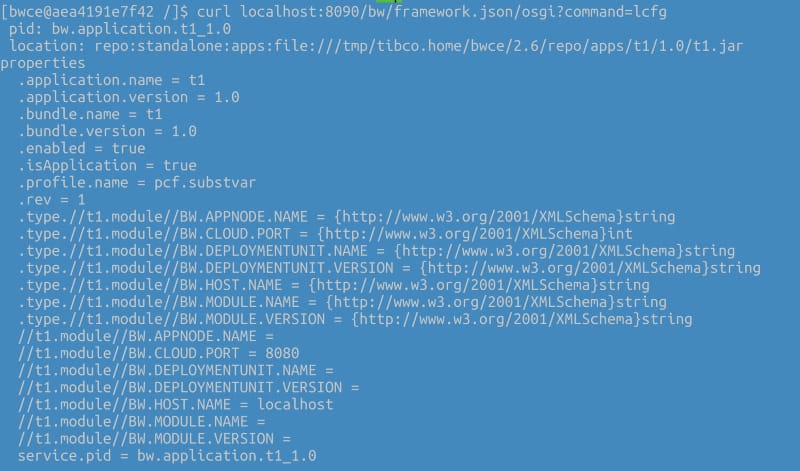
curl localhost:8090/bw/framework.json/osgi?command=lcfg

With an output similar to this:

How to Check TIBCO BusinessWorks Configuration at Runtime (OSGi lcfg Command)
Sample output for the lcfg command of a Running BusinessWorks Container Application

Summary

I hope you find this interesting, and if you are one of those facing this issue now, you have information not to be stopped by this one. If you would like to submit your questions feel free to use one of the following options:

  • Twitter: You can send me a mention at @alexandrev on Twitter or a DM or even just using the hashtag #TIBFAQs that I will monitor.
  • Email: You can send me an email to alexandre.vazquez at gmail.com with your question.
  • Instagram: You can send me a DM on Instagram at @alexandrev
How to Check TIBCO BusinessWorks Configuration at Runtime (OSGi lcfg Command)

How to Fix TIBCO BusinessWorks Impaired Status (Root Causes & Troubleshooting Guide)

How to Fix TIBCO BusinessWorks Impaired Status (Root Causes & Troubleshooting Guide)

Learn the main reasons behind an Impaired status and how you can perform troubleshooting to identify and solve the error.

#TIBFAQS: TIBCO BW Impaired Status: How to solve it?
Photo by Charles Deluvio on Unsplash

This is another post of the #TIBFAQS series. To remind you what all this about is, you can submit your questions regarding TIBCO developing issues or doubts and try to provide an answer here to try to help the community of TIBCO developers out there.

This article is part of my comprehensive TIBCO Integration Platform Guide where you can find more patterns and best practices for TIBCO integration platforms.

So, today I am going to start with one of the most common issues when we work with BusinessWorks, and it is when I am going to deploy my application or test it locally, and I get this log trace and nothing after that: TIBCO BW Impaired Status.

How to Fix TIBCO BusinessWorks Impaired Status (Root Causes & Troubleshooting Guide)
Impaired status error message

This is one of the usual situations for a BusinessWorks junior developer and one of the reasons you have more time spent doing troubleshooting. Let’s get some tricks today, so this message will never again stop you in your journey to production.

What is the cause of this error?

This error means that the BusinessWorks runtime is not able to meet all the dependencies among the components to be able to start. As you probably know, BusinessWorks each of the applications’ components is managed independently, and they are referencing each other.

For example, the Application depends on the Application Module and the Shared Module. The Application module can have a dependency on a JMS Connection and so on.

Situations that can raise this error

Let’s take a look now at the situation that can raise this error and solve it.

1.- Missing module or incompatible versions

One usual situation that can lead to this problem is missing modules or incompatible versions of the modules. In that case, the referencable component will wait for a module or a specific version of a module to be started. Still, this module is missing, or it is starting another version.

2.- Not valid shared connections

Another option can be if some of the components are required to establish the connection with other technologies such as JDBC connections, JMS connections, KAFKA connections, or another one of the more than 200 connectors available.

3.- Missing Starter component in the Module Descriptors

The last of the usual suspects here is when you have a Stater component in the Module Descriptors, but this process is not available inside the EAR file that you are deploying. That dependency is never satisfied, and that leads to unlimited Impaired status.

How to detect what component is missing?

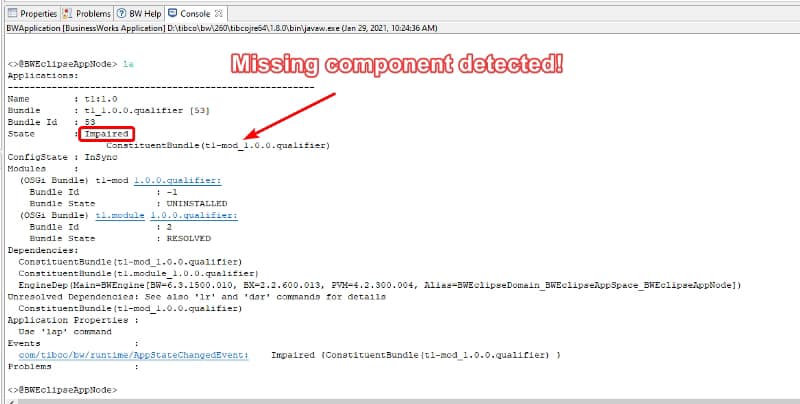
To help you in the process of detecting in which situation you are, you have an incredible tool at your disposal which is the command la from the OSGi Console Interface.

This command helps us list the applications deployed in this specific AppNode or container and give us the details of them, including the reason for an Impaired situation.

How to Fix TIBCO BusinessWorks Impaired Status (Root Causes & Troubleshooting Guide)

How to run the OSGi console depends on your deployment model, but you can read all the information about it in the link below:

Summary

I hope you find this interesting to solve your TIBCO BW Impaired status on your apps, and if you are one of those facing this issue now, you have information not to be stopped by this one. If you would like to submit your questions feel free to use one of the following options:

  • Twitter: You can send me a mention at @alexandrev on Twitter or a DM or even just use the hashtag #TIBFAQs that I will monitor.
  • Email: You can send me an email to alexandre.vazquez at gmail.com with your question.
  • Instagram: You can send me a DM on Instagram at @alexandrev
How to Fix TIBCO BusinessWorks Impaired Status (Root Causes & Troubleshooting Guide)

How to Fix “Failed to Read Profile from /tmp/tmp/pcf.substvar” in TIBCO BWCE

How to Fix “Failed to Read Profile from /tmp/tmp/pcf.substvar” in TIBCO BWCE

This is another post of the #TIBFAQS series and only to remind you what all this about is that you can submit your questions regarding TIBCO developing issues or doubts and I try to provide an answer here to try to help the community of TIBCO developers out there.

This article is part of my comprehensive TIBCO Integration Platform Guide where you can find more patterns and best practices for TIBCO integration platforms.

So, today I am going to start with one of the I think most common issues when we work with BusinessWorks Container Edition and we are deploying into our target environment and it is a trace similar to this one:

How to Fix “Failed to Read Profile from /tmp/tmp/pcf.substvar” in TIBCO BWCE
Error trace regarding I am not able to read the profile

What is the cause of this error?

This error means that the BusinessWorks runtime is not able to read and process the properties file to start the application. So that means that your error is regarding the configuration of the application and not the application itself. So, the good news here: your code seems to be fine at this point.

As probably you know all the TIBCO BW applications use for a very long time an XML file to have the configuration values to start with. This is the file that in the case of BusinessWokrks Container Edition is stored at /tmp/tmp/pcf.substvar and it is populated for several sources depending on how to manage your configuration.

As you know you have several options to manage your configuration in Cloud base environments: Environment variables, Config Maps, Configuration Management Systems such as Spring Cloud Config or Consul.. So it is important that you have a clear understanding of what are you using.

So the error is that the file has something in its content that is not valid, because it is wrong or because it is not able to understand it.

Situations that can raise this error

Let’s take a look now at the situation that can raise this error and how we can solve it.

1.- Incompatible BW-runtime vs EAR versions

Usually, EAR files are compatible with different BusinessWorks runtimes, but this is true when the runtime is more current than the EAR. So I mean, if I generate my application with BWCE 2.5.0 I can run it with runtime 2.5.0, or 2.5.3 or 2.6.0 without any issue, but if I try to run it with an older version like 2.4.2 I can get this error because the EAR file has some “new things” that the runtime is not able to understand.

So it is important to validate that the runtime version that you are using is the expected one and updated it if that is not the case.

2.- XML special characters that need to be escaped

This situation is only true in versions before 2.5.0, but in case you are running an older version, you can also get this error because your property value has an XML character that needs to be escaped. Characters like ‘<’ or ‘&’ and the most used ones to generate this error. If you are using a more updated version you don’t need to escape it because they are automatically escaped.

So depending on the version that you are using update your property’s value accordingly.

Summary

I hope you find this interesting and if you are one of those facing this issue now you have information to not be stopped by this one. If you would like to submit your questions feel free to use one of the following options:

  • Twitter: You can send me a mention at @alexandrev on Twitter or a DM or even just using the hashtag #TIBFAQs that I will monitor.
  • Email: You can send me an email to alexandre.vazquez at gmail.com with your question.
  • Instagram: You can send me a DM on Instagram at @alexandrev
How to Fix “Failed to Read Profile from /tmp/tmp/pcf.substvar” in TIBCO BWCE
#TIBFAQS: Failed to read profile from [/tmp/tmp/pcf.substvar]

TIBCO Development FAQs, Solutions & Best Practices

TIBCO Development FAQs, Solutions & Best Practices

Improve your knowledge about TIBCO technology and also solve the issues that you are facing in your daily development tasks

TIBFAQS is here! This new year I would like to start several initiatives, and I hope you can walk with me during this journey. As you may know, I am a TIBCO Architect, so in my daily activities, I got a lot of questions and inquiries about how to do different things with TIBCO technology from TIBCO BusinessWorks to TIBCO EMS or TIBCO Spotfire.

This article is part of my comprehensive TIBCO Integration Platform Guide where you can find more patterns and best practices for TIBCO integration platforms.

I have noticed that some of these questions are similar from one customer to another, so I would like to use this platform to share all this knowledge to benefit in our daily activities and use the technology most efficiently.

1.- How is this going to work?

I will use some of the common topics that I am aware of in terms of TIBCO development questions and create a periodic article covering it with detail and with a sample application showing the problem and the solution. All the code will be available in my GitHub repository to use for your own reference.

https://github.com/alexandrev

2.- Can I send you my questions?

Yes, sure!! That should be amazing! As I said, I would like to create an engaging community around these posts so we all can benefit from there. So I would like to see your questions and to send them to me you can do it in the following ways:

  • Twitter: You can send me a mention at @alexandrev on Twitter or a DM or even just using the hashtag #TIBFAQs that I will monitor.
  • Email: You can send me an email to alexandre.vazquez at gmail.com with your question.
  • Instagram: You can send me a DM on Instagram at @alexandrev

3.- Where is this going to start?

This will start in late January. The idea is to have at least an article in a bi-weekly periodicity, but that will depend a lot on this initiative’s engagement. The more you share and talk about this initiative to your peers, and the more questions you send to me, the more articles I will create.

4.- What is next?

Since today you can start sending your questions and sharing your feedback about this initiative, and you can follow this blog to wait for the articles to come! Let’s do it together!

TIBCO Development FAQs, Solutions & Best Practices
Photo by Brett Jordan on Unsplash