I don’t want to make a full article about what GraphQL is and the advantages that include comparing with REST and so. Especially when you have so many articles in medium about that topic, so please take a look at the following ones:
A Beginner’s Guide to GraphQL
One of the most commonly discussed terms today is the API. A lot of people don’t know exactly what an API is. Basically, API stands for…
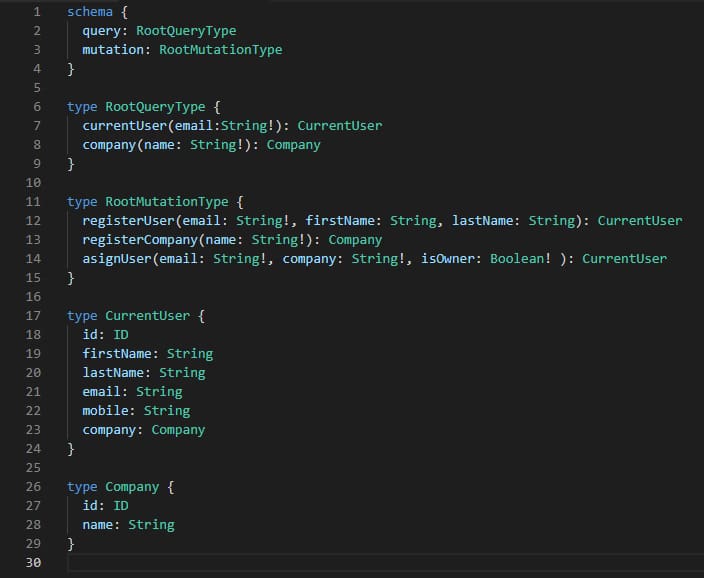
So, in summary, GraphQL it’s a different protocol to define your API interfaces with another approach in mind. So, let’s see how can include this kind of interfaces in our Flogo flows. We’re going to play with the following GraphQL Schema that is going to define our API
If this is the first time you see a GraphQL schema, let me give you some clarifications:
Schema is split into three parts: Queries, Mutations, and Model
Queries are GET-style request to get information. In our case, we have two queries currentUser and company.
Mutations are POST/PUT-style request to modify information. In our case, we have three mutations: registerUser, registerCompany, asignUser.
Model is the different objects and types our queries and mutations interact with.
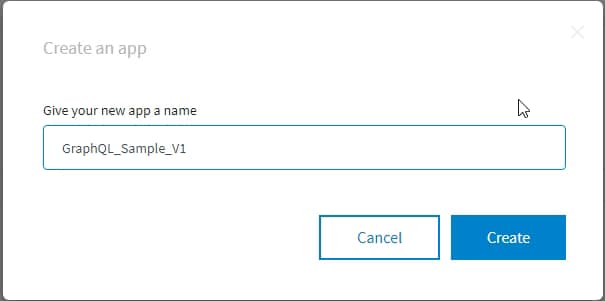
So, now we are going to do the hard work in Flogo Environment, and we start creating a new application that we’re going to call GraphQL_Sample_1
Creation form of the new app named GraphQL_Sample_V1
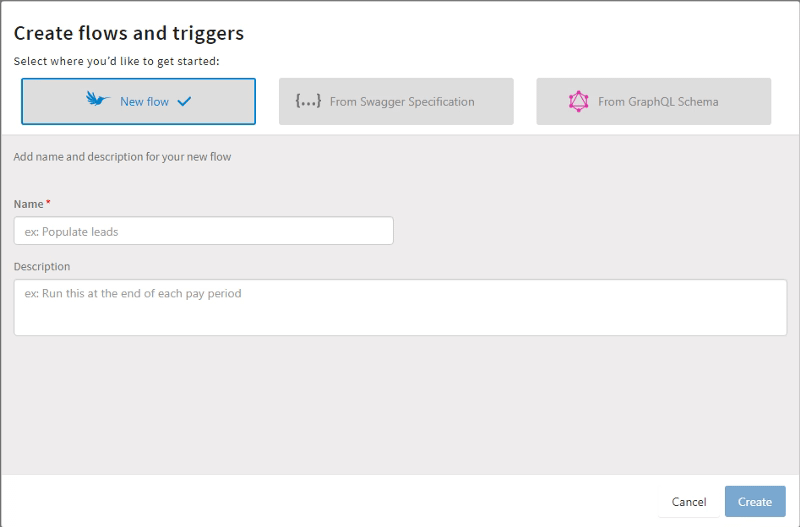
Now, we have an empty application. Until this point it wasn’t hard, right? Ok, let’s see how it goes. Now we are going to create a new flow, and we can choose between three options:
Empty flow
Swagger specification
GraphQL Schema
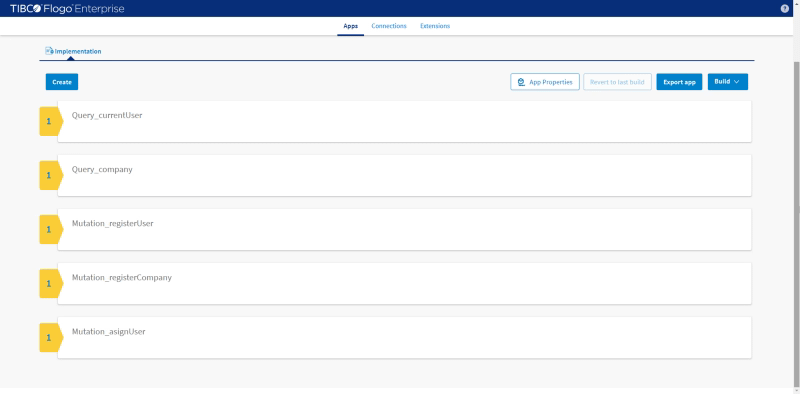
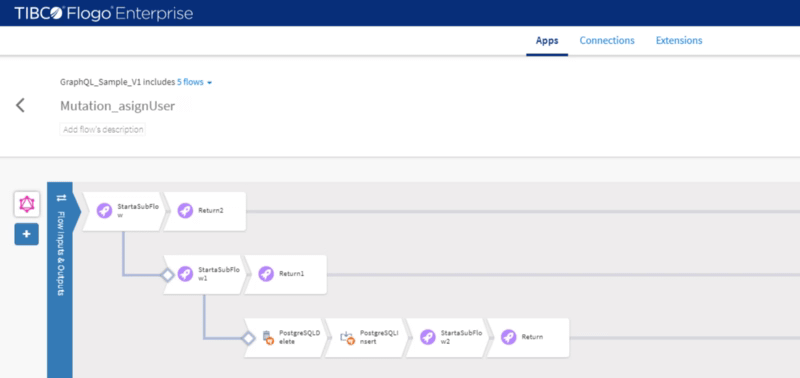
So we choose the option from GraphQL Schema and we upload the file and it generates a skeleton of all the flows needed to support this specification. A new flow is going to be generated for each of the queries and each of the mutations we’ve defined, as we have two (2) queries and three (3) mutations, so five (5) flows in total as you can see in the picture below:
Autogenerated flows based on GraphQL schema
As you can see flows have been generated following the following naming convention:
<TYPE>_<name>
Where <TYPE> can be either Mutation or Query and <name> is the name this component has in the GraphQL Schema.
Now, everything is done regarding GraphQL part, and we only need to provide content to each of the flows. In this sample, I’m going to rely on a PostgreSQL database to store all the info regarding users and companies, but the content is going to be very straight forward.
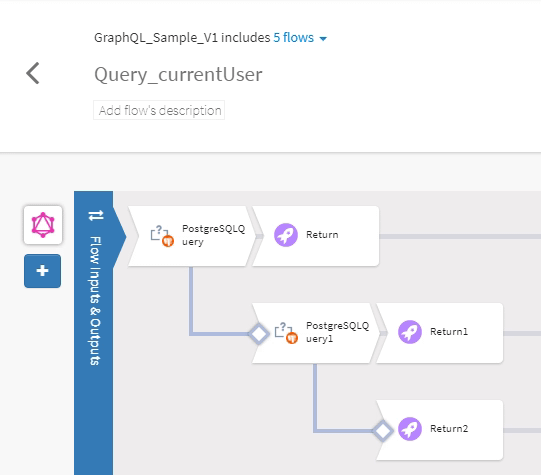
Query_currentUser: This flow is going to ask for the customer data to the PostgreSQL to return its data and the company he belongs to. In case he doesn’t belong to anyone, we gather only the data user and in case it is not present to return an empty object.
Query_currentUser flow
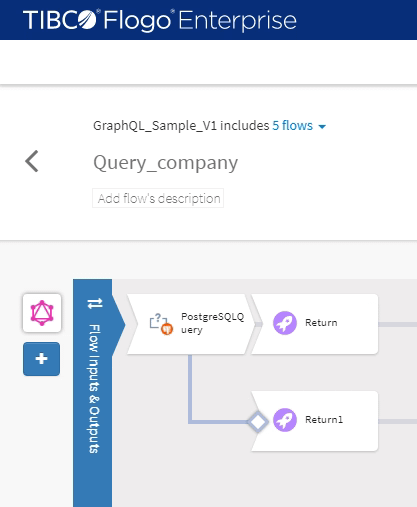
Query_company: This flow is going to ask for the company data to the PostgreSQL to return and in case it is not present to return an empty object.
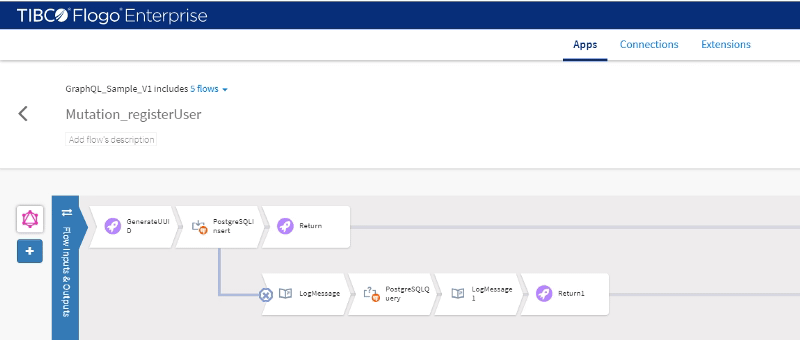
Mutation_registerUser: This flow is going to insert a user in the database and in case its mail already exists is going to return the existing data to the consumer.
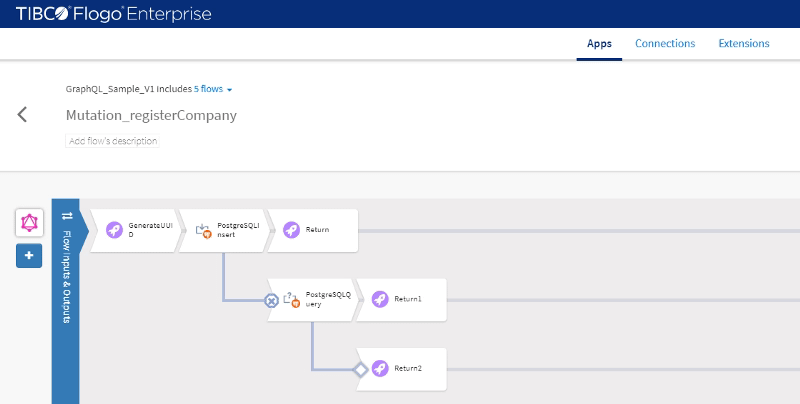
Mutation_registerCompany: This flow is going to insert a company in the database and in case its name already exists is going to return the existing data to the consumer.
Mutation_asignUser: This flow is going to assign a user into the company to do that is going to return the user data based on its email and same thing with the company and update the PostgreSQL activities based on that situation.
Ok, now we have our app already built, let’s see how we can test it and play with the GraphQL API we’ve built. So…its show-time!!!!!
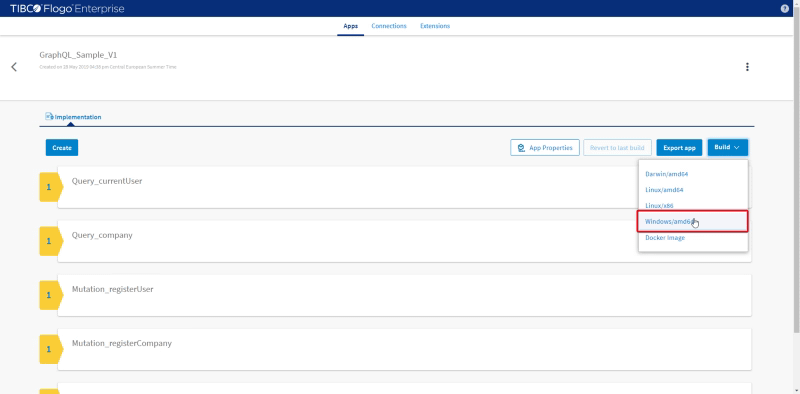
First, we’re going to build the app. As you probably know you can choose for different kinds of builts: docker image or OS-based package. In my case, I’m going to generate a Windows build to ease all the process, but you can choose whatever feels good to you.
To do that we go to the menu app and click in the Build and choose the Windows option:
Build option to windows
And once the built has done we’re going to have a new EXE file in our Download folder. Yes, that easy! And now, how to launch it? Even easier… just execute the EXE file and … it’s done!!
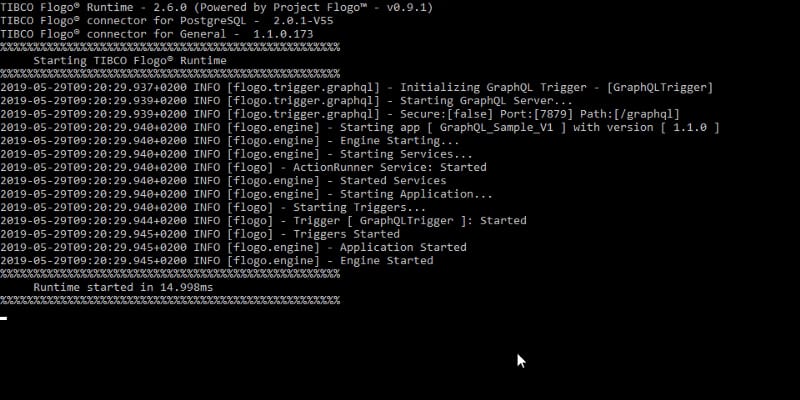
GraphQL Flogo app running in Windows console
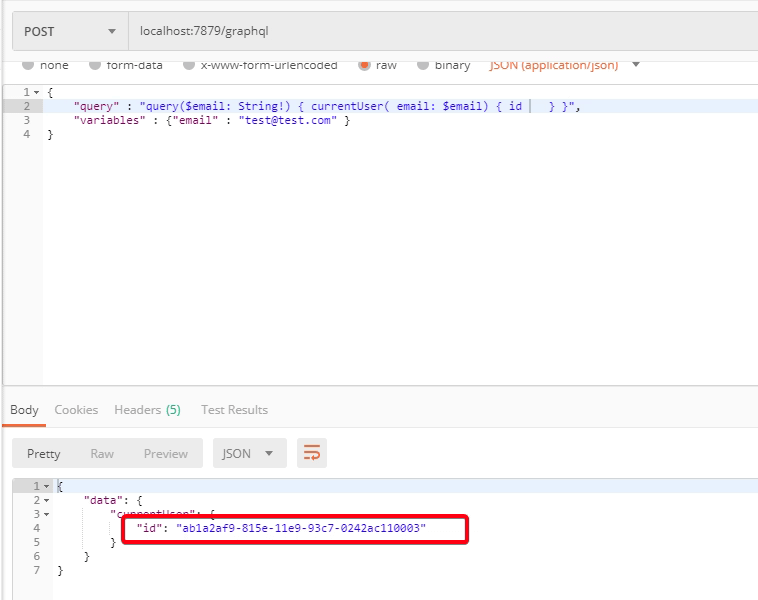
As you can see in the picture above we’re listening requests in port 7879 in the /graphql path. So, let’s open a Postman client and start sending requests to it!!
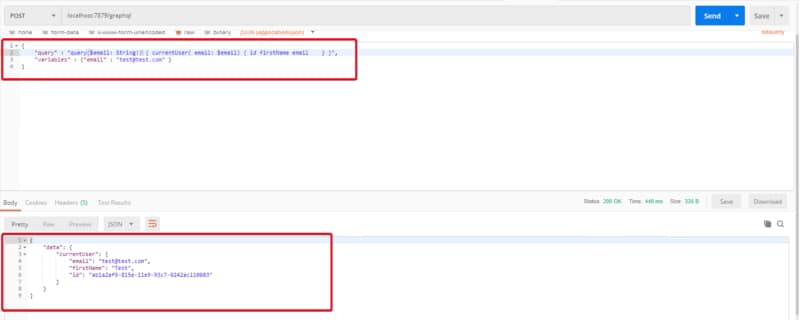
And we’re going to start with the queries and to be able to return data I’ve inserted in the database a sample record with test@test.com email so, If now I try to recover it, I can do this:
In previous posts, we’ve talked about capabilities of Flogo and how to build our first Flogo application, so at this moment if you’ve read both of them you have a clear knowledge about what Flogo provides and how easy is to create applications in Flogo.
But in those capabilities, we’ve spoken about that one of the strengths from Flogo is how easy is to extend the default capabilities Flogo provides. Flogo Extensions allows increasing the integration capabilities from the product as well as the compute capabilities and they’re built using Go. You can create a different kind of extensions:
Triggers: Mechanism to activate a Flogo flow (usually known as Starters)
Activities/Actions: Implementation logic that you can use inside your Flogo flows.
There are different kinds of extensions depending on how they’re provided and the scope they have.
TIBCO Flogo Enterprise Connectors: These are the connectors provided directly from TIBCO Software for the customers that are using TIBCO Flogo Enterprise. They are release using TIBCO eDelivery like all the other products and components from TIBCO.
Flogo Open Source Extensions: These are the extensions developed by the Community and that is usually stored in GitHub repositories or any other control version system that is publicly available.
TIBCO Flogo Enterprise Custom Extensions: These are the equivalent extensions to Flogo OpenSource Extensions but build to be used in TIBCO Flogo Enterprise or TIBCO Cloud Integration (iPaaS from TIBCO) and that follows the requirements defined by Flogo Enterprise Documentation and provides a little more configuration options about how this is displayed in UI.
Installation using TIBCO Web UI
We’re going to cover in this article how to work with all of them in our environment and you’re going to see that the procedure is pretty much the same but the main difference is how to get the deployable object.
We need to install some extension and for our case, we’re going to use both kinds of extensions possible: A connector provided by TIBCO for connecting to GitHub and an open source activity build for the community to manage the File operations.
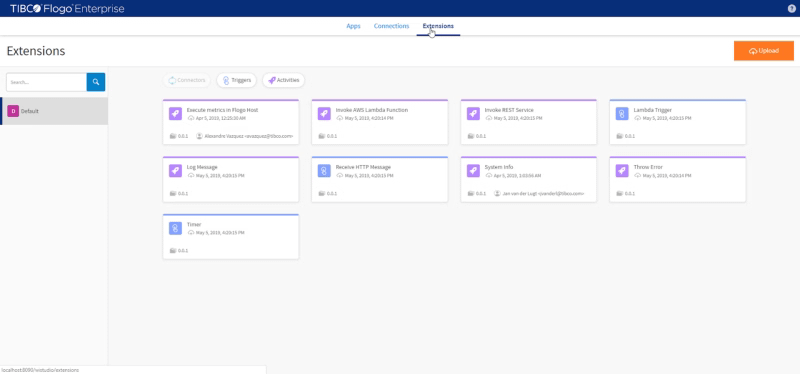
First, we’re going to start with the GitHub connector and we’re going to use the Flogo Connector for GitHub, that is going to be downloaded through TIBCO eDelivery as you did with Flogo Enterprise. Once you have the ZIP file, you need to add it to your installation and to do that, we’re going to go to the Extensions page
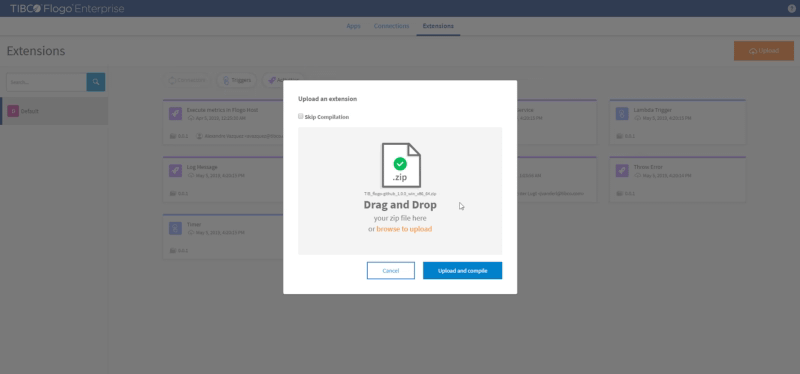
And we’re going to click in Upload and provide the ZIP file we’ve downloaded with the GitHub connector
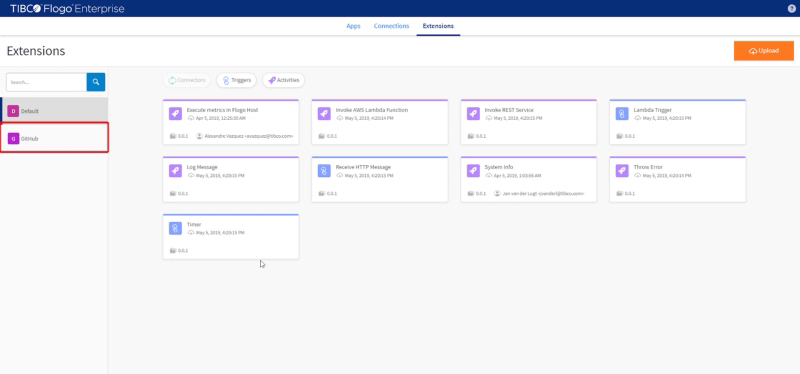
We click on the button “Upload and compile” and wait until the compilation process finishes and after that, we should notice that we have an additional trigger available as you can see in the picture below:
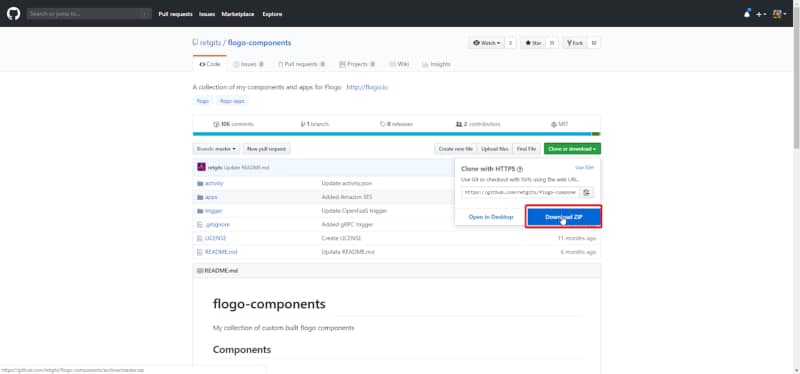
So, we already have our GitHub trigger, but we need our File activities and now we’re going to do the same exercise but with a different connector. In this case, we’re going to use an open source activity that is hosted in the Leon Stigter GitHub repository. And we’re going to download the full flogo-components repository and upload that ZIP file to the Extensions page as we did before:
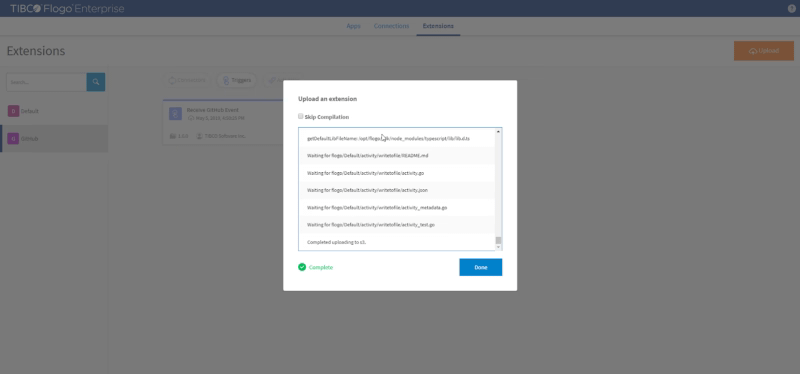
We’re going to extract the full repository and go to the path activity and generate a zip file from the folder named “writetofile” and that is the ZIP file that we’re going to upload it to our Extension page:
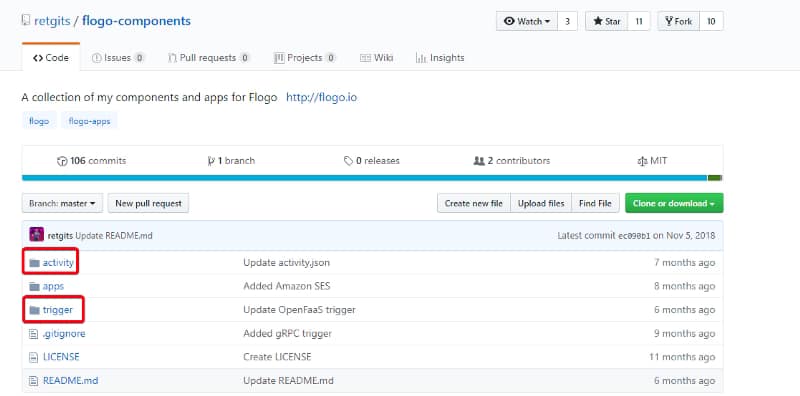
Repository structure is pretty much the same for all this kind of open source repositories, they usually have the name flogo-components and inside they have two main folders:
activity: Folder that is grouping all different activities that are available in this repository.
trigger: Folder that is grouping all different triggers that are available in this repository.
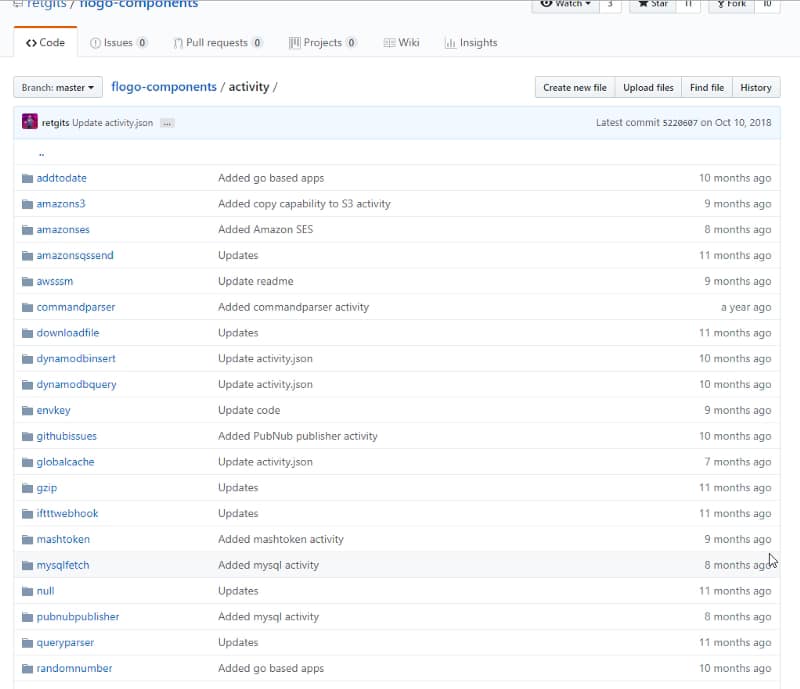
Each of these folders is going to have a folder for each of the activities and triggers that are being implemented in this repository like you can see in the picture below:
And each of them is to have the same structure:
activity.json: That is going to describe the model of the activity (name, description, author, input settings, output settings)
activity.go: Holds all the programming code in Go to build the capability the activity exposes.
activity_test.go : Holds all tests the activity has to be ready to be used by other developers and users.
NOTE: Extensions for TIBCO Flogo Enterprise have an additional file named activity.ts that is a TypeScript file that defines UI validations that it should be done for the activity.
And once we have the file we can upload it the same way we did with the previous extension.
Using CLI to Install
Also, If we’re using the Flogo CLI we can still install it using directly the URL to the activity folder without needed to provide the zip file. To do that we need to enable Installer Manager using the following command:
<FLOGO_HOME>/tools/installmgr.bat
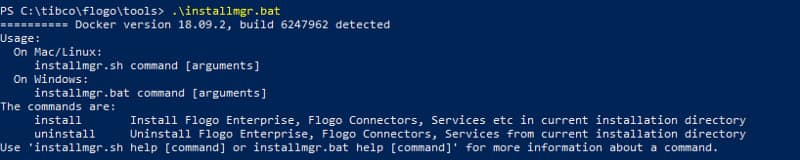
And that is going to build a Docker image that represents a CLI tool with the following commands:
Installer Manager usage menu
Install: Install Flogo Enterprise, Flogo Connectors, Services, etc in the current installation directory.
Uninstall: Uninstall Flogo Enterprise, Flogo Connectors, Services from the current installation directory.
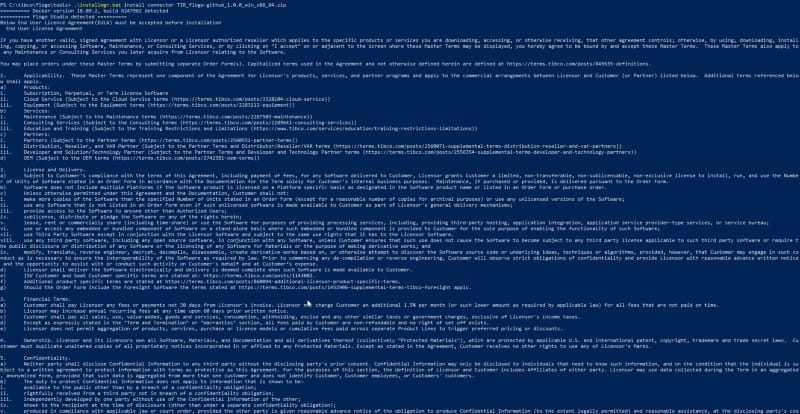
TIBCO Connector installation using Install Manager CLI
And this process can be used with an official Connector as well as an OSS Extension
OSS Extension Installation using Install Manager CLI
Probes are how we’re able to say to Kubernetes that everything inside the pod is working as expected. Kubernetes has no way to know what’s happening inside at the fine-grained and has no way to know for each container if it is healthy or not, that’s why they need help from the container itself.
First, you can think that you can do it with the entrypoint component of your Dockerfile as you only specify one command to run inside each container, so check if that process is running, and that means that everything is healthy? Ok… fair enough…
But, is this true always? A running process at the OS/container level means that everything is working fine? Let’s think about the Oracle database for a minute, imagine that you have an issue with the shared memory and it keeps in an initializing status forever, K8S is going to check the command, it is going to find that is running and says to the whole cluster: Ok! Don’t worry! Database is working perfectly, go ahead and send your queries to it!!
This could happen with similar components like a web server or even with an application itself, but it is too common when you have servers that can handle deployments on it, like BusinessWorks Container Edition itself. And that’ why this is very important for us as developers and even more important for us as administrators. So, let’s start!
The first thing we’re going to do is to build a BusinessWorks Container Edition Application, as this is not the main purpose of this article, we’re going to use the same ones I’ve created for the BusinessWorks Container Edition — Istio Integration that you could find here.
So, this is a quite simple application that exposes a SOAP Web Service. All applications in BusinessWorks Container Edition (as well as in BusinessWorks Enterprise Edition) has its own status, so you can ask them if they’re Running or not, that something the BusinessWorks Container internal “engine” (NOTE: We’re going to use the word engine to simplify when we’re talking about the internals of BWCE. In detail, the component that knows the status of the application is the internal AppNode the container starts, but let’s keep it simple for now)
Kubernetes Probes
In Kubernetes, exists the “probe” concept to perform health check to your container. This is performed by configuring liveness probes or readiness probes.
Liveness probe: Kubernetes uses liveness probes to know when to restart a Container. For example, liveness probes could catch a deadlock, where an application is running, but unable to make progress.
Readiness probe: Kubernetes uses readiness probes to know when a Container is ready to start accepting traffic. A Pod is considered ready when all of its Containers are ready. One use of this signal is to control which Pods are used as backends for Services. When a Pod is not ready, it is removed from Service load balance
Even when there are two types of probes for BusinessWorks Container Edition both are handling the same way, the idea is the following one: As long as the application is Running, you can start sending traffic and when it is not running we need to restart the container, so that makes it simpler for us.
Implementing Probes
Each BusinessWorks Container Edition application that is started has an out of the box way to know if it is healthy or not. This is done by a special endpoint published by the engine itself:
http://localhost:7777/_ping/
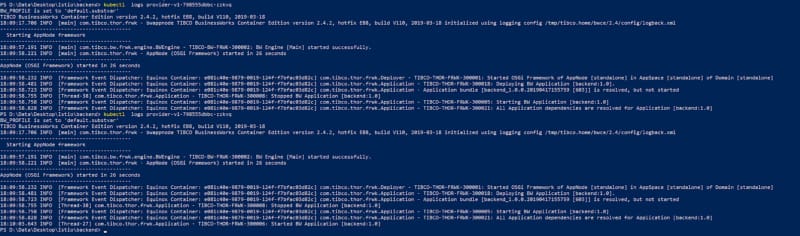
So, if we have a normal BusinessWorks Container Edition application deployed on our Kubernetes cluster as we had for the Istio integration we have logs similar to these ones:
Staring traces of a BusinessWorks Container Edition Application
As you can see logs says that the application is started. So, as we can’t launch a curl request from the inside the container (as we haven’t exposed the port 7777 to the outside yet and curl is not installed in the base image), the first thing we’re going to do is to expose it to the rest of the cluster.
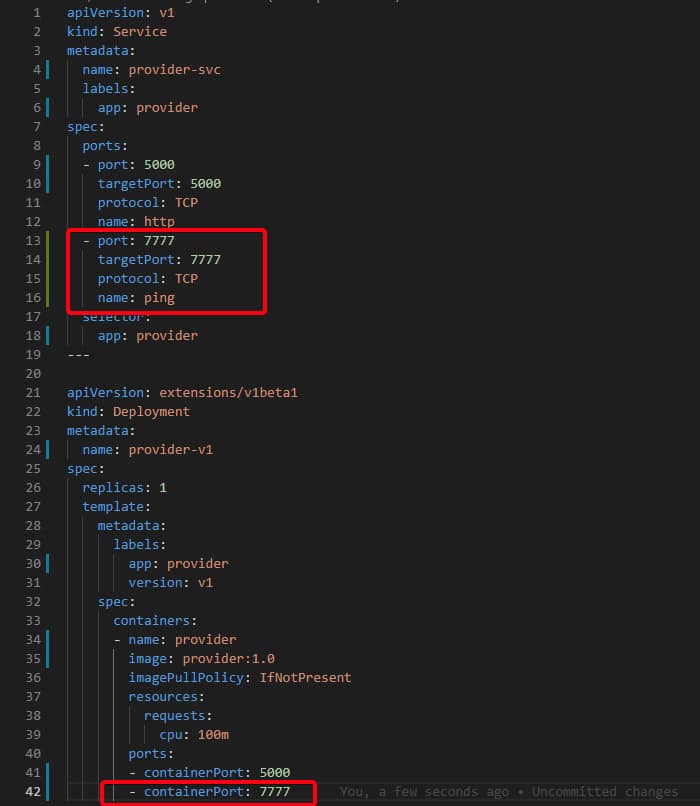
To do that we change our Deployment.yml file that we have used to this one:
Deployment.yml file with the 7777 port exposed
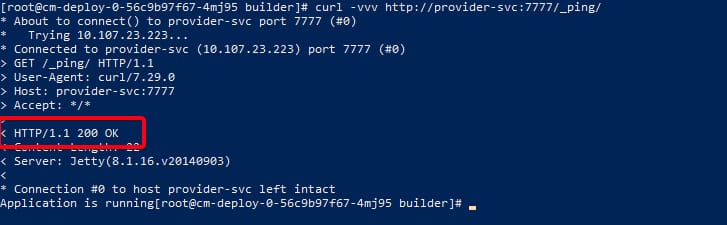
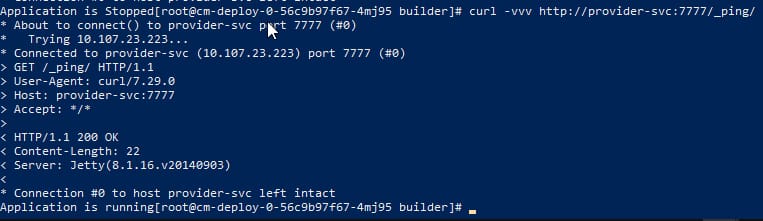
Now, we can go to any container in the cluster that has “curl” installed or any other way to launch a request like this one with the HTTP 200 code and the message “Application is running”.
Successful execution of _ping endpoint
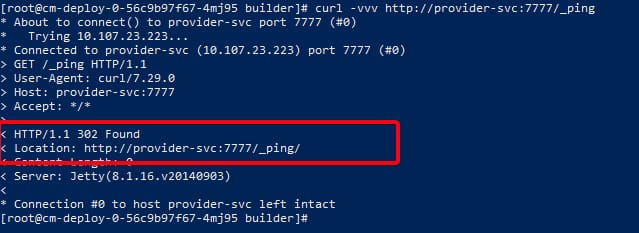
NOTE: If you forget the last / and try to invoke _ping instead of _ping/ you’re going to get an HTTP 302 Found code with the final location as you can see here:
HTTP 302 code execution were pointing to _ping instead of _ping/
Ok, let’s see what happens if now we stop the application. To do that we’re going to go inside the container and use the OSGi console.
To do that once you’re inside the container you execute the following command:
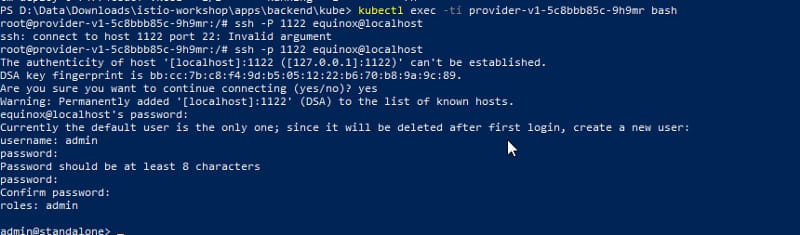
ssh -p 1122 equinox@localhost
It is going to ask for credentials and use the default password ‘equinox’. After that is going to give you the chance to create a new user and you can use whatever credentials work for you. In my example, I’m going to use admin / adminadmin (NOTE: Minimum length for a password is eight (8) characters.
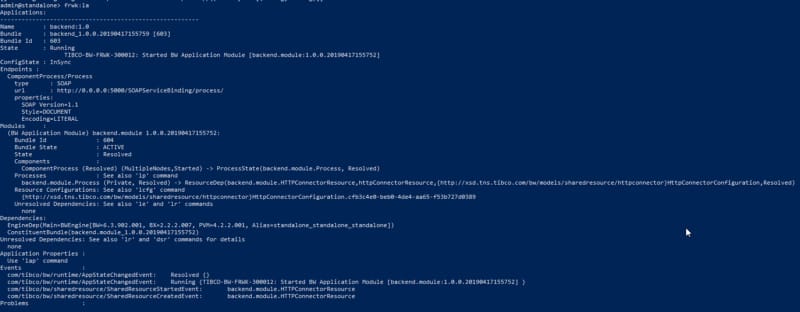
If we execute frwk:la is going to show the applications deployed, in our case the only one, as it should be in BusinessWorks Container Edition application:
To stop it, we are going to execute the following command to list all the OSGi bundle we have at the moment running in the system:
frwk:lb
Now, we find the bundles that belong to our application (at least two bundles (1 per BW Module and another for the Application)
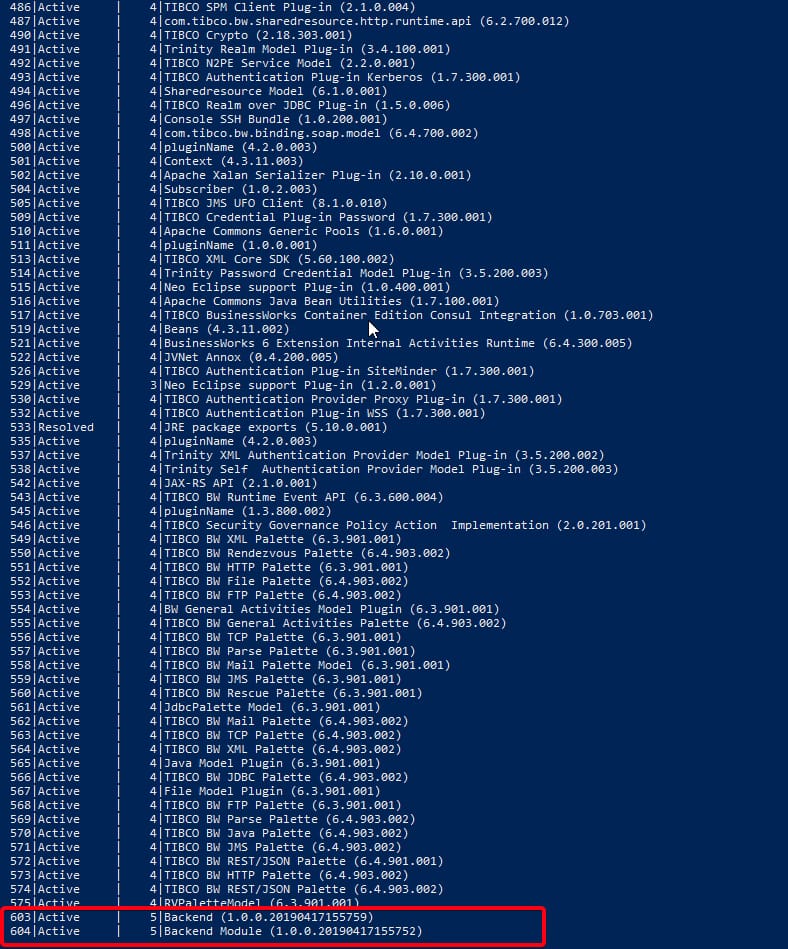
Showing bundles inside the BusinessWorks Container Application
And now we can stop it using felix:stop <ID>, so in my case, I need to execute the following commands:
stop “603”
stop “604”
Commands to stop the bundles that belong to the application
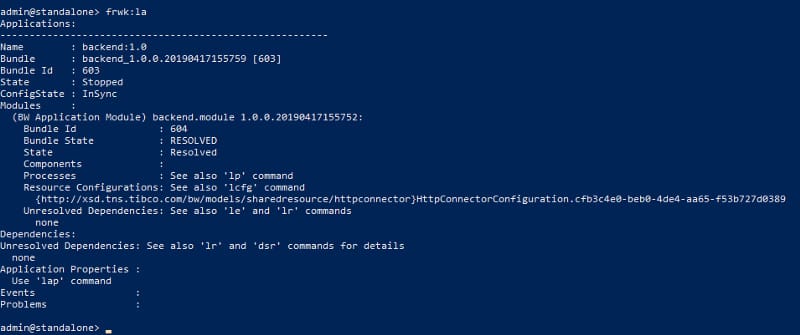
And now the application is stopped
OSGi console showing the application as Stopped
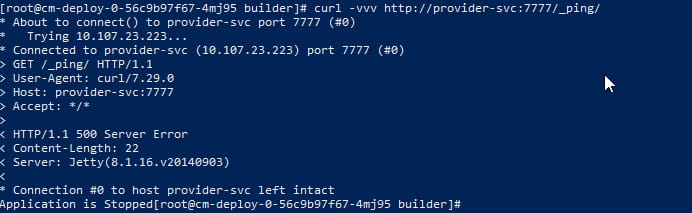
So, if now we try to launch the same curl command as we executed before, we’re getting the following output:
Failed execution of ping endpoint when Application is stopped
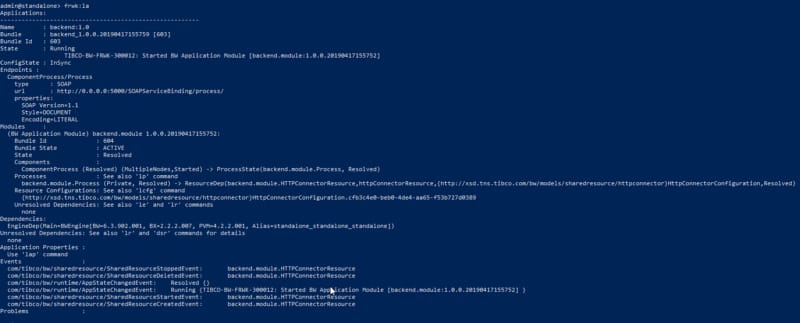
As you can see an HTTP 500 Error which means something is not fine. If now we try to start again the application using the start bundle command (equivalent to the stop bundle command that we used before) for both bundles of the application, you are going to see that the application says is running again:
And the command has the HTTP 200 output as it should have and the message “Application us running”
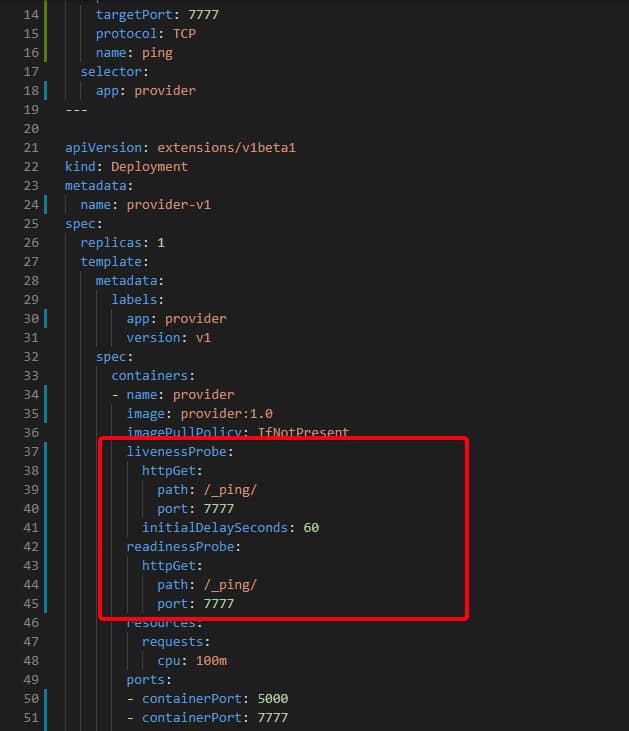
So, now, after knowing how the _ping/ endpoint works we only need to add it to our deployment.yml file from Kubernetes. So we modified again our deployment file to be something like this:
NOTE: It’s quite important the presence of initialDelaySeconds parameter to make sure the application has the option to start before start executing the probe. In case you don’t put this value you can get a Reboot Loop in your container.
NOTE: Example shows port 7777 as an exported port but this is only needed for the steps we’ve done before and you will not be needed in a real production environment.
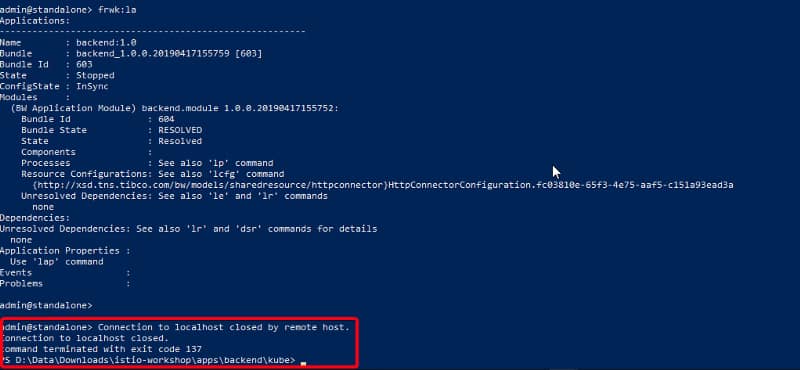
So now we deploy again the YML file and once we get the application running we’re going to try the same approach, but now as we have the probes defined as soon as I stop the application containers has going to be restarted. Let’s see!
As you can see in the picture above after the application is Stopped the container has been restarted and because of that, we’ve got expelled from inside the container.
So, that’s all, I hope that helps you to set up your probes and in case you need more details, please take a look at the Kubernetes documentation about httpGet probes to see all the configuration and option that you can apply to them.
Services Mesh is one the “greatest new thing” in our PaaS environments. No matter if you’re working with K8S, Docker Swarm, pure-cloud with EKS or AWS, you’ve heard and probably tried to know how can be used this new thing that has so many advantages because it provides a lot of options in handling communication between components without impacting the logic of the components. And if you’ve heard from Service Mesh, you’ve heard from Istio as well, because this is the “flagship option” at the moment, even when other options like Linkerd or AWS App Mesh are also a great option, Istio is the most used Service Mesh at the moment.
You probably have seen some examples about how to integrate Istio with your open source based developments, but what happens if you have a lot of BWCE or BusinessWorks applications… can you use all this power? Or are you going to be banned for this new world?
Do not panic! This article is going to show you how easy you can use Istio with your BWCE application inside a K8S cluster. So, let the match…. BEGIN!
Scenario
The scenario that we’re going to test is quite simple. It’s a simple consumer provider approach. We’re going to use a simple Web Service SOAP/HTTP exposed by a backend to show that this can work not only with fancy REST API but even with any HTTP traffic that we could generate at the BWCE Application level.
So, we are going to invoke a service that is going to request a response from its provider and give us the response. That’s pretty easy to set up using pure BWCE without anything else.
All code related to this example is available for you in the following GitHub repo: Go get the code!
Steps
Step 1 Install Istio inside your Kubernetes Cluster
In my case I’m using Kubernetes cluster inside my Docker Desktop installation so you can do the same or use your real Kubernetes cluster, that’s up to you. The first step anyway is to install istio. And to do that, nothing better than following the steps given at isito-workshop that you can find here: https://polarsquad.github.io/istio-workshop/install-istio/ (UPDATE: No longer available)
Once you’ve finished we’re going to get the following scenario in our kubernetes cluster, so please, check that the result is the same with the following commands:
kubectl get pods -n istio-system
You should see that all pods are Running as you can see in the picture below:
kubectl -n istio-system get deployment -listio=sidecar-injector
You should see that there is one instance (CURRENT = 1) available.
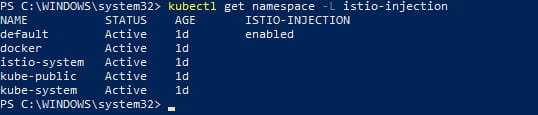
kubectl get namespace -L istio-injection
You should see that ISTIO-INJECTION is enabled for the default namespace as the image shown below:
Step 2 Build BWCE Applications
Now, as we have all the infrastructure needed at the Istio level we can start building our application and to do that we don’t have to do anything different in our BWCE application. Eventually, they’re going to be two application that talks using HTTP as protocol, so nothing specific.
This is something important because when we usually talk about Service Mesh and Istio with customers, the same question always arises: Is Istio supported in BWCE? Can we use Istio as a protocol to communicate our BWCE application? So, they expect that it should exist some palette or some custom plugin they should install to support Istio. But none of that is needed at the application level. And that applies not only to BWCE but also to any other technology like Flogo or even open source technologies because at the end Istio (and Envoy is the other part needed in this technology that we usually avoid talking about when we talk about Istio) works in a Proxy mode using one of the most usual patterns in containers that is the “sidecar pattern”.
So, the technology that is exposing and implementing or consuming the service knows nothing about all this “magic” that is being executed in the middle of this communication process.
We’re going to define the following properties as environment variables like we’ll do in case we’re not using Istio:
Provider application:
PROVIDER_PORT → Port where the provider is going to listen for incoming requests.
Consumer application:
PROVIDER_PORT → Port where the provider host will be listening to.
PROVIDER_HOST → Host or FQDN (aka K8S service name) where provider service will be exposed.
CONSUMER_PORT → Port where the consumer service is going to listen for incoming requests.
So, as you can see if you check that the code of the BWCE application we don’t need to do anything special to support Istio in our BWCE applications.
NOTE: There is only an important topic that is not related to the Istio integration but how BWCE populates the property BW.CLOUD.HOST that is never translated to loopback interface or even 0.0.0.0. So it’s better that you change that variable for a custom one or to use localhost or 0.0.0.0 to listen in the loopback interface because is where the Istio proxy is going to send the requests.
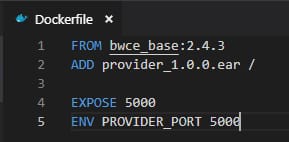
After that we’re going to create our Dockerfiles for these services without anything, in particular, something similar to what you can see here:
NOTE: As a prerequisite, we’re using BWCE Base Docker Image named as bwce_base.2.4.3 that corresponds to version 2.4.3 of BusinessWorks Container Edition.
And now we build our docker images in our repository as you can see in the following picture:
Step 3: Deploy the BWCE Applications
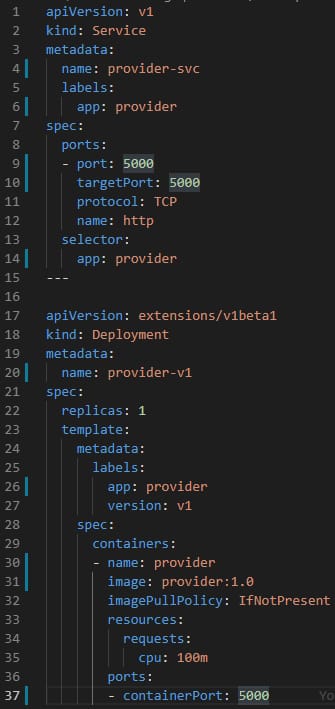
Now, when all the images are being created we need to generate the artifacts needed to deploy these applications in our Cluster. Once again in this case nothing special neither in our YAML file, as you can see in the picture below we’re going to define a K8S service and a K8S deployment based on the imaged we’ve created in the previous step:
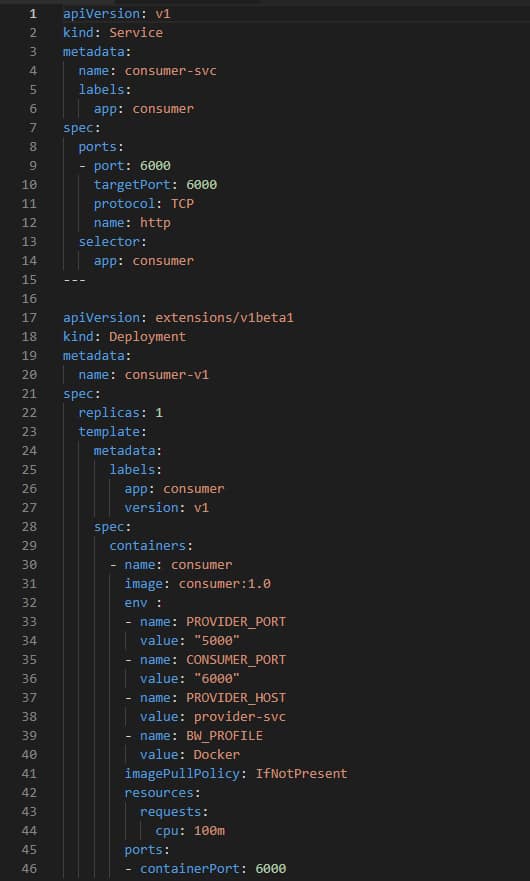
A similar thing happens with consumer deployment as well as you can see in the image below:
And we can deploy them in our K8S cluster with the following commands:
kubectl apply -f kube/provider.yaml
kubectl apply -f kube/consumer.yaml
Now, you should see the following components deployed. Only to fulfill all the components needed in our structure we’re going to create an ingress to make possible to execute requests from outside the cluster to those components and to do that we’re going to use the following yaml file:
kubectl apply -f kube/ingress.yaml
And now, after doing that, we’re going to invoke the service inside our SOAPUI project and we should get the following response:
Step 4 — Recap what we’ve just done
Ok, it’s working and you think… mmmm I can get this working without Istio and I don’t know if Istio is still doing anything or not…
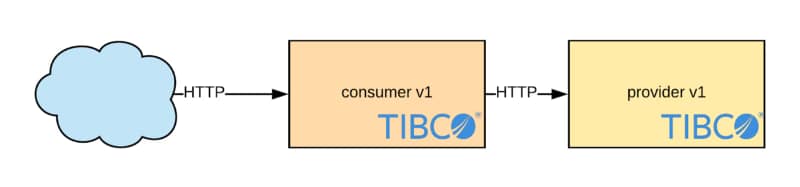
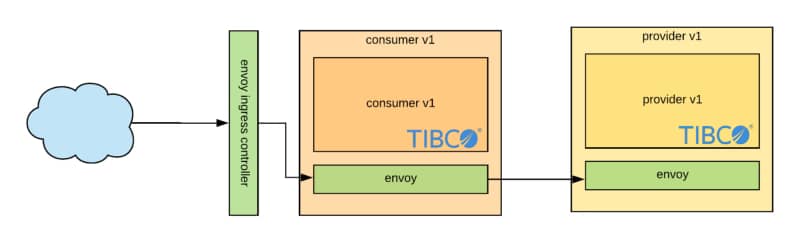
Ok, you’re right, this could not be so great as you were expected, but, trust me, we’re just going step by step… Let’s see what’s really happening instead of a simple request from outside the cluster to the consumer service and that request being forwarded to the backend, what’s happening is a little bit more complex. Let’s take a look at the image below:
Incoming request from the outside is being handled by an Ingress Envoy Controller that is going to execute all rules defined to choose which service should handle the request, in our case the only consumer-v1 component is going to do it, and the same thing happens in the communication between consumer and provider.
So, we’re getting some interceptors in the middle that COULD apply the logic that is going to help us to route traffic between our components with the deployment of rules at runtime level without changing the application, and that is the MAGIC.
Step 5 — Implement Canary Release
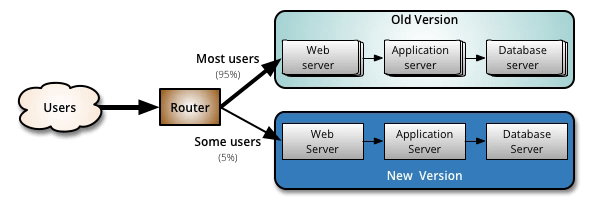
Ok, now let’s apply some of this magic to our case. One of the most usual patterns that we usually apply when we’re rolling out an update in some of our services is the canary approach. Only to do a quick explanation or what this is:
Canary release is a technique to reduce the risk of introducing a new software version in production by slowly rolling out the change to a small subset of users before rolling it out to the entire infrastructure and making it available to everybody.
If you want to read more about this you can take a look at the full article in Martin Fowler’s blog.
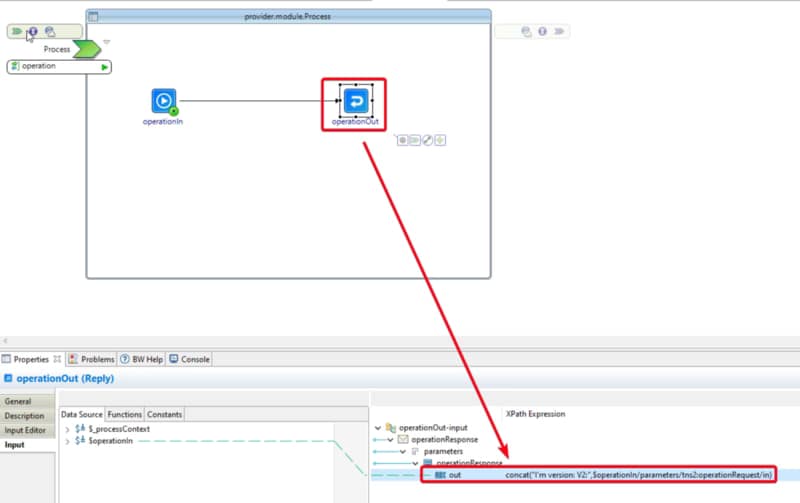
So, now we’re going to generate a small change in our provider application, that is going to change the response to be sure that we’re targeting version two, as you can see in the image below:
Now, we are going to build this application and generate the new image called provider:v2.
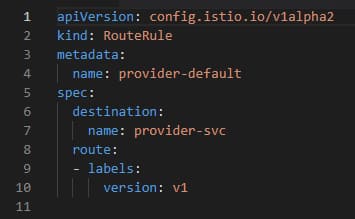
But before we’re going to deploy it using the YAML file called provider-v2.yaml we’re going to set a rule in our Istio Service Mesh that all traffic should be targeted to v1 even when others are applied. To do that we’re going to deploy the file called default.yaml that has the following content:
So, in this case, what we’re saying to Istio is that even if there are other components registered to the service, it should reply always the v1, so we can now deploy the v2 without any issue because it is not going to reply to any traffic until we decide to do so. So, now we can deploy the v2 with the following command:
kubectl apply -f provider-v2.yaml
And even when we execute the SOAPUI request we’re still getting a v1 reply even if we check in the K8S service configuration that the v2 is still bounded to that service.
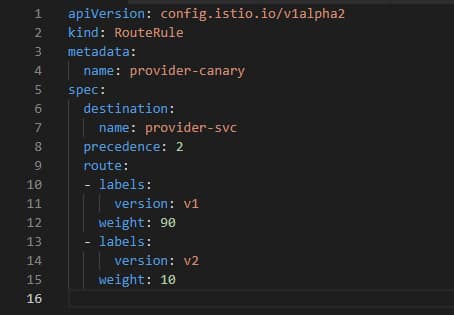
Ok, now we’re going to start doing the release and we’re going to start with 10% to the new version and 90% of the requests to the old one, and to do that we’re going to deploy the rule canary.yaml using the following command:
kubectl apply -f canary.yaml
Where canary.yaml has the content shown below:
And now when we try enough times we’re going to get that most of the requests (90% approx) is going to reply v1 and only for 10% is going to reply from my new version:
Now, we can monitor how v2 is performing without affecting all customers and if everything goes as expected we can continue increasing that percentage until all customers are being replied by v2.
If you are familiar with Enterprise Integration world for sure you know Kafka, one of the most famous projects from Apache Foundation for the last years, and also if you are in Integration World you know TIBCO Software, and some of our flagship products like TIBCO ActiveMatrix BusinessWorks for integration, TIBCO Cloud Integration as our iPaaS, TIBCO AMX BPM, TIBCO BusinessEvents.. and I could continue that list over and over.. 🙂
This article is part of my comprehensive TIBCO Integration Platform Guide where you can find more patterns and best practices for TIBCO integration platforms.
But, probably you don’t know about TIBCO(R) Messaging — Apache Kafka Distribution. This is one of the parts of our global messaging solution named TIBCO Messaging and it is composed of several components:
TIBCO Enterprise Message Service (aka TIBCO EMS) is our JMS 2.0 compliant server, one of our messaging standards over a decade.
TIBCO FTL is our cloud-ready messaging solution, using a direct pub-sub no centralized and so performant communication system.
TIBCO(R) Messaging — Apache Kafka Distribution is designed for efficient data distribution and stream processing with the ability to bridge Kafka applications to other TIBCO Messaging applications powered by TIBCO FTL(R), TIBCO eFTL(TM) or TIBCO Enterprise Message Service(TM).
TIBCO(R) Messaging — Eclipse Mosquitto Distribution includes a lightweight MQTT broker and C library for MQTT client in the Core package and a component for bridging MQTT clients to TIBCO FTL applications in the Bridge package.
I’d like to do that post fully-technical but I’m going to let a piece of info about product version that you could find interesting, because we have a Community Edition of this whole Messaging solution and you could use yourself.
TIBCO Messaging software is available in a community edition and an enterprise edition.
TIBCO Messaging — Community Edition is ideal for getting started with TIBCO Messaging, for implementing application projects (including proof of concept efforts) for testing, and for deploying applications in a production environment. Although the community license limits the number of production processes, you can easily upgrade to the enterprise edition as your use of TIBCO Messaging expands. The community edition is available free of charge, with the following limitations and exclusions:
● Users may run up to 100 application instances or 1000 web/mobile instances in a production environment.
● Users do not have access to TIBCO Support, but you can use TIBCO Community as a resource (http://community.tibco.com).
TIBCO Messaging — Enterprise Edition is ideal for all application development projects, and for deploying and managing applications in an enterprise production environment. It includes all features presented in this documentation set, as well as access to TIBCO Support.
You can read that info here, but, please, take your time too to read our official announcement that you could find here.
So, this is going to be the first of a few posts about how to integration Kafka in the usual TIBCO ecosystem and different technologies. This series is going to assume that you already know about Apache Kafka, and if you don’t, please take a look at the following reference before moving forward:
So, now we are going to start installing this distribution in our machine, in my case I’m going to use UNIX based target, but you have this software available for MacOS X, Windows or whatever OS you’re using.
Installation process is quite simple because distribution is based on the most usual Linux distributions so it provides you a deb package, a rpm package or even a tar package so you can use whatever you need for your current distribution. In my case, as I’m using CentOS I’ve moved with the rpm package and everything goes so smooth.
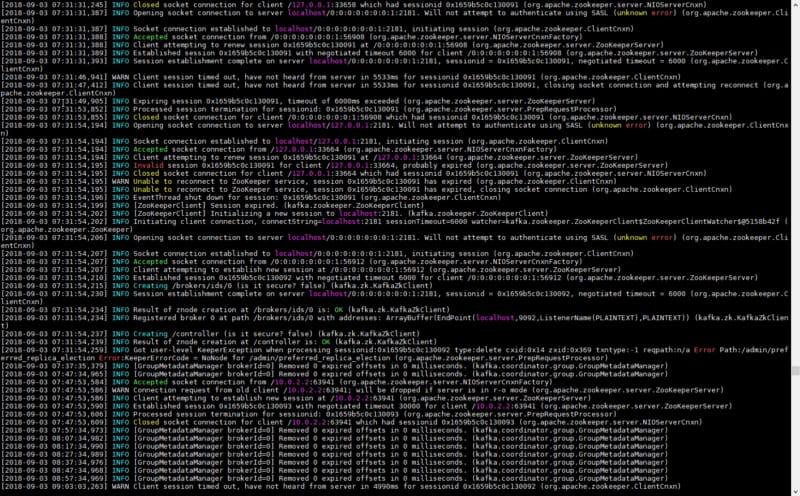
And after that I have installed in my /opt/tibco folder a pretty much usual Kafka distribution, so to start it we need to start the zookeeper server first and then the kafka server itself. And that’s it. Everything is running!!
Apache Kafka Distribution up & running
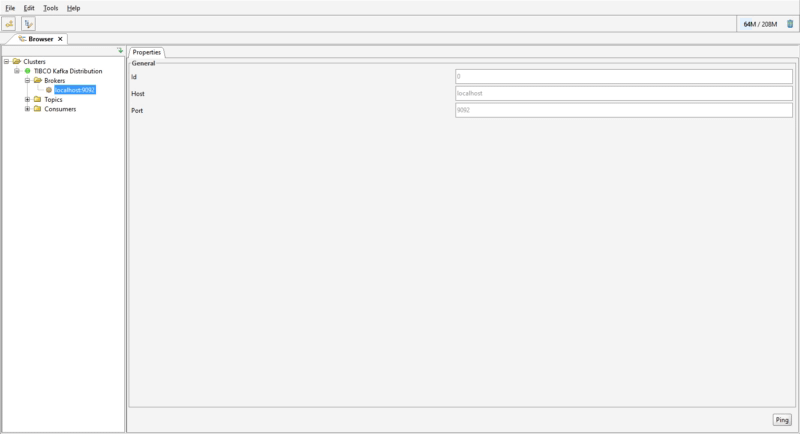
Mmmm.. But, How can I be sure of it? Kafka it doesn’t provide a GUI to monitor or monitor it, but there are a bunch of tools out there to do that. In my case I’m going to use Kafka Tool because it doesn’t need another components like Kafka REST and so on, but keep in mind there are other options with “prettier” UI but this is going to make the job just perfect.
So, after installing Kafka Tool, we only provide the data of where zookeeper is listening (if you keep everything by default, is going to be listening at 2181) and the Kafka version we’re using (in this case is 1.1), and now you can be sure everything is up & running and working as expected:
Kafka Tool could be used to monitor your Kafka brokers
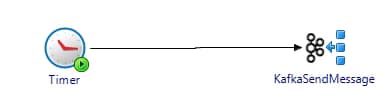
So, now we are going to do only a quick test using our flagship integration product TIBCO AMX BusinessWorks which has a Kafka plug-in, so you can communicate with this new server we just launched. This is going to be only a Hello World with the following structure:
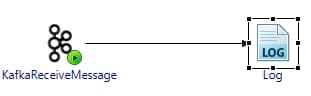
Process A is going to sent a Hello! to Process B.
Process B is going to receive that message and print it in a log.
The process are going to be developed just like these:
Kafka Sender Test ProcessKafka Receiver Test Process
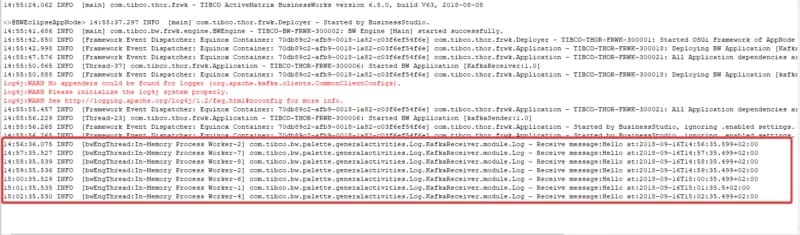
And that’s the output we get after executing both processes:
Correct execution using TIBCO Business Studio
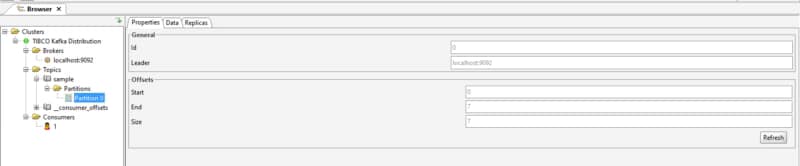
And we can see that the topic sample we used to do the comunication and the default partition has been created by default using Kafka Tool:
Topic has been created on-demand
As you can see, so easy and straightforward to have it all configured in a default way. After that, we continue going deep on this new component in the TIBCO world!
We are living times where you hear about DevOps everywhere, how the walls should be removed between these two worlds like Development and Operations, but all these speeches are based on the point of view from the developer and the business, but never from the point to view of the Administrator.
We are coming from a time where the operation teams where split on several levels of escalation where each level should be less populated and more skilled than the previous one. So we have a first level with people with basic knowledge that are working 24×7 covering any kind of incident that could happen. In case anything happen they try to solve it with the knowledge (usually more document than knowledge…) and in case something is not working as expected they forward it to a second level with more knowledge about the platform where they are probably an on-call team to handle that and we’re going to have so many levels as wanted. How all of this fit with Devops, CI & CD and so on…? Ok, pretty easy..
Level 1 today doesn’t exists: Monitoring tools, CI & CD and so on, make no needed this first level, because if you could create a document with the steps to do when something wrong happen you are writing code but inside a Document so nobody stops you to deliver an automated tool to do that. So, in plain english, yesterday first level operators are now scripts. But we still need our operation teams, our 24×7 seven service and so on.. for sure, because from time to time (more usually that we’d liked it) something out of the normal happens and that’s need to be managed.
So, automation is never going to replace L2 & L3, so you’re going to need skill people to handle incidents, maybe you could have a smaller team as you automate more process but never you can get rid of the knowledge part, that’s not the point. Here, we can discuss if this team could be the development team or a mix team from both worlds, and that could be right. Any approach is valid with this. So, we’ve implemented all our new fancy CI & CD process, monitoring tools and the platforms seems to be running without any help and support until somethings really strange happen. So, what to do with that people? Of course, teach the skills to be valuable as L2 & L3, so they have to be better operator / system administrator /whatever word you like the most. And how they can do that?
As I said before we are moving from a world where the Operation teams works based on written procedures and they have their imagination limited to look far from its approved protocol, but that’s not anymore the way L2 & L3 works. When you are facing an incident, the procedure is pretty much the same as hunting a bug, or if we escape from the IT world, it’s like to solving a crime. What are the similarities between solving a crime and managing a platform? Ok, let’s enumerate them:
– What? — What happened to my system? You start with the consequences of the issue, probably a error log trace, probably another system calling you because you system is unavailable.. Ok, here you have, this is your dead body.
When? — When you know something wrong happen, you start to find the root cause, and you start search logs traces to find the first one that generate the problem, even you discard the log traces that are consequences from the first one, and you try to find when everything starting to fail. To do that, you need to seek evidences about the crash and so on.. So now, you are investigating, searching for evidences, talking to witnesses (yeah, your log traces are the most trustworthy witnesses you are going to find, rarely they lied. It’s like they are on the stand in fron the of a judge)
….. And now? How & Why? — And that’s the difficult point, how & why, are the next steps as you do in a bug hunting, but the main difference here, is when the dev team is hunting a bug, they can correlate the evidences they gather on the step two, with the source code they built to know how and why everything goes wrong.. But in you case, as a system administrator you are facing probably a proprietary system or you don’t have access to the code or how to fight it even if it was open source.. and probably you don’t have even access to the source code from the dev team.. So, how do you solve this?
Ok, probably most of you are thinking something like: Knowing the product and your platform. Being a certificated operator of the product you are managing, know the whole manual from the product, and so on.. And that could be helpful, because that means you know better about how things works at a high level… but.. let’s be clear: Do you ever find in a certification course, or exam or documentation or whatever, so low-level info that could help you to the specific case you are facing.. ? In case the answer to my question is yes, maybe you’re not facing a difficult bug, but a main configuration error..
So.. what we can do? As the title said: Learn to code. But you are probably thinking, how can be related know to code with hunting a bug when I don’t have access to the code even to take a look? And.. learn to code in what language? on the components that are managed in my platform? in java? in Go? In node.js? In C++? In x86? All of them? Ok… you’re right, maybe the question is not simply learn to code but that’s the idea: Learn to code, learn to design, learn to architect solutions…. Do you want to know why? Ok, let’s see. In my whole career I’ve been working with a lot of different products, different approaches, different paradigms, different base languages, different everything, but all of them share one thing, that all the systems nowadays shared: They are built by people.
Yes, each piece of software, each server, each program, each web page, each everything is built by a person, like you and like me..
If you think that all the products and piece of software are done by genius you are wrong. Are you aware how many software pieces are available? Do you think that exists so many genius all over the world? Of course, they are skilled people and some of them are truly brilliant, and that’s why they usually follow the common sense to architect, design and build their solutions.
And that’s the point we can use to go crack down our case and solve our murder, because with the evidences we have and the ideas of building solution we have to think: Ok, how had I built this if I was the one in charge of this piece of software? And you are going to see that you are right almost every time…
But I’m missing another important point that we leave unanswered before.. Learn to code in which language? In the one you platform are based: If you are managing a OSGi based platform, learn a lot of java development and OSGI development and architecture, you are going to find that all the issues are the same thing.. A dependency between two OSGI modules, and Import-package sentence that should be there.. the other in which someone load the packages or some Export-Package sentence that should be there…
Same thing, if you are running a .NET Desktop application, learn a lot of .NET development and you’ll be skilled enough to don’t need a document to know what to do, because you know how this should be work.. and that is going to lead you to why this is happening.
And with all that questions answered, just only thing is left. You need to put in motion a plan to mitigate or solve the issue, so the issue is never happened again. And with all of than, we filed our arrest order to the incident.
That finally you are at the court part, when you present you’re evidence, your theory about how and why this happened (the motive 😛 ) and you should be able to convince the jury (the customer) beyond a reasonable doubt, and finally you finish with the sentence that you asked for the bug/crash/incident that are the mitigation plan, and you platform is a better world with one less incident walking free.
What we describe here is how to do a post-morten analysis and probably for most of you this is daily stuff you do, but all the times in customers when we work in collaboration with operation team, we notice that they don’t follow this approach, so they are stuck because they don’t have a document which tell us how to do (step by step) in this strange situations.
So, I’d like to finish with a anthem to summarize all of this: When you are facing an incident: “Keep calm, Apply common sense and start reading the log traces!!
The Microservices Hype: Why Everyone Wants to Apply It Everywhere
In the last two years, everyone is talking about microservices and they want to apply it anywhere.
It’s the same story with containers and docker (and it was before with Cloud Approach and even before that with SOA, BPM, EDA….).
Anything that has enough buzz from the community, it results with all customers (and “all kind” of customers) trying to apply the “new fashion” no matter what. Because of that all the System Integrator trying to search for somewhere where it fits (or even if it doesn’t fit…) to apply this “new thing” because it is “what we have to do now”. It’s like the fashion business. What is trendy today? That? Ok, Let’s do that.
Don’t get my wrong, this post is not going to be against microservice because I love the concept and I love the advantages it comes with it and how good it is to go to this kind of model.
But, I’d like to talk about some specific aspects that were not in the common talk and experience with this kind of technology. This pattern, model or paradigm, it is great and it is a proven success.
You can watch any Adrian Cockcroft talk about his experience at Netflix to be sure this is not only a BuzzWord (#NotOnlyABuzzWord) but, is it able to be use on all cases?
When we usually watch a talk about microservices is always the same story: microservices vs monolith application, especially web applications following some kind of client — server pattern or even a MVC pattern or something similar. And for that kind of applications is great, simple and clear.
Microservices in SOA Enterprise Environments: The Real Challenge
But what about enterprise applications where we’ve been following a SOA approach for decades: Is microservices applicable here?
For sure there are a lot of differences between Microservice Approach (the pure one, the one that Martin Fowler used in his article) and the SOA Paradigm. They don’t share the same principles but at the end they are closer than the usual contestants you see in all the talks (monolith webapp vs microservices)
Microservices talks about breaking the monolith and that’s easy for a web application, but what about an SOA Architecture? In this case is not even possible to go down that path.
If you’ve ever worked in enterprise integration, you’ve seen legacy silos that are mandatory to keep untouched. These enterprise systems often cannot be decomposed into microservices. It is something not open to discuss.
They existed different reasons for that decision: It could be because they are so legacy no one knows about them, about how they do what they do, or could be because they are so critical no-one is going to down-path or only because they are not business-case to justify to replace this kind of silos.
Hybrid Approach: Combining Microservices Benefits with SOA Architecture
So what now? Can we adopt microservices or should we stick with the SOA approach?
Microservices is not only about breaking the silos but is something very important, so no, we can not go the Microservices path for Enterprise Integrations, but we can gather all the other advantages the Microservices includes and try to applying it to our integration layer (now, we wouldn’t be talking about SOA Architecture because most of this advantages are against some of the SOA principles)
Microservices Wave is also about Agile & DevOps, about to be faster, to be automated, to be better, to reduce your time to market. It is about cloud (not in the term or public cloud but in the term that not be tied to your infrastructure). It is all about that things too.
So, Microservices are about so many things that we could apply even if we couldn’t go 100% over this. There are several names to this approach like Service-Based Architecture, but I’d like much more the micro-services approach (with dash in between, talking about services that are micro) because I think it explains better the approach.
So, we’d like to do smaller services to be more flexible, to be able to apply all this Devops things, and there we can apply all the other things related to the Microservices Wave.
And that’s not something new, that’s not something that is starting now or in the last years.
It is something that I’ve been seen since the beginning in my career (a decade ago) when I’ve started working with TIBCO AMX BusinessWorks that gives you the chance to decide yourself the scope of your services and depending on the needs to could create “Enterprise Applications” or you could go for “Enterprise Services” or “Small Services” that worked together to do the job.
And that path has been followed not only by TIBCO but some other companies as well, with the evolution of the ESB concept to be adapted for the new era, that were more like PaaS where allowed you to run your services in a “some-kind” of containerized world.
For example, TIBCO AMX Platform (from 2006) you could develop your services and applications using several kind of languages and options like the Graphical Editor for Mediations or Java, C/C++, .NET, Spring and so on using SCA standard and running on a elastic OSGI-based platform where you can manage all of them in the same way (sounds similar, right? 🙂 )
Service Reusability: SOA vs Microservices Trade-offs
What about service reusability? The SOA paradigm has very high standards to ensure service reuse and entreprise registry and repository… and microservice is (at the beggining) against reuse, you should duplicate instead of reusing to be able to be self-contained and more free. But, the latest advances on Microservices includes an Orchestration layer, things like Conductor that are going the path of reusing and orchestration. So, we can find a middle place, when you need to reuse if possible but not stop your agility to ensure 100% reuse of the chances available. Time to market is the critical driver here for everyone now, and all the “principles” have to adapt to that.
What about DevOps and Cloud? No problem, here you could include the same techniques for this case like you were doing previously. Infrastructure as Code, Contianers, Continuous Integration & Deployment and so on.
What about agile standards REST/JSON and so on? No problems here as well.
In summary, you can adopt and implement most of the flavors and components of the Microservices movement, but you need to compromise on others as well, and you are not going to be used “pure” Microservices, you are going to use another thing, and that’s not bad. You always have to adapt any paradigm for your specific use case.