BanzaiCloud Logging Operator on Kubernetes: Log Aggregation in 5 Minutes

BanzaiCloud Logging Operator on Kubernetes: Log Aggregation in 5 Minutes

In the previous article, we described what capability BanzaiCloud Logging Operator provides and its main features. So, today we are going to see how we can implement it.

The first thing we need to do is to install the operator itself, and to do that, we have a helm chart at our disposal, so the only thing that we will need to do are the following commands:

 helm repo add banzaicloud-stable https://kubernetes-charts.banzaicloud.com
helm upgrade --install --wait --create-namespace --namespace logging logging-operator banzaicloud-stable/logging-operator

That will create a logging namespace (in case you didn’t have it yet), and it will deploy the operator components itself, as you can see in the picture below:

BanzaiCloud Logging Operator on Kubernetes: Log Aggregation in 5 Minutes
BanzaiCloud Logging Operator installed using HelmChart

So, now we can start creating the resources we need using the CRD that we commented on in the previous article but to do a recap. These are the ones that we have at our disposal:

  • logging – The logging resource defines the logging infrastructure for your cluster that collects and transports your log messages. It also contains configurations for Fluentd and Fluent-bit.
  • output / clusteroutput – Defines an Output for a logging flow, where the log messages are sent. output will be namespaced based, and clusteroutput will be cluster based.
  • flow / clusterflow – Defines a logging flow using filters and outputs. The flow routes the selected log messages to the specified outputs. flow will be namespaced based, and clusterflows will be cluster based.

So, first of all, we are going to define our scenario. I don’t want to make something complex; I wish that all the logs that my workloads generate, no matter what namespace they are in, are sent to a Grafana Loki instance that I have also installed on that Kubernetes Cluster on a specific endpoint using the Simple Scalable configuration for Grafana Loki.

So, let’s start with the components that we need. First, we need a Logging object to define my Logging infrastructure, and I will create it with the following command.

kubectl -n logging apply -f - <<"EOF"
apiVersion: logging.banzaicloud.io/v1beta1
kind: Logging
metadata:
  name: default-logging-simple
spec:
  fluentd: {}
  fluentbit: {}
  controlNamespace: logging
EOF

We will keep the default configuration for fluentd and fluent-bit just for the sake of the sample, and later on in upcoming articles, we can talk about a specific design, but that’s it.

Once the CRD is processed, the components will appear on your logging namespace. In my case that I’m using a 3-node cluster, I will see 3 instances for fluent-bit deployed as a DaemonSet and a single example of fluentd, as you can see in the picture below:

BanzaiCloud Logging Operator on Kubernetes: Log Aggregation in 5 Minutes
BanzaiCloud Logging Operator configuration after applying Logging CRD

So, now we need to define the communication with Loki, and as I would like to use this for any namespace I can have on my cluster, I will use the ClusterOutput option instead of the normal Output one that is namespaced based. And to do that, we will use the following command (please ensure that the endpoint is the right one; in our case, this is loki-gateway. default as it is running inside the Kubernetes Cluster:

kubectl -n logging apply -f - <<"EOF"
apiVersion: logging.banzaicloud.io/v1beta1
kind: ClusterOutput
metadata:
 name: loki-output
spec:
 loki:
   url: http://loki-gateway.default
   configure_kubernetes_labels: true
   buffer:
     timekey: 1m
     timekey_wait: 30s
     timekey_use_utc: true
EOF

And pretty much we have everything; we just need one flow to communicate our Logging configuration to the ClusterOutput we just created. And again, we will go with the ClusterFlow because we would like to define this at the Cluster level and not in a by-namespaced fashion. So we will use the following command:

 kubectl -n logging  apply -f - <<"EOF"
apiVersion: logging.banzaicloud.io/v1beta1
kind: ClusterFlow
metadata:
  name: loki-flow
spec:
  filters:
    - tag_normaliser: {}
  match:
    - select: {}
  globalOutputRefs:
    - loki-output
EOF

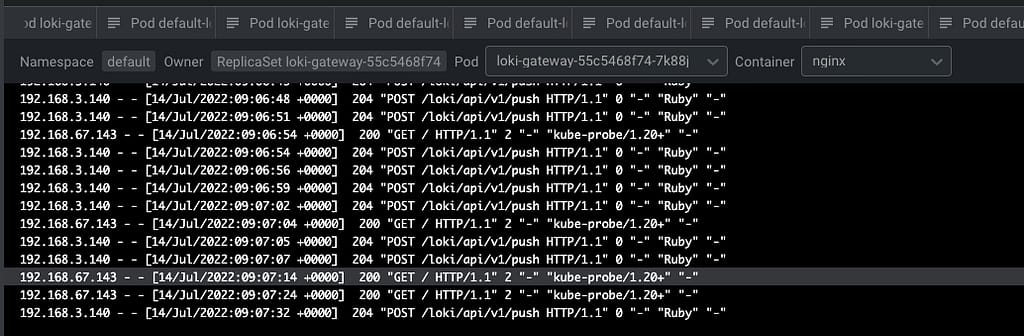
And after some time to do the reload of the configuration (1-2 minutes or so), you will start to see in the Loki traces something like this:

BanzaiCloud Logging Operator on Kubernetes: Log Aggregation in 5 Minutes
Grafana showing the logs submitted by the BanzaiCloud Logging Operator

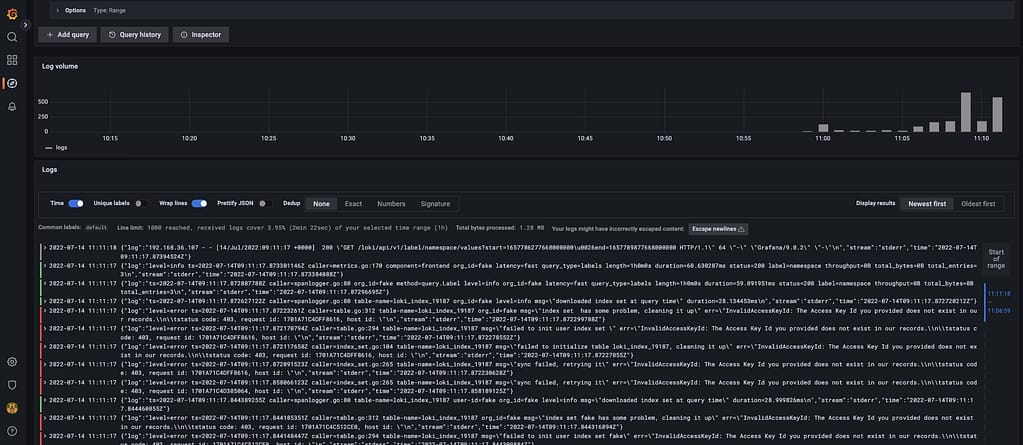
And that indicates that we are already receiving push of logs from the different components, mainly the fluentd element we configured in this case. But I think it is better to see it graphically with Grafana:

BanzaiCloud Logging Operator on Kubernetes: Log Aggregation in 5 Minutes
Grafana showing the logs submitted by the BanzaiCloud Logging Operator

And that’s it! And to change our logging configuration is as simple as changing the CRD component we defined, applying matches and filters, or sending it to a new place. Straightforwardly we have this completely managed.

📚 Want to dive deeper into Kubernetes? This article is part of our comprehensive Kubernetes Architecture Patterns guide, where you’ll find all fundamental and advanced concepts explained step by step.

Log Aggregation in Kubernetes Explained with BanzaiCloud Logging Operator

Log Aggregation in Kubernetes Explained with BanzaiCloud Logging Operator

We already have talked about the importance of Log Aggregation in Kubernetes and why the change in the behavior of the components makes it a mandatory requirement for any new architecture we deployed today.

To solve that part, we have a lot of different stacks that you probably have heard about. For example, if we follow the traditional Elasticsearch path, we will have the pure ELK stack from Elasticsearch, Logstash, and Kibana. Now this stack has been extended with the different “Beats” (FileBeat, NetworkBeat, …) that provides a light log forwarder to be added to the task.

Also, you can change Logstash for a CNCF component such as Fluentd that probably you have heard about, and in that case, we’re talking about an EFK stack following the same principle. And also, have the Grafana Labs view using promtail, Grafana Loki, and Grafana for dashboarding following a different perspective.

Then you can switch and change any component for the one of your preference, but in the end, you will have three different kinds of components:

  • Forwarder: Component that will listen to all the log inputs, mainly the stdout/stderr output from your containers, and push it to a central component.
  • Aggregator: Component that will receive all the traces for the forwarded, and it will have some rules to filter some of the events, format, and enrich the ones received before sending it to central storage.
  • Storage: Component that will receive the final traces to be stored and retrieved for the different clients.

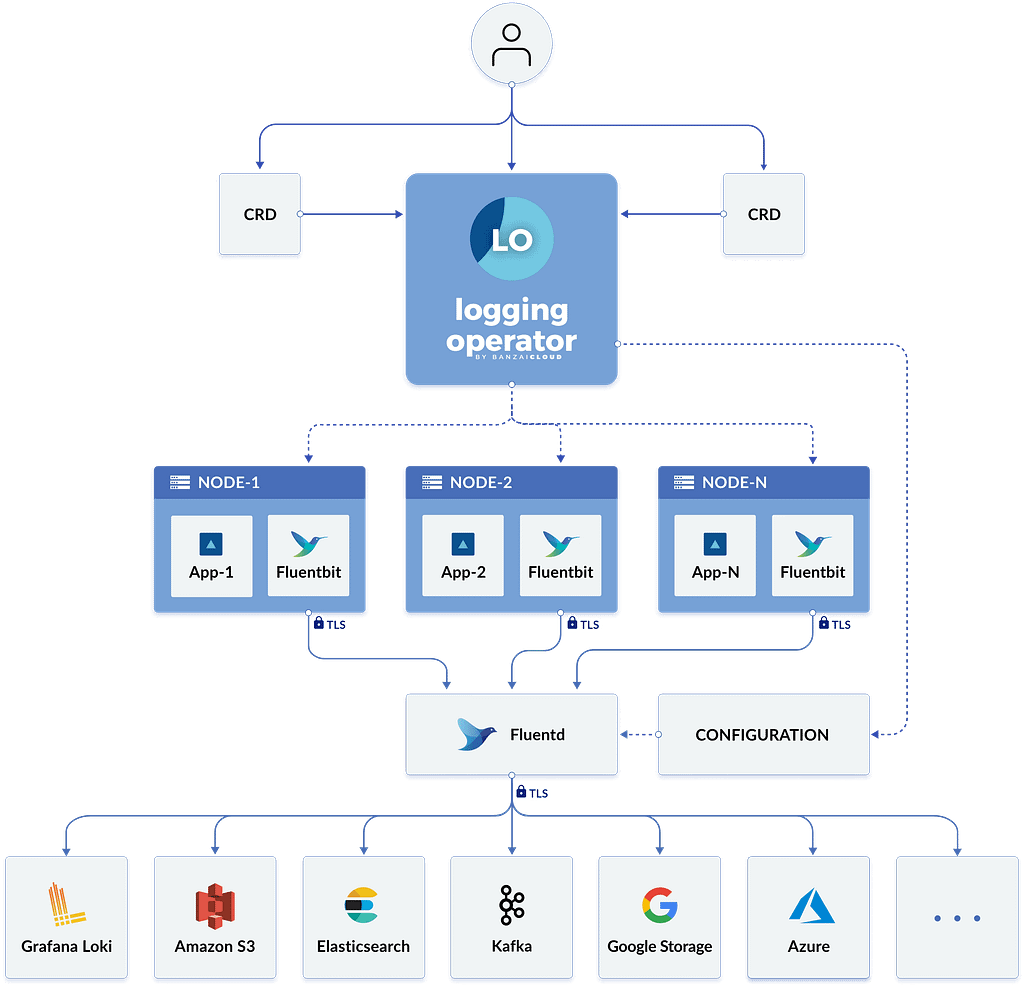
To simplify the management of that in Kubernetes, we have a great Kubernetes Operator named BanzaiCloud Logging Operator that tries to follow that approach in a declarative / policy manner. So let’s see how it works, and to explain it better, I will use its central diagram from its website:

Log Aggregation in Kubernetes Explained with BanzaiCloud Logging Operator
BanzaiCloud Logging Operator Architecture

This operator uses the same technologies we were talking about. It covers mainly the two first steps: Forwarding and Aggregation and the configuration to be sent to a Central Storage of your choice. To do that works with the following technologies, all of them part of the CNCF Landscape:

  • Fluent-bit will act as a forwarded deployed on a DaemonSet mode to collect all the logs you have configured.
  • Fluentd will act as an aggregator defining the flows and rules of your choice to adapt the trace flow you are receiving and sending to the output of your choice.

And as this is a Kubernetes Operator, this works in a declarative way. We will define a set of objects that will define our logging policies. We have the following components:

  • logging – The logging resource defines the logging infrastructure for your cluster that collects and transports your log messages. It also contains configurations for Fluentd and Fluent-bit.
  • output / clusteroutput – Defines an Output for a logging flow, where the log messages are sent. output will be namespaced based, and clusteroutput will be cluster based.
  • flow / clusterflow – Defines a logging flow using filters and outputs. The flow routes the selected log messages to the specified outputs. flow will be namespaced based, and clusterflows will be cluster based.

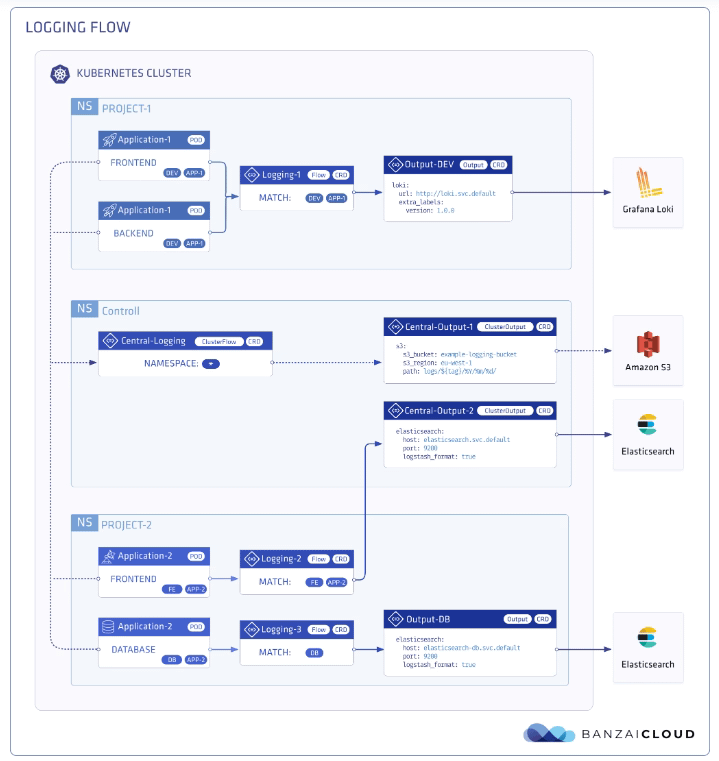
In the picture below, you will see how these objects are “interacting” to define your desired logging architecture:

Log Aggregation in Kubernetes Explained with BanzaiCloud Logging Operator
BanzaiCloud Logging Operator CRD Relationship

And apart from the policy mode, it also includes a lot of great features such as:

  • Namespace isolation
  • Native Kubernetes label selectors
  • Secure communication (TLS)
  • Configuration validation
  • Multiple flow support (multiply logs for different transformations)
  • Multiple output support (store the same logs in multiple storages: S3, GCS, ES, Loki, and more…)
  • Multiple logging system support (multiple Fluentd, Fluent Bit deployment on the same cluster)

In upcoming articles we were talking about how we can implement this so you can see all the benefits that this CRD-based, policy-based approach can provide to your architecture.

📚 Want to dive deeper into Kubernetes? This article is part of our comprehensive Kubernetes Architecture Patterns guide, where you’ll find all fundamental and advanced concepts explained step by step.

Grafana Loki with MinIO: Scalable Log Storage for Kubernetes without S3

Grafana Loki with MinIO: Scalable Log Storage for Kubernetes without S3

Grafana Loki is becoming one of the de-facto standards for log aggregation in Kubernetes workloads nowadays, and today, we are going to show how we can use together Grafana Loki and MinIO. We already have covered on several occasions the capabilities of Grafana Loki that have emerged as the main alternative to the Elasticsearch leadership in the last 5-10 years for log aggregation.

With a different approach, more lightweight, more cloud-native, more focus on the good things that Prometheus has provided but for logs and with the sponsorship of a great company such as Grafana Labs with the dashboard tools as the leader of each day more enormous stack of tools around the observability world.

And also, we already have covered MinIO as an object store that can be deployed anywhere. It’s like having your S3 service on whatever cloud you like or on-prem. So today, we are going to see how both can work together.

Grafana Loki mainly supports three deployment models: monolith, simple-scalable, and distributed. Pretty much everything but monolith has the requirement to have an Object Storage solution to be able to work on a distributed scalable mode. So, if you have your deployment in AWS, you already have covered with S3. Also, Grafana Loki supports most of the Object Storage solutions for the cloud ecosystem of the leading vendors. Still, the problem comes when you would like to rely on Grafana Loki for a private cloud or on-premises installation.

In that case, is where we can rely on MinIO. To be honest, you can use MinIO also in the cloud world to have a more flexible and transparent solution and avoid any lock-in with a cloud vendor. Still, for on-premises, its uses have become mandatory. One of the great features of MinIO is that it implements the S3 API, so pretty much anything that supports S3 will work with MinIO.

In this case, I just need to adapt some values on the helm chart from Loki in the simple-distributed mode as shown below:

 loki:
  storage:
    s3:
      s3: null
      endpoint: http://minio.minio:9000
      region: null
      secretAccessKey: XXXXXXXXXXX
      accessKeyId: XXXXXXXXXX
      s3ForcePathStyle: true
      insecure: true

We’re just pointing to the endpoint from our MinIO tenant, in our case, also deployed on Kubernetes on port 9000. We’re also providing the credentials to connect and finally just showing that needs s3ForcePathSyle: true is required for the endpoint to be transformed to minio.minio:9000/bucket instead to bucket.minio.minio:9000, so it will work better on a Kubernetes ecosystem.

And that’s pretty much it; as soon as you start it, you will begin to see that the buckets are starting to be populated as they will do in case you were using S3, as you can see in the picture below:

MinIO showing buckets and objects from Loki configuration

We already covered the deployment models from MinIO. As shown here, you can use its helm chart or the MinIO operator. But, the integration with Loki it’s even better because the helm charts from Loki already included MinIO as a sub-chart so you can deploy MinIO as part of your Loki deployment based on the configuration you will find on the values.yml as shown below:

 # -------------------------------------
# Configuration for `minio` child chart
# -------------------------------------
minio:
  enabled: false
  accessKey: enterprise-logs
  secretKey: supersecret
  buckets:
    - name: chunks
      policy: none
      purge: false
    - name: ruler
      policy: none
      purge: false
    - name: admin
      policy: none
      purge: false
  persistence:
    size: 5Gi
  resources:
    requests:
      cpu: 100m
      memory: 128Mi

So with a single command, you can have both platforms deployed and configured automatically! I hope this is as useful for you as it was for me when I discovered and did this process.

📚 Want to dive deeper into Kubernetes? This article is part of our comprehensive Kubernetes Architecture Patterns guide, where you’ll find all fundamental and advanced concepts explained step by step.

Write Kubernetes YAML Manifests More Efficiently: Tools, Templates, and Best Practices

Write Kubernetes YAML Manifests More Efficiently: Tools, Templates, and Best Practices

When we are all in this new cloud-native environment where Kubernetes is the uncontestable king, you need to learn how to deal with Kubernetes YAML manifest all the time. You will become an expert on indent sections to make sure this can be processed and so on. But we need to admit that it is tedious. All the benefits from the Kubernetes deployment make an effort worth it, but even with that, it is pretty complex to be able to handle it.

It is true that, to simplify this situation, there are a lot of projects that have been launched, such as Helm to manage templates of related Kubernetes YAML manifest or Kustomize different approaches to get to the sample place or even solutions that are specific to a Kubernetes distribution such as the Openshift Templates. But in the end, none of this can solve the problem at the primary level. So you need to write those files manually yourself.

And what is the process now? You are probably following a different one, but I will tell you my approach. Depending on what I’m trying to create, I try to find a template available for the Kubernetes YAML Manifest that I want to make. This template can be some previous resource that I have already created. Hence, I use that as a base, it could be something generated for some workload that is already deployed (so great that Lens has existed to simplify the management of Running Kubernetes workloads! If you don’t know Lens, please take a look at this article) or if you don’t have anything at hand, you search on google about something similar probably in the Kubernetes documentation, stack overflow or the first reasonable resource that Google provides to you.

And after that, the approach is the same. You go to your Text Editor, VS Code in my case. I have a lot of different plugins to make this process less painful. A lot of different linters validate the structure of the Kubernetes YAML Manifest to make sure everything is indented property, that there are no repeated tags or no missing mandatory tags in the latest version of the resource, and so on.

Things got a bit tricky if you are creating a Helm Chart because in that case the linters for YAML don’t work that well and detect some false positives because they don’t truly understand the Helm syntax. You also complete your setup with a few more linters for Helm, and that’s it. You fight error and error and change by change to have your desired Kubernetes YAML Manifest.

But, it should be a better way to do that? Yes, it should, and this is what tools such as Monokle try to provide a better experience of that process. Let’s see how that works. Starting from their contributor words:

Monokle is your friendly desktop UI for managing Kubernetes manifests. Monokle helps you quickly get a high-level view of your manifests and their contained resources, easily edit resources without having to learn yaml syntax, diff resources against your cluster, preview and debug resources generated with kustomize or Helm, and more.

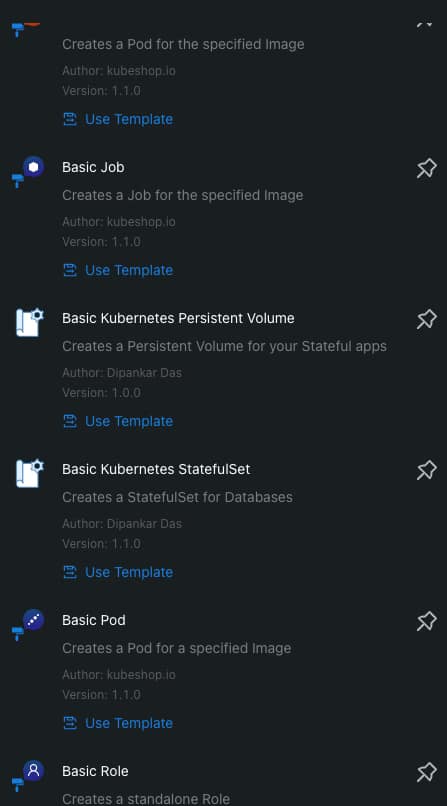
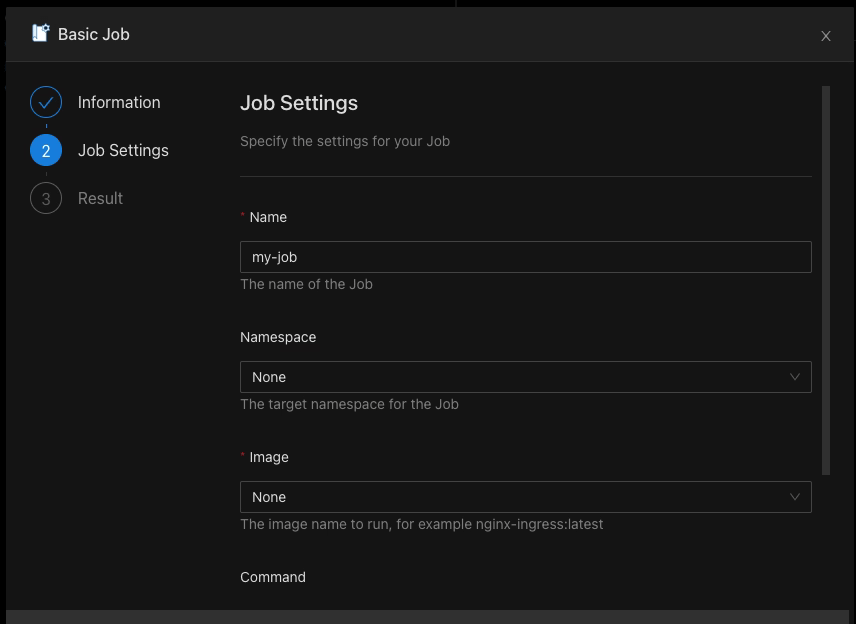
Monokle helps you in the following ways. First of all, present at the beginning of your work with a set of templates to create your Kubernetes YAML Manifests, as you can see in the picture below:

Write Kubernetes YAML Manifests More Efficiently: Tools, Templates, and Best Practices
Monokle Template Selection Dialog

When you select a template, you can populate the required values graphically without needing to type YAML code yourself, as you can see in the picture below:

Write Kubernetes YAML Manifests More Efficiently: Tools, Templates, and Best Practices
Monokle Template Value Population Process

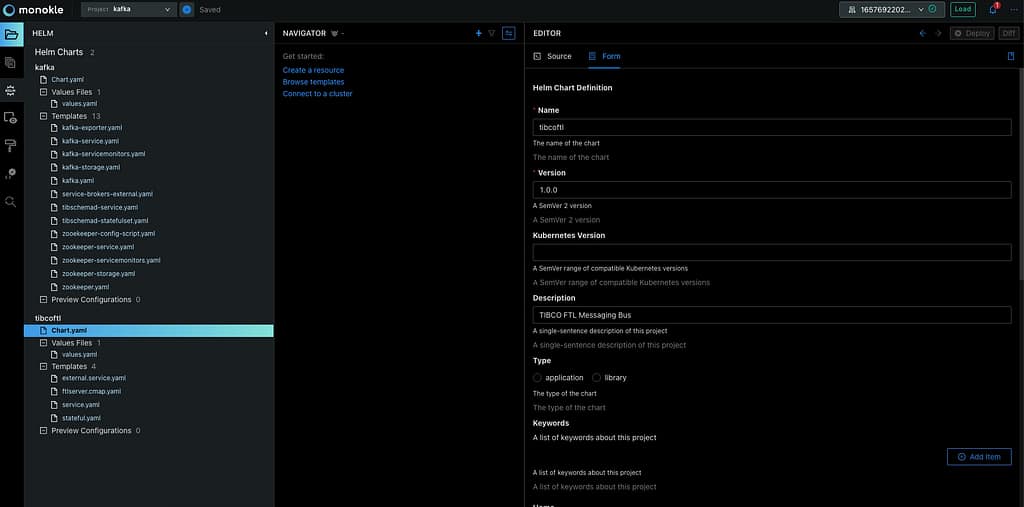
It also supports Helm Chart and Kustomize resource recognition so you will quickly see your charts, and you can edit them in a more fashion mode even graphically for some of the resources as well:

Write Kubernetes YAML Manifests More Efficiently: Tools, Templates, and Best Practices
Helm Chart Modification using Monokle

If allows good integration in several ways, first of all with OPA so it can validate all the rules and best-practice that you have defined and also you can connect to a running cluster to see the resources from there and also see the difference between them if exists to simplify the process and provide more agility on the Kubernetes YAML Manifest creation process

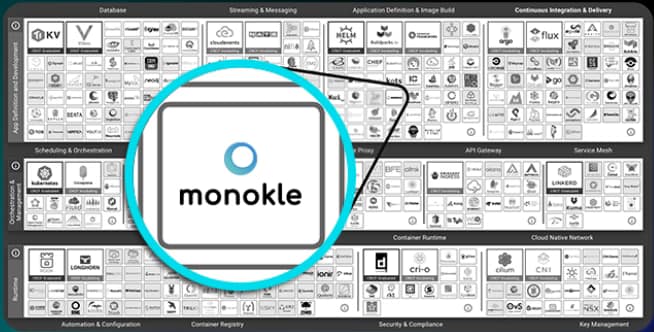
On top of all of that, Monokle is a certified component from the CNCF foundation, so you will be using a project that is backup from the same foundation is that takes care of Kubernetes itself, among other tasks:

Write Kubernetes YAML Manifests More Efficiently: Tools, Templates, and Best Practices
Monokle is part of the CNCF Foundation Landscape

If you want to download Monokle, give it a try and you can do it from its web page: https://monokle.kubeshop.io/ and I’m sure your performance writing Kubernetes YAML Manifest will thank you shortly!

📚 Want to dive deeper into Kubernetes? This article is part of our comprehensive Kubernetes Architecture Patterns guide, where you’ll find all fundamental and advanced concepts explained step by step.

Grafana LDAP Integration: Secure Authentication in Less Than 5 Minutes

Grafana LDAP Integration: Secure Authentication in Less Than 5 Minutes

This article will cover how to quickly integrate Grafana and LDAP server to increase the security of your application

Grafana is one of the most used dashboard tools, mainly for the observability platforms on cloud-workload environments. But none of these tools is complete until you can configure them to meet your security standards. Security is becoming each time more and more important and this is especially true when we are talking about any cloud-related component. So this topic should always something that any cloud architect has in mind when they are defining or implementing any piece of software today.

And at that point, the LDAP integration is one of the main things you will always need to do. I don’t know any enterprise, big or small, that allows the usage of any tool with a Graphical User Interface if it is not connected to the corporate directory.

So, let’s see how we can implement this with a popular tool such as Grafana. In my case, I’m going to use a containerized version of grafana, but the steps and things to do remains the same no matter the deployment model.

The task that we are going to perform is based on three steps:

  • Enable the LDAP settings
  • Basic LDAP settings configuration
  • Group mapping configuration

The first thing we need to modify is the grafana.ini adding the following snippet:

    [auth.ldap]
    enabled = true
    config_file = /etc/grafana/ldap.toml

That means that we are enabling the authentication based on LDAP and setting the location of the LDAP configuration file. This ldap.toml has all the configuration needed for the LDAP:

    [[servers]]
    host = "localhost"
    port = 389
    use_ssl = false
    start_tls = false
    ssl_skip_verify = false
  
    bind_dn = "XXXXXX-XXXXXXXXX"
    bind_password = "XXXXXX"
    
	search_filter = "(&(sAMAccountName=%s)(memberOf=ADMIN_GROUP))"
    search_base_dns = [DC=example,DC=org"]

  
    [servers.attributes]
    member_of = "member"
    email =  "mail"
    name = "givenName"
    surname = "sn"
    username = "sAMAccountName"

    [[servers.group_mappings]]
    group_dn = "*"
    org_role = "Admin"

The first part is regarding the primary connection. We will establish the host location and port, the admin user, and the password. After that, we will need a second section that definesearch_filter and search_base_dns to define the users that can access the system.

Finally, we have another section to define the mapping between the LDAP attributes and the grafana attributes to be able to gather the data from the LDAP.

    [servers.attributes]
    member_of = "member"
    email =  "mail"
    name = "givenName"
    surname = "sn"
    username = "sAMAccountName"

Also, we can define the privileges that the different groups allow to have to the various org_rolesin Grafana, as you can see in the snippet below:

    [[servers.group_mappings]]
    group_dn = "*"
    org_role = "Admin"

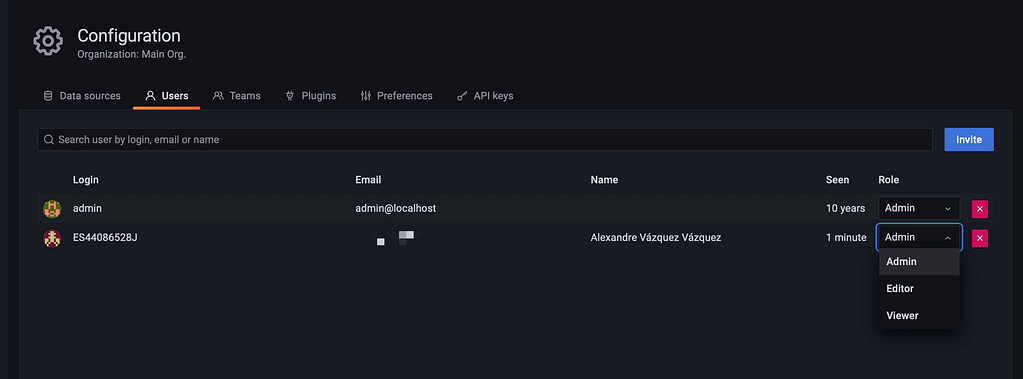
With all those changes in place, you need to restart the Grafana server to see all this configuration applied. After that point, you can log in using the LDAP credentials as you can see in the picture below and see all the data retrieved from the LDAP Server:

Grafana LDAP Integration: Secure Authentication in Less Than 5 Minutes

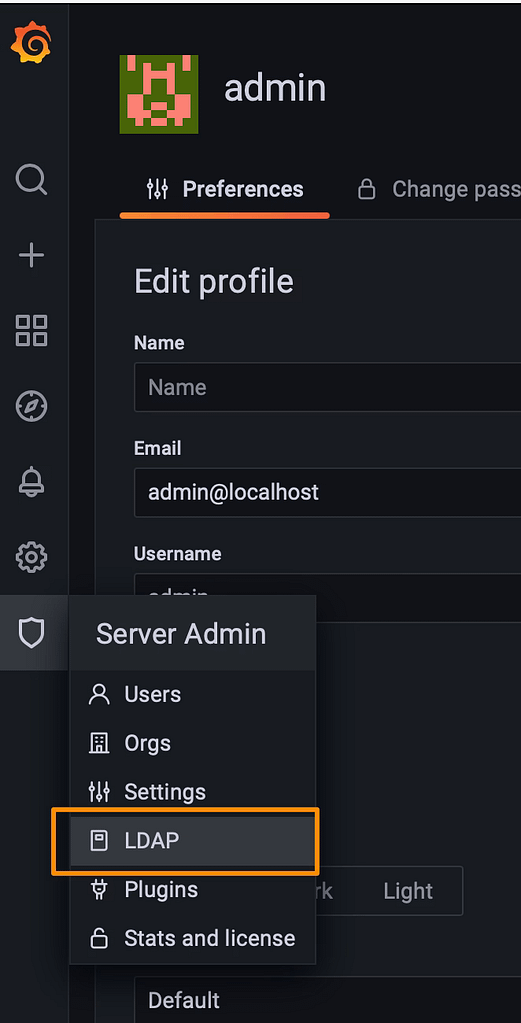
Using the default admin server, you can also use a new feature to test the LDAP configuration using the LDAP option that you can see in the picture below:

Grafana LDAP Integration: Secure Authentication in Less Than 5 Minutes

And then you can search for a User and you will see how this user will play on the Grafana Server:

  • Check the attributes will map from the LDAP server to the Grafana server
  • Also check the status of activity and the role allowed to this user

You can see one sample in the picture below:

I hope that this article helps you in a way to level up the security settings on your Grafana installations to integrate with the LDAP server. If you want to see more information about this and similar topics I encourage you to take a look at the links that you would find below these sentences.

Kubernetes Operators: 5 Things You Truly Need to Know

Kubernetes Operators: 5 Things You Truly Need to Know
Kubernetes Operators: 5 Things You Truly Need to Know (Photo by Dan Lohmar on Unsplash)

Kubernetes Operator has been the new normal to deploy big workloads on Kubernetes, but as some of these principles don’t align immediately with the main concepts of Kubernetes usually generates a little bit of confusion and doubts when you need to use them or even create them.

What Are Kubernetes Operators?

Operators are the way to extend Kubernetes capabilities to manage big workloads where different options are related. In components with a distributed architecture such as monitoring system, log aggregation system, or even service mesh, you can find that. Based on the words from the Kubernetes official documentation , operators are defined as below:

Operators are software extensions to Kubernetes that use custom resources to manage applications and their components. Operators follow Kubernetes principles, notably the control loop.

Its primary usage is for standard services and not as much as the simple application or user workloads, but it could be used in cases even for that scenario.

How Does Kubernetes Operator Works?

The central concept behind the Kubernetes Operator is the extension concept. It is based on the definition and management of custom Kubernetes objects named Custom Resource Definition (CRDs) that allow a description in a Kubernetes way of new concepts that you could need for your workloads.

Some samples of these CRDs are the ServiceMonitor and PodMonitor that we explained in the previous posts, for example, but many more to add. So, that means that now you have a new YAML file to define your objects, and you can use the main primitives from Kubernetes to create, edit, or delete them as needed.

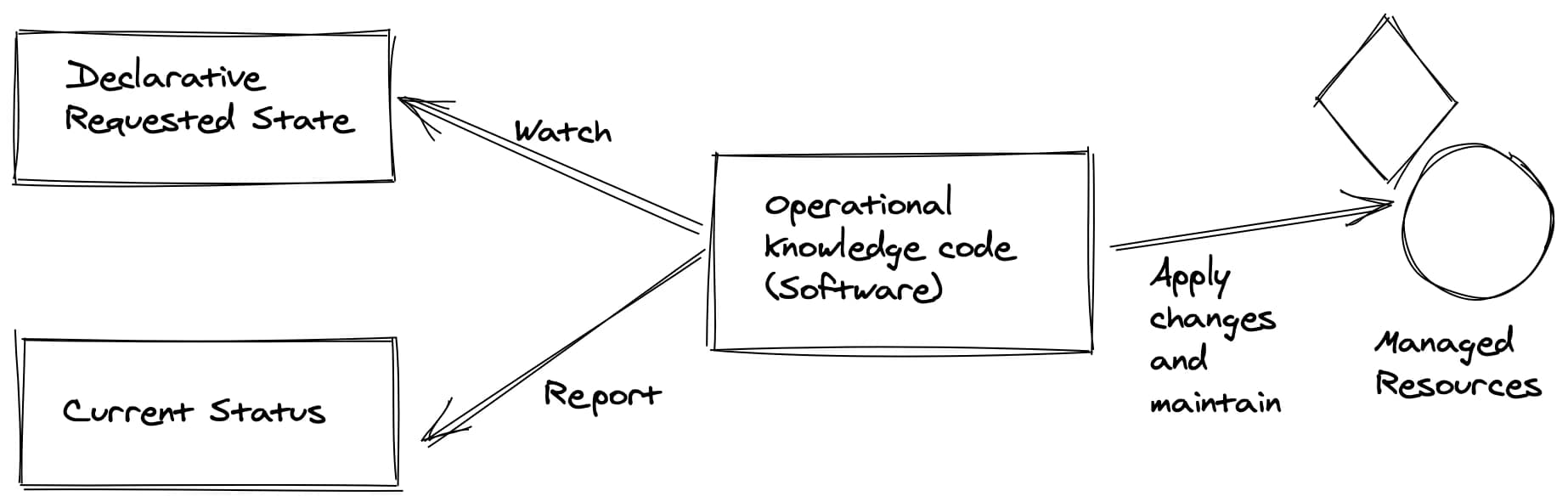
So, for these components to do any work, you need to code some specific controllers that are translating the changes done to those YAML files to reach primitives to the status of the cluster.

Kubernetes Operator Pattern (https://github.com/cncf/tag-app-delivery/blob/eece8f7307f2970f46f100f51932db106db46968/operator-wg/whitepaper/Operator-WhitePaper_v1-0.md#foundation)

How To Manage Kubernetes Operators?

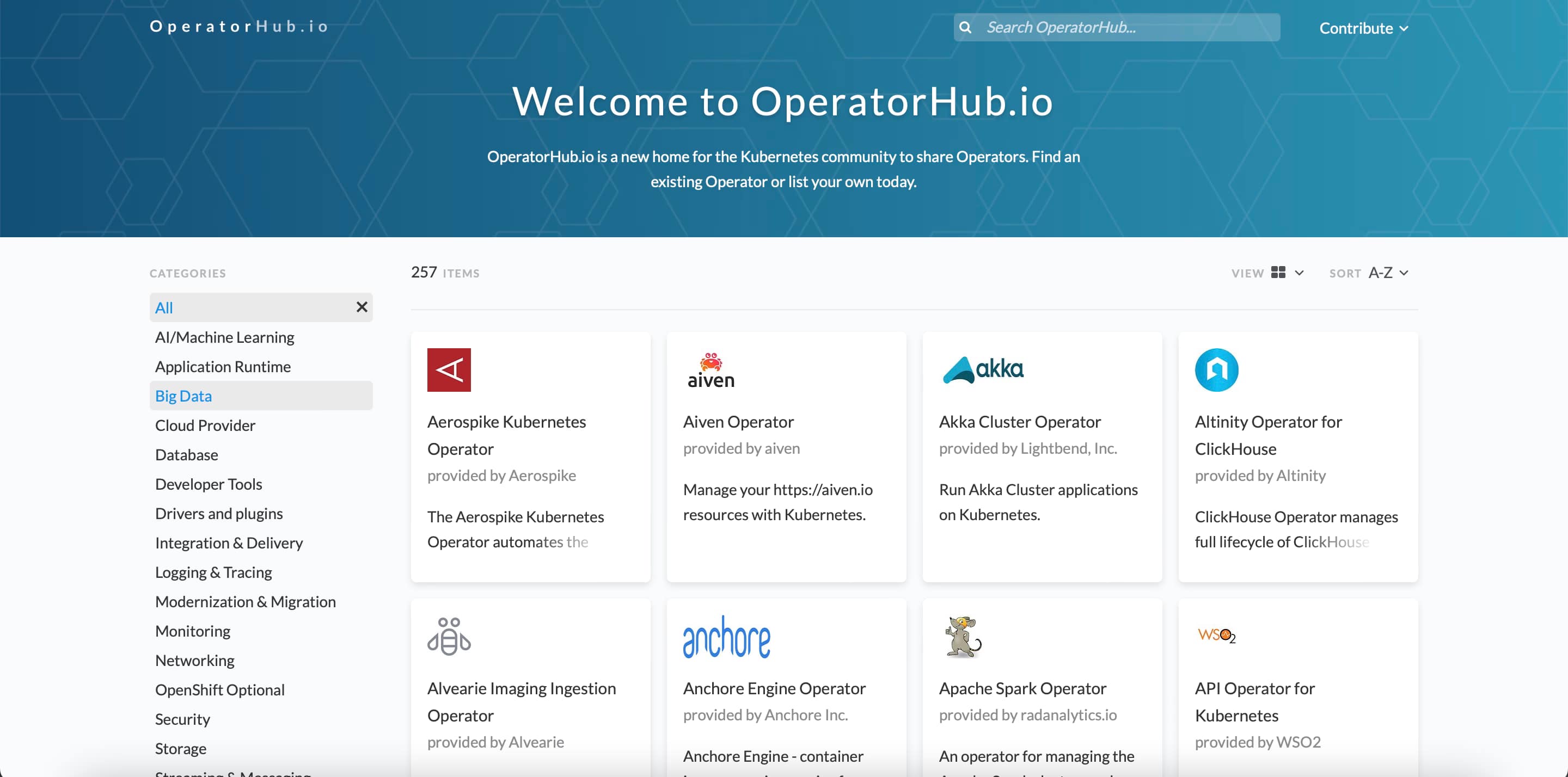
The Kubernetes operator can be installed like any other Kubernetes workload, so depending on the case can be distributed as a YAML file or a Helm Chart. You even can find a shared repository of operators on OperatorsHub.

OperatorHub: Central Repository for Kubernetes Operators

Kubernetes Operator vs. Helm Charts

As already discussed, they are not the same kind of object as Helm Charts because Helm Charts only work at the deployment level doing the packaging and managing of those releases, but operators go a step beyond that because managing and controlling the lifecycle at the runtime level. And as commented, Helm and Operators are compatible; this is, for example, how Prometheus Operator works that have a Helm Chart to deploy itself, as you can find here.

How To Build a Kubernetes Operator

If your goal after reading this is to create a Kubernetes Operator, you need to know that there are already some frameworks that will make your life easier at that task.

Tools like Kopf, kubebuilder, metacontroller , or even the CNCF Operator Framework will provide you the tools and the everyday tasks to start focusing on what your operator needs to do, and they will handle the main daily tasks for you.

 More Resources To Learn about Kubernetes Operator

Suppose you want to learn more about Kubernetes Operators or the Operator pattern. In that case, I strongly recommend you look at the CNCF Operator Whitepaper that you can find here.

This will cover all the topics discussed above in more technical detail and introduce other vital issues, such as security lifecycle management or event best practices.

Other interesting resources are the bibliography resource from the Whitepaper itself that I am going to add here just in case you want to jump directly to the source:

  • Dobies, J., & Wood, J. (2020). Kubernetes Operators. O’Reilly.
  • Ibryam, B. (2019). Kubernetes Patterns. O’Reilly.
  • Operator Framework. (n.d.). Operator Capabilities. Operator Framework. Retrieved 11 2020, 24, from https://operatorframework.io/operator-capabilities/
  • Philips, B. (2016, 03 16). Introducing Operators: Putting Operational Knowledge into Software. CoreOS Blog. Retrieved 11 24, 2020, from https://coreos.com/blog/introducing-operators.html
  • Hausenblas, M & Schimanski, S. (2019). Programming Kubernetes. O’Reilly.

📚 Want to dive deeper into Kubernetes? This article is part of our comprehensive Kubernetes Architecture Patterns guide, where you’ll find all fundamental and advanced concepts explained step by step.

Top kubectl Commands and Tips to Boost Kubernetes Productivity

Top kubectl Commands and Tips to Boost Kubernetes Productivity

Kubectl command can be the most used command you can type when working with the Kubernetes ecosystem. As you know, kubectl is the open the door to all the Kubernetes world as pretty much all of our interactions go through that part, unless you are using a CLI approach.

So, based on the productivity principles, if you can improve just 1% in the task that you perform the most, the global improvement will be massive. So, let’s see how we can do that here.

kubectl is a command with many different options that could help boost your productivity a lot. But at the same time, as it has so many options, it is pretty complex to know all of them or be aware that there is a faster way to do the job, and that’s why I would like to add some options here to try to help you with this set of kubectl tips.

Kubectl Commands Tips

Let’s start with the first kubectl commands that help a lot to improve your productivity:

kubectl explain <resource-object>

This command will show the API reference for any Kubernetes Object, so it would help you know the exact spelling of the option that you always miswrite.

kubectl get <resource-object> —watch-output

The —watch-output option added to any kubectl command will work in the same way as the watch command itself, so it will refresh the same command every 2.0 seconds to see the real-time version of that command and avoid that you need to type it again or rely on an external command such as watch

kubectl get events --sort-by=".lastTimestamp"

This command will help you when you want to see the events in your current context, but the main difference is that it will sort the output by the timestamp from more recent to older, so you will avoid needing to scroll to find the latest events.

kubectl logs --previous

We always talk about one of the needs for a Log Aggregation Architecture because the logs are disposable, but what about if you want to get the logs in a killed container? You can use the --previous flag to access the logs for a recently terminated container. This will not remove the need for a logging aggregation technique, but it will help troubleshoot when Kubernetes start killing things and you need to know what happened.

kubectl create <object> <options> -o=yaml --dry-run=client

kubectl create allows us to create an object of our preference by providing the required arguments imperatively, but if we add the -o=yaml --dry-run=client option, we will not get our object created. Instead, we will have a YAML file defining that object. So we can easily modify it to our needs without needing to make it from scratch by searching Google for a sample to start with.

kubectl top pods --all-namespaces --sort-by='memory'

This command will alter the standard top pods order to show the pods and the resources they are consuming, and at the same time, it will sort that output by the memory usage. So, in environments with many pods, it will provide just at the top the ones you should focus on first to optimize the resources for your whole cluster.

Kubectl Alias

One step beyond that is to simplify those commands by adding an alias to this. As you can see, most of these commands are pretty long as they have many options, so writing each of these options will take a while.

So, if you want to go one step further on this optimization, you can always add an alias to that command to simplify it a lot. And if you want to learn more about those aliases, I strongly recommend the GitHub repo from Ahmet Alp Balkan:

📚 Want to dive deeper into Kubernetes? This article is part of our comprehensive Kubernetes Architecture Patterns guide, where you’ll find all fundamental and advanced concepts explained step by step.

MinIO Multi-Cloud Object Storage: S3-Compatible Storage for Kubernetes

MinIO Multi-Cloud Object Storage: S3-Compatible Storage for Kubernetes

All The Power of Object Storage In Your Kubernetes Environment

In this post, I would like to bring to you MinIO, a real cloud object storage solution with all the features you can imagine and even some more. You are probably aware of Object Storage from the AWS S3 service raised some years ago and most of the alternatives in the leading public cloud providers such as Google or Azure.

But what about private clouds? Is it something available that can provide all the benefits of object storage, but you don’t need to rely on a single cloud provider. And even more important than that, in the present and future, that all companies are going to be multi cloud do we have at our disposal a tool that provides all these features but doesn’t force us to have a vendor lock-in. Even some software, such as Loki, encourages you to use an object storage solution

The answer is yes! And this is what MinIO is all about, and I just want to use their own words:

“MinIO offers high-performance, S3 compatible object storage. Native to Kubernetes, MinIO is the only object storage suite available on every public cloud, Kubernetes distribution, the private cloud, and the edge. MinIO is software-defined and is 100% open source under GNU AGPL v3.”

So, as I said, everything you can imagine and even more. Let’s focus on some points:

  • Native to Kubernetes: You can deploy it in any Kubernetes distribution of choice, whether this is public or private (or even edge).
  • 100% open source under GNU AGPL v3, so no vendor lock-in.
  • S3 compatible object storage, so it even simplifies the transition for customers with a strong tie with the AWS service.
  • High-Performance is the essential feature.

Sounds great. Let’s try it in our environment! So I’m going to install MinIO in my rancher-desktop environment, and doing that, I am going to use the operator that they have available here:

To be able to install, the recommended option is to use krew, the plugin manager we already talked about it in another article. The first thing we need to do is run the following command.

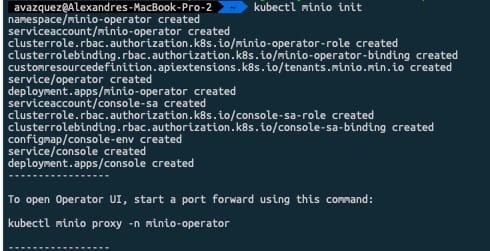
 kubectl minio init

This command will deploy the operator on the cluster as you can see in the picture below:

MinIO Multi-Cloud Object Storage: S3-Compatible Storage for Kubernetes

Once done and all the components are running we can launch the Graphical interfaces that will help us create the storage tenant. To do so we need to run the following command:

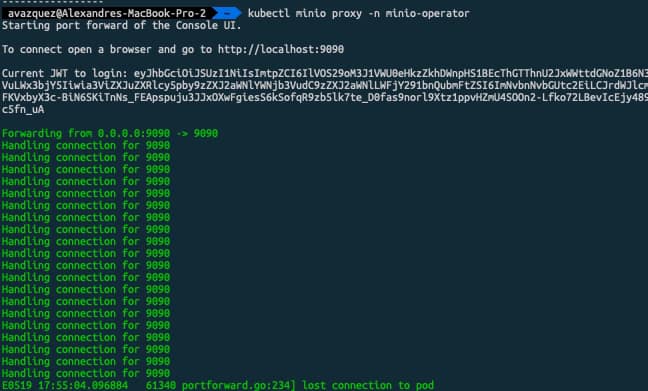
 kubectl minio proxy -n minio-operator

This will expose the internal interface that will help us during that process. We will be provided a JWT token to be able to log into the platform as you can see in the picture below:

MinIO Multi-Cloud Object Storage: S3-Compatible Storage for Kubernetes

Now we need to click on the button that says “Create Tenant” which will provide us a Wizard menu to create our MinIO object storage tenant:

MinIO Multi-Cloud Object Storage: S3-Compatible Storage for Kubernetes

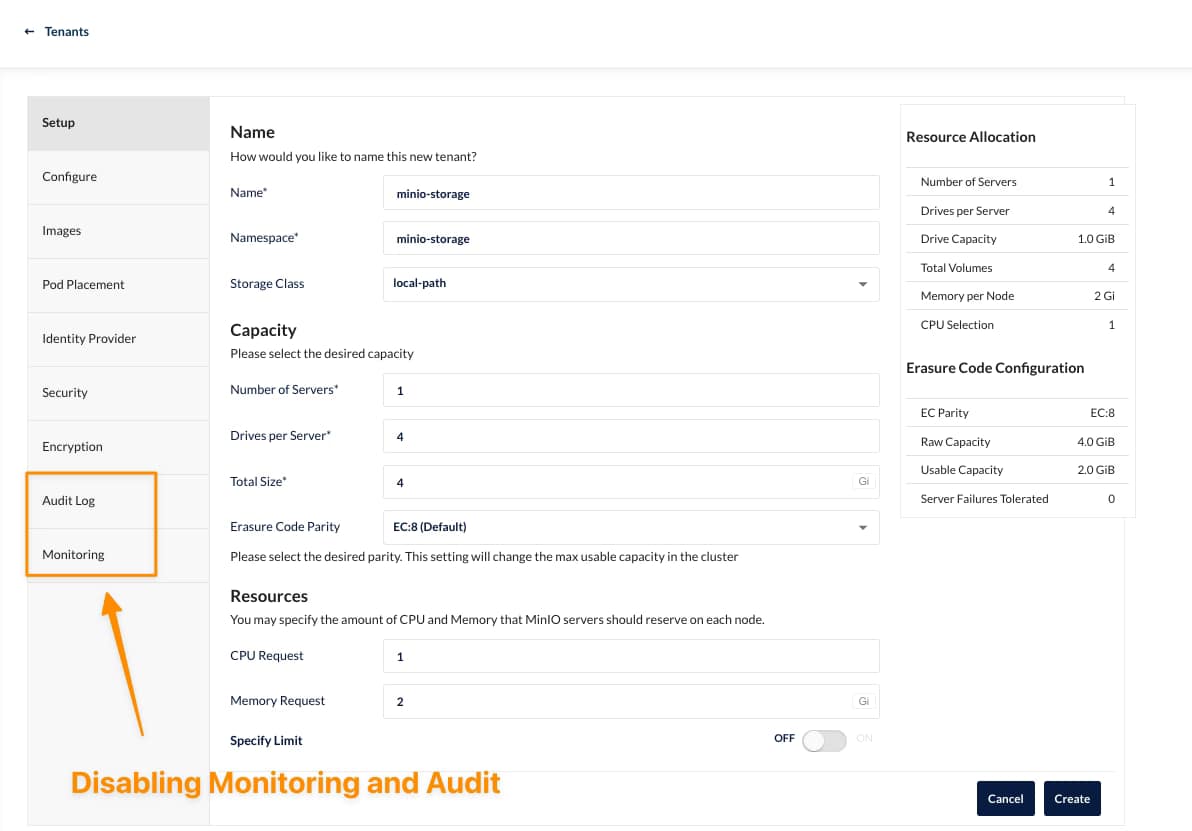
On that wizard we can select several properties depending on our needs, as this is for my rancher desktop, I’ll try to keep the settings at the minimum as you can see here:

MinIO Multi-Cloud Object Storage: S3-Compatible Storage for Kubernetes

It would help if you had the namespace created in advance to be retrieved here. Also, you need to be aware that there can be only one tenant per namespace, so you will need additional namespaces to create other tenants.

As soon as you hit create, you will be provided with an API Key and Secret that you need to store (or download) to be able to use later, and after that, the tenant will start its deployment. After a few minutes, you will have all your components running, as you can see in the picture below:

MinIO Multi-Cloud Object Storage: S3-Compatible Storage for Kubernetes

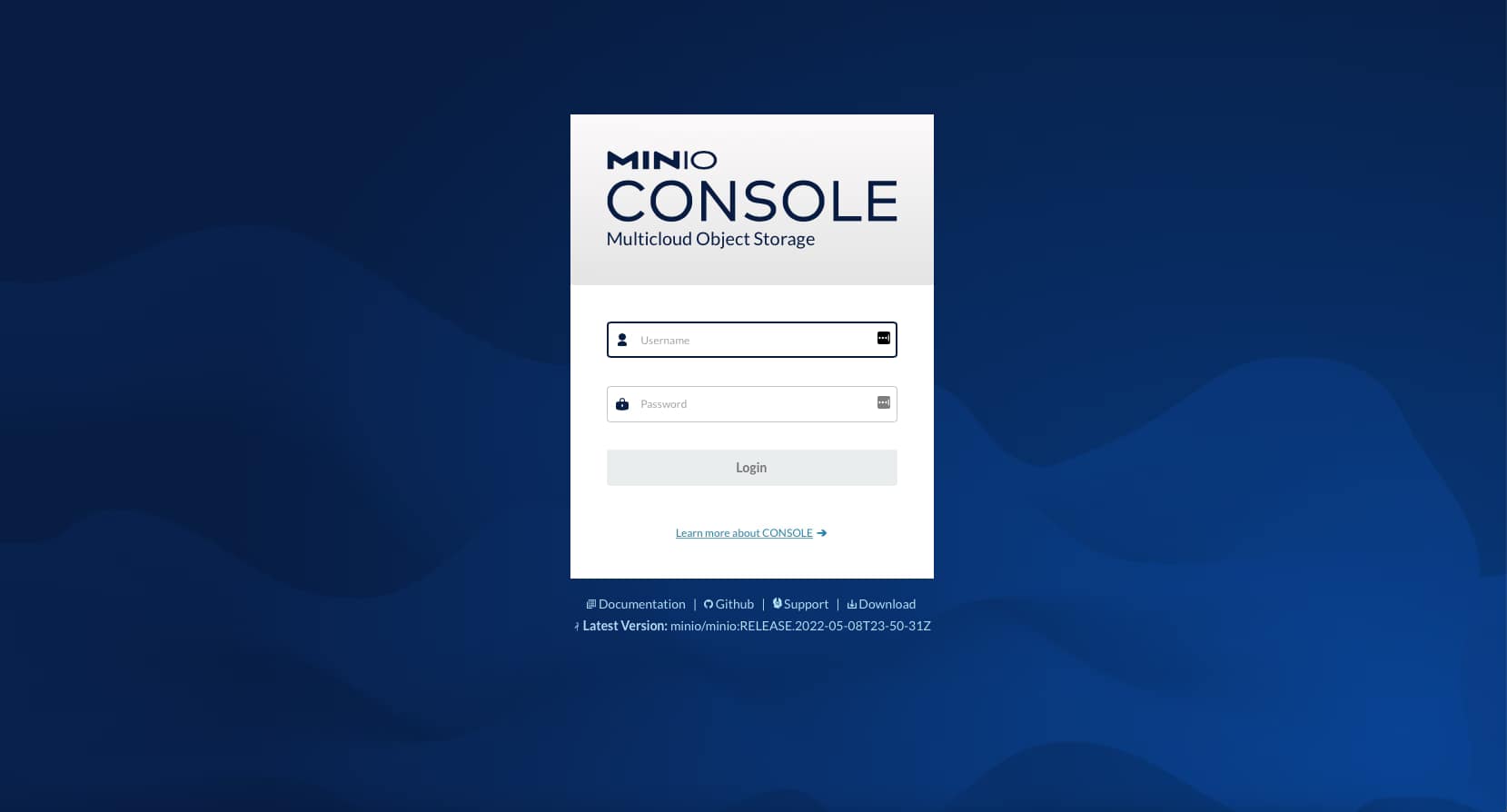
If we go to our console-svc, you will find the following GUI available:

MinIO Multi-Cloud Object Storage: S3-Compatible Storage for Kubernetes

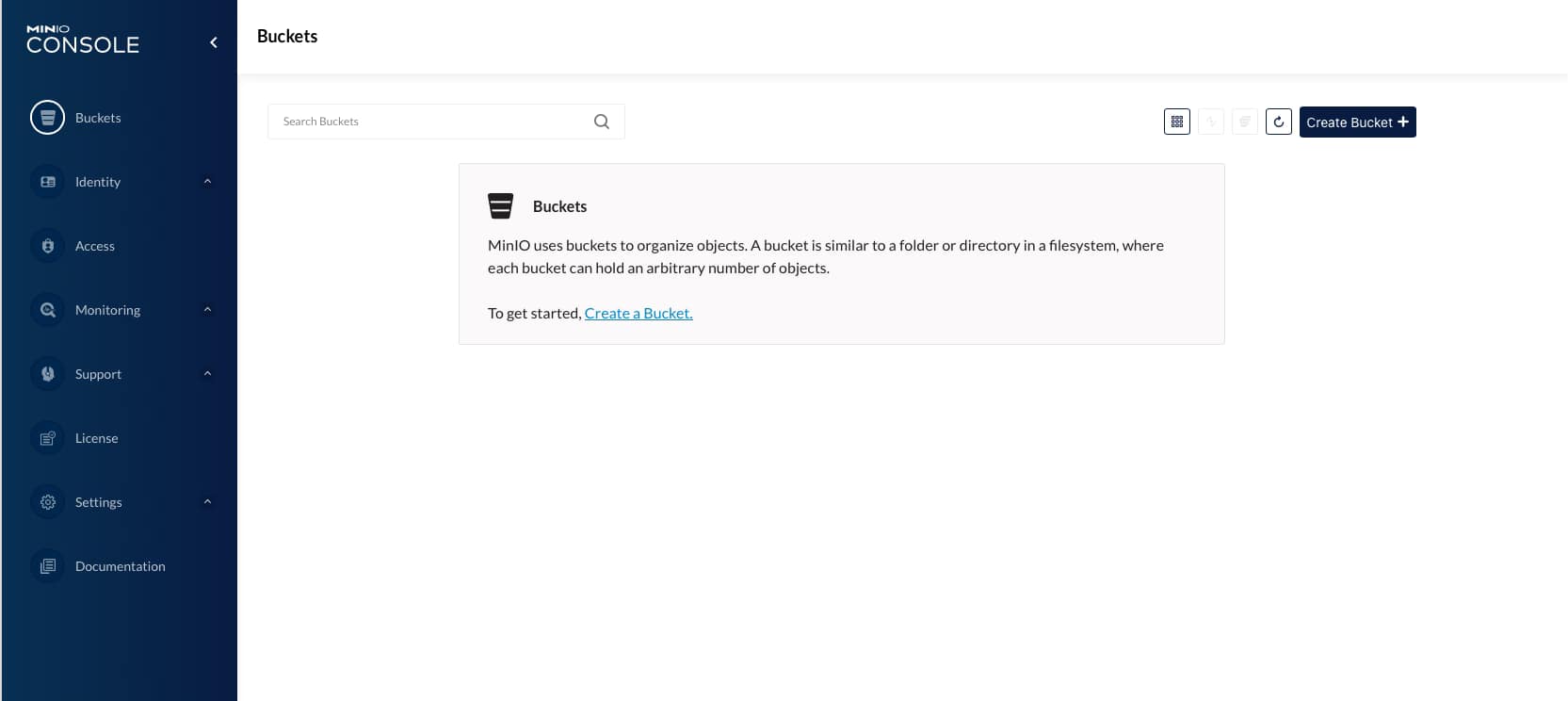
After the credentials are download in the previous step, we will enter the console for our cloud object store and be able to start creating our buckets as you can see in the picture below:

MinIO Multi-Cloud Object Storage: S3-Compatible Storage for Kubernetes

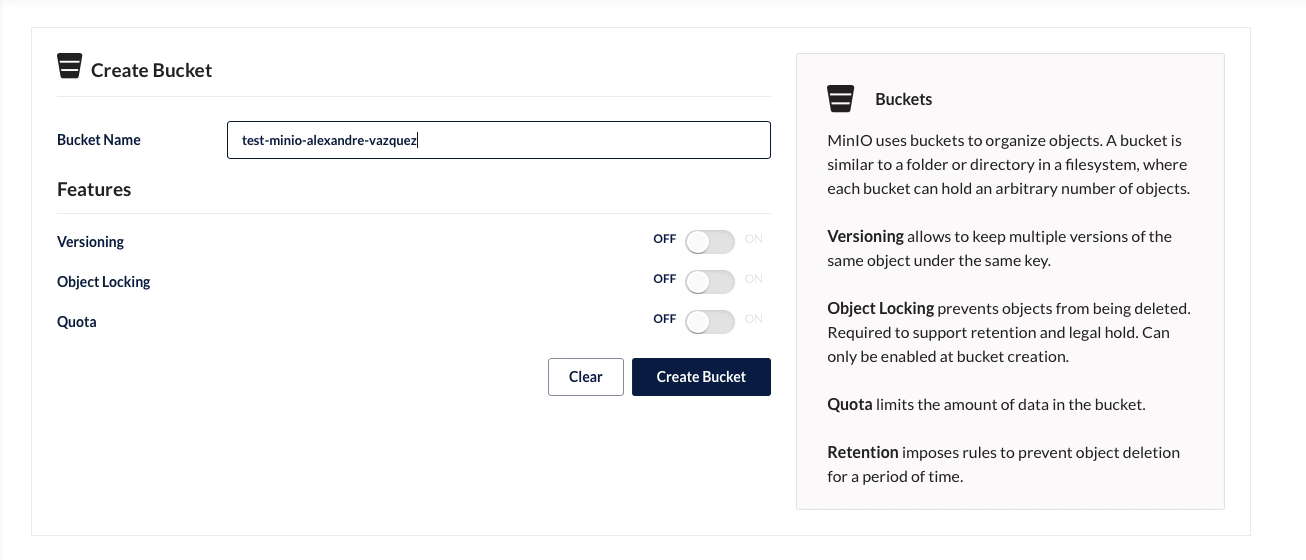
On the screen of creating a bucket, you can see several options, such as Versioning, Quota, and Object Locking, that give a view of the features and capability this solution has

MinIO Multi-Cloud Object Storage: S3-Compatible Storage for Kubernetes

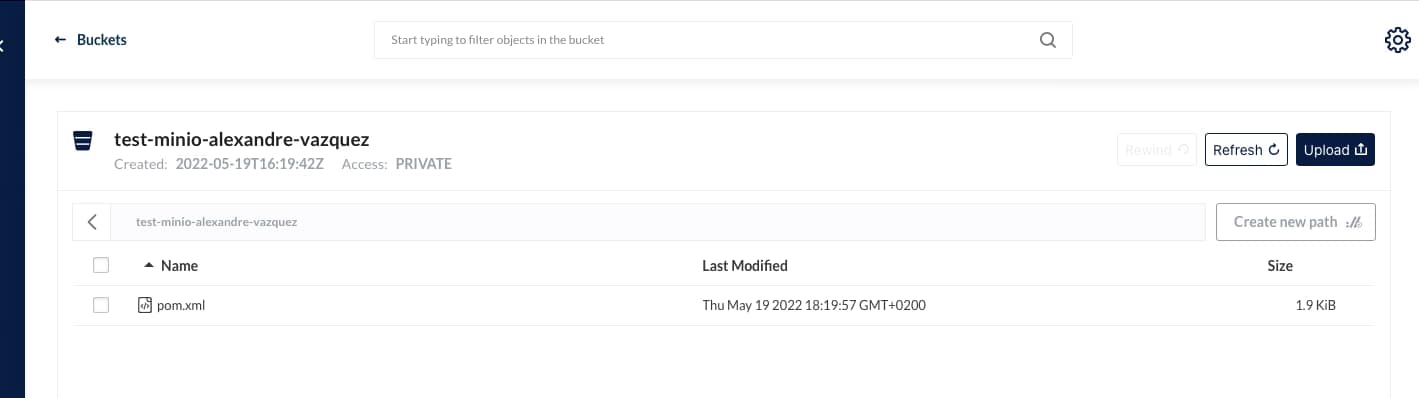
And we can start uploading and downloading objects to this new bucket created:

MinIO Multi-Cloud Object Storage: S3-Compatible Storage for Kubernetes

I hope you can see this as an option for your deployments, especially when you need an Object Storage solution option for private deployments or just as an AWS S3 alternative.

📚 Want to dive deeper into Kubernetes? This article is part of our comprehensive Kubernetes Architecture Patterns guide, where you’ll find all fundamental and advanced concepts explained step by step.

Top 3 Ways to Deploy Grafana Loki on Kubernetes for Scalable Logging

Top 3 Ways to Deploy Grafana Loki on Kubernetes for Scalable Logging

Deployment Models for a Scalable Log Aggregation Architecture using Loki

Deploy a scalable Loki is not an straightforward task. We already have talked about Loki in previous posts on the site, and it is becoming more and more popular, and usage becomes much more regular each day. That is why I think it makes sense to include another post regarding Loki Architecture.

Loki has several advantages that promote it as a default choice to deploy a Log Aggregation Stack. One of them is its scalability because you can see across different deployment models how many components you like to deploy and their responsibilities. So the target of the topic is to show you how to deploy an scalable Loki solution and this is based on two concepts: components available and how you group them.

So we will start with the different components:

  • ingester: responsible for writing log data to long-term storage backends (DynamoDB, S3, Cassandra, etc.) on the write path and returning log data for in-memory queries on the read path.
  • distributor: responsible for handling incoming streams by clients. It’s the first step in the write path for log data.
  • query-frontend: optional service providing the querier’s API endpoints and can be used to accelerate the read path
  • querier: service handles queries using the LogQL query language, fetching logs from the ingesters and long-term storage.
  • ruler: responsible for continually evaluating a set of configurable queries and performing an action based on the result.

Then you can join them into different groups, and depending on the size of these groups, you have a different deployment topology, as shown below:

Top 3 Ways to Deploy Grafana Loki on Kubernetes for Scalable Logging
Loki Monolith Deployment Mode
  • Monolith: As you can imagine, all components are running together in a single instance. This is the simplest option and is recommended as a 100 GB / day starting point. You can even scale this deployment, but it will scale all components simultaneously, and it should have a shared object state.
Top 3 Ways to Deploy Grafana Loki on Kubernetes for Scalable Logging
Loki Simple Scalable Deployment Mode
  • Simple Scalable Deployment Model: This is the second level, and it can scale up at several TB of logs per day. It consists of splitting the components into two different profiles: read and write.
Top 3 Ways to Deploy Grafana Loki on Kubernetes for Scalable Logging
Loki Microservice Deployment Mode
  • Microservices: That means that each component will be managed independently, giving you all the power at your hand to scale each of these components alone.

Defining the deployment model of each instance is very easy, and it is based on a single parameter named target. So depending on the value of the target it will follow one of the previous deployment models:

  • all (default): It will deploy as in monolith mode.
  • write: It will be the write path on the simple scalable deployment model
  • read: It will be the reading group on the simple, scalable deployment model
  • ingester, distributor, query-frontend, query-scheduler, querier, index-gateway, ruler, compactor: Individual values to deploy a single component for the microservice deployment model.

The target argument will help for an on-premises kind of deployment. Still, if you are using Helm for the installation, Loki already provides different helm charts for the other deployment models:

But all those helm charts are based on the same principle commented above on defining the role of each instance using the argument target, as you can see in the picture below:

Top 3 Ways to Deploy Grafana Loki on Kubernetes for Scalable Logging

📚 Want to dive deeper into Kubernetes? This article is part of our comprehensive Kubernetes Architecture Patterns guide, where you’ll find all fundamental and advanced concepts explained step by step.

Enable Access Logs on OpenShift Default Routes (HAProxy Ingress Debugging)

white and gray spiral stairs

Put some brain when a route is not working as expected, or your consumers are not able to reach the service

We all know that Openshift is an outstanding Kubernetes Distribution and one of the most used mainly when talking about private-cloud deployments. Based on the solid reputation of Red Hat Enterprise Linux, Openshift was able to create a solid product that is becoming almost a standard for most enterprises.

It provides a lot of extensions from the Vanilla Kubernetes style, including some of the open-source industry standards such as Prometheus, Thanos, and Grafana for Metrics Monitoring or ELK stack for Logging Aggregation but also including its extensions such as the Openshift Routes.

Openshift Routes was the initial solution before the Ingress concept was a reality inside the standard. Now, it also implements following that pattern to keep it compatible. It is backed by HAProxy, one of the most known reverse-proxy available in the open-source community.

One of the tricky parts by default is knowing how to debug when one of your routes is not working as expected. The way you create routes is so easy that anyone can make it in a few clicks, and if everything works as expected, that’s awesome.

But if it doesn’t, the problems start because, by default, you don’t get any logging about what’s happening. But that’s what we are going to solve here.

First, we will talk a little more about how this is configured. Currently (Openshift 4.8 version), this is implemented, as I said, using HAProxy by default so if you are using other technology as ingresses such as Istio or Nginx, this article is not for you (but don’t forget to leave a comment if a similar kind of article would be of your interest so I can also bring it to the back-log 🙂 )

From the implementation perspective, this is implemented using the Operator Framework, so the ingress is deployed as an Operator, and it is available in the openshift-ingress-operator namespace.

Enable Access Logs on OpenShift Default Routes (HAProxy Ingress Debugging)
ingress-operator pods on Openshift ecosystem

So, as this is an operator, several Custom Resources Definition (CRD) have been installed to work with this, one of the most interesting of this article. This CRD is Ingress Controllers.

Enable Access Logs on OpenShift Default Routes (HAProxy Ingress Debugging)
Ingress instances on Openshift Ecosystem

By default, you will only see one instance named default. This is the one that includes the configuration of the ingress that is being deployed, so we need to add here an additional configuration to have also the logs.

Enable Access Logs on OpenShift Default Routes (HAProxy Ingress Debugging)
Ingress controller YAML file

The snippet that we need to that is the one shown below under the spec parameter that starts the definition of the specification of the IngressController itself:

   logging:
    access:
      destination:
        type: Container
      httpLogFormat: >-
        log_source="haproxy-default" log_type="http" c_ip="%ci" c_port="%cp"
        req_date="%tr" fe_name_transport="%ft" be_name="%b" server_name="%s"
        res_time="%TR" tot_wait_q="%Tw" Tc="%Tc" Tr="%Tr" Ta="%Ta"
        status_code="%ST" bytes_read="%B" bytes_uploaded="%U"
        captrd_req_cookie="%CC" captrd_res_cookie="%CS" term_state="%tsc"
        actconn="%ac" feconn="%fc" beconn="%bc" srv_conn="%sc" retries="%rc"
        srv_queue="%sq" backend_queue="%bq" captrd_req_headers="%hr"
        captrd_res_headers="%hs" http_request="%r"
 

This will make another container deployed on the router pods in the openshift-ingressnamespace following the sidecar pattern named logs.

Enable Access Logs on OpenShift Default Routes (HAProxy Ingress Debugging)
Router pods on Openshift Installation

This container will print the logs from the requests reaching the ingress component, so next time your consumer is not able to call your service, you will be able to see the incoming requests with all their metadata and know at least what is doing wrong:

Enable Access Logs on OpenShift Default Routes (HAProxy Ingress Debugging)
Openshift Route Access Logs

As you can see, simple and easy!! If you don’t need it anymore, you can again remove the configuration and save it, and the new version will be rolled out and go back to normal.

📚 Want to dive deeper into Kubernetes? This article is part of our comprehensive Kubernetes Architecture Patterns guide, where you’ll find all fundamental and advanced concepts explained step by step.