Check out the properties that will let you an optimized use of your disk storage and savings storing your monitoring data
Prometheus has become a standard component in our cloud architectures and Prometheus storage is becoming a critical aspect. So I am going to guess that if you are reading this you already know what Prometheus is. If this is not the case, please take your time to take a look at other articles that I have created:
Prometheus Monitoring for Microservices using TIBCO
We’re living a world with constant changes and this is even more true in the Enterprise Application world. I’ll not spend much time talking about things you already know, but just say that the microservices architecture approach and the PaaS solutions have been a game-changer for all enterprise integration technologies. This time I’d like to […]
Kubernetes Service Discovery for Prometheus
In previous posts, we described how to set up Prometheus to work with your TIBCO BusinessWorks Container Edition apps, and you can read more about it here. In that post, we described that there were several ways to update Prometheus about the services that ready to monitor. And we choose the most simple at that […]
We know that usually when we monitor using Prometheus we have so many exporters available at our disposal and also that each of them exposes a lot of very relevant metrics that we need to track everything we need to and that lead to very intensive usage of the storage available if we do not manage accordingly.
There are two factors that affect this. The first one is to optimize the number of metrics that we are storing and we already provide tips to do that in other articles as the ones shown below:
How it optimize the disk usage in the Prometheus database?
Learn some tricks to analyze and optimize the usage that you are doing of the TSDB and save money on your cloud deployment. Photo by Markus Spiske on Unsplash In previous posts, we discussed how the storage layer worked for Prometheus and how effective it was. But in the current times, we are of cloud computing […]
The other one is how long we store the metrics called the “retention period in Prometheus.” And this property has suffered a lot of changes during the different versions. If you would like to see all the history please take a look at this article from Robust Perception:
How can you control how much history Prometheus keeps?
The main properties that you can configure are the following ones:
storage.tsdb.retention.time: Number of days to store the metrics by default to 15d. This property replaces the deprecated one storage.tsdb.retention.
storage.tsdb.retention.size: You can specify the limit of size to be used. This is not a hard limit but a minimum so please define some margin here. Units supported: B, KB, MB, GB, TB, PB, EB. Ex: “512MB”. This property is experimental so far as you can see in the official documentation:
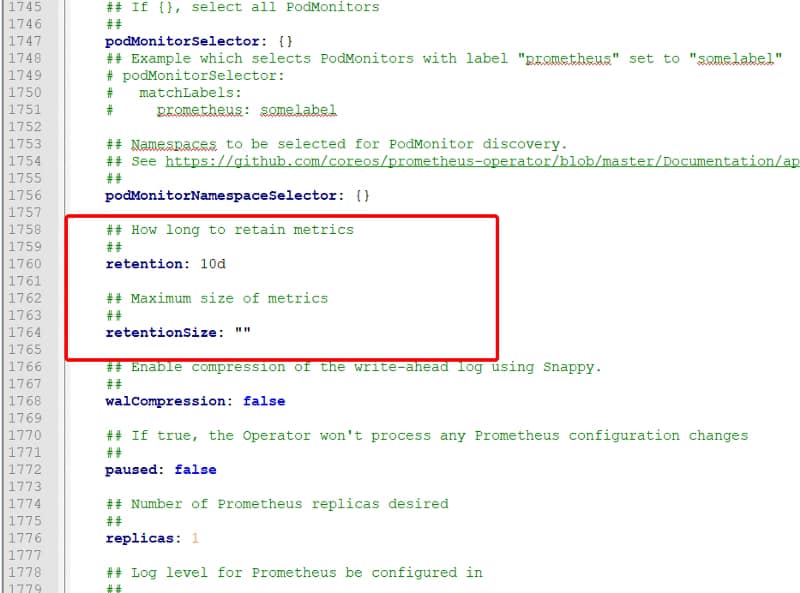
What about setting this configuration in the operator for Kubernetes? In that case, you also have similar options available in the values.yaml configuration file for the chart as you can see in the image below:
values.yml for the Prometheus Operator Helm Chart
This should help you get an optimized deployment of Prometheus that ensures all the features that Prometheus has but at the same time an optimal use of the resources at your disposal.
Additional to that, you should also check the Managed Service options that some providers have regarding Prometheus, such as the Amazon Managed Services for Prometheus, as you can see in the link below:
Amazon Prometheus Service to Provide More Availability to Your Monitoring Solution
Learn what Amazon Managed Service for Prometheus provides and how you can benefit from it. Photo by Casey Horner on Unsplash Monitoring is one of the hot topics when we talk about cloud-native architectures. Prometheus is a graduated Cloud Native Computing Foundation (CNCF) open-source project and one of the industry-standard solutions when it comes to monitoring your […]
Learn about the new horizontally-scalable, highly available, multi-tenant log aggregation system inspired by Prometheus that can be the best fit for your logging architecture
Loki vs ELK is something you are reading and hearing each time more often as from some time it is a raise on the dispute of becoming the de-factor standard for log aggregation architectures.
When we talk about Cloud-Native Architecture, log aggregation is something key that you need to consider. The old practices that we followed in the on-premises virtual machine approach for logging are not valid anymore.
We already cover this topic in my previous post that I recommend you to talk a look in case you haven’t read it yet, but this is not the topic for today.
Three reasons why you need a Log Aggregation Architecture today
Log Aggregation are not more a commodity but a critical component in container-based platforms Photo by Olav Ahrens Røtne on Unsplash Log Management doesn’t seem like a very fantastic topic. It is not the topic that you see and says: “Oh! Amazing! This is what I was dreaming about my whole life”. No, I’m aware that […]
Elasticsearch as the core and the different derívate de stacks like ELK/EFK had gained popularity in the last years, being pretty much the default open-source option when we talked about log aggregation and one of the options. The main public cloud providers have also adopted this solution as part of their own offering as the Amazon Elasticsearch Service provides.
But Elasticsearch is not perfect. If you have already used it, you probably know about it. Still, because their features are so awesome, especially on the searching and indexing capabilities, it has been the kind of leader today. But other topics like the storage use, the amount of power you need to handle it, and the architecture with different kinds of nodes (master, data, ingester) increase its complexity for cases when we need something smaller.
And to fill this gap is where our main character for today’s post arrives: Loki or Grafana Loki.
Loki is a logging management system created as part of the Grafana project, and it has been created with a different approach in mind than Elasticsearch.
Loki is a horizontally-scalable, highly-available, multi-tenant log aggregation system inspired by Prometheus. It is designed to be very cost effective and easy to operate. It does not index the contents of the logs, but rather a set of labels for each log stream.
So as we can read in the definition from their own page above, it covers several interesting topics in comparison with Elasticsearch:
First of all, it addresses some of the usual pain points for ELK customers: It is very cost-effective and easy to operate.
It clearly says that the approach is not the same as ELK, you are not going to have a complete index of the payload for the events, but it is based on different labels that you can define for each log stream.
Prometheus inspires that, which is critical because it enabled the idea to use log traces as metrics to empower our monitoring solutions.
Let’s start with the initial questions when we show an interesting new technology, and we would like to start testing it.
How can I install Loki?
Loki is distributed in different flavors to be installed in your environment in the way you need it.
SaaS: provided as part of the hosting solution of Grafana Cloud.
On-Premises: Provided as a normal binary to be download to run in an on-premises mode.
Cloud: Provided a docker image or even a Helm Chart to be deployed into your Kubernetes-based environment.
GrafanaLabs teams also provide Enterprise Support for Loki if you would like to use it on production mode in your company. Still, at the same time, all the code is licensed using Apache License 2.0, so you can take a look at all the code and contribute to it.
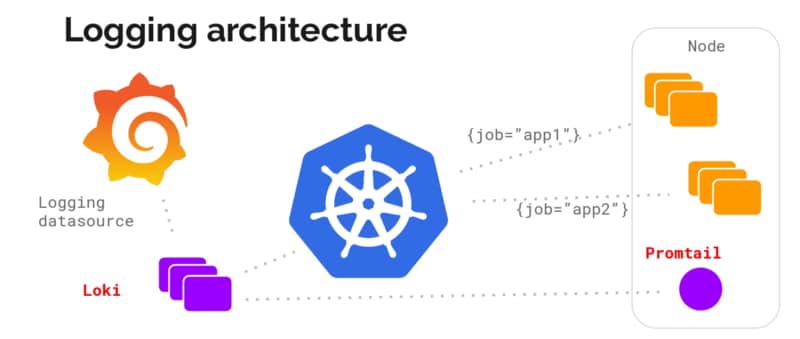
Architecture wise is very similar to the ELK/EFK stack and follow the same approach of “collectors” and “indexers” as ELK has:
Loki itself is the central node of the architecture responsible for storing the log traces and their labels and provided an API to search among them based on their own language LogQL (a similar approach to the PromQL from Prometheus).
promtail is the agent component that runs in the edge getting all those log traces that we need that can be running on a machine on-prem or a DaemonSet fashion in our own Kubernetes cluster. It plays the same role as Logstash/Fluent-bit/Fluentd works in the ELK/EFK stack. Promtail provides the usual plugin mode to filter and transforms our log traces as the other solutions provide. At the same time, it provides an interesting feature to convert those log traces into Prometheus metrics that can be scraped directly by your Prometheus server.
Grafana is the UI for the whole stack and plays a similar role as Kibana in the ELK/EFK stack. Grafana, among other plugins, provides direct integration with Loki as a Datasource to explore those traces and include them in the Dashboards.
Summary
Grafana Loki can be a great solution for your logging architecture to cover address two points: Provide a Lightweight log aggregation solution for your environment and at the same time enable your log traces as a source for your metrics, allowing you to create detailed, more business-oriented metrics that use in your dashboards and your monitoring systems.
CNCF-sponsored service Mesh Linkerd provides a lot of needed features in nowadays microservices architectures.
If you are reading this, probably, you are already aware of the challenges that come with a microservices architecture. It could be because you are reading about those or even because you are challenging them right now in your own skin.
One of the most common challenges is network and communication. With the eclosion of many components that need communication and the ephemeral approach of the cloud-native developments, many new features are a need when in the past were just a nice-to-have.
Concepts like service registry and service discovery, service authentication, dynamic routing policies, and circuit breaker patterns are no longer things that all the cool companies are doing but something basic to master the new microservice architecture as part of a cloud-native architecture platform, and here is where the Service Mesh project is increasing its popularity as a solution for most of this challenges and providing these features that are needed.
If you remember, a long time ago, I already cover that topic to introduce Istio as one of the options that we have:
Integrating Istio with BWCE Applications
Introduction Services Mesh is one the “greatest new thing” in our PaaS environments. No matter if you’re working with K8S, Docker Swarm, pure-cloud with EKS or AWS, you’ve heard and probably tried to know how can be used this new thing that has so many advantages because it provides a lot of options in handling […]
But this project created by Google and IBM is not the only option that you have to provide those capabilities. As part of the Cloud Native Computing Foundation (CNCF), the Linkerd project provides similar features.
How to install Linkerd
To start using Linkerd, the first thing that we need to do is to install the software and to do that. We need to do two installations, one on the Kubernetes server and another on the host.
To install on the host, you need to go to the releases page and download the edition for your OS and install it.
I am using a Windows-based system in my sample, so I use chocolatey to install the client. After doing so, I can see the version of the CLI typing the following command:
linkerd version
And you will get an output that will say something similar to this:
PS C:\WINDOWS\system32> linkerd.exe version
Client version: stable-2.8.1
Server version: unavailable
Now we need to do the installation on the Kubernetes server, and to do so, we use the following command:
linkerd install | kubectl apply -f -
And you will get an output similar to this one:
PS C:\WINDOWS\system32> linkerd install | kubectl apply -f -
namespace/linkerd created
clusterrole.rbac.authorization.k8s.io/linkerd-linkerd-identity created
clusterrolebinding.rbac.authorization.k8s.io/linkerd-linkerd-identity created
serviceaccount/linkerd-identity created
clusterrole.rbac.authorization.k8s.io/linkerd-linkerd-controller created
clusterrolebinding.rbac.authorization.k8s.io/linkerd-linkerd-controller created
serviceaccount/linkerd-controller created
clusterrole.rbac.authorization.k8s.io/linkerd-linkerd-destination created
clusterrolebinding.rbac.authorization.k8s.io/linkerd-linkerd-destination created
serviceaccount/linkerd-destination created
role.rbac.authorization.k8s.io/linkerd-heartbeat created
rolebinding.rbac.authorization.k8s.io/linkerd-heartbeat created
serviceaccount/linkerd-heartbeat created
role.rbac.authorization.k8s.io/linkerd-web created
rolebinding.rbac.authorization.k8s.io/linkerd-web created
clusterrole.rbac.authorization.k8s.io/linkerd-linkerd-web-check created
clusterrolebinding.rbac.authorization.k8s.io/linkerd-linkerd-web-check created
clusterrolebinding.rbac.authorization.k8s.io/linkerd-linkerd-web-admin created
serviceaccount/linkerd-web created
customresourcedefinition.apiextensions.k8s.io/serviceprofiles.linkerd.io created
customresourcedefinition.apiextensions.k8s.io/trafficsplits.split.smi-spec.io created
clusterrole.rbac.authorization.k8s.io/linkerd-linkerd-prometheus created
clusterrolebinding.rbac.authorization.k8s.io/linkerd-linkerd-prometheus created
serviceaccount/linkerd-prometheus created
clusterrole.rbac.authorization.k8s.io/linkerd-linkerd-proxy-injector created
clusterrolebinding.rbac.authorization.k8s.io/linkerd-linkerd-proxy-injector created
serviceaccount/linkerd-proxy-injector created
secret/linkerd-proxy-injector-tls created
mutatingwebhookconfiguration.admissionregistration.k8s.io/linkerd-proxy-injector-webhook-config created
clusterrole.rbac.authorization.k8s.io/linkerd-linkerd-sp-validator created
clusterrolebinding.rbac.authorization.k8s.io/linkerd-linkerd-sp-validator created
serviceaccount/linkerd-sp-validator created
secret/linkerd-sp-validator-tls created
validatingwebhookconfiguration.admissionregistration.k8s.io/linkerd-sp-validator-webhook-config created
clusterrole.rbac.authorization.k8s.io/linkerd-linkerd-tap created
clusterrole.rbac.authorization.k8s.io/linkerd-linkerd-tap-admin created
clusterrolebinding.rbac.authorization.k8s.io/linkerd-linkerd-tap created
clusterrolebinding.rbac.authorization.k8s.io/linkerd-linkerd-tap-auth-delegator created
serviceaccount/linkerd-tap created
rolebinding.rbac.authorization.k8s.io/linkerd-linkerd-tap-auth-reader created
secret/linkerd-tap-tls created
apiservice.apiregistration.k8s.io/v1alpha1.tap.linkerd.io created
podsecuritypolicy.policy/linkerd-linkerd-control-plane created
role.rbac.authorization.k8s.io/linkerd-psp created
rolebinding.rbac.authorization.k8s.io/linkerd-psp created
configmap/linkerd-config created
secret/linkerd-identity-issuer created
service/linkerd-identity created
deployment.apps/linkerd-identity created
service/linkerd-controller-api created
deployment.apps/linkerd-controller created
service/linkerd-dst created
deployment.apps/linkerd-destination created
cronjob.batch/linkerd-heartbeat created
service/linkerd-web created
deployment.apps/linkerd-web created
configmap/linkerd-prometheus-config created
service/linkerd-prometheus created
deployment.apps/linkerd-prometheus created
deployment.apps/linkerd-proxy-injector created
service/linkerd-proxy-injector created
service/linkerd-sp-validator created
deployment.apps/linkerd-sp-validator created
service/linkerd-tap created
deployment.apps/linkerd-tap created
configmap/linkerd-config-addons created
serviceaccount/linkerd-grafana created
configmap/linkerd-grafana-config created
service/linkerd-grafana created
deployment.apps/linkerd-grafana created
Now we can check that the installation has been done properly using the command:
linkerd check
And if everything has been done properly, you will get an output like this one:
PS C:\WINDOWS\system32> linkerd check
kubernetes-api
--------------
√ can initialize the client
√ can query the Kubernetes API
kubernetes-version
------------------
√ is running the minimum Kubernetes API version
√ is running the minimum kubectl version
linkerd-existence
-----------------
√ 'linkerd-config' config map exists
√ heartbeat ServiceAccount exist
√ control plane replica sets are ready
√ no unschedulable pods
√ controller pod is running
√ can initialize the client
√ can query the control plane API
linkerd-config
--------------
√ control plane Namespace exists
√ control plane ClusterRoles exist
√ control plane ClusterRoleBindings exist
√ control plane ServiceAccounts exist
√ control plane CustomResourceDefinitions exist
√ control plane MutatingWebhookConfigurations exist
√ control plane ValidatingWebhookConfigurations exist
√ control plane PodSecurityPolicies exist
linkerd-identity
----------------
√ certificate config is valid
√ trust anchors are using supported crypto algorithm
√ trust anchors are within their validity period
√ trust anchors are valid for at least 60 days
√ issuer cert is using supported crypto algorithm
√ issuer cert is within its validity period
√ issuer cert is valid for at least 60 days
√ issuer cert is issued by the trust anchor
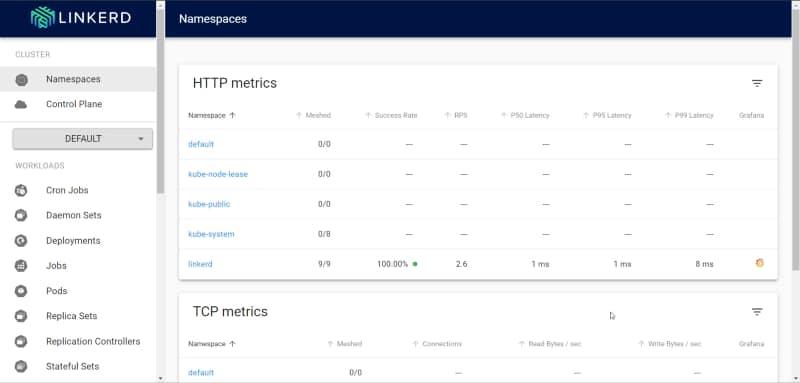
Then we can see the dashboard from Linkerd using the following command:
linkerd dashboard
Dashboard initial web page after a clean Linkerd installation
Deployment of the apps
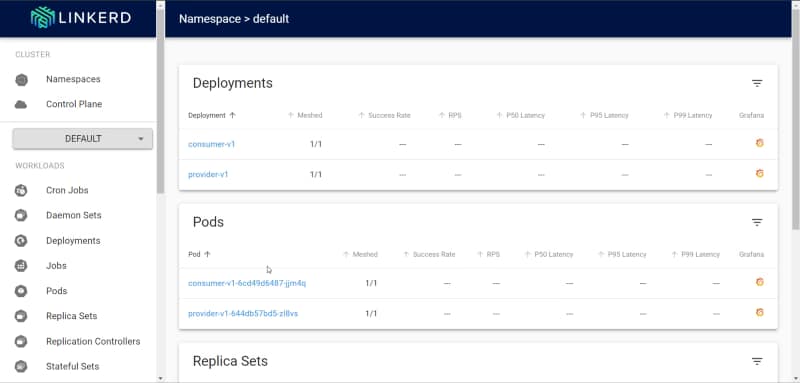
We will use the same apps that we use some time ago to deploy istio, so if you want to remember what they are doing, you need to look again at that article.
And if we reach the endpoint, we got the expected reply from the provider.
Sample response provided by the provider
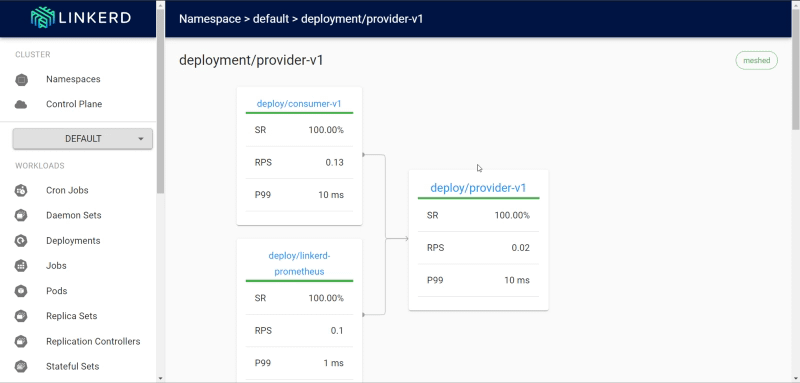
And in the dashboard, we can see the stats of the provider:
Linkerd dashboard showing the stats of the flow
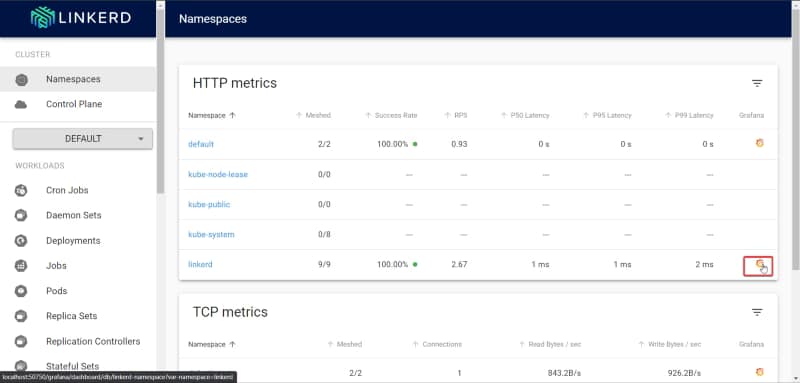
Also, linked by default provided a Grafana dashboard where you can see more metrics you can get there using the grafana link that the dashboard has.
Grafana link on the Linkerd Dashboard
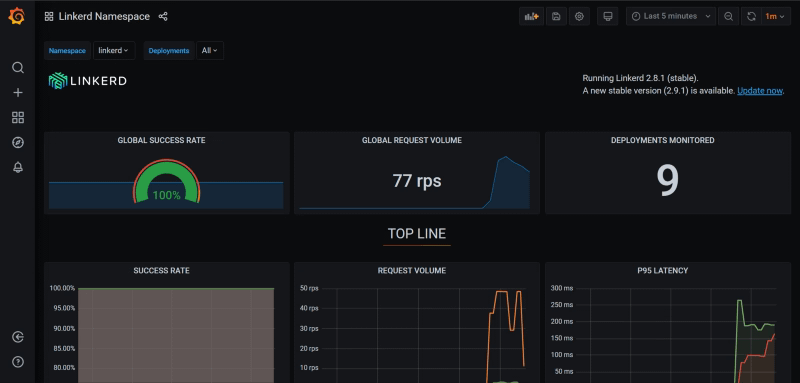
When you enter that, you could see something like the dashboard shown below:
Grafana dashboard showing the linkerd statistics
Summary
With all this process, we have seen how easily we can deploy a linkerd service mesh in our Kubernetes cluster and how applications can integrate and interact with them. In the next posts, we will dive into the most advanced features that will help us in the new challenges that come with the Microservices architecture.
Event Streaming, API, and Data are the three musketeers that cover all the aspects of mastering integration in the cloud.
Enterprise Application Integration has been one of the most challenging IT landscape topics since the beginning of time. As soon as the number of systems and applications in big corporations started and grows, this becomes an issue we should address. This process’s efficiency will also define what companies succeed and which ones will fail as the cooperation between applications becomes critical to respond at the pace that the business was demanding.
I usually like to use the “road analogy” to define this:
It doesn’t matter if you have the fastest cars if you don’t have proper roads you will not get anywhere
This situation generates a lot of investments from the companies. Also, a lot of vendors and products were launched to support that situation. Some solutions are starting to emerge: EAI, ESB, SOA, Middleware, Distributed Integration Platforms, Cloud-Native solution, and iPaaS.
Each of the approaches provides a solution for existing challenges. As long as the rest of the industry was evolving, the solutions changed to adapt to the new reality (containers, microservices, DevOps, API-led, Event-Driven..)
So, what is the situation today? Today is extended the misconception that integration is the same as API and also that API is asynchronous HTTP based (REST, gRPC, GraphQL) API. But it is much more than this.
API-led is key to the integration solution for sure, especially focus on the philosophical approach behind it. Each component that we create today is created with a collaboration in mind to work with existing and future components to benefit the business in an easy and agile way. This transcends the protocol discussion completely.
API covers all different kinds of solutions from existing REST API to AsyncAPI to cover the event-based API.
2.- Event Streaming
Asynchronous communication is needed because the patterns and the requirements when you are talking about big enterprises and different applications make this essential. Requirements like pub-sub approach to increase independence among services and apps, control-flow to manage the execution of high-demanding flows that can exceed the throttling for applications, especially when talking about SaaS solutions.
So, you can think that this is a very opinionated view, but at the same time, this is something that most of the providers in this space have realized based on their actions:
AWS release SNS/SQS, its first messaging system, as its only solution.
Nov 2017 AWS releases Amazon MQ, another queue messaging system to cover the scenarios that SQS cannot cover.
May 2019 AWS releases Amazon MSK, a managed service for Kafka solutions to provide streaming data distribution and processing capabilities.
And that situation is because when we move away from smaller applications when we are migrating from a monolith approach to a micro-service application, more patterns and more requirements are needed, and here is. In contrast, integration solutions have shown in the past,t this is critical for integration solutions.
3.- Data Integration
Usually, when we talk about integration, we talk about Enterprise Application Integration because we have this past bias. Even I use this term to cover this topic, EAI, because we usually refer to these solutions. But since the last years, we are more focused on the data distribution amount the company rather than how applications integrated because what is really important is the data they are exchanging and how we can transform this raw data into insights that we can use to know better our customers or optimize our process or discover new opportunities based on that.
Until recently, this part was handled apart from the integration solutions. You probably rely on a focused ETL (Extract-Transform-Load) that helps to move the data from one database to another or a different kind of storage like a Data Warehouse so your Data Scientist can work with them.
But again, agility has made that this needs to change, and all the principles integration has in terms of providing more agility to the business is also applied to how we exchange data. We try to avoid the data’s technical move and try to ease the access and the right organization on this data. Data Virtualization and Data Streaming are the core capabilities that address and handle those challenges providing an optimized solution for how the data is distributed.
Summary
My main expectation with this article is to make you aware that when you are thinking about integrating your application, this is much more than the REST API that you are exposing, maybe using some API Gateway, and the needs can be very different. The strongest your integration platform is, the stronger your business will be.
This is not going to be one of those articles about tools that can help you develop code faster. If you’re interested in that, you can check out my previous articles regarding VS Code extensions, linters, and other tools that make your life as a developer easier.
My job is not only about software development but also about solving issues that my customers have. While their issues can be code-related, they can be an operation error or even a design problem.
I usually tend to define my role as a lone ranger. I go out there without knowing what I will face, and I need to be ready to adapt, solve the problem, and make customers happy. This experience has helped me to develop a toolchain that is important for doing that job.
Let’s dive in!
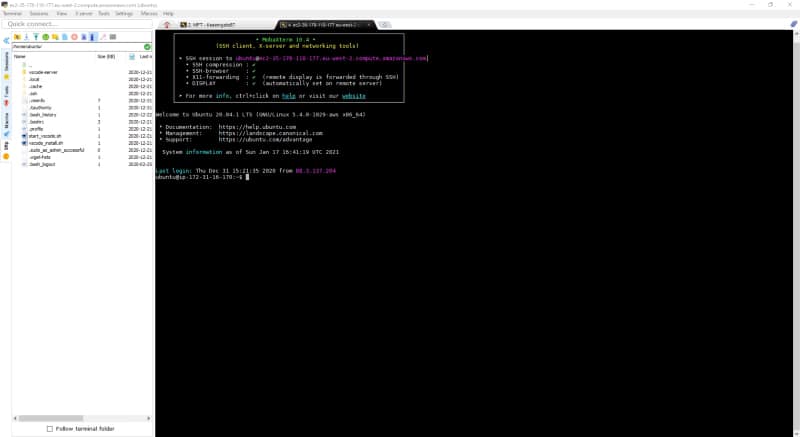
1. MobaXterm
MobaXterm free Xserver and tabbed SSH client for Windows
The ultimate toolbox for remote computing – includes X server, enhanced SSH client and much more!
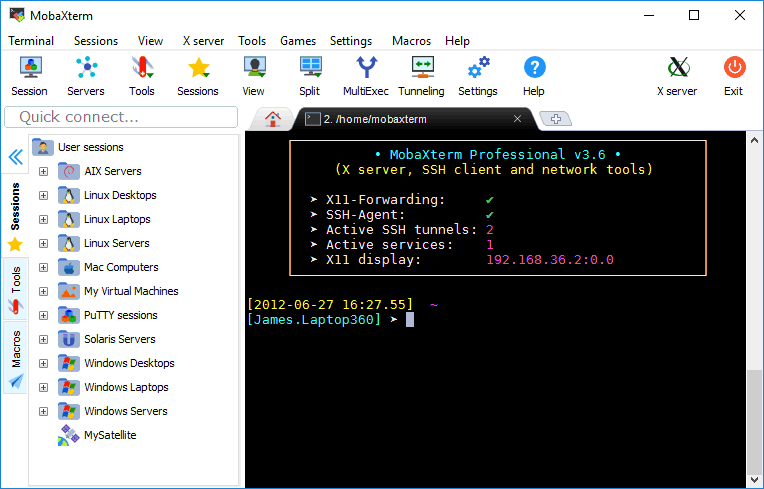
This is the best tool to manage different connections to different servers (SSH access for a Linux server, RDP for a Windows server, etc.). Here are some of its key features:
Graphical SSH port-forwarding for those cases when you need to connect to a server you don’t have direct access to.
Easy identity management to save the passwords for the different servers. You can organize them hierarchically for ease of access, especially when you need to access so many servers for different environments and even different customers.
SFTP automatic connection when you connect to an SSH server. It lets you download and upload files as easily as dropping files there.
Automatical X11 forwarding so you can launch graphical applications from your Linux servers without needing to configure anything or use other XServers like XMing.
MobaXterm in action
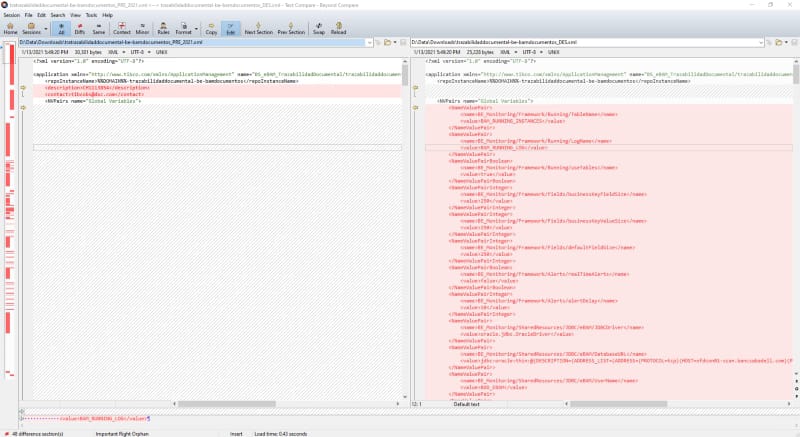
2. Beyond Compare
Scooter Software: Home of Beyond Compare
Beyond Compare is a multi-platform utility that combines directory compare and file compare functions in one package. Use it to manage source code, keep directories in sync, compare program output, etc.
There are so many tools to compare files, and I think I have used all of them — from standalone applications like WinMerge, Meld, Araxis, KDiff, and others to extensions for text editors like VS Code and Notepad++.
However, none of those can compare to the one and only Beyond Compare.
I covered Beyond Compare when I started working on software engineering in 2010, and it is a tool that comes with me on each project I have. I use it every day. So, what makes this tool different from the rest?
It is simply the best tool to make any comparison because it does not just compare text and folders. It does that perfectly, but at the same time, it also compares ZIP files while browsing the content, JAR files, and so on. This is very important when we’d like to check if two JAR files that are uploaded in DEV and PROD are the same version of the tool or to know if a ZIP file has the right content when it is uploaded.
Beyond Compare 4
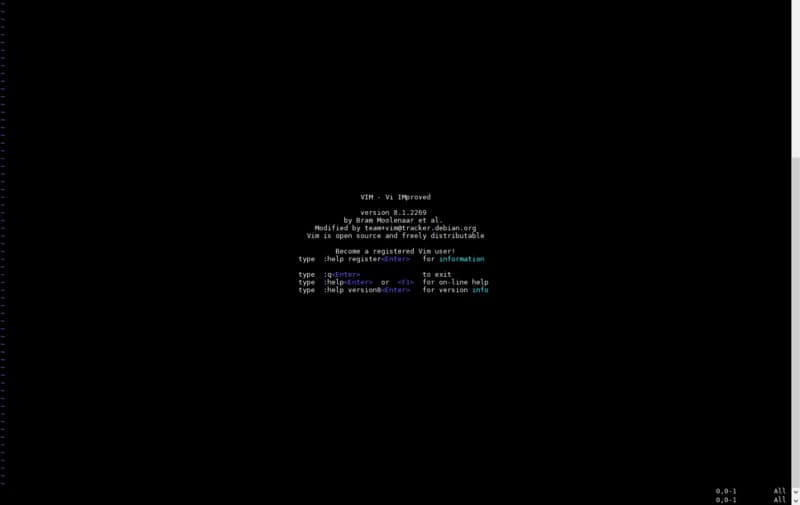
3. Vi Editor
welcome home : vim online
Vim is rock stable and is continuously being developed to become even better. Among its features are:
This is the most important one — the best text editor of all time — and it is available pretty much on every server.
It is a command-line text editor with a huge number of shortcuts that allows you to be very productive when you are inside a server checking logs and configuration files to see where the problem is.
For a long time, I have had a Vi cheat sheet printed out to make sure I can master the most important shortcuts and thus increase my productivity while fighting inside the enemy lines (the customer’s servers).
Learn what Amazon Managed Service for Prometheus provides and how you can benefit from it.
Monitoring is one of the hot topics when we talk about cloud-native architectures. Prometheus is a graduated Cloud Native Computing Foundation (CNCF) open-source project and one of the industry-standard solutions when it comes to monitoring your cloud-native deployment, especially when Kubernetes is involved.
Following its own philosophy of providing a managed service for some of the most used open-source projects but fully integrated with the AWS ecosystem, AWS releases a general preview (at the time of writing this article): Amazon Managed Service for Prometheus (AMP).
The first thing is to define what Amazon Managed Service for Prometheus is and what features provide. So, this is the Amazon definition of the service:
A fully managed Prometheus-compatible monitoring service that makes it easy to monitor containerized applications securely and at scale.
And I would like to spend some time on some parts of this sentence.
Fully managed service: So, this will be hosted and handle by Amazon, and we are just going to interact with it using API as we do with other Amazon services like EKS, RDS, MSK, SQS/SNS, and so on.
Prometheus-compatible: So, that means that even if this is not a pure-Prometheus installation, the API is going to be compatible. So the Prometheus clients who can use Grafana or others to get the information from Prometheus will work without changing their interfaces.
Service at-scale: Amazon, as part of the managed service, will take care of the solution’s scalability. You don’t need to define an instance-type or how much RAM or CPU you do need. This is going to be handled by AWS.
So, that sounds perfect. So you can think that you are going to delete your Prometheus server, and it will start using this service. Maybe you are even typing something like helm delete prom… WAIT WAIT!!
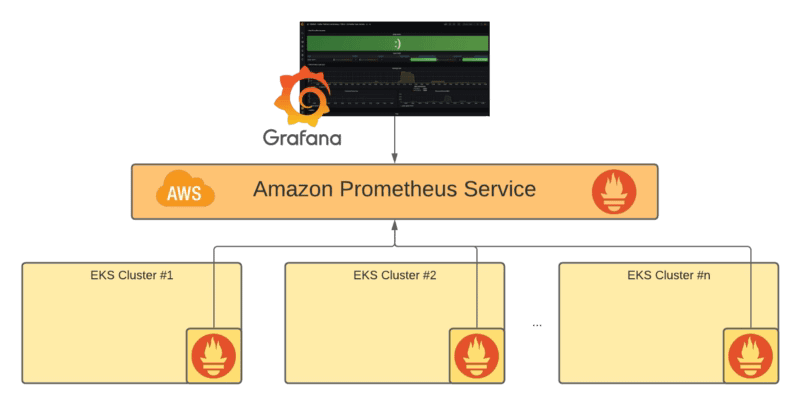
Because at this point, this is not going to replace your local Prometheus server, but it will allow the integration with it. So, that means that your Prometheus server is going to act like a scraper for the whole monitoring scalable solution that AMP is providing, something as you can see in the picture below:
Reference Architecture for Amazon Prometheus Service
So, you are still going to need a Prometheus server, that is right, but all the complexity are going to be avoided and leverage to the managed service: Storage configuration, High availability, API optimization, and so on is going to be just provided to you out of the box.
Ingesting information into Amazon Managed Service for Prometheus
At this moment, there is two way to ingest data into the Amazon Prometheus Service:
From an existing Prometheus server using the remote_write capability and configuration, so that means that each series that is scraped by the local Prometheus is going to be sent to the Amazon Prometheus Service.
Using AWS Distro for OpenTelemetry to integrate with this service using the Prometheus Receiver and the AWS Prometheus Remote Write Exporter components to get that.
Summary
So this is a way to provide an enterprise-grade installation leveraging on all the knowledge that AWS has hosting and managing this solution at scale and optimized in terms of performance. You can focus on the components you need to get the metrics ingested into the service.
I am sure this will not be the last movement from AWS in observability and metrics management topics. I am sure they will continue to provide more tools to the developer’s and architects’ hands to define optimized solutions as easily as possible.
3 benefits of using GraphQL in your API that you should take into consideration.
We all know that APIs are the new standard when we develop any piece of software. All the latest paradigm approaches are based on a distributed amount of components created with a collaborative approach in mind that they need to work together to provide more value to the whole ecosystem.
Talking about the technical part, an API has become a synonym for using REST/JSON to expose those APIs as a new standard. But this is not the only option even in the synchronous request/reply world, and we are starting to see a shift in this by-default selection of REST as the only choice in this area.
GraphQL has emerged as an alternative that works as well since Facebook introduced it in 2015. During these five years of existence, its adoption is growing outside Facebook walls, but this is still far from the general public uses as the following Google Trends graph shows
Google Trend graph showing interest in REST vs. GraphQL in the last five years
But I think this is a great moment to look again and the benefits that GraphQL can provide to your APIs in your ecosystem. You can start a new year by introducing a technology that can provide you and your enterprise with clear benefits. So, let’s take a look at them.
1.- More flexible style to meet different client profile needs.
I want to start this point with a small jump to the past when REST was introduced. REST was not always the standard we use to create our API or Web Services, as we called it at that point. A W3C standard, SOAP, was the leader of that, and REST replaces it, focusing on several points.
However, the weight of the protocol much lighter than SOAP makes a difference, especially when mobile devices start to be part of the ecosystem.
That is the situation today, and GraphQL is an additional step further on that approach and the perspective of being more flexible. GraphQL allows each customer to decide what part of the data they would like to use the same interface for different applications. Each of them will still have an optimized approach because they can decide what they like to obtain at each time.
2.- More loosely coupled approach with the service provider
Another important topic is the dependency between the consumer of the API and the provider. We all know that different paradigms like microservices are focus on that approach. We aim to get much independence as possible among our components.
REST is not providing a big link between the components that is true. Still, the interface is fixed at the same time, so that means each time we modify that interface by adding a new field or changing one, we can affect the consumer even if they do not need that field for anything.
GraphQL, by its feature of selecting the fields that I would like to obtain, makes much easier the evolution of the API itself much and at the same time provides much more independence for the components because only the changes that have a clear impact on the data that a client needs can generate an effect on them but the rest it is completely transparent form them.
3.- More structured and defined specification
One of the aspects that defined the rise of REST as a wide-used protocol is the lack of standards to structure and define its behavior. We had several attempts using RAML or even just “samples as specification”, swagger, and finally an OpenAPI specification. But that time of “unstructured” situation generates that REST API can be done in very different ways.
Each developer or service provider can generate REST API with a different approach and philosophy that generates noise and is difficult to standardize. GraphQL is based on a GraphQL Schema that defines the type managed by the API and the operations that you can do with it in two main groups: queries and mutations. That allows that all the GraphQL APIs, no matter who is developing them, follow the same philosophy as it is already included in the core of the specification itself.
Summary
After reading this article, you are probably saying, so that means that I should remove all my REST API and start building everything in GraphQL. And my answer to that is …. NO!
The goal of this article if that you are aware of the benefits that different way to define API is providing to you so you can add them to your toolbelt, so next time that you create an API to think about these topics described here and reach to a conclusion that is: mmm I think GraphQL is the better pick for this specific situation or the other way around, I am not going to get any benefits on this specific API, so I rather use REST.
The idea is that you now know to apply to your specific case and choose based on that because no better than yourself to decide what is best for your use case.
The development world has changed a lot, but that does not mean that all things are not valid. Learn what principles you should be aware of.
The world changes fast, and in IT, it changes even faster. We all know that, which usually means that we need to face new challenges and find new solutions. Samples of that approach are the trends we have seen in the last years: Containers, DevSecOps, Microservices, GitOps, Service Mesh…
But at the same time, we know that IT is a cycle in terms that the challenges that we face today are different evolution of challenges that have been addressed in the past. The main goal is to avoid re-inventing the wheel and avoiding making the same mistakes people before us.
So, I think it is worth it to review principles that Service-oriented Architectures (SOA) provided to us in the last decades and see which ones are relevant today.
Principles Definition
I will use the principles from Thomas Erl’s SOA Principles of Service Design and the definitions that we can found on the Wikipedia article:
1.- Service Abstraction
Design principle that is applied within the service-orientation design paradigm so that the information published in a service contract is limited to what is required to effectively utilize the service.
The main goal behind these principles is that a service consumer should not be aware of the particular component. The main advantage of that approach is that we need to change the current service provider. We can do it without impacting those consumers. This is still totally relevant today because of different reasons:
Service to service communication: Service Meshes and similar projects provide service registry and service discovery capabilities based on the same principles to avoid knowing the pod providing the functionality.
SaaS “protection-mode” enabled: Some backend systems are still here to stay even if they have more modern ways to be set up as SaaS platforms. That flexibility also provides a more easy way to move away or change the SaaS application providing the functionality. But all that flexibility is not real if you have that SaaS application totally coupled with the rest of the microservices and cloud-native application in your land space.
2.- Service Autonomy
Design principle that is applied within the service-orientation design paradigm, to provide services with improved independence from their execution environments.
We all know the importance of the service isolation that cloud-native development patterns provide based on containers’ capabilities to provide independence among execution environments.
Each service should have its own execution context isolated as much as possible from the execution context of the other services to avoid any interference between them.
So that is still relevant today but encouraged by today’s paradigms as the new normal way to do things because of the benefits shown.
3.- Service Statelessness
Design principle that is applied within the service-orientation design paradigm, in order to design scalable services by separating them from their state data whenever possible.
Stateless microservices do not maintain their own state within the services across calls. The services receive a request, handle it, and reply to the client requesting that information. If needed to store some state information, this should be done externally to the microservices using an external data store such as a relational database, a NoSQL database, or any other way to store information outside the microservice.
4.- Service Composability
Design of services that can be reused in multiple solutions that are themselves made up of composed services. The ability to recompose the service is ideally independent of the size and complexity of the service composition.
We all know that re-usability is not one of the principles behind the microservices because they argue that re-usability is against agility; when we have a shared service among many parties, we do not have an easy way to evolve it.
But this is more about leverage on existing services to create new ones that are the same approach that we follow with the API Orchestration & Choreography paradigm and the agility that provides leverage on the existing ones to create compounded services that meet the innovation targets from the business.
Summary
Cloud-native application development paradigms are a smooth evolution from the existing principles. We should leverage the ones that are still relevant and provide an updated view to them and update the needed ones.
In the end, in this industry, what we do each day is to do a new step of the long journey that is the history of the industry, and we leverage all the work that has been done in the past, and we learn from it.
One of the biggest announcements from the latest AWS re:Invent 2020 sessions was the release of EKS-D from Amazon. EKS-D is their open-source Kubernetes Distribution that’s now available for everyone to start using in their cloud provider or even on-premises.
It’s based on past findings and the entire process Amazon has undergone in managing their Kubernetes managed platform, Amazon EKS.
These announcements have many people asking themselves: “OK, I know Kubernetes, but what’s a Kubernetes distribution? And why should I care?”
So I’ll try to answer that with the knowledge I have, and I always try to use the same approach: a Kubernetes versus Linux model comparison.
Kubernetes is an open-source project, as you know, started by Google and is now being managed by the community and the Cloud Native Computing Foundation (CNCF), and you can find all the code available here:
GitHub – kubernetes/kubernetes: Production-Grade Container Scheduling and Management
Production-Grade Container Scheduling and Management – GitHub – kubernetes/kubernetes: Production-Grade Container Scheduling and Management
But let’s be honest: Not many of us are pulling that repo and trying to compile it to provide a cluster. That’s not how we usually work. If you follow the code path — downloading it, building it, and so on — this is usually named vanilla Kubernetes.
If we start with the Linux comparison, it’s the same situation as we have with the Linux kernel that most of the Linux distribution ships, but this is already compiled and available with a bunch of other tools all working together via the usual approach.
So that’s what a Kubernetes distribution is. They build Kubernetes. They provide other tools and components to enhance or provide more features and to focus on additional aspects like a security focus, a DevOps focus, or another focus. Another concept that usually is raised is the purity of distribution, and we try to talk about distribution that’s pure.
We call a distribution pure when it’s building Kubernetes, and that’s it. It leaves everything else to the developers or users to decide what they want to use on top of it.
What Are the Main Components Shipped in a Kubernetes Distribution?
The main components that can differ when we’re talking about a Kubernetes distribution are the following:
Container runtime and registries
We all know there’s more that one container runtime, and even if you weren’t aware of that, you’ve probably read all of the articles regarding the removal of Docker support in Kubernetes v1.20, as you can read in this awesome article from Edgar Rodriguez.
Kubernetes Just Deprecated Docker Support. What Now?
Will this kill Docker?
At this moment, it seems all runtimes should support the existing Container Runtime Interface, and runtimes like CRI-O, Containerd, or Kata seem to be the default options now.
Networking
Another topic that often differs when we’re talking about Kubernetes distributions is how they manage their network, and this is one of the most critical aspects of the whole platform.
As we have with the container runtime, a standard specification exists to cover that topic, and that’s the Container Network Interface (CNI). Several projects exist on this topic, like Flannel, Calico, Canal, and Wave. Also, some platforms provide their own component, like the Openshift SDN operator.
Storage
How to handle storage in Kubernetes is also very important, especially as we embrace this model in deployments that require stateful models. Different platforms can support different storage options, like file systems and so on.
Who Are the Top Players?
The first thing we need to be aware of is there are a huge number of Kubernetes distributions out there.
We’ll count the ones with a CNCF certification, and you can take a look at all of them here. At the moment of writing this article, we’re talking about 72 certified distributions.
These are the ones that I’d like to highlight today:
Red Hat OpenShift
The Red Hat OpenShift platform could be one of the most used platforms, especially in a private-cloud fashion. It could include most of the Red Hat services regarding storage, like GlusterFS and networking with OpenShift DNS. It has OKD as the open-source project that backs and contributes to the OpenShift platform. Check this article to see how to set up Openshift locally to test it
Mirantis
The former Docker enterprise that’s been acquired by Mirantis is another of the usual choices when we’re talking about supported platforms.
VMware Tanzu
VMware Tanzu, also coming from the acquisition of Pivotal from VMware, is a Kubernetes platform.
Canonical
Canonical (open source) is a platform from the company that develops and maintains Ubuntu. It’s another one of the important choices here and provides a variety of options, focusing not only on the common central mode but also on edge Kubernetes deployments with projects like MicroK8S and more options.
Rancher
Rancher (open source) is another one of the big players, focusing on following and extending the CNCF standards and also offering a big push for edge deployment with K3S. It also offers automated upgrades.
Summary
So, as you can see, the number of options available out there is huge. They all differ, so it’s important to take your time when you’re deciding your target platform based on your criteria for your project or your company.
And that’s without covering the managed platforms available out there that are becoming one of the more preferred options for companies so they can get all the flexibility from Kubernetes while not needing to handle the complexity of managing a Kubernetes platform themselves. But that’s a topic for another article — hopefully soon.
This article at least has provided you with more clarity about what a Kubernetes distribution is, the main differences among them, and a quick look at some of the key actors in this spectrum. Enjoy your day, and enjoy your life.
Helping you excel using low code in distributed teams and parallel programming
Most enterprises are exploring low-code/no-code development now that the most important thing is to achieve agility on the technology artifacts from different perspectives (development, deployment, and operation).
This article is part of my comprehensive TIBCO Integration Platform Guide where you can find more patterns and best practices for TIBCO integration platforms.
The benefits of this way of working make this almost a no-brainer decision for most companies. We already covered them in a previous article. Take a look if you have not read it yet.
But we know that all new things come with their own challenges that we need to address and master in order to unleash the full benefits that these new paradigms or technologies are providing. Much like with cloud-native architecture, we need to be able to adapt.
Sometimes it is not the culture that we need to change. Sometimes the technology and the tools also need to evolve to address those challenges and help us on that journey. And this is how Visual Diff came into life.
When you develop using a low-code approach, all the development process is easier. You need to combine different blocks that do the logic you need, and everything is simpler than a bunch of code lines.
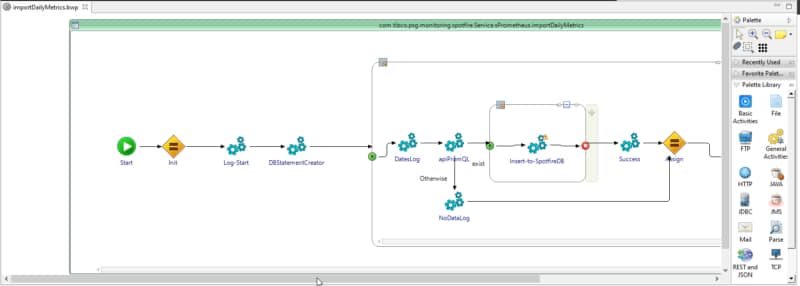
Low-code development approach using TIBCO BusinessWorks.
But we also need to manage all these artifacts in a repository whereby all of them are focused on source code development. That means that when you are working with those tools at the end, you are not working with a “low-code approach” but rather a source code approach. Things like merging different branches and looking to the version history to know the changes are complex.
And they are complex because they are performed by the repository itself, which is focused on the file changes and the source code that changes. But one of the great benefits of low-code development is that the developer doesn’t need to be aware of the source code generated as part of the visual, faster activity. So, how can we solve that? What can we use to solve that?
Low-code technologies need to advance to take the lead here. For example, this is what TIBCO BusinessWorks has done with the release of their Visual Diff capability.
So, you still have your integration with your source code repository. You can do all the processes and activities you usually need to do in this kind of parallel distributed development. Still, you can also see all those activities from a “low-code” perspective.
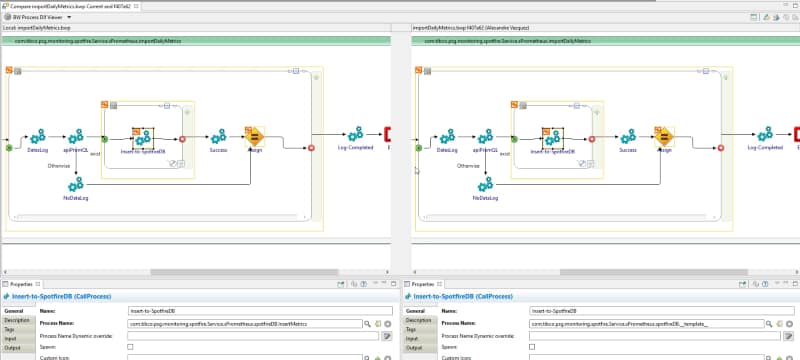
That means that when I am taking a look at the version history, I can see the visual artifacts that have been modified. The activities added or deleted are shown there in a meaningful way for low-code development. That closes the loop about how low-code developments can take all the advantages of the modern source code repositories and their flows (GitFlow, GitHub Flow, One Flow, etc.) as well as the advantages of the low-code perspective.
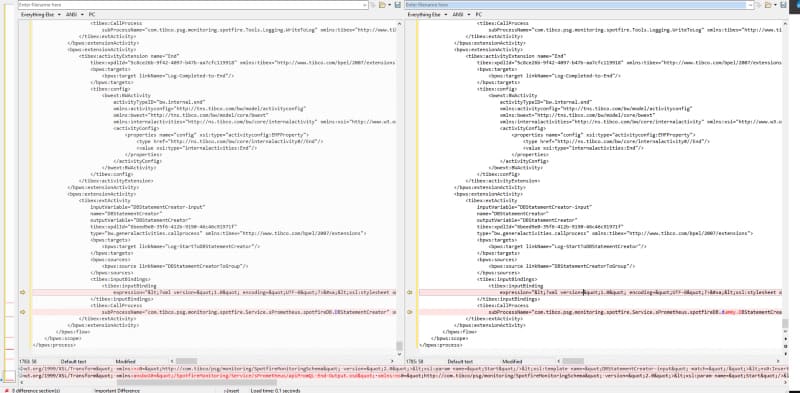
Let’s say there are two options with which you can see how an application has been changed. One is the traditional approach and the other uses the Visual Diff:
Option A: Visual Diff of your processesOption B: Same processes but with a Text Comparison approach
So, based on this evidence, what do you think is easier to understand? Even if you are a true coder as I am, we cannot deny the ease and benefits of the low-code approach for massive and standard development in the enterprise world.
Summary
No matter how fast we are developing with all the accelerators and frameworks that we have, a well-defined low-code application will be faster than any of us. It is the same battle that we had in the past with the Graphical Interfaces or mouse control versus the keyboard.
We accept that there is a personal preference to choose one or the other, but when we need to decide what is more effective and need to rely on the facts, we cannot be blind to what is in front of us.
I hope you have enjoyed this article. Have a nice day!