Using Statistics in your favor to detect bottlenecks in TIBCO BusinessWorks Container Edition

Using Statistics in your favor to detect bottlenecks in TIBCO BusinessWorks Container Edition

Usually, when you’re developing or running your container application you will get to a moment when something goes wrong. But not in a way you can solve with your logging system and with testing.

A moment when there is some bottleneck, something that is not performing as well as you want, and you’d like to take a look inside. And that’s what we’re going to do. We’re going to watch inside.

Using Statistics in your favor to detect bottlenecks in TIBCO BusinessWorks Container Edition
Photo by Chris Liverani on Unsplash

Because our BusinessWorks Container Edition provides so great features to do it that you need to use it into your favor because you’re going to thank me for the rest of your life. So, I don’t want to spend one more minute about this. I’d like to start telling you right now.

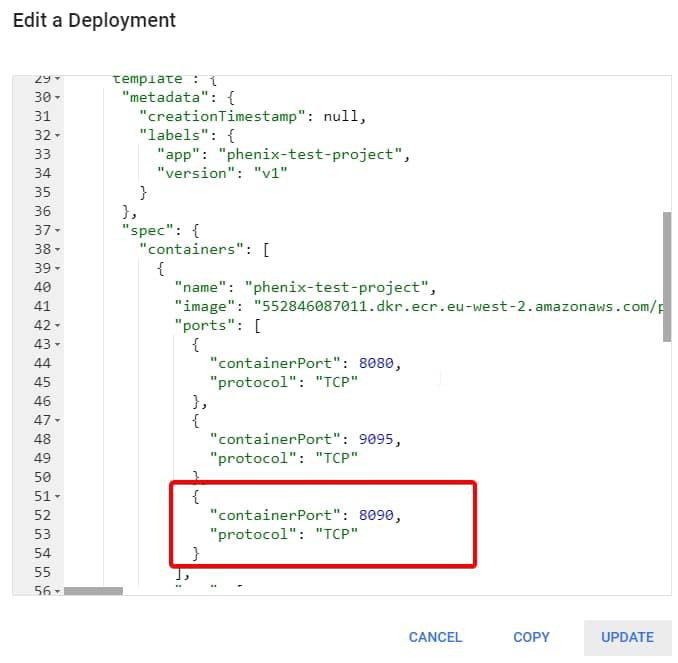
The first thing we need to do, we need to go inside the OSGi console from the container. So, the first thing we do is to expose the 8090 port as you can see in the picture below

Using Statistics in your favor to detect bottlenecks in TIBCO BusinessWorks Container Edition

Now, we can expose that port to your host, using the port-forward command

kubectl port-forward deploy/phenix-test-project-v1 8090:8090

And then we can execute an HTTP Request to execute any info using commands like this:

curl -v http://localhost:8090/bw/framework.json/osgi?command=<command>

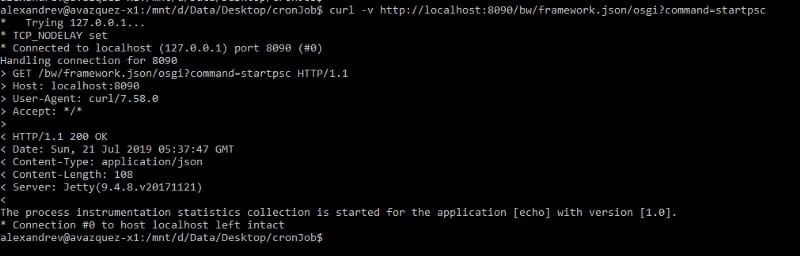
And we’re are going to execute first the activation of the process statistics like this:

curl -v http://localhost:8090/bw/framework.json/osgi?command=startpsc
Using Statistics in your favor to detect bottlenecks in TIBCO BusinessWorks Container Edition

And as you can see it says that statistics has been enabled for echo application, so using that application name we’re going to gather the statistics at the level

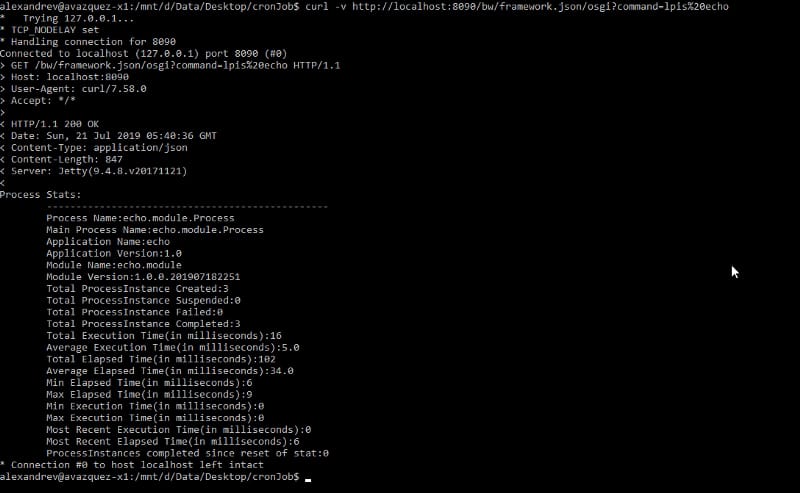
curl -v http://localhost:8090/bw/framework.json/osgi?command=lpis%20echo
Using Statistics in your favor to detect bottlenecks in TIBCO BusinessWorks Container Edition

And you can see the statistics at the process level where you can see the following metrics:

  • Process metadata (name, parent process and version)
  • Total instance by status (create, suspended, failed and executed)
  • Execution time (total, average, min, max, most recent)
  • Elapsed time (total, average, min, max, most recent)
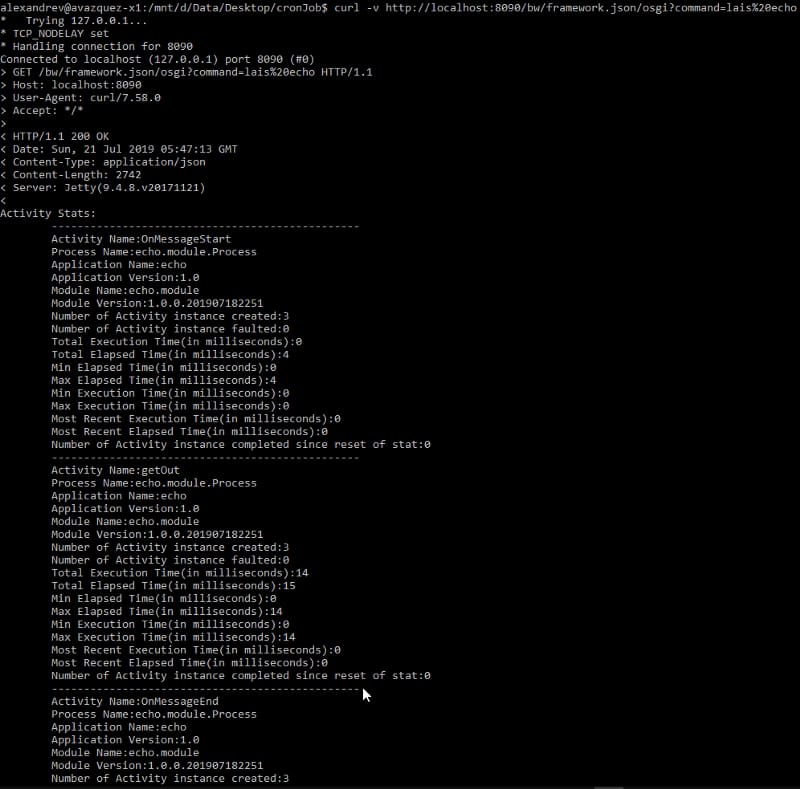
And we can get the statistics at the activity level:

Using Statistics in your favor to detect bottlenecks in TIBCO BusinessWorks Container Edition

And with that, you can detect any bottleneck you’re facing into your application and also be sure which activity or which process is responsible for it. So you can solve it in a quick way.

Have fun and use the tools at your disposal!

Prometheus TIBCO Monitoring for Containers: Quick and Simple in 5 Minutes!

Prometheus TIBCO Monitoring for Containers: Quick and Simple in 5 Minutes!

Prometheus is becoming the new standard for Kubernetes monitoring and today we are going to cover how we can do Prometheus TIBCO monitoring in Kubernetes.

We’re living in a world with constant changes and this is even more true in the Enterprise Application world. I’ll not spend much time talking about things you already know, but just say that the microservices architecture approach and the PaaS solutions have been a game-changer for all enterprise integration technologies.

This time I’d like to talk about monitoring and the integration capabilities we have of using Prometheus to monitor our microservices developed under TIBCO technology. I don’t like to spend too much time either talking about what Prometheus is, as you probably already know, but in a summary, this is an open-source distributed monitoring platform that has been the second project released by the Cloud Native Computing Foundation (after Kubernetes itself) and that has been established as a de-facto industry standard for monitoring K8S clusters (alongside with other options in the market like InfluxDB and so on).

Prometheus has a lot of great features, but one of them is that it has connectors for almost everything and that’s very important today because it is so complicated/unwanted/unusual to define a platform with a single product for the PaaS layer. So today, I want to show you how to monitor your TIBCO BusinessWorks Container Edition applications using Prometheus.

Most of the info I’m going to share is available in the bw-tooling GitHub repo, so you can get to there if you need to validate any specific statement.

Ok, are we ready? Let’s start!!

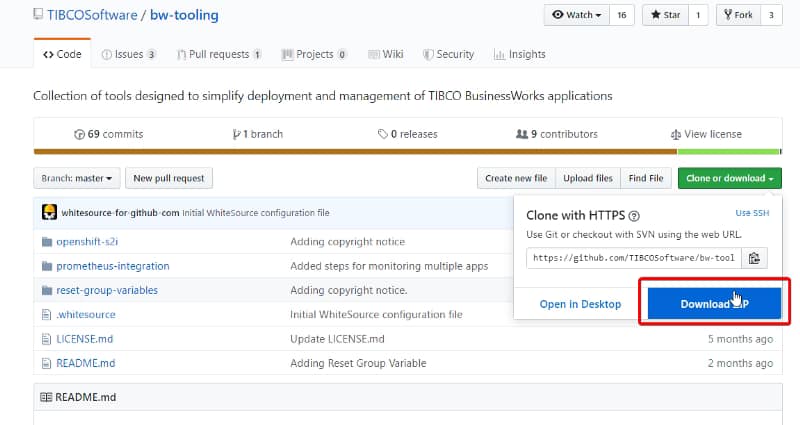
I’m going to assume that we already have a Kubernetes cluster in place and Prometheus installed as well. So, the first step is to enhance the BusinessWorks Container Edition base image to include the Prometheus capabilities integration. To do that we need to go to the GitHub repo page and follow these instructions:

  • Download & unzip the prometheus-integration.zip folder.
Prometheus TIBCO Monitoring for Containers
  • Open TIBCO BusinessWorks Studio and point it to a new workspace.
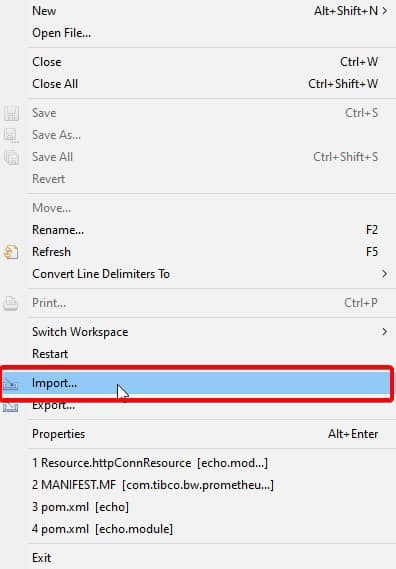
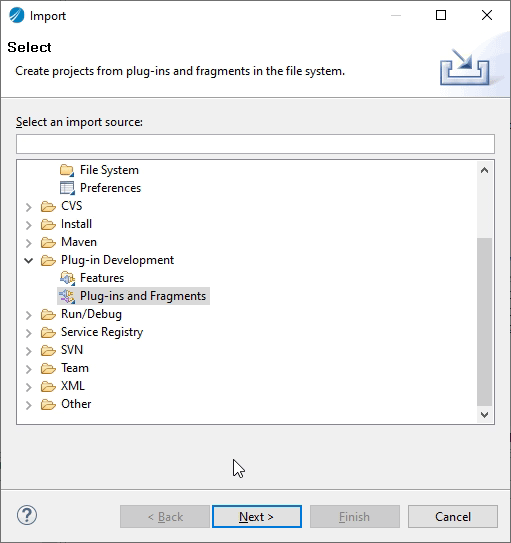
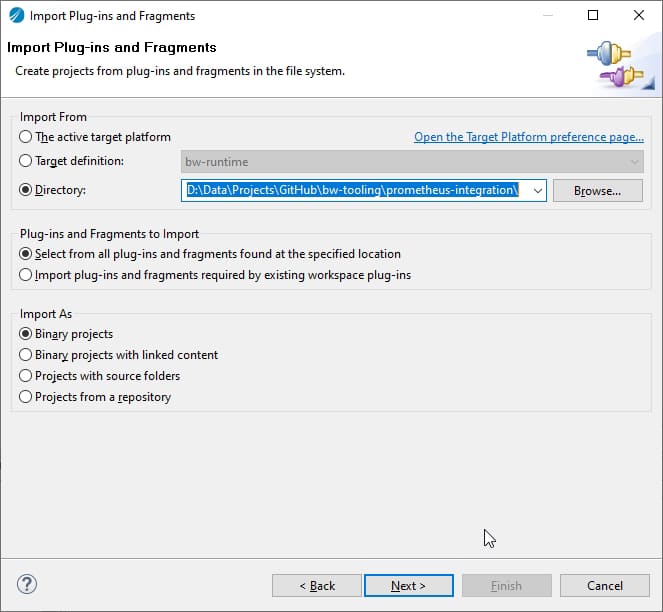
  • Right-click in Project Explorer → Import… → select Plug-ins and Fragments → select Import from the directory radio button
Prometheus TIBCO Monitoring for Containers: Quick and Simple in 5 Minutes!
  • Browse it to prometheus-integration folder (unzipped in step 1)
Prometheus TIBCO Monitoring for Containers: Quick and Simple in 5 Minutes!
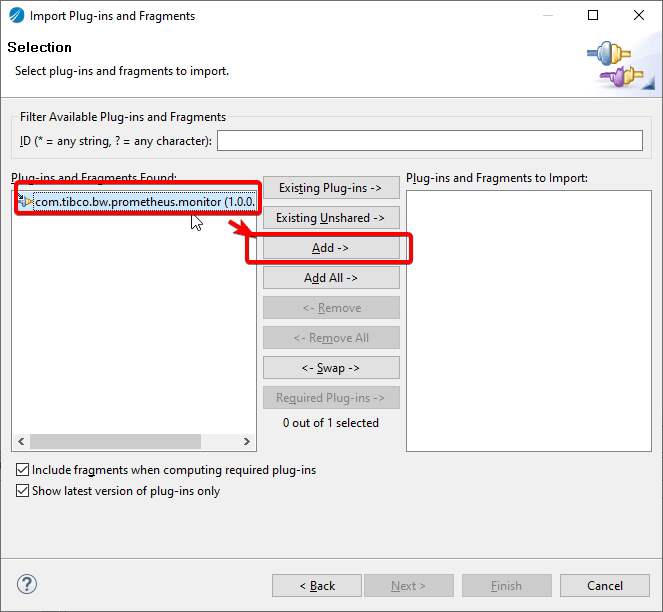
  • Now click Next → Select Prometheus plugin → click Add button → click Finish. This will import the plugin in the studio.
Prometheus TIBCO Monitoring for Containers: Quick and Simple in 5 Minutes!
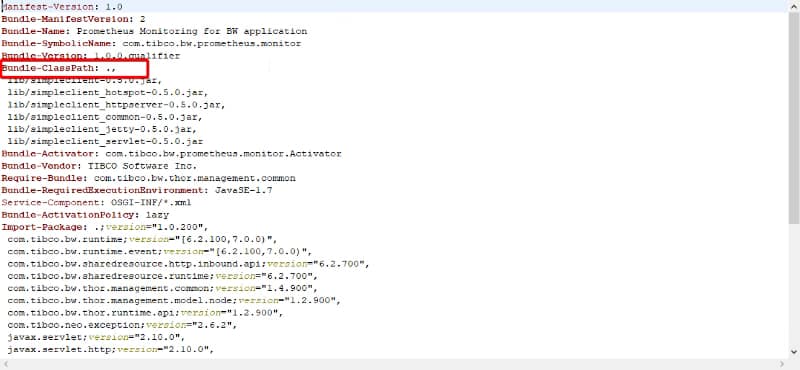
  • Now, to create JAR of this plugin so first, we need to make sure to update com.tibco.bw.prometheus.monitor with ‘.’ (dot) in Bundle-Classpath field as given below in META-INF/MANIFEST.MF file.
Prometheus TIBCO Monitoring for Containers: Quick and Simple in 5 Minutes!
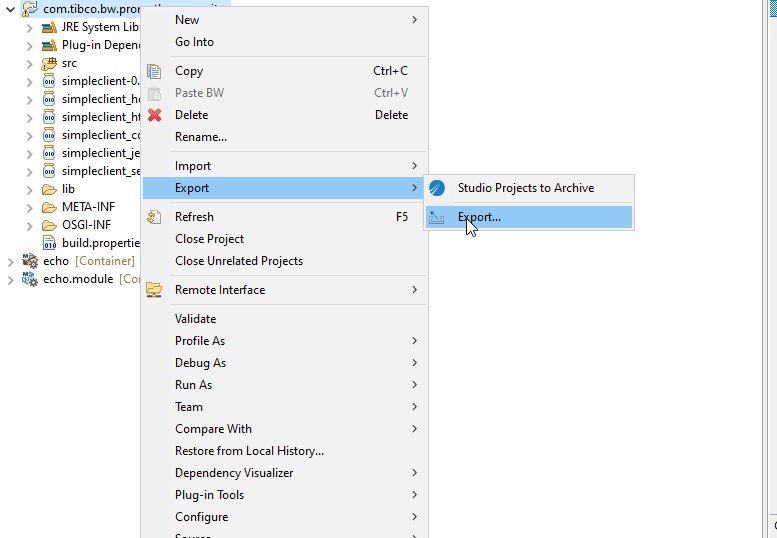
  • Right-click on Plugin → Export → Export…
Prometheus TIBCO Monitoring for Containers: Quick and Simple in 5 Minutes!
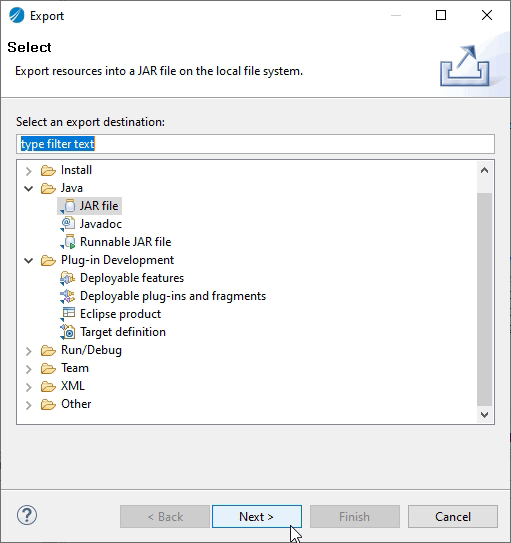
  • Select type as JAR file click Next
Prometheus TIBCO Monitoring for Containers: Quick and Simple in 5 Minutes!
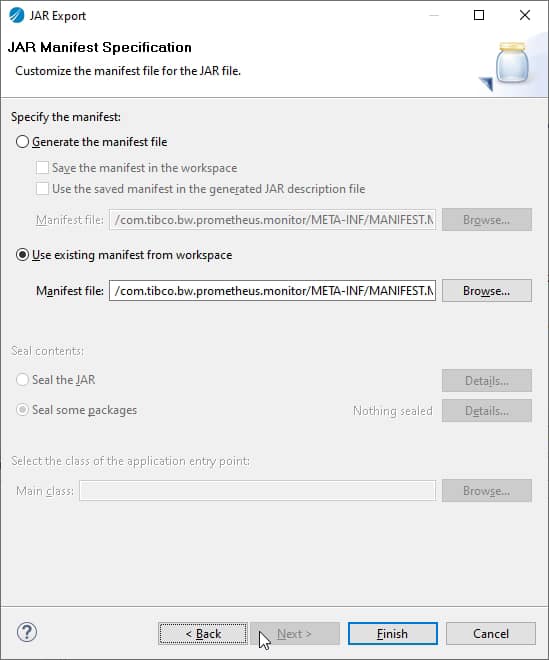
  • Now Click Next → Next → select radio button to use existing MANIFEST.MF file and browse the manifest file
Prometheus TIBCO Monitoring for Containers: Quick and Simple in 5 Minutes!
  • Click Finish. This will generate prometheus-integration.jar

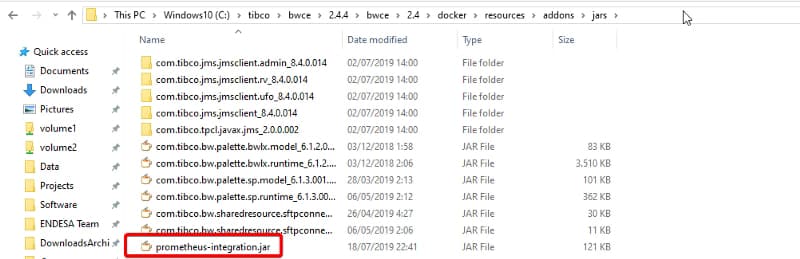
Now, with the JAR already created what we need to do is include it in your own base image. To do that we place the JAR file in the <TIBCO_HOME>/bwce/2.4/docker/resources/addons/jar

Prometheus TIBCO Monitoring for Containers: Quick and Simple in 5 Minutes!

And we launch the building image command again from the <TIBCO_HOME>/bwce/2.4/docker folder to update the image using the following command (use the version you’re using at the moment)

docker build -t bwce_base:2.4.4 .

So, now we have an image with Prometheus support! Great! We’re close to the finish, we just create an image for our Container Application, in my case, this is going to be a very simple echo service that you can see here.

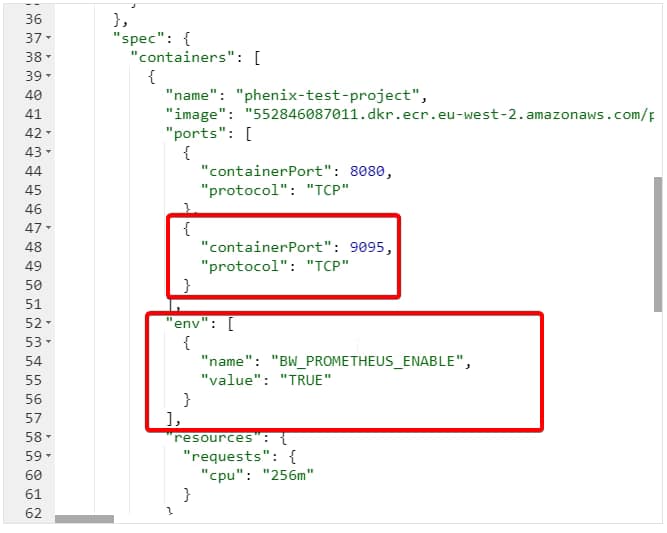
And we only need to keep these things in particular when we deploy to our Kubernetes cluster:

  • We should set an environment variable with the BW_PROMETHEUS_ENABLE to “TRUE”
  • We should expose the port 9095 from the container to be used by Prometheus to integrate.
Prometheus TIBCO Monitoring for Containers: Quick and Simple in 5 Minutes!

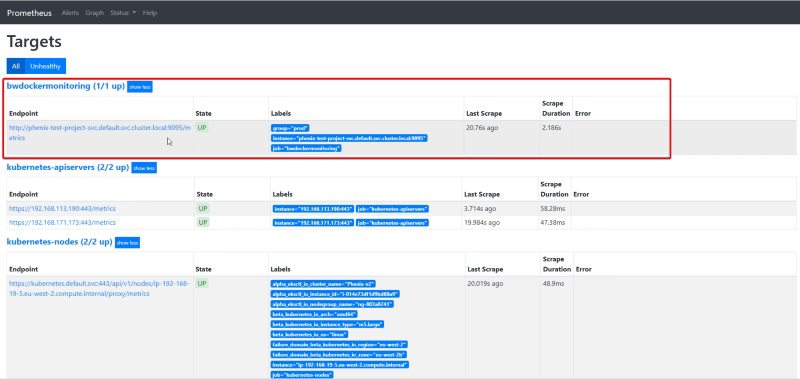
Now, we only need to provide this endpoint to the Prometheus scrapper system. There are several ways to do that, but we’re going to focus on the simple one.

We need to change the prometheus.yml to add the following job data:

- job_name: 'bwdockermonitoring'
  honor_labels: true
  static_configs:
    - targets: ['phenix-test-project-svc.default.svc.cluster.local:9095']
      labels:
        group: 'prod'

And after restarting Prometheus we have all the data indexed in the Prometheus database to be used for any dashboard system.

Prometheus TIBCO Monitoring for Containers: Quick and Simple in 5 Minutes!

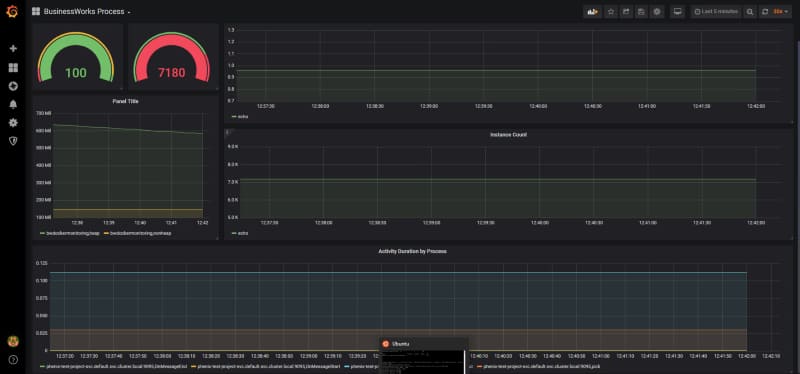
In this case, I’m going to use Grafana to do quick dashboard.

Prometheus TIBCO Monitoring for Containers: Quick and Simple in 5 Minutes!

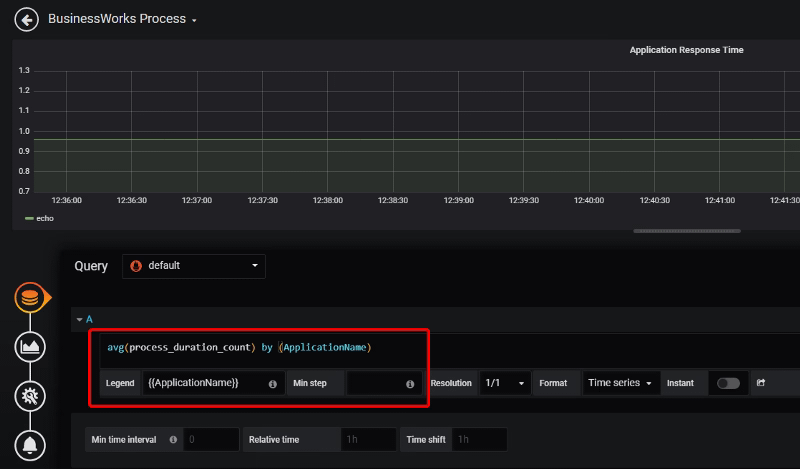
Each of these graph components is configured based on the metrics that are being scraped by Prometheus TIBCO exporter.

Prometheus TIBCO Monitoring for Containers: Quick and Simple in 5 Minutes!

OpenTracing support in TIBCO BusinessWorks Container Edition

OpenTracing support in TIBCO BusinessWorks Container Edition

The past month during the KubeCon 2019 Europe in Barcelona OpenTracing announces its merge with OpenCensus project to create a new standard named OpenTelemetry that is going to be live in September 2019.

[visual-link-preview encoded=”eyJ0eXBlIjoiZXh0ZXJuYWwiLCJwb3N0IjowLCJwb3N0X2xhYmVsIjoiIiwidXJsIjoiaHR0cHM6Ly90aGVuZXdzdGFjay5pby9vcGVudHJhY2luZy1vcGVuY2Vuc3VzLW1lcmdlLWludG8tYS1zaW5nbGUtbmV3LXByb2plY3Qtb3BlbnRlbGVtZXRyeS8iLCJpbWFnZV9pZCI6LTEsImltYWdlX3VybCI6Imh0dHBzOi8vY2RuLnRoZW5ld3N0YWNrLmlvL21lZGlhLzIwMTkvMDUvNmI1ZTA4YTctb3BlbnRlbGVtZXRyeS0wMi5qcGciLCJ0aXRsZSI6Ik9wZW5UcmFjaW5nLCBPcGVuQ2Vuc3VzIE1lcmdlIGludG8gYSBTaW5nbGUgTmV3IFByb2plY3QsIE9wZW5UZWxlbWV0cnkgLSBUaGUgTmV3IFN0YWNrIiwic3VtbWFyeSI6IlR3byBvcGVuIHNvdXJjZSBwcm9qZWN0cyB0aGF0IGhhdmUgYmVlbiBpbnN0cnVtZW50YWwgaW4gcHJvdmlkaW5nIG1ldHJpY3MgZm9yIGNsb3VkIG5hdGl2ZSBvcGVyYXRpb25zIGhhdmUgbWVyZ2VkIGludG8gYSBzaW5nbGUgcHJvamVjdC4gVGhlIGZ1c2lvbiBvZiBHb29nbGXigJlzIE9wZW5DZW5zdXMgYW5kIHRoZSBDbG91ZCBOYXRpdmUgQ29tcHV0aW5nIEZvdW5kYXRpb27igJlzIE9wZW5UcmFjaW5nIHdpbGwgYmUga25vd24gYXMgT3BlblRlbGVtZXRyeSwgYW5kIHdpbGwgYmUgbWFuYWdlZCBieSB0aGUgQ05DRi4gVGhlIGlkZWHigKYiLCJ0ZW1wbGF0ZSI6InVzZV9kZWZhdWx0X2Zyb21fc2V0dGluZ3MifQ==”]

So, I think that would be awesome to take a look at the capabilities regarding OpenTracing we have available in TIBCO BusinessWorks Container Edition

Today’s world is too complex in terms of how our architectures are defined and managed. New concepts in the last years like containers, microservices, service mesh, give us the option to reach a new level of flexibility, performance, and productivity but also comes with a cost of management we need to deal with.

Years ago architectures were simpler, service was a concept that was starting out, but even then a few issues begin to arise regarding monitoring, tracing, logging and so on. So, in those days everything was solved with a Development Framework that all our services were going to include because all of our services were developed by the same team, same technology, and in that framework, we can make sure things were handled properly.

Now, we rely on standards to do this kind of things, and for example, for Tracing, we rely on OpenTracing. I don’t want to spend time talking about what OpenTracing is where they have a full medium account talking themselves much better than I could ever do, so please take some minutes to read about it.

[visual-link-preview encoded=”eyJ0eXBlIjoiZXh0ZXJuYWwiLCJwb3N0IjowLCJwb3N0X2xhYmVsIjoiIiwidXJsIjoiaHR0cHM6Ly9tZWRpdW0uY29tL29wZW50cmFjaW5nL2Rpc3RyaWJ1dGVkLXRyYWNpbmctaW4tMTAtbWludXRlcy01MWIzNzhlZTQwZjEiLCJpbWFnZV9pZCI6LTEsImltYWdlX3VybCI6Imh0dHBzOi8vbWlyby5tZWRpdW0uY29tL2ZyZWV6ZS9tYXgvOTYwLzEqLTZUektXbC1LbFp4eEZ5aDNpV3o0QS5naWYiLCJ0aXRsZSI6IkRpc3RyaWJ1dGVkIFRyYWNpbmcgaW4gMTAgTWludXRlcyIsInN1bW1hcnkiOiJXaXRoIHRoZSBpbnRyaW5zaWMgY29uY3VycmVuY3kgYW5kIGFzeW5jaHJvbnkgb2YgbW9kZXJuIHNvZnR3YXJlIGFwcGxpY2F0aW9ucywgZGlzdHJpYnV0ZWQgdHJhY2luZyBoYXMgYmVjb21lIHBhcnQgb2YgdGhlIHRhYmxlIHN0YWtlcyBmb3IgZWZmZWN0aXZlIG1vbml0b3JpbmcuIFRoYXQgc2FpZCwgaW5zdHJ1bWVudGluZyBhIHN5c3RlbSBmb3LigKYiLCJ0ZW1wbGF0ZSI6InVzZV9kZWZhdWx0X2Zyb21fc2V0dGluZ3MifQ==”]

The only statement I want to do here is the following one:

Tracing is not Logging, and please be sure you understand that.

Tracing is about sampling, it’s like how flows are performing and if everything is worked but it is not about a specific request has been done well for customer ID whatever… that’s logging, no tracing.

So OpenTracing and its different implementations like Jaeger or Zipkin are the way we can implement tracing today in a really easy way, and this is not something that you could only do in your code-based development language, you can do it with our zero-code tools to develop cloud-native applications like TIBCO BusinessWorks Container Edition and that’s what I’d like to show you today. So, let the match, begin…

OpenTracing support in TIBCO BusinessWorks Container Edition
Photo by Mario Klassen on Unsplash

First thing I’d like to do is to show you the scenario we’re going to implement, and this is going to be the one shown in the image below:

OpenTracing support in TIBCO BusinessWorks Container Edition

You are going to have two REST service that is going to call one to each other, and we’re going to export all the traces to Jaeger external component and later we can use its UI to analyze the flow in a graphical and easy way.

So, the first thing we need to do is to develop the services that as you can see in the pictures below are going to be quite easy because this is not the main purpose of our scenario.

Once, we have our docker images based on those applications we can start, but before we launch our applications, we need to launch our Jaeger system you can read all info about how to do it in the link below:

[visual-link-preview encoded=”eyJ0eXBlIjoiZXh0ZXJuYWwiLCJwb3N0IjowLCJwb3N0X2xhYmVsIjoiIiwidXJsIjoiaHR0cHM6Ly93d3cuamFlZ2VydHJhY2luZy5pby9kb2NzLzEuOC9nZXR0aW5nLXN0YXJ0ZWQvIiwiaW1hZ2VfaWQiOi0xLCJpbWFnZV91cmwiOiJodHRwczovL3d3dy5qYWVnZXJ0cmFjaW5nLmlvL2ltZy9qYWVnZXItbG9nby5wbmciLCJ0aXRsZSI6IkdldHRpbmcgc3RhcnRlZCIsInN1bW1hcnkiOiJHZXQgdXAgYW5kIHJ1bm5pbmcgd2l0aCBKYWVnZXIgaW4geW91ciBsb2NhbCBlbnZpcm9ubWVudCIsInRlbXBsYXRlIjoidXNlX2RlZmF1bHRfZnJvbV9zZXR0aW5ncyJ9″]

But at the end we only to run the following command:

docker run -d --name jaeger -e COLLECTOR_ZIPKIN_HTTP_PORT=9411  -p 5775:5775/udp  -p 6831:6831/udp  -p 6832:6832/udp  -p 5778:5778  -p 16686:16686  -p 14268:14268  -p 9411:9411  jaegertracing/all-in-one:1.8

And now, we’re ready to launch our applications and the only things we need to do in our developments because as you could see we didn’t do anything strange in our development and it was quite straightforward is to add the following environment variables when we launch our container

BW_JAVA_OPTS=”-Dbw.engine.opentracing.enable=true” -e JAEGER_AGENT_HOST=jaeger -e JAEGER_AGENT_PORT=6831 -e JAEGER_SAMPLER_MANAGER_HOST_PORT=jaeger:5778

And… that’s it, we launch our containers with the following commands and wait until applications are up & running

docker run -ti -p 5000:5000 — name provider -e BW_PROFILE=Docker -e PROVIDER_PORT=5000 -e BW_LOGLEVEL=ERROR — link jaeger -e BW_JAVA_OPTS=”-Dbw.engine.opentracing.enable=true” -e JAEGER_AGENT_HOST=jaeger -e JAEGER_AGENT_PORT=6831 -e JAEGER_SAMPLER_MANAGER_HOST_PORT=jaeger:5778 provider:1.0
OpenTracing support in TIBCO BusinessWorks Container Edition
docker run — name consumer -ti -p 6000:6000 -e BW_PROFILE=Docker — link jaeger — link provider -e BW_JAVA_OPTS=”-Dbw.engine.opentracing.enable=true” -e JAEGER_AGENT_HOST=jaeger -e JAEGER_AGENT_PORT=6831 -e JAEGER_SAMPLER_MANAGER_HOST_PORT=jaeger:5778 -e CONSUMER_PORT=6000 -e PROVIDER_HOST=provider consumer:1.0
OpenTracing support in TIBCO BusinessWorks Container Edition

Once they’re running, let’s generate some requests! To do that I’m going to use a SOAPUI project to generate some stable load for 60 secs, as you can see in the image below:

OpenTracing support in TIBCO BusinessWorks Container Edition

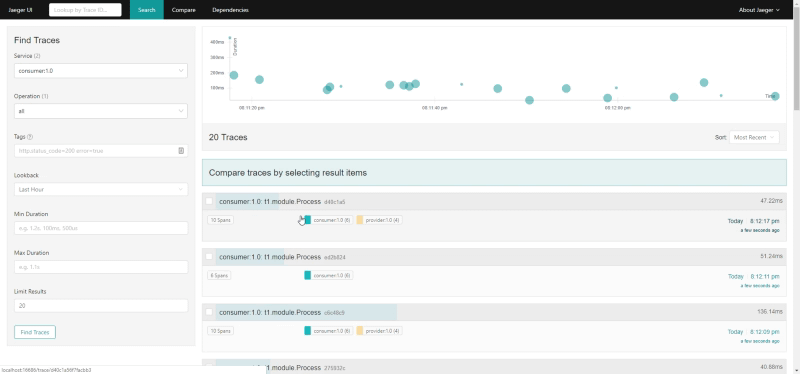
And now we’re going to go to the following URL to see the Jaeger UI and we can see the following thing as soon as you click in the Search button

OpenTracing support in TIBCO BusinessWorks Container Edition

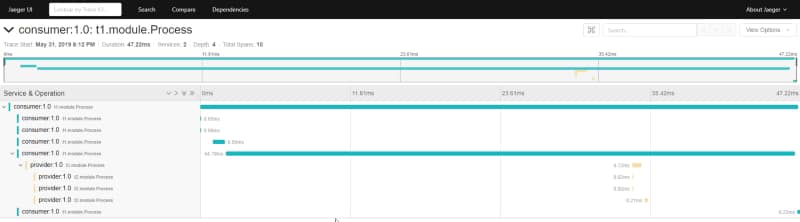
And then if we zoom in some specific trace:

OpenTracing support in TIBCO BusinessWorks Container Edition

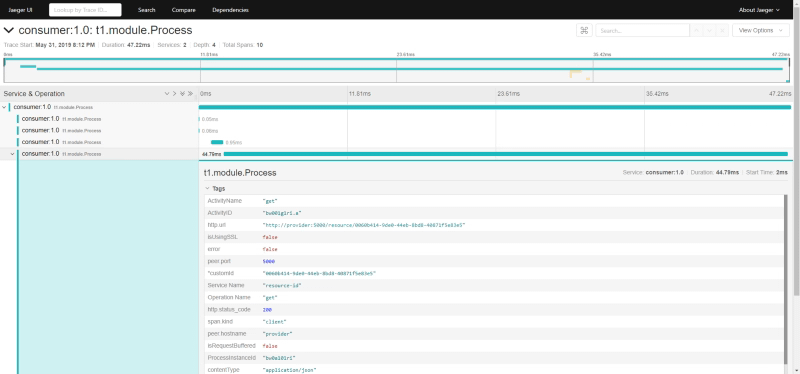
That’s pretty amazing but that’s not all, because you can see if you search in the UI about the data of this traces, you can see technical data from your BusinessWorks Container Edition flows as you can see in the picture below:

OpenTracing support in TIBCO BusinessWorks Container Edition

But… what if you want to add your custom tags to those traces? You can do it as well!! Let me explain to you how.

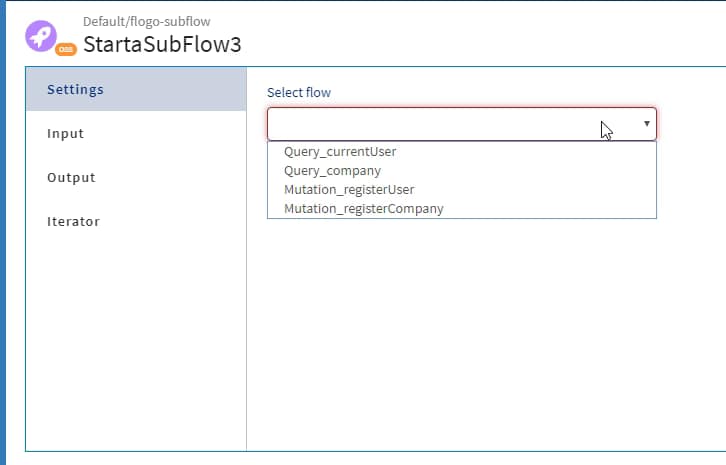
Since BusinessWorks Container Edition 2.4.4 you are going to find a new tab in all your activities named “Tags” where you can add the custom tags that you want this activity to include, for example, a custom id that is going to be propagated through the whole process we can define it as you can see here.

OpenTracing support in TIBCO BusinessWorks Container Edition

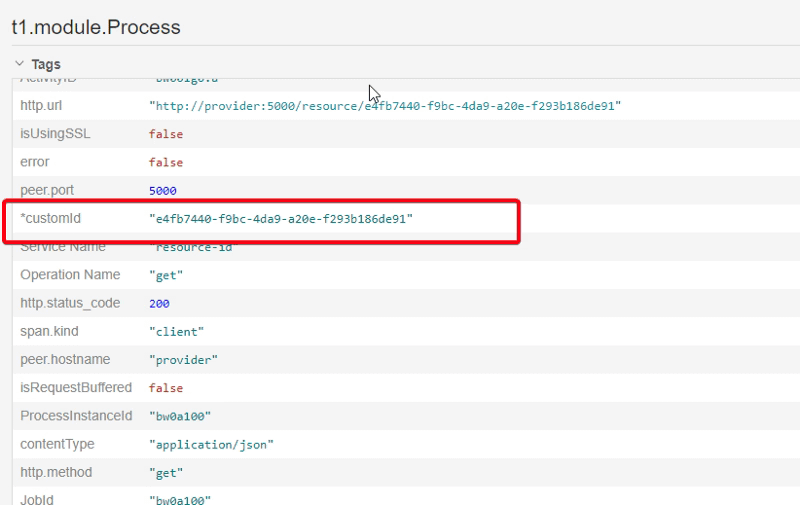
And if you take a look at the data we have in the system, you can see all of these traces has this data:

OpenTracing support in TIBCO BusinessWorks Container Edition

You can take a look at the code in the following GitHub repository:

[visual-link-preview encoded=”eyJ0eXBlIjoiZXh0ZXJuYWwiLCJwb3N0IjowLCJwb3N0X2xhYmVsIjoiIiwidXJsIjoiaHR0cHM6Ly9naXRodWIuY29tL2FsZXhhbmRyZXYvYndjZS1vcGVudHJhY2luZy1jdXN0b210YWdzIiwiaW1hZ2VfaWQiOi0xLCJpbWFnZV91cmwiOiJodHRwczovL29wZW5ncmFwaC5naXRodWJhc3NldHMuY29tLzg5MDI0NWU0OTMyY2U3NGJlMGYxM2VmMWQ3OTcxOWZjMWM0MjFkY2Q5Mjg1NWYzODliNDFmZGVjMTMyMjU1YjQvYWxleGFuZHJldi9id2NlLW9wZW50cmFjaW5nLWN1c3RvbXRhZ3MiLCJ0aXRsZSI6IkdpdEh1YiAtIGFsZXhhbmRyZXYvYndjZS1vcGVudHJhY2luZy1jdXN0b210YWdzIiwic3VtbWFyeSI6IkNvbnRyaWJ1dGUgdG8gYWxleGFuZHJldi9id2NlLW9wZW50cmFjaW5nLWN1c3RvbXRhZ3MgZGV2ZWxvcG1lbnQgYnkgY3JlYXRpbmcgYW4gYWNjb3VudCBvbiBHaXRIdWIuIiwidGVtcGxhdGUiOiJ1c2VfZGVmYXVsdF9mcm9tX3NldHRpbmdzIn0=”]