Top 3 Best WebApps To Optimize Your Daily Activities

Top 3 WebApps That I Use Daily as Software Architect to do my job in a better, more efficient way.

Photo by Tom Conway on Unsplash

WebApps are part of our life and part of our creation and work process. Especially the ones that are working in the software industry pretty much each task that we need to accomplish you need to use a tool (if not more than one) as part of this process and there are tools that will help you to make this process smooth or easier.

I have a preference for the native/desktop apps probably because I am old enough to suffer the first age of the web apps that were a nightmare but things have changed a lot after all these years and now I have to admit that there are some that I use pretty much in my daily activities:

1.- Lucidchart: Your Diagram Tool

This is pretty much the only tool that I use to cover all my sketch needs as a Software Architect that are a lot. It compares to other native alternatives like Microsoft Visio but I like their focus on the software industry with a lot of shapes focus for modern architectures including the shapes for main cloud providers such as Microsoft Azure, Amazon Web Services, or Google Cloud.

Lucidchart with the Shapes available for Microsoft Azure and also other listed such as AWS Architecture and Google Cloud

In an easy way, you can create design diagrams, UML ones, or architecture diagrams with the look and feel of a professional. It has a free license for personal use but I encourage to jump into one of the pro plans especially if you are a software company. This is a very innovative company and not stopping at the diagram sector but also including things like Lucidspark to bring the visual thinking approach to the digital world in such an excellent manner. I have used other alternatives like draw.io or Google Shapes but Lucidchart works better for my creative process.

2.- regex101.com: Your RegExp Jedi Master Online

No matter what you do for a living, if you are a System Administrator or a Software Developer, if you are a Software Architect working at the high-level definition of architectures or just a pre-sales engineering you will need to provide some Regular Expression and for sure it will not be an easy one. So you need tools that help you in this process and this is what regexp101.com will provide to you.

regex101.com main interface dialog

A clean interface will provide an easy way to test your RE or fix it if needed at also a way to improve your theoretical knowledge of the ER providing you the way to express some of your ER in the most efficient way. For sure a must tool that you need to have in your bookmarks to optimize the time you need to create your tested RE and become an RE master

3.- fastthread.io: Your Java Wise Advisor

If you need to deal with any Java program in your daily activities for sure you have been in the process of analyzing thread dumps to understand an. unexpected behavior of a Java program. That implies having a stack trace for each of the hundreds of threads that you can get and extract some insights into that data. To help on that process you have fastthread.io that provides an initial analysis focus on the usual key factors such as thread status (blocked, timed_waiting, runnable..) depending on blocking situation, similar stack trace, pool management, CPU consumptions.

fastthread.io analysis result after uploading a thread dump through the page

It is clearly a must if you need to deal with any Java-based app, at least to have the first analysis to help you focus on anything relevant and apply your wisdom to the preliminary analysis already done in an automated, graph-riched way.

Bonus Track: ilovepdf

As a final addition to this list I could not forget about one app. This is not a geek web app but the app that I used the most, because ilovepdf is a set of webapps covering all your needs regarding the usage of PDF and everything so easy to use and just directly on your browser. ilovepdf provides way to transform your PDF to more editable formats such as Word or Excel but also to be able to split or merge different PDF documents in one, rotate PDF, add watermark, unlock them… and the one that I use the most compress PDF to be able to reduce their size without losing visible quality to send it as an attachment using email.

ilovepdf.com main page with all the options at your disposal

Summary

I hope these tools will help you to improve your daily process to be more efficient or at least to open your known web apps for some of these tasks if you already have another one and maybe give it a try to see if can be of any benefit for you. If you also have other web apps that you use a lot in your daily process please let me know with your responses to this article.

GraalVM: How to Improve Performance for Microservices in 2022?

GraalVM provides the capabilities to make Java a first-class language to create microservices at the same level as Go-Lang, Rust, NodeJS, and others.

GraalVM: Making JVM Languages Performant for Microservices
Photo by Caspar Camille Rubin on Unsplash

Java language has been the language leader for generations. Pretty much every piece of software has been created with Java: Web Servers, Messaging System, Enterprise Application, Development Frameworks, and so on. This predominance has been shown in the most important indexes like the TIOBE index, as is shown below:

TIOBE index image from https://www.tiobe.com/tiobe-index/

But always, Java has some trade-offs that you need to make. The promise of the portability code is because the JVM allows us to run the same code in different OS and ecosystems. Still, at the same time, the interpreter approach will also provide a little bit of overhead compared with other compiled options like C.

That overhead was never a problem until we go inside the microservices route. When we have a server-based approach with an overhead of 100–200 MB, it is not a big problem compared with all the benefits it provides. Still, if we transform that server into, for example, hundreds of services, and each of them has a 50 MB overhead, this starts to become something to worry about.

Another trade-off was start-up time, again the abstraction layer provides a slower start-up time, but in client-service architecture, that was not an important issue if we need few more seconds to start serving requests. Still, today in the scalability era, this becomes critical if we talk about second-based startup time compared with milliseconds-based startup time because this provides better scalability and more optimized infrastructure usage.

So, how to provide all the benefits from Java and provide a solution for these trade-offs that were now starting to be an issue? And GraalVM becomes to be the answer to all of this.

GraalVM is based on its own words: “a high-performance JDK distribution designed to accelerate the execution of applications written in Java and other JVM languages,” which provides an Ahead-of-Time Compilation process to generate binary process from Java code that removes the traditional overhead from the JVM running process.

Regarding its use in microservices, this is a specific focus that they have given, and the promise of around 50x faster startup and 5x less memory footprint is just amazing. And this is why GraalVM becomes the foundation for high-level microservice development frameworks in Java-like Quarkus from RedHat, Micronaut, or even the Spring-Boot version powered by GraalVM.

So, probably you are just asking: How can I start using this? The first thing that we need to do is to go to the GitHub release page of the project and find the version for our OS and follow the instructions provided here:

[visual-link-preview encoded=”eyJ0eXBlIjoiZXh0ZXJuYWwiLCJwb3N0IjowLCJwb3N0X2xhYmVsIjoiIiwidXJsIjoiaHR0cHM6Ly93d3cuZ3JhYWx2bS5vcmcvMjIuMC9kb2NzL2dldHRpbmctc3RhcnRlZC8iLCJpbWFnZV9pZCI6LTEsImltYWdlX3VybCI6Imh0dHBzOi8vd3d3LmdyYWFsdm0ub3JnL3Jlc291cmNlcy9pbWcvZ3JhYWx2bS5wbmciLCJ0aXRsZSI6IkdyYWFsVk0iLCJzdW1tYXJ5IjoiR3JhYWxWTSBpcyBhIGhpZ2gtcGVyZm9ybWFuY2UgSkRLIGRpc3RyaWJ1dGlvbiBkZXNpZ25lZCB0byBhY2NlbGVyYXRlIHRoZSBleGVjdXRpb24gb2YgYXBwbGljYXRpb25zIHdyaXR0ZW4gaW4gSmF2YSBhbmQgb3RoZXIgSlZNIGxhbmd1YWdlcyBhbG9uZyB3aXRoIHN1cHBvci4uLiIsInRlbXBsYXRlIjoidXNlX2RlZmF1bHRfZnJvbV9zZXR0aW5ncyJ9″]

[visual-link-preview encoded=”eyJ0eXBlIjoiZXh0ZXJuYWwiLCJwb3N0IjowLCJwb3N0X2xhYmVsIjoiIiwidXJsIjoiaHR0cHM6Ly9naXRodWIuY29tL2dyYWFsdm0vZ3JhYWx2bS1jZS1idWlsZHMvcmVsZWFzZXMiLCJpbWFnZV9pZCI6LTEsImltYWdlX3VybCI6Imh0dHBzOi8vb3BlbmdyYXBoLmdpdGh1YmFzc2V0cy5jb20vODcwODk4ODY0MTRlMzkyZTFmN2RkZjU0OGY4ZjQ1OGZhNzZiZTgxYTNiOTk1ZjNkMmI0OWNkY2MzMTY1ZGY3MS9ncmFhbHZtL2dyYWFsdm0tY2UtYnVpbGRzIiwidGl0bGUiOiJSZWxlYXNlcyDCtyBncmFhbHZtL2dyYWFsdm0tY2UtYnVpbGRzIiwic3VtbWFyeSI6IkdyYWFsVk0gQ0UgYmluYWlyZXMgYnVpbHQgYnkgdGhlIEdyYWFsVk0gY29tbXVuaXR5IC0gZ3JhYWx2bS9ncmFhbHZtLWNlLWJ1aWxkcyIsInRlbXBsYXRlIjoidXNlX2RlZmF1bHRfZnJvbV9zZXR0aW5ncyJ9″]

When we have this installed, this is the moment to start testing it, and what better of doing so than creating a REST/JSON service and comparing it with a traditional OpenJDK 11-powered solution?

To create this REST service as simple as possible to focus on the difference between both modes, I will use the Spark Java Framework which is a minimal framework to create REST Services.

I will share all the code in this GitHub repository, so if you would like to take a look, clone it from here:

[visual-link-preview encoded=”eyJ0eXBlIjoiZXh0ZXJuYWwiLCJwb3N0IjowLCJwb3N0X2xhYmVsIjoiIiwidXJsIjoiaHR0cHM6Ly9naXRodWIuY29tL2FsZXhhbmRyZXYvZ3JhYWx2bS1zYW1wbGUtcmVzdC1zZXJ2aWNlIiwiaW1hZ2VfaWQiOi0xLCJpbWFnZV91cmwiOiJodHRwczovL29wZW5ncmFwaC5naXRodWJhc3NldHMuY29tL2VkMTgwMTAwMzBhNTU5NGYyZDIxYTFiYWRkMThmNmZiZjYxMjA5YTZkMTVhZGFmMzBiYzVjOWRiNjQxMDc0ZjcvYWxleGFuZHJldi9ncmFhbHZtLXNhbXBsZS1yZXN0LXNlcnZpY2UiLCJ0aXRsZSI6IkdpdEh1YiAtIGFsZXhhbmRyZXYvZ3JhYWx2bS1zYW1wbGUtcmVzdC1zZXJ2aWNlOiBTYW1wbGUgUkVTVCBTZXJ2aWNlIFVzaW5nIEdyYWFsVk0iLCJzdW1tYXJ5IjoiU2FtcGxlIFJFU1QgU2VydmljZSBVc2luZyBHcmFhbFZNIC4gQ29udHJpYnV0ZSB0byBhbGV4YW5kcmV2L2dyYWFsdm0tc2FtcGxlLXJlc3Qtc2VydmljZSBkZXZlbG9wbWVudCBieSBjcmVhdGluZyBhbiBhY2NvdW50IG9uIEdpdEh1Yi4iLCJ0ZW1wbGF0ZSI6InVzZV9kZWZhdWx0X2Zyb21fc2V0dGluZ3MifQ==”]

The code that we are going to use looks very simple, just a single line to create a REST service:

Then, we will use a GraalVM maven plugin for all the compilation processes. You can check all the options here:

[visual-link-preview encoded=”eyJ0eXBlIjoiZXh0ZXJuYWwiLCJwb3N0IjowLCJwb3N0X2xhYmVsIjoiIiwidXJsIjoiaHR0cHM6Ly93d3cuZ3JhYWx2bS5vcmcvMjIuMC9yZWZlcmVuY2UtbWFudWFsL25hdGl2ZS1pbWFnZS9OYXRpdmVNYXZlblBsdWdpbi8iLCJpbWFnZV9pZCI6LTEsImltYWdlX3VybCI6Imh0dHBzOi8vd3d3LmdyYWFsdm0ub3JnL3Jlc291cmNlcy9pbWcvZ3JhYWx2bS5wbmciLCJ0aXRsZSI6IkdyYWFsVk0iLCJzdW1tYXJ5IjoiR3JhYWxWTSBpcyBhIGhpZ2gtcGVyZm9ybWFuY2UgSkRLIGRpc3RyaWJ1dGlvbiBkZXNpZ25lZCB0byBhY2NlbGVyYXRlIHRoZSBleGVjdXRpb24gb2YgYXBwbGljYXRpb25zIHdyaXR0ZW4gaW4gSmF2YSBhbmQgb3RoZXIgSlZNIGxhbmd1YWdlcyBhbG9uZyB3aXRoIHN1cHBvci4uLiIsInRlbXBsYXRlIjoidXNlX2RlZmF1bHRfZnJvbV9zZXR0aW5ncyJ9″]

The compilation process takes a while (around 1–2 min). Still, you need to understand that this compiles everything to a binary process because the only output you will get out of this is a single binary process (named in my case rest-service-test) that will have all the things you need to run your application.

And finally, we will have a single binary that is everything that we need to run our application:

This binary is an exceptional one because it does not require any JVM on your local machine, and it can start in a few milliseconds. And the total size of the binary is 32M on disk and less than 5MB of RAM.

The output of this first tiny application is straightforward, as you saw, but I think you can get the point. But let’s see it in action I will launch a small load test with my computer with 16 threads launching requests to this endpoint:

As you can see, this is just incredible, even with the lack of latency as this is just triggered by the same machine we are reaching with a single service a rate of TPS in 1 minute of more than 1400 requests/sec with a response time of 2ms for each of those.

And how does that compare with a normal JAR-based application with the same code exactly? For example, you can see in the table below:

In a nutshell, we have seen how using tools such as GraalVM we can make our JVM-based programs ready for our microservices environment avoiding the normal issues regarding high-memory footprint or small startup time that are critical when we are adopting a full cloud-native strategy in our companies or projects.

But, the truth must be told. This is not always as simple as we showed on this sample because depending on the libraries you are using, generating the native image can be much more complex and require a lot of configuration or just be impossible. So it is not everything already done but the future looks bright and full of hope.

Top 3 Hacks To Use Medium To Keep You Current in the Tech Industry

Medium can be one of your best allies in this neverending task of keeping pace with the updates in the Tech Industry.

All of us that are here use Medium. I am a little bit Captain Obvious here because if you are reading this, I am sure you are already using Medium for professional growth and to learn new things, but I’d like to highlight how I use it to keep pace with the current situation.

You know that things change so fast. Of course, this is happening for all industries and businesses, but this is even more pressing in the technology industry.

We’re seeing new technologies each week or even each day. Frameworks change as fast as we can imagine, and try to keep the pace of that is quite complex for any of us. So, we must use all the tools at our disposal to make sure we do our best in this situation.

#1 Tune your Personalized Recommendations

One of the great things about Medium is that it uses your interests and the articles you have been reading and how much time you spent reading them to recommend new articles relevant to you.

So, here the recommendations are clear: Use Medium all the time. Try to use the search capability to search into many available articles because the most you use it, the most accurate the recommendations are for you.

I had a time, a few weeks ago, when I was really interested in Modern, Cloud-Native Data Architectures because of some professional duties. So I have started to look for those articles in Medium. Since that time, the recommendations have been quite accurate of what I was looking for and help me to improve my knowledge and find articles that I had no clue that was available at Medium.

Additional to that, you need to make sure your interests are well set. Usually, when we set up an account and ask about our interests, we probably don’t think about it for so long because of the only thing that we want to get access to the content right now (guilty person here!).

So, you must take your time now to make sure the interest you selected when you joined is still the most relevant for you today. If you want to check your current interests s you need to go to your profile and click on “Control Your Recommendations,” as you can see in the picture below:

Control Your Recommendation page from my Medium profile

Also, you will see the topics that you’re interested in now and a bunch of suggestions of new topics based on your reading history that they think you could be interested in. So it is important to visit the page from time to time to make sure these are accurate and check the recommendations they’re providing to you.

#2: Read Later Feature

Another key feature is saving all the interesting articles to continue to read them later or keep it as your own library. This is the main use I do to that concept. I try to use the Read Later feature to create and manage my own “Medium-based library.”

And the main reason behind this approach is because we all have suffered this situation when we found a great article about a topic. Still, we change to another task, and later, when we need to find that article again, we don’t remember the title or the author, and we spend so much time trying to locate it again.

#3: Search Capability

Even when we are used to using Google as our main search option to search for anything but I think it’s important to use the search capabilities in-site Medium because several reasons:

  • The content we have available in Medium is huge, and most of them is of great quality because of the curation process.
  • It is important to get Medium to know you better, and that will fine-tune all the recommendations we already have been commented on.

And all of this without worrying that you will find a lot of advertisements based on your search history 🙂

#4: Medium Member

And I have left to the end the one that I think is the most important part: Become a Medium Member.

Medium is so great, no matter if you are a member or not. Still, when I wasn’t a Medium member, it was just annoying to find the article that I need, but I cannot read it because I already spent using the “starred” articles for the month, and I need to wait an additional time month. So we know that this is not valid if you want to keep updated in the tech industry, so please, make yourself a favor and just become a Medium member. You will feel more comfortable around the platform, and you start living inside it.

Learn How To Keep Under Control The Disk Usage of Your Local Docker Environment

Discover new options that you have at your disposal to do efficient disk usage in your Docker installation

Photo by Dominik Lückmann on Unsplash

The rise of the container has been a game-changer for all of us, not only at the server-side where pretty much any new workload that we deploy is deployed in a container form but also in our local environments happens same change.

We embrace containers to easily manage the different dependencies that we need to handle as developers. Even if the task at hand was not a container-related thing. Do you need a Database up & running? You use a containerized version of it. Do you need a Messaging System to test some of your applications? You quickly start a container providing that functionality.

And as soon as you don’t need them, those are killed, and your system is still as clean as it was before starting this task. But there are always things that we need to handle even when we have a wonderful solution in front of us, and in the case of a local docker environment, Disk Usage is one of the most critical ones.

This process of launching new things over and over and then we get rid of them is true in some way because all these images that we have needed and all these containers we have launched are still there in our system waiting for a new round and during that time using our disk resources as you can see in a current picture of my local Docker environment with more than 60 GB used for that purpose.

Docker dashboard settings page image showing the amount of disk Docker is using.

The first thing we need to do is to check what is using this amount of space to see if we can release some of them. To do that, we can leverage on the docker system df command the docker CLI provides to us:

The output of the execution of the docker system df command

As you can see, the 61 GB that is in use are 20.88 GB per the images that I have in use, 21.03 MB just for the containers that I have defined, 1.25 GB for the local volumes 21.07 for the build cache. As I only have active 18 of the 26 images defined I can reclaim up to 9.3 GB that is an important amount.

If we would like to get more details about this data, we can always use the verbose option as an append to the command, as you can see in the picture below:

Detailed verbose output of the docker system df -v command

So, after getting all this information, we can go ahead and execute a prune of your system. This activity will get rid of any unused container and image that you have in your system, and to execute that, you only need to type this:

docker system prune -af

It has several options to turn a little bit the execution that you can check on the Docker Oficial web page :

[visual-link-preview encoded=”eyJ0eXBlIjoiZXh0ZXJuYWwiLCJwb3N0IjowLCJwb3N0X2xhYmVsIjoiIiwidXJsIjoiaHR0cHM6Ly9kb2NzLmRvY2tlci5jb20vZW5naW5lL3JlZmVyZW5jZS9jb21tYW5kbGluZS9zeXN0ZW1fcHJ1bmUvIiwiaW1hZ2VfaWQiOjAsImltYWdlX3VybCI6IiIsInRpdGxlIjoiIiwic3VtbWFyeSI6IiIsInRlbXBsYXRlIjoidXNlX2RlZmF1bHRfZnJvbV9zZXR0aW5ncyJ9″]

In my case, that help me to recover up to 40.8 GB of my system, as you can see in the picture below.

But if you would like to move one step ahead, you can also tune some properties to consider where you are executing this prune. For example, the defaultKeepStorage will help you define how much disk you want to use for this build-cache system to optimize the amount of network usage you do when building images with common layers.

To do that, you need to have the following snippet in your Docker Engine configuration section, as shown in the image below:

Docker Engine configuration with the defaultKeepStorage up to 20GB

I hope that all this housekeeping process will help your location environments to shine again and get the most of it without needing to waste a lot of resources in the process

Why I Declined an Offer From a Popular Tech Company

No, it wasn’t a matter of salary. It was about trust

Work meeting
Photo by Christina @ wocintechchat.com on Unsplash.

We all go through several recruiting processes each year. We might not feel comfortable about our current company or role. I tend to use them to see what is available outside and make sure I am not getting rusty.

I don’t apply to online offers in normal situations, but when somebody reaches out to me with an interesting proposal, I tend to listen to them to see what they have to offer.

This is how I started my latest recruiting process.

The main reason to be on board with the process was that the company (I will not name it here) and the role were what I had on my radar as my next step.


The Process

It started with a basic talk with the recruiter to get an overview of the company’s role (the company is pretty much known by everyone alive, so that was quick) and what they were expecting. We agreed on the terms, and the numbers that he shared regarding salary convinced me to move forward with the next steps to invest some time in this opportunity.

I have to admit I am not someone who prepares and studies for interviews. I am who I am. If my knowledge and skills are OK for the company, I don’t want to pretend to be somebody else or show that I am smarter than I am.

We started with a virtual process and some virtual assignments — first, a role model that I liked because it was unexpected. You have a virtual mailbox, you get emails from your boss or colleagues, and you need to decide what answer is the most suitable one.

Then we moved on to a technical questionnaire that was as expected. Normal low-level stuff for the role that I was trying to get (Senior Solution Architect), but that was OK.

So, we went to the first call with my future Hiring Manager, and it was more role-based than technical. He wanted to know about my previous experience that had shown some aspects he considered relevant for the job. That was fine, and it was a comfortable discussion. But this was the first interview, and I started to detect something was not right. Everything would become clear in the last part of the process.

Before that, I had another technical assignment that was pretty easy. It was focused on solving a problem, providing improvements for the medium and long term. It was a great one-hour exercise. As I said, nothing complicated but still fun.

The last part of the process consisted of a series of interviews with different profiles in the company. It followed the same approach as the previous one. Most of them focused on role-model questions and others focused on topics regarding technologies that I would use in my job or general IT-related questions.


The Resolution

Apart from the time-consuming process (in the end, I did nine interviews with HR), I didn’t have any problem with those interviews. They were fine and they all made me feel very comfortable, but the process was took the wrong approach in several ways:

  • The technical questions were not focused on the right things. I have done many interviews in my life on both sides of the table, and in this case, it felt like more of an IT exam than an interview. Most of the questions were very low-level for a Senior Architect and more similar to the kind of things you see when you’re fresh out of college. I never liked this approach to interviews like this is an exam that you need to pass. It was the first warning.
  • But the second warning was during each of the interviews. All of the interviews included five minutes for me to ask questions regarding my role or the company. If I had seven interviews (I will not count the ones with HR), I had five minutes on each of them. I had 35 minutes to ask my questions (that I prepared in advance), and they had 385 minutes for their questions. That left me with 9% of the interview time to decide if this was the right company for me.

Summary

Finally, I got the offer and decided to decline it because this was not the approach that I would expect when you are hiring someone properly. I can understand big companies need to have a defined process to make sure they only hire the best among a large pool of candidates. Still, I think there is a missing aspect they are not covering.

This is a two-way road: As a company, it should be as important for me to select the right candidate as it is for them. They failed in that regard. I didn’t feel comfortable or like I had enough information. Even worse, I don’t think that they even cared if I was having any second thoughts about the company.

I won’t pretend that this article will make companies rethink their processes. I just wanted to show my thought process and why the right job and the right salary in an amazing company were not enough. If I was not even able to feel comfortable during the process, this company would not be a good fit for me in the long term.

I hope you enjoyed this article. Please feel free to share your opinions and views — especially if you think that I acted like a fool.

Apache NetBeans Is Still My Preferred Option for Java Development

Discover what are the reasons why to me, Apache NetBeans is still the best Java IDE you can use

Photo by Maximilian Weisbecker on Unsplash

Let me start from the beginning. I always have been a Java Developer since my time at University. Even that I first learned another less-known programming (Modula-2), I quickly jump to Java to do all the different assignments and pretty much every task on my journey as a student and later as a software engineer.

I was always looking for the best IDE that I could find to speed up my programming tasks. The main choice was Eclipse at the university, but I have never been an Eclipse fan, and that has become a problem.

If you are in the Enterprise Software industry, you have noticed that pretty much every Developer-based tool is based on Eclipse because its licensing and its community behind make the best option. But I never thought that Eclipse was a great IDE, and it was too flexible but at the same time too complex.

So at that time is when I discover NetBeans. I think the first version I tried was in branch 3.x, and Sun Microsystem developed it at that time. It was quite much better than Eclipse. Indeed, the number of plugins available was not comparable with Eclipse, but the things that it did, it did it awesomely.

To me, if I need to declare why at that time Netbeans was better than Eclipse, probably the main things will be these:

  • Simplicity in the Run Configuration: Still, I think most Java IDE makes things too complex just to run the code. NetBeans simple Run without needed to create a Run Configuration and configure it (you can do it, but you are not mandated to do so)
  • Better Look & Feel: This is more based on a personal preference, but I prefer the default configuration from NetBeans compared with Eclipse.

So because of that, Netbeans become my default app to do my Java Programming, but Oracle came, and things change a little. With the acquisition of Sun Microsystems from Oracle, NetBeans was stalled like many other Open source projects. For years no many updates and progress.

It is not that they deprecated the product, but Oracle had a different IDE at the time JDeveloper, which was the main choice. This is easy to understand. I continued loyal to NetBeans even that we had another big guy in the competition: IntelliJ IDEA.

This is the fancy option, the one most developers used today for Java programming, and I can understand why. I’ve tried several times in my idea to try to feel the same feelings that others did, and I could read the different articles, and I acknowledge some of the advantages of the solution:

  • Better performance: It is clear that the response time from the IDE is better with IntelliJ IDEA than NetBeans because it doesn’t come from an almost 20-years journey, and it could start from scratch and use modern approaches for the GUI.
  • Fewer Memory Resources: Let’s be honest: All IDE consumes tons of memory. No one does great here (unless you are talking about text editors with Java compiler; that is a different story). NetBeans indeed requires more resources to run properly.

So, I did the switch and started using the solution from JetBrains, but it never stuck with me, because to me is still too complex. A lot of fancy things, but less focus on the ones that I need. Or, just because I was too used to how NetBeans do things, I could not do the mental switch that is required to adopt a new tool.

And then… when everything seems lost, something awesome happens: Netbeans was donated to the Apache Foundation and became Apache NetBeans. It seems like a new life for the tool providing simple things like Dark Mode and keeping the solution up-to-date to the progress in Java Development.

So, today, Apache NetBeans is still my preferred IDE, and I couldn’t voucher more for the usage of this awesome tool. And these are the main points I would like to raise here:

  • Better Maven Management: To me, the way and the simplicity you can manage your Maven project with NetBeans is out of this league. It is simple and focuses on performance, adding a new dependency without go to the pom.xml file, updating dependencies on the fly.
  • Run Configuration: Again, this still is a differentiator. When I’m coding something fast because of a new kind of utility, I don’t like to waste time creating run configuration or adding a maven exec plugin to my pom.xml to run the software I just coded. Instead, I need to click Run, a green button, and let the magic begins.
  • There is no need for everything else: Things evolve too fast in the Java programming world, but even today, I never feel that I was missing some capability or something in my NetBeans IDE that I could get if I move to a more modern alternative. So, no trade-offs here at this level.

So, I am aware that probably my choice is because I have a biased view of this situation. After all, this has been my main solution for more than a decade now, and I’m just used to it. But I consider myself an open person, and if I saw a clear difference, I wouldn’t have second thoughts of ditching NetBeans as I did with many other solutions in the past (Evernote, OneNote, Apple Mail, Gmail, KDE Basket, Things, Wunderstling.. )

So, if you have some curiosity about seeing how Apache NetBeans has progressed, please take a look at the latest version and give it a try. Or, if you feel that you don’t connect with the current tool, give it a try again. Maybe you have the same biased view as I have!!!

Portainer: A Visionary Software and an Evolution Journey

Discover the current state of the first graphical interfaces for docker containers and how it provides a solution for modern container platforms

Photo by HyoSun Rosy Ko on Unsplash

I want to start this article with a story that I am not sure all of you, incredible readers, know. It was a time that there were no graphical interfaces to monitor your containers. It was a long time ago, understanding a long time as we can do in the container world. Maybe this was 2014-2015 when Kubernetes was in its initial stage, and also, Docker Swarm was just released and seemed the most reliable solution.

So most of us didn’t have a container platform as such. We just run our containers from our own laptops or small servers for cutting-edge companies using docker commands directly and without more help than the CLI tool. As you can see, things have changed a lot since then, and if you would like to refresh that view, you can check the article shared below:

And at that time, an open-source project provides the most incredible solution because we didn’t know that we needed that until we use it, and that option was portainer. Portainer provides a very awesome web interface where you can see all the docker containers deployed on your docker host and deploy as another platform.

Portainer: A Visionary Software and an Evolution Journey
Web page of portainer in 2017 from https://ostechnix.com/portainer-an-easiest-way-to-manage-docker/

It was the first one and generated a tremendous impact, even generated a series of other projects that were named: the portainer of… like dodo the portainer of Kubernetes infrastructure at that time.

But maybe you can ask.. and how is portainer doing? is still portainer a thing? It is still alive and kicking, as you can see on their GitHub project page: https://github.com/portainer/portainer, with the last release in the last of May 2021.

Now they have a Business version but still as Comunity Edition one that is the one that I am going to be analyzing here in more detail in another article. Still, I would like to provide some initial highlights:

  • Installing process still follows the same approach as the initial releases to be another component of your cluster. The options to be used in Docker, Docker Swarm, or Kubernetes cover all the main solutions all enterprise uses.
  • Provides now a list of application templates similar to the Openshift Catalog list, and also, you can create your own ones. This is very useful for companies that usually rely on these templates to allow developers to use a common deployment approach without needing to do all the work.
Portainer 2.5.1 Application Template view
  • Team Management capabilities can define users with access to the platform and group those users as part of the team to a more granular permission management.
  • Multi-registry support: By default, it will be integrated with Docker Hub, but you can add your own registries as well and be able to pull images directly from those directly from the GUI.

In summary, this is a great evolution of the portainer tool while keeping the same spirit that all the old users loved at that time: Simplicity and Focus on what an Administrator or Developer needs to know, but also adding more features and capabilities to keep the pace of the evolution in the container platform industry.

Promtail: The Missing Link Logs and Metrics for your Monitoring Platform.

Promtail is the solution when you need to provide metrics that are only present on the log traces of the software you need to monitor to provide a consistent monitoring platform

Promtail: The Missing Link Logs and Metrics for your Monitoring Platform.
Photo by SOULSANA on Unsplash

It is a common understanding that three pillars in the observability world help us to get a complete view of the status of our own platforms and systems: Logs, Traces, and Metrics.

To provide a summary of the differences between each of them:

  • Metrics are the counters about the state of the different components from both a technical and a business view. So we can see here things like the CPU consumption, the number of requests, memory, or disk usage…
  • Logs are the different messages that each of the pieces of software in our platform provides to understand its current behavior and detect some non-expected situations.
  • Trace is the different data regarding the end-to-end request flow across the platform with the services and systems that have been part of that flow and data related to that concrete request.

We have solutions that claim to address all of them, mainly in the enterprise software with Dynatrace, AppDynamics, and similar. And on the other hand, we try to go with a specific solution for each of them that we can easily integrate together and we have discussed a lot about that options in previous articles.

But, some situations in that software don’t work following this path because we live in the most heterogeneous era. We all embrace, at some level, the polyglot approach on the new platforms. In some cases, we can see that software is using log traces to provide data related to metrics or other matters, and here is when we need to rely on pieces of software that help us “fix” that situation, and Promtail does specifically that.

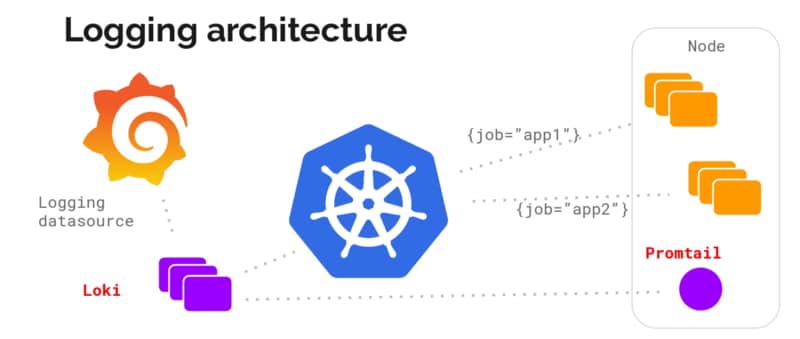
Promtail is mainly a log forwarder similar to others like fluentd or fluent-bit from CNCF or logstash from the ELK stack. In this case, this is the solution from Grafana Labs, and as you can imagine, this is part of the Grafana stack with Loki to be the “master-mind” that we cover in this article that I recommend you to take a look at if you haven’t read it yet:

Promtail has two main ways of behaving as part of this architecture, and the first one is very similar to others in this space, as we commented before. It helps us ship our log traces from our containers to the central location that will mainly be Loki and can be a different one and provide the usual options to play and transform those traces as we can do in other solutions. You can look at all the options in the link below, but as you can imagine, this includes transformation, filtering, parsing, and so on.

But what makes promtail so different is just one of the actions that you can do, and that action is metrics. Metrics provides a specific way to, based on the data that we are reading from the logs, create Prometheus metrics that a Prometheus server can scrape. That means that you can use the log traces that you are processing that can something like this:

[2021–06–06 22:02.12] New request received for customer_id: 123
[2021–06–06 22:02.12] New request received for customer_id: 191
[2021–06–06 22:02.12] New request received for customer_id: 522

With this information apart to send those metrics to the central location to create a metric call, for example: `total_request_count` that will be generated by the promtail agent and also exposed by it and being able also to use a metrics approach even for systems or components that don’t provide a standard way to do that like a formal metrics API.

And the way to do this is very well integrated with the configuration. This is done with an additional stage (this is how we call the actions we can do in Promtail) that is namedmetrics.

The schema of that metric stage is straightforward, and if you are familiar with Prometheus, you will see how direct it is from a definition of Prometheus metrics to this snippet:

# A map where the key is the name of the metric and the value is a specific
# metric type.
metrics:
  [<string>: [ <metric_counter> | <metric_gauge> | <metric_histogram> ] ...]

So we start defining the kind of metrics that we would like to define, and we have the usual ones: counter, gauge, or histogram, and for each of them, we have a set of options to be able to declare our metrics as you can see here for a Counter Metrics

# The metric type. Must be Counter.
type: Counter

# Describes the metric.

[description: <string>]

# Defines custom prefix name for the metric. If undefined, default name “promtail_custom_” will be prefixed.

[prefix: <string>]

# Key from the extracted data map to use for the metric, # defaulting to the metric’s name if not present.

[source: <string>]

# Label values on metrics are dynamic which can cause exported metrics # to go stale (for example when a stream stops receiving logs). # To prevent unbounded growth of the /metrics endpoint any metrics which # have not been updated within this time will be removed. # Must be greater than or equal to ‘1s’, if undefined default is ‘5m’

[max_idle_duration: <string>]

config: # If present and true all log lines will be counted without # attempting to match the source to the extract map. # It is an error to specify `match_all: true` and also specify a `value`

[match_all: <bool>]

# If present and true all log line bytes will be counted. # It is an error to specify `count_entry_bytes: true` without specifying `match_all: true` # It is an error to specify `count_entry_bytes: true` without specifying `action: add`

[count_entry_bytes: <bool>]

# Filters down source data and only changes the metric # if the targeted value exactly matches the provided string. # If not present, all data will match.

[value: <string>]

# Must be either “inc” or “add” (case insensitive). If # inc is chosen, the metric value will increase by 1 for each # log line received that passed the filter. If add is chosen, # the extracted value most be convertible to a positive float # and its value will be added to the metric. action: <string>

And with that, you will have your metric created and exposed, just waiting for a Prometheus server to scrape it. If you would like to see all the options available, all this documentation is available in the Grafana Labs documentation that you can check in the link:

I hope you will find this interesting and a useful way to keep all your observability information managed correctly using the right solution and provide a solution for these pieces of software that don’t follow your paradigm.

Maid: The Ultimate Open-Source Automated File Organizer for Hackers

Maid provides the best of both worlds: Ease of use and flexibility that comes with a code-based interface.

Maid: The Ultimate Open-Source Automated File Organizer for Hackers
Photo by Kowon vn on Unsplash

One of the main problems that I have because of my routine practices using computers is the lack of organizational discipline. To me is quite complex to have all the different files organized in the right place all the time, and I finally decided to stop fighting against it.

This is something that had happened to me since the beginning of my use of computers but got worse when I started working in the industry more than ten years ago.

I have colleagues with a solid organization process from mail received (using the well-known Louts or Outlook folders) to the documents they received or produced for the different topics and accounts using specific folder organization.

To me, everything is dropped in some folder, such as Downloads, Desktop, or a similar folder, and I hope to find everything around there. For emails, I have solved this problem because the search capabilities from Gmail are so powerful that they can recover any email in seconds, but finding and arranging my files is much more complex.

Because of that, I have been looking for a tool to do all this work for me because I know I cannot do it. I can try it… I can do it one day or maybe two, but this is a habit I cannot hold for a long period of time.

So, in this search of options, I have tried a lot of things because, in this time, I also have changed a lot from operating systems, so I managed to try Hazel, FileJuggle, Drop, and so on. But no one of them provided the flexibility and the simplicity that I needed at the same time. And over and over I come back to my old friend maid

Maid is a project created by Ben Oakes that he defines in its own words like a Hazel for Hackers, and that’s true. So it provides the same capabilities as Hazel but in a way that is much more flexible for people that have a programming background.

Sample rule from maid to move pdf files from Downloads to the Books folder

Based on Ruby On Rails, in the end, your duty is as easy as defining the rules you want to apply using this language. But to make it easier and because it is not needed to be a Ruby expert to be able to use the tools, Ben has already developed a lot of helper functions to simplify the creation of these rules.

Helper functions like weeks.accessed, downloaded_from, image_px, and at the same time the common actions like move, trash, or copy.

So, in the end, it is like you code your rules using a very high-level language, like when you are using a GUI in other programs like Hazel. Still, at the same time as this is code, you also have all the flexibility and power at your disposal to be used when you need it.

To install the tools is as easy as just typing the following commands:

gem install maid
maid sample 

And after that, you will have a sample rules file in your .maid folder to help you create the initial set of rules. And after that point, you are only limited by your needs and your imagination to finally handle this file madness that, at least, myself, I have been for a long time into.

#TIBFAQS Enabling Remote Debugging for TIBCO BusinessWorks Application on Kubernetes

Provide more agility to your troubleshooting efforts by debugging exactly where the error is happening using Remote Debugging techniques

Photo by Markus Winkler on Unsplash

Container revolution has provided a lot of benefits, as we have been discussed in-depth in other articles, and at the same time, it has also provided some new challenges that we need to tackle.

All agility that we have now in the hands of our developers needs to be also extended to the maintenance work and fixing things. We need to be agile as well. We know some of the main issues that we have regarding this: It works on my environment, with the data set that I have, I couldn’t see the issue, or I couldn’t reproduce the error, are just sentences that we listen to over and over and delay the resolution of some errors or improvements even when the solution is simple we struggle in getting a real scenario to test.

And here is where Remote Debugging comes in. Remote Debugging is, just as its own name clearly states, to be able to debug something that is not local that is remote. It has been focused since its conception in Mobile Development because it doesn’t matter how good the simulator is. You will always need to test in a real device to make sure everything is working properly.

So this is the same concept but applicable to a container, so that means that I have a TIBCO BusinessWorks application running on Kubernetes. We want to debug it as it has been running locally, as shown in the image before. To be able to do that, we need to follow these steps:

Enabling the Remote Debugging in the pod

The first step is to enable the remote debug option in the application and to do that, we need to use the internal API that the BusinessWorks provides, and to do that, we need to execute from inside the container:

curl -XPOST http://localhost:8090/bw/bwengine.json/debug/?interface=0.0.0.0&port=5554&engineName=Main

In case that we do not have any tool like curl or wget to hit a URL inside the container, you can always use the port-forward strategy to make the 8090 port from the pod accessible to enable the debug port using a command similar to the one below:

kubectl port-forward hello-world-test-78b6f9b4b-25hss 8090:8090

And then, we can hit it from our local machine to enable remote debugging

Make the Debug Port accessible to the Studio

To do the remote debugging, we need to be able to connect our local TIBCO BusinessStudio to this specific pod that is executing the load and, to do that, we need to have access to the Debug port. To get this, we have mainly two options that are the ones shown in the subsections below: Expose the port at the pod level and port-forwarding option.

Expose the port at the Pod Level

We need to have the debug port opened in our pod. To do that, we need to define another port that is not in use by the application, and it is not the default administration port (8090) to the one to be exposed. For example, in my case, I will use 5554 as the debug port, and to do that, I define another port to be accessed.
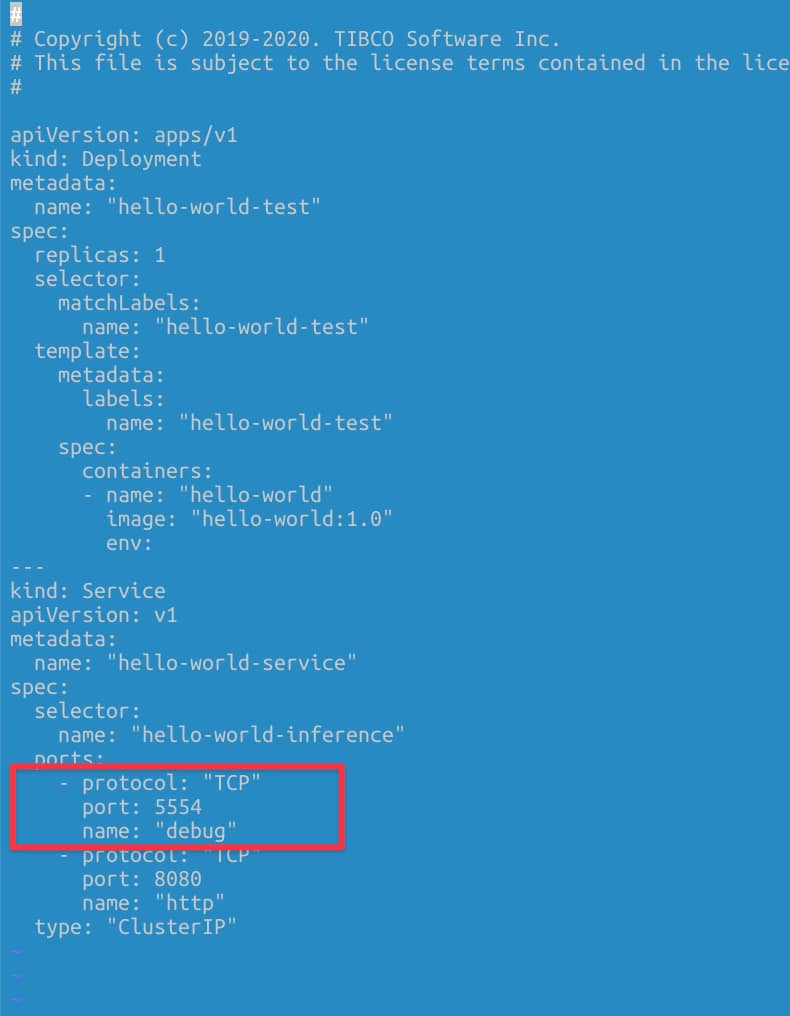
Definition of the debug port as a Service

Port-Forwarding Option

Another option if we do not want to expose the debug port all the time, even if this is not going to be used unless we’re executing the remote debug, we have another option to do a port-forward to the debug port in our local.

kubectl port-forward hello-world-test-78b6f9b4b-cctgh 5554:5554

Connection to the TIBCO Business Studio

Now that we have everything ready, we need to connect our local TIBCO Business Studio to the pod, and to do that, we need to follow these steps:

Run → Debug Configurations, and we select the Remote BusinessWorks
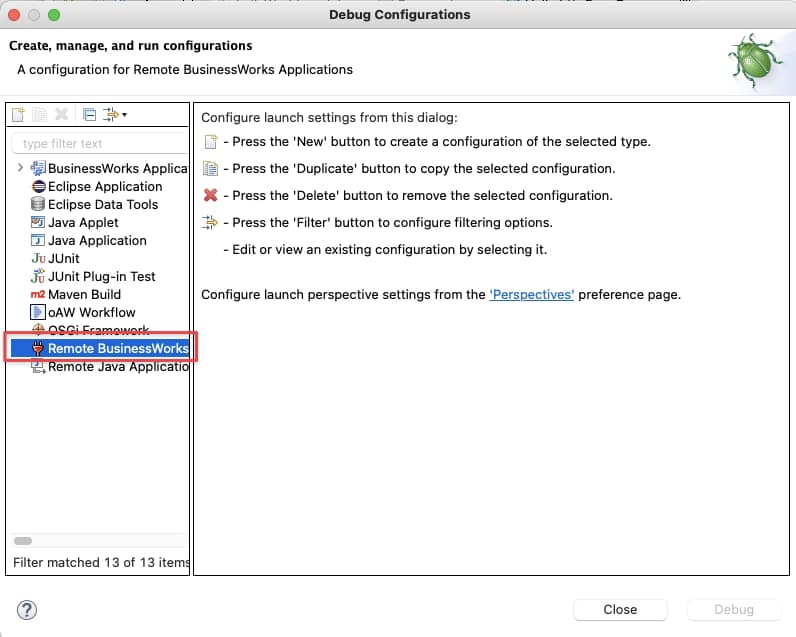
Selection of the Remote BusinessWorks application option in the Debug Configuration

And now we need to provide the connection details. For this case, we will use the localhost and port 5554 and click on the Debug button.
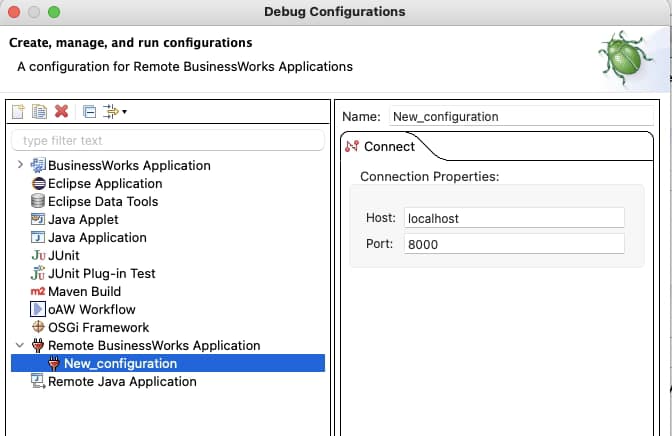
Setting the connection properties for the Remote Debugging

After that moment, we will establish a connection between both environments: the pod running on our Kubernetes cluster and our local TIBCO BusinessStudio. And as soon as we hit the container, we can see the execution in our local environment:
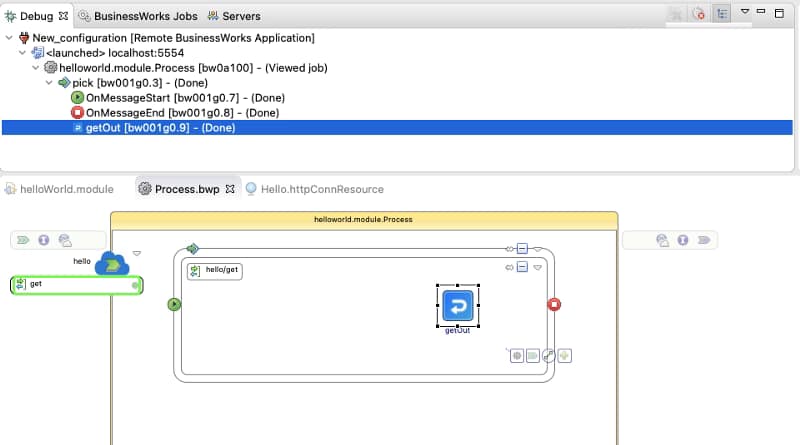
Remote Debugging execution from our TIBCO BusinesStudio instance

Summary

I hope you find this interesting, and if you are one of those facing this issue now, you have information not to be stopped by this one. If you would like to submit your questions feel free to use one of the following options:

  • Twitter: You can send me a mention at @alexandrev on Twitter or a DM or even just using the hashtag #TIBFAQS that I will monitor.
  • Email: You can send me an email to alexandre.vazquez at gmail.com with your question.
  • Instagram: You can send me a DM on Instagram at @alexandrev